当前位置:网站首页>如何用Pygame制作简单的贪吃蛇游戏
如何用Pygame制作简单的贪吃蛇游戏
2022-06-10 15:51:00 【InfoQ】
1.序言
2.安装与导入
import pygame,sys,random
from pygame.locals import *
3.定义后续需要的参数
#初始化pygame库
pygame.init()
#初始化一个游戏界面
DISPLAY=pygame.display.set_mode((800,800))
#设置游戏窗口标题
pygame.display.set_caption('贪吃蛇')
#定义一个变量控制游戏速度
FPSCLOCK=pygame.time.Clock()

#定义颜色
BLACK=pygame.Color(0,0,0)
WHITE=pygame.Color(255,255,255)
RED=pygame.Color(255,0,0)

# 定义蛇头初始位置
snake_Head=[100,100]
# 定义一个蛇初始长度,因为界面都是20*20所以长度都是减20
snake_Body=[[80,100], [60,100]]
# # 蛇初始方向
direction="right"
# 定义改变方向的变量,按键
changeDirection = direction
#定义初始食物位置
food_Postion = [300,300]
# 定义食物状态,0表示被吃,1表示没有被吃
food_Total = 1
4.绘制蛇与食物
#绘制贪吃蛇
def drawSnake(snake_Body):
 for i in snake_Body:
 pygame.draw.rect(DISPLAY,WHITE,Rect(i[0],i[1],20,20))

#绘制食物位置
def drawFood(food_Postion):
 pygame.draw.rect(DISPLAY,RED,Rect(food_Postion[0],food_Postion[1],20,20))
5.游戏规则与运行
def gameover():
 #退出pygame
 pygame.quit()
 #退出程序
 sys.exit()
game_flag=True
while game_flag:
 #渲染底色
 DISPLAY.fill(BLACK)
 #画出贪吃蛇
 drawSnake(snake_Body)
 #画出食物位置
 drawFood(food_Postion)
 #增加游戏速度
 game_speed=1+len(snake_Body)//3
 #刷新显示层,贪吃蛇与食物每次移动,都会刷新显示层
 pygame.display.flip()
 FPSCLOCK.tick(game_speed)
 for event in pygame.event.get():
 if event.type==QUIT:
 pygame.quit()
 sys.exit()
 elif event.type == KEYDOWN:
 # 如果是右箭头或者是d,蛇向右移动
 if event.key == K_RIGHT or event.key == K_d:
 changeDirection = 'right'
 # 如果是做箭头或者是a,蛇向左移动
 if event.key == K_LEFT or event.key == K_a:
 changeDirection = 'left'
 if event.key == K_UP or event.key == K_w:
 changeDirection = 'up'
 if event.key == K_DOWN or event.key == K_s:
 changeDirection = 'down'
 # 点击esc,退出
 if event.key == KSCAN_ESCAPE:
 pygame.event.post(pygame.event.Event(QUIT))

 # 确认方向,判断是否输入了反方向
 if changeDirection == 'right' and not direction == 'left':
 direction = changeDirection
 if changeDirection == 'left' and not direction == 'right':
 direction = changeDirection
 if changeDirection == 'up' and not direction == 'down':
 direction = changeDirection
 if changeDirection == 'down' and not direction == 'up':
 direction = changeDirection

 #根据方向移动蛇头
 if direction=='right':
 snake_Head[0]+=20
 if direction=='left':
 snake_Head[0]-=20
 if direction=='up':
 snake_Head[1]-=20
 if direction=='down':
 snake_Head[1]+=20
 #增加蛇的长度
 snake_Body.insert(0,list(snake_Head))
 #判断是否吃到食物
 if snake_Head[0] == food_Postion[0] and snake_Head[1] == food_Postion[1]:
 food_Total = 0
 else:
 snake_Body.pop()
 if food_Total == 0:
 x = random.randrange(1, 32)
 y = random.randrange(1, 24)
 food_Postion = [int(x * 20), int(y * 20)]
 food_Total = 1
 if snake_Head[0] > 800 or snake_Head[0] < 0:
 gameover()
 elif snake_Head[0] > 800 or snake_Head[0] < 0:
 gameover()
 # 如果碰到自己
 for body in snake_Body[1:]:
 if snake_Head[0] == body[0] and snake_Head[1] == body[1]:
 gameover()
6.成品展示
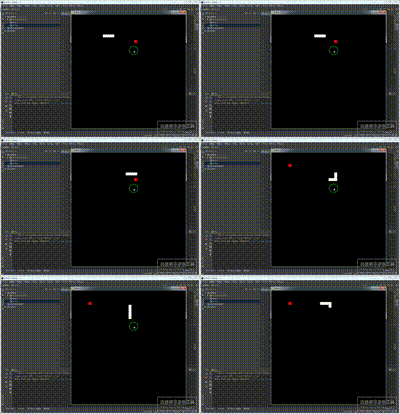
7.完整代码
import pygame,sys,random
from pygame.locals import *

#初始化pygame库
pygame.init()
#初始化一个游戏界面
DISPLAY=pygame.display.set_mode((800,800))
#设置游戏窗口标题
pygame.display.set_caption('贪吃蛇')

#定义一个变量控制游戏速度
FPSCLOCK=pygame.time.Clock()

#定义颜色
BLACK=pygame.Color(0,0,0)
WHITE=pygame.Color(255,255,255)
RED=pygame.Color(255,0,0)

# 定义蛇头初始位置
snake_Head=[100,100]
# 定义一个蛇初始长度,因为界面都是20*20所以长度都是减20
snake_Body=[[80,100], [60,100],[40,100]]
# # 蛇初始方向
direction="right"
# 定义改变方向的变量,按键
changeDirection = direction
#定义初始食物位置
food_Postion = [300,300]
# 定义食物状态,0表示被吃,1表示没有被吃
food_Total = 1

#绘制贪吃蛇
def drawSnake(snake_Body):
 for i in snake_Body:
 pygame.draw.rect(DISPLAY,WHITE,Rect(i[0],i[1],20,20))

#绘制食物位置
def drawFood(food_Postion):
 pygame.draw.rect(DISPLAY,RED,Rect(food_Postion[0],food_Postion[1],20,20))

def gameover():
 #退出pygame
 pygame.quit()
 #退出程序
 sys.exit()


game_flag=True
while game_flag:
 #渲染底色
 DISPLAY.fill(BLACK)
 #画出贪吃蛇
 drawSnake(snake_Body)
 #画出食物位置
 drawFood(food_Postion)
 #增加游戏速度
 game_speed=1+len(snake_Body)//3
 #刷新显示层,贪吃蛇与食物每次移动,都会刷新显示层
 pygame.display.flip()
 FPSCLOCK.tick(game_speed)
 for event in pygame.event.get():
 if event.type==QUIT:
 pygame.quit()
 sys.exit()

 elif event.type == KEYDOWN:
 # 如果是右箭头或者是d,蛇向右移动
 if event.key == K_RIGHT or event.key == K_d:
 changeDirection = 'right'
 # 如果是做箭头或者是a,蛇向左移动
 if event.key == K_LEFT or event.key == K_a:
 changeDirection = 'left'
 if event.key == K_UP or event.key == K_w:
 changeDirection = 'up'
 if event.key == K_DOWN or event.key == K_s:
 changeDirection = 'down'
 # 点击esc,退出
 if event.key == KSCAN_ESCAPE:
 pygame.event.post(pygame.event.Event(QUIT))

 # 确认方向,判断是否输入了反方向
 if changeDirection == 'right' and not direction == 'left':
 direction = changeDirection
 if changeDirection == 'left' and not direction == 'right':
 direction = changeDirection
 if changeDirection == 'up' and not direction == 'down':
 direction = changeDirection
 if changeDirection == 'down' and not direction == 'up':
 direction = changeDirection

 #根据方向移动蛇头
 if direction=='right':
 snake_Head[0]+=20
 if direction=='left':
 snake_Head[0]-=20
 if direction=='up':
 snake_Head[1]-=20
 if direction=='down':
 snake_Head[1]+=20
 #增加蛇的长度
 snake_Body.insert(0,list(snake_Head))
 #判断是否吃到食物
 if snake_Head[0] == food_Postion[0] and snake_Head[1] == food_Postion[1]:
 food_Total = 0
 else:
 snake_Body.pop()

 if food_Total == 0:
 x = random.randrange(1, 32)
 y = random.randrange(1, 24)
 food_Postion = [int(x * 20), int(y * 20)]
 food_Total = 1

 if snake_Head[0] > 800 or snake_Head[0] < 0:
 gameover()
 elif snake_Head[0] > 800 or snake_Head[0] < 0:
 gameover()
 # 如果碰到自己
 for body in snake_Body[1:]:
 if snake_Head[0] == body[0] and snake_Head[1] == body[1]:
 gameover()
边栏推荐
- Shit, jialichuang's price is reduced again
- PHP wechat H5 payment demo
- postman参数化
- Simple file upload
- Jerry's ble OTA upgrade requires shutting down unnecessary peripherals [chapter]
- STM32 printf garbled
- 51 timer initial value calculation
- Zhangxiaobai teaches you how to use Ogg to synchronize Oracle 19C data with MySQL 5.7 (3)
- The fragrant locust flowers on the fragrant locust road have been in a hurry for four years.
- The guide to the application of all-in-one privacy computing machine - the technical requirements for financial application of all-in-one privacy computing machine was officially released to help the
猜你喜欢

Devops software architecture evolution

New York financial regulators issue official guidelines for stable currency
![leetcode:730. Statistics of different palindrome subsequences [traversed by point and surface interval DP + 3D DP + diagonal]](/img/90/79c51f944709ef230f394e874aa9ac.png)
leetcode:730. Statistics of different palindrome subsequences [traversed by point and surface interval DP + 3D DP + diagonal]
Meetup回顾|DevOps&MLOps如何在企业中解决机器学习困境?

postman参数化

How does Dao achieve decentralized governance?

Application of stop in screen program_ SAP LIUMENG_

Software College of Shandong University Project Training - Innovation Training - network security range experimental platform (XVII)

AI video cloud: a good wife in the era of we media
![[today in history] June 10: Apple II came out; Microsoft acquires gecad; The scientific and technological pioneer who invented the word](/img/0d/9f99eb3dcb73c912987b81fba71890.png)
[today in history] June 10: Apple II came out; Microsoft acquires gecad; The scientific and technological pioneer who invented the word "software engineering" was born
随机推荐
Nanomq newsletter 2022-05 | release of V0.8.0, new webhook extension interface and connection authentication API
Sorting of MapReduce cases
再联合 冲量在线与飞腾完成合作伙伴认证,携手打造信创隐私计算生态圈
Zhangxiaobai teaches you how to use Ogg to synchronize Oracle 19C data with MySQL 5.7 (3)
How does Dao achieve decentralized governance?
Jerry's ble PB2 cannot be hardware grounded or connected to triode base [chapter]
Embedded development: five challenges in wireless update using MCU
Software College of Shandong University Project Training - Innovation Training - network security range experimental platform (XVII)
STM32 printf garbled
Chinese translation of Rilke's autumn with heartless sword
The guide to the application of all-in-one privacy computing machine - the technical requirements for financial application of all-in-one privacy computing machine was officially released to help the
Li Ling: in six years, how did I go from open source Xiaobai to Apache top project PMC
Link multiple alamofire requests - chain multiple alamofire requests
Take you to play completablefuture asynchronous programming
China coal machinery industry development research and investment prospect analysis report 2022-2028 Edition
PHP wechat H5 payment demo
Query convert quickview is a grayed out solution (turn)_ SAP LIUMENG
51 timer initial value calculation
【无标题】
PV operation daily question - single log bridge problem