当前位置:网站首页>Basic functions of promise [IV. promise source code]
Basic functions of promise [IV. promise source code]
2022-06-27 03:25:00 【Yiyao Bingo】
For hand rolling promise Bedding made
Supporting notes view :promise Introduction and key problems of hand rolling
List of articles
- One 、 Promise Functional experience
- 1-1 Promise Request lottery interface .html
- 1-2 fs Read the file .js
- 1-3 Ajax request .html
- 1-4 promise Encapsulate contact -fs modular
- 1-5 promise encapsulation AJAX request .html
- 1-6 Promise Constructor for catch
- 1-7 Promise API - resolve.html
- 1-8 Promise API - reject.html
- 1-9 Promise.all Method .html
- 1-10 Promise.race Method .html
- Two 、 promise key problem
- 2-1 1- State modification .html
- 2-2 2- Whether multiple callbacks can be executed .html
- 2-3 3-then Execute first or change the state to execute first .html
- 2-4 4-then What is the decision of the result returned by the method .html
- 2-5 5- Cascade multiple operation tasks .html
- 2-6 6- extraordinary transmission x The phenomenon .html
- 2-7 7- interrupt Promise chain .html
One 、 Promise Functional experience
1-1 Promise Request lottery interface .html

<!DOCTYPE html>
<html lang="en">

<head>
    <meta charset="UTF-8">
    <meta http-equiv="X-UA-Compatible" content="IE=edge">
    <meta name="viewport" content="width=device-width, initial-scale=1.0">
    <title>Promise Request lottery interface </title>
</head>

<body>
    <div class="container">
        <div class="page-header">Promise First experience </div>
        <button class="btn btn-primary" id="btn"> Click on the draw </button>
    </div>
    <script> //  Generate random number  function rand(m, n) {
       return Math.ceil(Math.random() * (n - m + 1) + m - 1); } /*  Click button , 2 s Whether to win the prize will be displayed after ( 30 %  Probability winning )  If you win, pop up   Congratulations   If you don't win, pop up   Make persistent efforts  */ //  Get element object  const btn = document.querySelector('#btn'); //  Bind click event  btn.addEventListener('click', function() {
       // setTimeout(() => {
       // // 30%, 1-100 1 2 30 // //  Get from 1-100 A random number of  // let n = rand(1, 100); // //  Judge  // if (n <= 30) {
       // alert(' Congratulations '); // } else {
       // alert("zaijiezailin"); // } // }, 1000) const p = new Promise((resolve, reject) => {
       setTimeout(() => {
       // 30%, 1-100 1 2 30 //  Get from 1-100 A random number of  let n = rand(1, 100); //  Judge  if (n <= 30) {
       resolve(n); //  take promise The turntable of the object is set to success  } else {
       reject(n); //  take promise The state of the object is set to failed  } }, 1000) }); console.log(p); //  call then Method  p.then((value) => {
       alert(' Congratulations , The prize is 10 ten thousand ' + value); }, (reason) => {
       alert(' Make persistent efforts ' + reason); }) }) // Promise  Formal realization  // resolve  solve   Data of function type  // reject  Refuse   Data of function type  </script>
</body>

</html>
1-2 fs Read the file .js
Create according to the corresponding path content.txt
const fs = require('fs');

//  Callback function form
// fs.readFile('./content.txt', (err, data) => {

// //  If something goes wrong , Throws an error
// if (err) throw err;
// //  Output file content
// console.log(data.toString());
// })

//Promise  form
let p = new Promise((resolve, reject) => {

    fs.readFile('./content.txt', (err, data) => {

        //  If something goes wrong , Throws an error
        if (err) reject(err);
        //  Output file content
        resolve(data);
    })
})

p.then((value) => {

    console.log(value.toString());
}, reason => {

    console.log(reason);
})
1-3 Ajax request .html
<!DOCTYPE html>
<html lang="en">

<head>
    <meta charset="UTF-8">
    <meta http-equiv="X-UA-Compatible" content="IE=edge">
    <meta name="viewport" content="width=device-width, initial-scale=1.0">
    <title>Promise encapsulation Ajax request </title>
</head>


<body>
    <div class="container">
        <h2 class="page-header">Promise encapsulation  AJAX  operation </h2>
        <button class="btn btn-primary" id="btn"> Click Send  AJAX</button>
    </div>
    <script> const btn = document.querySelector('#btn'); btn.addEventListener('click', function() {
       const p = new Promise((resolve, reject) => {
       const xhr = new XMLHttpRequest(); xhr.open('GET', 'https://netease-cloud-music-api-crete722p-hannah-bingo.vercel.app/user/detail?uid=32953014'); xhr.send(); xhr.onreadystatechange = function() {
       if (xhr.readyState === 4) {
       if (xhr.status >= 200 && xhr.status < 300) {
       resolve(xhr.response); } else {
       reject(xhr.status); } } } }) p.then(value => {
       console.log(value); }, reason => {
       console.warn(reason); }) }) </script>
</body>

</html>

1-4 promise Encapsulate contact -fs modular
/*  Encapsulate a function  mineReadFile  Read the file   Parameters : path  File path   return : promise  object  */

const {
     readFile } = require('fs');

function mineReadFile(path) {

    return new Promise((resolve, reject) => {

        //  Read the file
        require('fs').readFile(path, (err, data) => {

            //  Judge
            if (err) reject(err);
            //  success
            resolve(data);
        })
    })
}


mineReadFile('./content.txt')
    .then(value => {

        //  Output file content
        console.log(value.toString());
    }, reason => {

        console.log(reason);
    })

1-5 promise encapsulation AJAX request .html
<!DOCTYPE html>
<html lang="en">

<head>
    <meta charset="UTF-8">
    <meta http-equiv="X-UA-Compatible" content="IE=edge">
    <meta name="viewport" content="width=device-width, initial-scale=1.0">
    <title>Promise encapsulation Ajax request </title>
</head>

<body>
    <!--  Encapsulate a function sendAJAX send out  GET AJAX  request   Parameters  URL  Return results  Promise  object  -->
    <script> function sendAJAX(url) {
       return new Promise((resolve, reject) => {
       //  Create an asynchronous call object  const xhr = new XMLHttpRequest(); //  Specify the HTTP Requested method ,URL And verification information  xhr.open("GET", url); //  send out HTTP request  xhr.send(); //  Processing results  //  Set response HTTP Functions that request state changes  xhr.onreadystatechange = function() {
       if (xhr.readyState === 4) {
       if (xhr.status >= 200 && xhr.status < 300) {
       resolve(xhr.response); } else {
       reject(error); } } } }) } sendAJAX('https://netease-cloud-music-api-crete722p-hannah-bingo.vercel.app/user/detail?uid=32953014') .then(value => {
       console.log(value); }, reason => {
       console.log(reason); }) </script>
</body>

</html>
1-6 Promise Constructor for catch
<!DOCTYPE html>
<html lang="en">

<head>
    <meta charset="UTF-8">
    <meta http-equiv="X-UA-Compatible" content="IE=edge">
    <meta name="viewport" content="width=device-width, initial-scale=1.0">
    <title>Promise API</title>
</head>

<body>
    <script> let p = new Promise((resolve, reject) => {
       //  Synchronously called  // console.log(111); //  modify promise  Object state  reject('uu'); }) console.log(p); //  perform  catch Method  p.catch(reason => {
       console.log(reason); }) </script>

</body>

</html>

1-7 Promise API - resolve.html
<!DOCTYPE html>
<html lang="en">

<head>
    <meta charset="UTF-8">
    <meta http-equiv="X-UA-Compatible" content="IE=edge">
    <meta name="viewport" content="width=device-width, initial-scale=1.0">
    <title>Promise API - resolve</title>
</head>

<body>
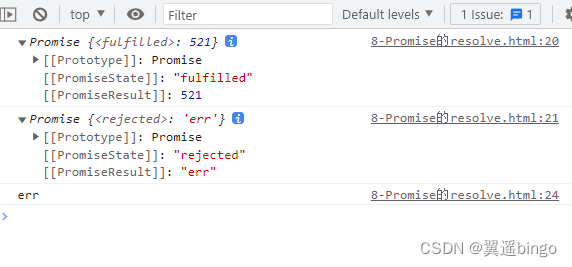
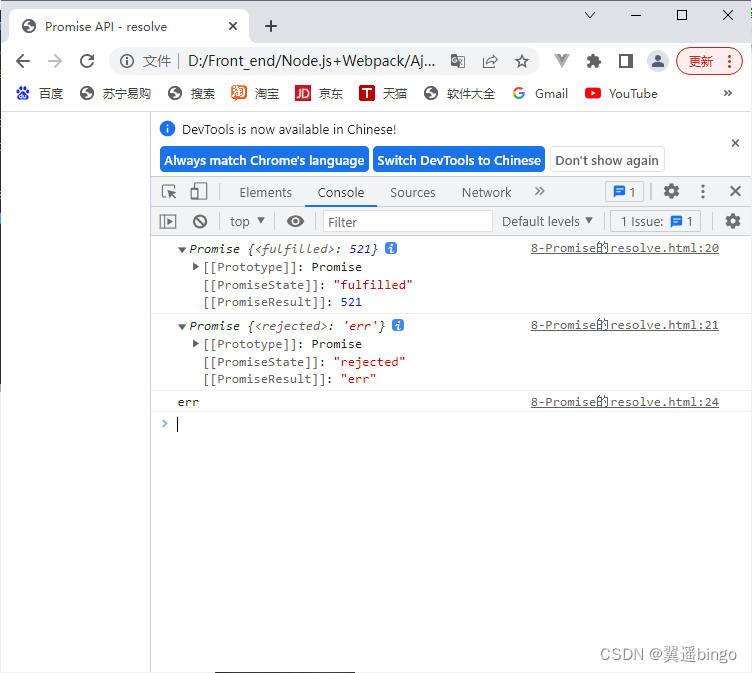
    <script> let p1 = Promise.resolve(521); //  If the parameter passed in is not Promise Object of type , The result returned is   success promise object  //  If the passed parameter is Promise object , Then the result of the parameter determines  resolve Result  let p2 = Promise.resolve(new Promise((resolve, reject) => {
       // resolve('ok'); reject('err'); })) console.log(p1); console.log(p2); p2.catch(reason => {
       console.log(reason); }) </script>

</body>

</html>
1-8 Promise API - reject.html
<!DOCTYPE html>
<html lang="en">

<head>
    <meta charset="UTF-8">
    <meta http-equiv="X-UA-Compatible" content="IE=edge">
    <meta name="viewport" content="width=device-width, initial-scale=1.0">
    <title>Promise API - reject</title>
</head>

<body>
    <script> let p = Promise.reject(521); console.log(p); let p3 = Promise.reject(new Promise((resolve, reject) => {
       resolve("ok"); })) //  The status is failure , The result returned is success  console.log(p3); </script>

</body>

</html>

1-9 Promise.all Method .html
<!DOCTYPE html>
<html lang="en">

<head>
    <meta charset="UTF-8">
    <meta http-equiv="X-UA-Compatible" content="IE=edge">
    <meta name="viewport" content="width=device-width, initial-scale=1.0">
    <title>Promise API - all</title>
</head>

<body>
    <script> let p1 = new Promise((resolve, reject) => {
       resolve('OK'); }) let p2 = Promise.reject('EEE'); let p3 = Promise.resolve('Oh Yeah'); const result = Promise.all([p1, p2, p3]); const reject = Promise.all([p1, p3]) console.log(result); console.log(reject); </script>
</body>

</html>

1-10 Promise.race Method .html
<!DOCTYPE html>
<html lang="en">

<head>
    <meta charset="UTF-8">
    <meta http-equiv="X-UA-Compatible" content="IE=edge">
    <meta name="viewport" content="width=device-width, initial-scale=1.0">
    <title>Promise.race Method </title>
</head>

<body>
    <script> let p1 = new Promise((resolve, reject) => {
       setTimeout(() => {
       reject('OK'); }, 1000) }) let p2 = Promise.reject('EEE'); let p3 = Promise.resolve('Oh Yeah'); const result = Promise.race([p1, p2, p3]); console.log(result); </script>
</body>

</html>

Two 、 promise key problem
2-1 1- State modification .html

<!DOCTYPE html>
<html lang="en">

<head>
    <meta charset="UTF-8">
    <meta http-equiv="X-UA-Compatible" content="IE=edge">
    <meta name="viewport" content="width=device-width, initial-scale=1.0">
    <title>Promise  How the object state changes </title>
</head>

<body>
    <script> let p = new Promise((resolve, reject) => {
       // 1.  By calling resolve function  // resolve('ok'); // pending => fulfilled(resolved) // 2. reject function  // reject("error"); // pending => rejected // 3.  Throw an error  throw " have a problem " }); console.log(p); </script>

</body>

</html>
2-2 2- Whether multiple callbacks can be executed .html
<!DOCTYPE html>
<html lang="en">

<head>
    <meta charset="UTF-8">
    <meta http-equiv="X-UA-Compatible" content="IE=edge">
    <meta name="viewport" content="width=device-width, initial-scale=1.0">
    <title>Promise Specify multiple callbacks </title>
</head>

<body>
    <script> let p = new Promise((resolve, reject) => {
       resolve('OK'); }) //  Specify callback  -1 p.then(value => {
       console.log(value); }) //  Specify callback  -2 p.then(value => {
       alert(value); }) </script>
</body>

</html>

2-3 3-then Execute first or change the state to execute first .html
<!DOCTYPE html>
<html lang="en">

<head>
    <meta charset="UTF-8">
    <meta http-equiv="X-UA-Compatible" content="IE=edge">
    <meta name="viewport" content="width=device-width, initial-scale=1.0">
    <title>Promise Specify multiple callbacks </title>
</head>

<body>
    <script> let p = new Promise((resolve, reject) => {
       // resolve("ok"); //  Asynchronous task , Callback executed first  setTimeout(() => {
       resolve('OK'); }, 1000) }) p.then(value => {
       console.log(value); }, reason => {
       }) </script>
</body>

</html>
2-4 4-then What is the decision of the result returned by the method .html
<!DOCTYPE html>
<html lang="en">

<head>
    <meta charset="UTF-8">
    <meta http-equiv="X-UA-Compatible" content="IE=edge">
    <meta name="viewport" content="width=device-width, initial-scale=1.0">
    <title>Promise then Method returns the characteristics of the result </title>
</head>

<body>
    <script> let p = new Promise((resolve, reject) => {
       resolve('ok'); }) //  perform  then Method  let result = p.then(value => {
       // console.log(value); // throw ' Something went wrong. ' //  Throw an error  return 521 //  Return the result of right and wrong Promise Object of type  // return new Promise((resolve, reject) => {
       // resolve('success'); // }) }, reason => {
       console.warn(reason); }) console.log(result); </script>
</body>

</html>

2-5 5- Cascade multiple operation tasks .html
<!DOCTYPE html>
<html lang="en">

<head>
    <meta charset="UTF-8">
    <meta http-equiv="X-UA-Compatible" content="IE=edge">
    <meta name="viewport" content="width=device-width, initial-scale=1.0">
    <title> How to concatenate multiple operation tasks </title>
</head>

<body>
    <script> let p = new Promise((resolve, reject) => {
       setTimeout(() => {
       resolve("ok"); // reject("err"); }, 1000) }) p.then(value => {
       return new Promise((resolve, reject) => {
       // resolve("success"); reject("err2") }) }).then(value => {
       console.log(value); }, reason => {
       console.log(reason); }).then(value => {
       console.log(value); }) </script>

</body>

</html>

2-6 6- extraordinary transmission x The phenomenon .html
<!DOCTYPE html>
<html lang="en">

<head>
    <meta charset="UTF-8">
    <meta http-equiv="X-UA-Compatible" content="IE=edge">
    <meta name="viewport" content="width=device-width, initial-scale=1.0">
    <title> extraordinary transmission </title>
</head>

<body>
    <script> let p = new Promise((resolve, reject) => {
       setTimeout(() => {
       resolve('OK') // reject('Err'); }, 1000); }) p.then(value => {
       // console.log(111); throw ' failed ' }).then(value => {
       console.log(222); }).then(value => {
       console.log(333); }).catch(reason => {
       console.warn(reason); }) </script>

</body>

</html>
2-7 7- interrupt Promise chain .html
<!DOCTYPE html>
<html lang="en">

<head>
    <meta charset="UTF-8">
    <meta http-equiv="X-UA-Compatible" content="IE=edge">
    <meta name="viewport" content="width=device-width, initial-scale=1.0">
    <title> interrupt Promise chain </title>
</head>

<body>
    <script> let p = new Promise((resolve, reject) => {
       setTimeout(() => {
       resolve('OK') // reject('Err'); }, 1000); }) p.then(value => {
       console.log(111); //  There is but one way , interrupt Promise chain  return new Promise(() => {
      }); }).then(value => {
       console.log(222); }).then(value => {
       console.log(333); }).catch(reason => {
       console.warn(reason); }) </script>

</body>

</html>
边栏推荐
- 2021:Passage Retrieval for Outside-KnowledgeVisual Question Answering通道检索的外部知识视觉问答
- [micro service sentinel] degradation rules slow call proportion abnormal proportion abnormal constant
- Topolvm: kubernetes local persistence scheme based on LVM, capacity aware, dynamically create PV, and easily use local disk
- Is the division of each capability domain of Dama, dcmm and other data management frameworks reasonable? Is there internal logic?
- 学习太极创客 — MQTT(六)ESP8266 发布 MQTT 消息
- Pat grade a 1026 table tennis
- 2022中式面点师(高级)复训题库及在线模拟考试
- 敏捷开发篇--Agile Development-自用
- Cvpr2021:separating skills and concepts for new visual question answering
- JWT certification process and use cases
猜你喜欢

Flink learning 3: data processing mode (stream batch)

Career outlook, money outlook and happiness outlook

2021:Zero-shot Visual Question Answering using Knowledge Graphs使用知识图的零次视觉问答

PAT甲级 1025 PAT Ranking

SAI钢笔工具如何使用,入门篇
Flink learning 5: how it works
mmdetection ValueError: need at least one array to concatenate解决方案

pytorch_grad_cam——pytorch下的模型特征(Class Activation Mapping, CAM)可视化库

Anaconda3安装过程及安装后缺失大量文件,没有scripts等目录

TechSmith Camtasia latest 2022 detailed function explanation Download
随机推荐
2020:MUTANT: A Training Paradigm for Out-of-Distribution Generalizationin Visual Question Answering
resnet152 辣椒病虫害图像识别1.0
PAT甲级 1018 Public Bike Management
ESP8266
Il manque beaucoup de fichiers et de répertoires tels que scripts pendant et après l'installation d'anaconda3
2016Analyzing the Behavior of Visual Question Answering Models
[micro service sentinel] degradation rules slow call proportion abnormal proportion abnormal constant
清华&华为等 综述 | 语义通信:原则与挑战
Yiwen teaches you Kali information collection
Anaconda3 is missing a large number of files during and after installation, and there are no scripts and other directories
【一起上水硕系列】Day 6
jmeter将上一个请求的结果作为下一个请求的参数
I found a JSON visualization tool artifact. I love it!
C # check whether the date is in the correct format
Overview of Tsinghua & Huawei | semantic communication: Principles and challenges
IDEA中好用的插件
Pat grade a 1026 table tennis
PAT甲级 1025 PAT Ranking
Nacos调用微服务两个问题:1.Load balancer does not contain an instance for the service 2.Connection refused
Learning Tai Chi Maker - mqtt (VII) advanced mqtt theme