当前位置:网站首页>Table responsive layout tips
Table responsive layout tips
2022-07-02 15:03:00 【zx_ twenty million two hundred and twenty thousand one hundred 】
today , I met a very interesting question , A group friend asked me , Only use CSS, Whether such a responsive layout effect can be achieved :
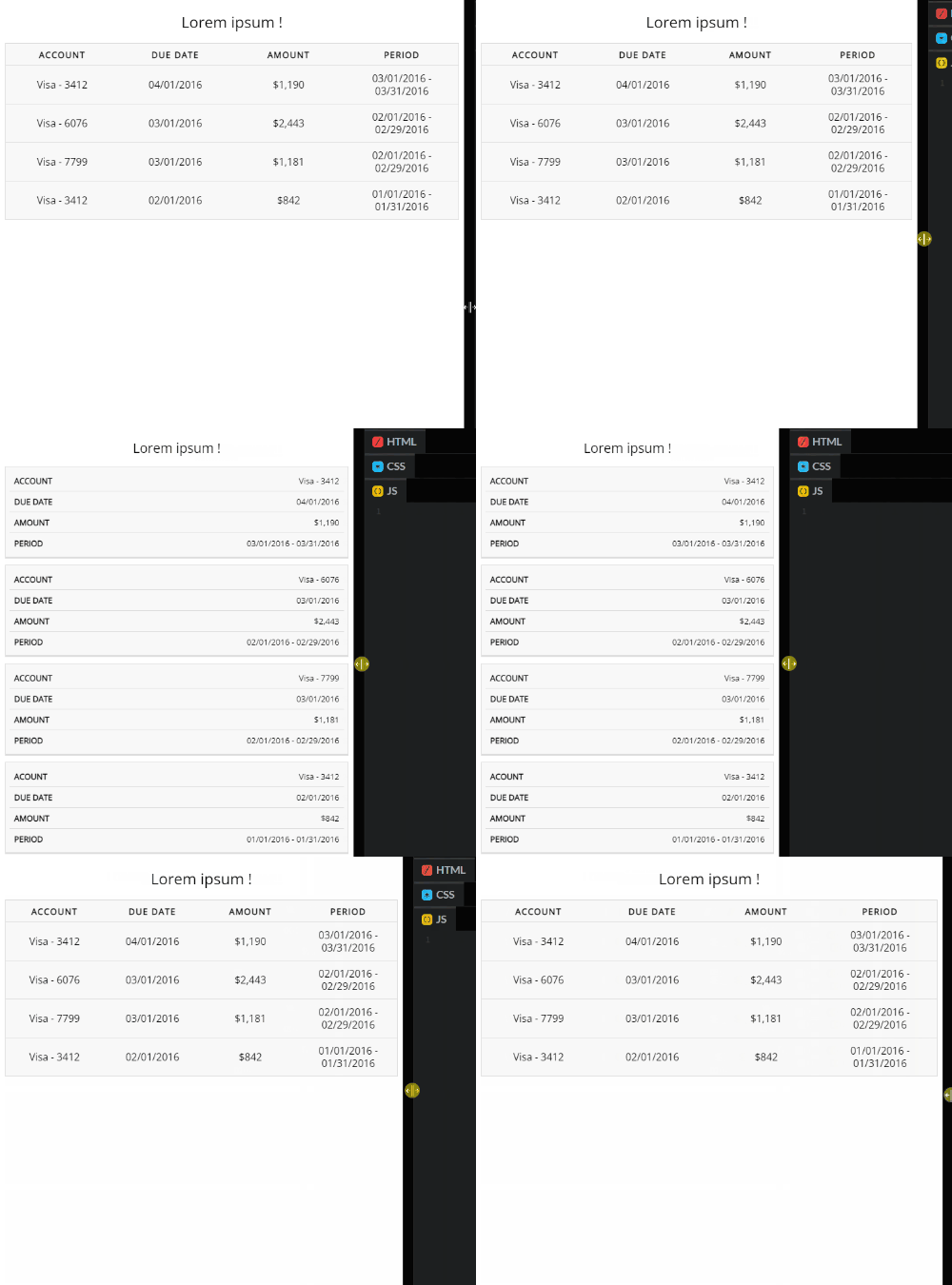
Simply analyze the effect :
When the screen viewport is wide , As a whole Table The style of
When the screen viewport width is small , primary Table Each row of data in the is split into one Table To display
An interesting responsive layout , Let the information get a good display under the small screen .
that , Only use CSS Words , Can such a layout be realized ? The answer is Tolerable .
First , It will definitely use Media query , It's not hard to see that . in addition , Let's look at each set of data after splitting :

There will be a group of the original whole Table Header information when , The main difficulty is here , How do we split it into sub - items one by one Table Display time , At the same time, these header information ?
Implementation of the basic structure
First , Let's first implement the... Under the conventional widescreen HTML And the corresponding CSS.
Relatively simple , There is nothing special here , Use <table> Label or use div、ul Wait for the tag to simulate a table .
<table> <caption>Lorem ipsum !</caption> <thead> <tr> <th>Account</th> <th>Due Date</th> <th>Amount</th> <th">Period</th> </tr> </thead> <tbody> <tr> <td data-label="Account">Visa - 3412</td> <td data-label="Due Date">04/01/2016</td> <td data-label="Amount">$1,190</td> <td data-label="Period">03/01/2016 - 03/31/2016</td> </tr> // ... Repeat groups </tbody> </table> Get such a simple Table:

Use media query to put a single Table Split into multiple
The next step is simple , Set the appropriate threshold ( It depends on the actual business situation ), Use media query to put a single Table Split into multiple children Table.
@media screen and (max-width: 600px) {
          table {
            border: 0;   }     table thead {
            display: none;   }   table tr {
            display: block;     margin-bottom: 10px;   }   table td {
            border-bottom: 1px solid #ddd;     display: block;   } }
What is done here is also very simple :
Use the media to search , Set the screen width to be less than 600px The style of
Remove from the original table <thead> Header , Just hide it
Put the original line <tr>, Set to display: block, And set a bottom margin , Make each of them separate
In the original line <td>, Set to display: block, such , They will be arranged vertically , Make every one <tr> Form a new child table
good , such , Then the screen width is less than 600px when , We got this one Table:

With the help of pseudo elements and their properties , Display header information
Next step , That is the most critical step , How do we get there table Each line , That is to say <td> Inside , Show the original header information ?
It's actually very simple here , It simply uses pseudo elements , Extremely readable HTML Small feature implementation of tag attributes .
We just need to make a simple change to the code , For each <td> Of HTML, Bring the corresponding header column description information :
<table> // The information above is consistent <tbody> <tr> <td data-label="Account">Visa - 3412</td> <td data-label="Due Date">04/01/2016</td> <td data-label="Amount">$1,190</td> <td data-label="Period">03/01/2016 - 03/31/2016</td> </tr> <tr> <td scope="row" data-label="Account">Visa - 6076</td> <td data-label="Due Date">03/01/2016</td> <td data-label="Amount">$2,443</td> <td data-label="Period">02/01/2016 - 02/29/2016</td> </tr> // ... Every tr Do the same </tbody> </table> next , With the help of td The pseudo elements of , Display the header information :
@media screen and (max-width: 600px) {
          // ...  bring into correspondence with    table td {
            position: relative;     display: block;     text-align: right;   }   table td::before {
            position: absolute;     left: 10px;     righht: 0;     content: attr(data-label);   } }
here , Our core knowledge point is to use the pseudo element of the element to be able to content In the attribute , Read it HTML Attribute contents within the element , And show the knowledge points .
Suppose a HTML Labels are defined as :<div data-msg="ABC">
Then the div If the corresponding pseudo element is set content: attr(data-msg) , You can read data-msg Value , amount to content:"ABC"
such , We are on a small screen , You get such an effect :

Last
This feature of pseudo elements can be applied in many places in daily effects , A very small skill , Have you learned ?
边栏推荐
- Kityformula editor configure font size and spacing
- Thoroughly master prototype__ proto__、 Relationship before constructor (JS prototype, prototype chain)
- LeetCode 2310. The number of digits is the sum of integers of K
- .NET Core 日志系统
- STM32 standard firmware library function name (I)
- forEach的错误用法,你都学废了吗
- Why can't programmers who can only program become excellent developers?
- C语言实现N皇后问题
- [development environment] install the visual studio community 2013 development environment (download the installation package of visual studio community 2013 with update 5 version)
- 【题解】Educational Codeforces Round 82
猜你喜欢

socket(套接字)与socket地址
MathML to latex

为什么只会编程的程序员无法成为优秀的开发者?

LeetCode 2310. 个位数字为 K 的整数之和

Makefile separates file names and suffixes

Simple verification code generator for 51 single chip microcomputer experiment

Actual combat sharing of shutter screen acquisition
Fatal: unsafe repository is owned by someone else

实现一个多进程并发的服务器
LeetCode 2320. Count the number of ways to place the house
随机推荐
Makefile 分隔文件名与后缀
taobao.logistics.dummy.send( 无需物流发货处理 )接口,淘宝店铺发货API接口,淘宝订单发货接口,淘宝r2接口,淘宝oAu2.0接口
Btrace- (bytecode) dynamic tracking tool
kibana 基础操作
STM32 library function for GPIO initialization
OpenCV调用USB摄像头的点滴
电脑怎么设置扬声器播放麦克风的声音
##51单片机实验之简易验证码发生器
Simple verification code generator for 51 single chip microcomputer experiment
4. Array pointer and pointer array
AtCoder Beginner Contest 254
Base64 编码原来还可以这么理解
Dragonfly low code security tool platform development path
STM32 standard firmware library function name (I)
Add vector formula in rich text editor (MathType for TinyMCE, visual addition)
MFC CString 转 char*
【C语言】详解指针的初阶和进阶以及注意点(1)
C#代码审计实战+前置知识
【NOI模拟赛】伊莉斯elis(贪心,模拟)
Reuse and distribution