当前位置:网站首页>MySQL教程:MySQL数据库学习宝典(从入门到精通)
MySQL教程:MySQL数据库学习宝典(从入门到精通)
2022-07-26 02:42:00 【代码小怡】
软件工程领域内所有的系统,都应该从这两个问题开始
1“这是什么?“
2“为什么要有这个?
什么是数据库?
数据库,用来存储数据。由表组成,可以有0到n张表,
表就像是Excel,它适合存放一些简单的文字信息——
一个人的身份证号码
电话号码
姓名
Excel不适合存放什么信息呢?
照片
电影
小说
这些单个大体量的文件对象,不会放在数据库里。
比如说,淘宝上所有的商品,背后的商品信息、店铺信息、销量等数据,就躺在数据库中的表格中,但是店铺上的宣传视频、图片、音乐,不会放在数据库中。
世界上有各种各样的数据库,但幸运的是,你只需要学会MySQL基本使用方法,就可以应对绝大多数的场景。
MySQL是什么?
MySQL是一种数据库软件,数据库和MySQL的关系,就像是聊天软件与QQ、微信的关系。
世界上有各种各样的数据库,比如Oracle、MySQL、SQL Server等等,一般互联网公司都会用MySQL,因为它是免费、使用范围最广。
一般面试,也只会问及MySQL相关的知识。
SQL是什么?
是一种编程语言,就像Java、C++、Python,但是它特别简单。
SQL是用来操纵数据库的一种语言。
只需要上百个英文单词,SQL就可以对数据进行让人眼花缭乱的操作,非常容易上手。
总结一下,数据库是一种数据存储系统,其中最有代表性的是MySQL,它是使用最广泛的数据库,我们使用SQL语言对他进行操作。
第二个问题——
为什么要有数据库?
因为Excel不能供一个大型系统使用,它的性能不够好。我们需要一个可以供多人同时访问、操纵、安全的数据存储系统。
通俗来说,数据库是一个共享的硬盘,可以多人同时地进行访问、更改数据。在数据量很大(0~300G)的时候,数据库的性能将会非常地好。
(想象一下一个几十G的Excel,操作他将会非常困难)
如何学习数据库呢?
我将不再介绍概念,我们直接来抄一份代码跑跑看。不用觉得奇怪,几乎所有程序员入门的起点都是抄代码,跑跑看。
一般来说,我们需要下载免费的MySQL进行安装,但是这对普通人来说成本太高了,你可能会遇到各种各样的安装错误,我非常不推荐在这种事情上浪费时间。所幸有一个网站,可以让你在线地使用
我们将从以下N步来实操一下数据库操作。
1,建立一张表格。并存进去一些数据。
2,查询数据。
3,花式查询数据。
第一步,建表并插入数据
目标:建一张简单的表:
我们把网站打开
将下面SQL语句,拷贝到网页左边框:
注意,不要用鼠标复制粘贴,使用键盘操作。不然可能会抛错。
如果一直抛错,就把代码复制到txt文件中,再粘贴到网站上。
CREATE TABLE `student_info` (
  `id` bigint(20) unsigned NOT NULL AUTO_INCREMENT COMMENT 'id,主键',
  `student_name` varchar(50) COMMENT '学生姓名',
  `student_age` int COMMENT '学生年龄',
  `student_sex` varchar(10) COMMENT '学生性别',
  PRIMARY KEY (`id`)
);

INSERT INTO `student_info`
(`student_name`, `student_age`,`student_sex`)
VALUES
('葛尧', 17 , '男')
;
INSERT INTO `student_info`
(`student_name`, `student_age`,`student_sex`)
VALUES
('XH', 23 , '男')
;
INSERT INTO `student_info`
(`student_name`, `student_age`,`student_sex`)
VALUES
('QHR', 24 , '男')
;

INSERT INTO `student_info`
(`student_name`, `student_age`,`student_sex`)
VALUES
('WR', 22 , '女')
;
在左边输入框,拷贝上面的SQL,点击build Schema
这样就完成了建立表格,并插入数据的操作。觉得懵?没关系,我们把数据查出来看看。
第二步,查询数据
将下面代码复制到网页右边的输入栏,点击Run SQL
selectid
,student_name
,student_age
from student_info
;
#!拷贝到网页右边,点击Run SQL
有了4条数据啦!
如果你觉得写列名很烦,你也可以写
select
  *
from `student_info`;
会默认地拉出所有列的数据,如下:
如果你依然觉得很懵,不用管上面具体含义,只需要知道我们已经有了下面4条数据即可

一共4条记录,代表着4个学生,表里面有他们的姓名、年龄、性别。
第三步,做一些花式查询
一些常用到场景,比如——
列出所有的男学生:将下面代码复制到右边边框,点击Run SQL
select
  *
from `student_info`
where `student_sex`='男'
;

列出所有年龄大于20岁的学生
select
  *
from `student_info`
where `student_age` > 20
;

列出所有年龄大于20岁的男学生
select
  *
from `student_info`
where `student_age` > 20
  and `student_sex` = '男'
;

列出所有的男学生,按照年龄升序排列(1,2,3…)
select
  *
from `student_info`
where `student_sex` = '男'
order by `student_age` ASC
;
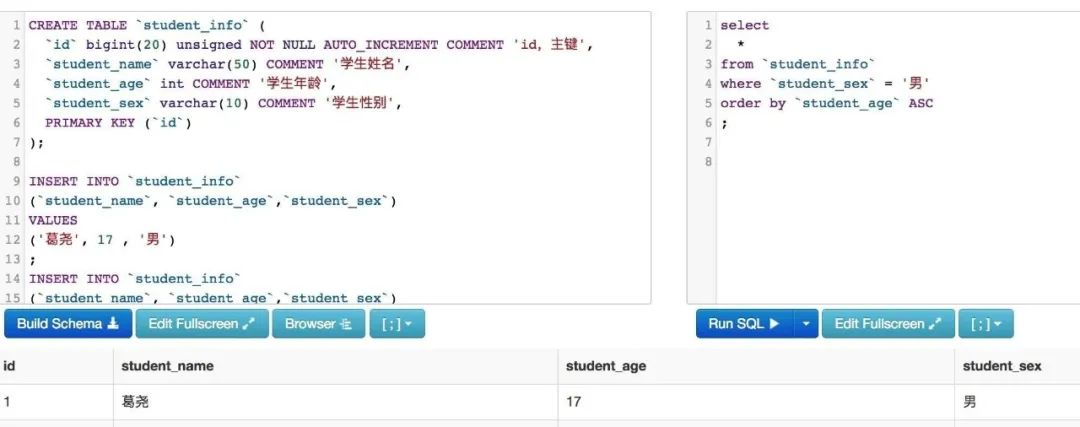
把男学生按照年龄排序,列出最年轻的2个人:
select
  *
from `student_info`
where `student_sex` = '男'
order by `student_age` ASC
limit 2
;

最后一个常用关键字,group by
把学生按照性别分组,找出男女分别最大的年龄
这个需求,实际上,是要先从表中拿出数据,之后按照性别分成2组,之后在每个组里,找出年龄最大的那个数字。
select
  `student_sex`
  , max( `student_age` )
from `student_info`
group by `student_sex`
;

这是一个比较复杂的操作,我们可以之后再讲。
最后感谢每一个认真阅读我文章的人,下面这个网盘链接也是我费了几天时间整理的非常全面的,希望也能帮助到有需要的你!
这些资料,对于想转行做【软件测试】的朋友来说应该是最全面最完整的备战仓库,这个仓库也陪伴我走过了最艰难的路程,希望也能帮助到你!凡事要趁早,特别是技术行业,一定要提升技术功底。希望对大家有所帮助……
如果你不想一个人野蛮生长,找不到系统的资料,问题得不到帮助,坚持几天便放弃的感受的话,可以点击下方小卡片加入我们群,大家可以一起讨论交流,里面会有各种软件测试资料和技术交流。
敲字不易,如果此文章对你有帮助的话,点个赞收个藏来个关注,给作者一个鼓励。也方便你下次能够快速查找。
自学推荐B站视频:
零基础转行软件测试:自学完软件测试,拿到了字节的测试岗offer,堪称B站最好的视频!
自动化测试进阶:已上岸华为,涨薪20K,2022最适合自学的python自动化测试教程,自己花16800买的,无偿分享

边栏推荐
- 【方向盘】使用IDEA的60+个快捷键分享给你,权为了提效(Live Template&Postfix Completion篇)
- 第3章业务功能开发(删除线索)
- Image recognition (VI) | activation function
- Study notes of pytorch deep learning practice: convolutional neural network (Advanced)
- BigDecimal use
- [pure theory] Yolo v4: optimal speed and accuracy of object detection
- 移位距离和假设的应用
- Data warehouse: Practice of hierarchical structure of data warehouse in banking industry
- JS get the time composition array of two time periods
- [steering wheel] use the 60 + shortcut keys of idea to share with you, in order to improve efficiency (live template & postfix completion)
猜你喜欢

From the annual reports of major apps, we can see that user portraits - labels know you better than you do

What does the Red Cross in the SQL editor mean (toad and waterdrop have been encountered...)
Information System Project Manager - Chapter 10 communication management and stakeholder management examination questions over the years

Li Kou 148: sorting linked list

如何有效的去防止别人穿该网站首页快照

Eslint common error reporting set

DFS Niuke maze problem

ES6 advanced - using prototype object inheritance methods

HLS Experiment 1 -- multiplier
![[steering wheel] use the 60 + shortcut keys of idea to share with you, in order to improve efficiency (reconstruction)](/img/b4/62a4c06743fdedacdffd9b156a760f.png)
[steering wheel] use the 60 + shortcut keys of idea to share with you, in order to improve efficiency (reconstruction)
随机推荐
Pinia plugin persist, a data persistence plug-in of Pinia
[C] Explain language file operation in detail
Pipnet: face key point detection for natural scenes "pixel in pixel net: directions efficient facial landmark detection in the wild"
【方向盘】启动命令和IDEA如何传递:VM参数、命令行参数、系统参数、环境变量参数、main方法参数
pbootcms上传缩略图尺寸自动缩小变模糊
Annotation development management third-party beans
AMD64 (x86_64) architecture ABI document: medium
Prometheus+blackbox exporter+grafana monitoring server port and URL address
【红队】ATT&CK - 利用BITS服务实现持久化
The sixth day of the third question of daily Luogu
ERROR: could not extract tar starting at offset 000000000000020980+9231072+2
Binary search 33. search rotation sort array
ES6 advanced - using prototype object inheritance methods
Convert rich text to normal text
prometheus+process-exporter+grafana 监控进程的资源使用
1.软件测试-----软件测试的基本概念
(Dynamic Programming Series) sword finger offer 48. the longest substring without repeated characters
assert _ Aligns
[steering wheel] how to transfer the start command and idea: VM parameters, command line parameters, system parameters, environment variable parameters, main method parameters
Wechat applet - get user location (longitude and latitude + city)