当前位置:网站首页>pyspark.ml feature transformation module
pyspark.ml feature transformation module
2022-07-31 06:14:00 【Young_win】
pyspark.ml 2.1
mlThe module's operator is based ondataframe构建的:
(1)ML Pipeline APIs
快速构建ML pipeline的API
(2)pyspark.ml.param module
(3)pyspark.ml.feature module
(4)pyspark.ml.classification module
(5)pyspark.ml.clustering module
(6)pyspark.ml.linalg module
线性代数计算
稀疏向量:用mllib构建SparseVector or Scipy构建scipy.sparse
稠密向量:Numpy构建array
(7)pyspark.ml.recommendation module
(8)pyspark.ml.regression module
(9)pyspark.ml.tuning module
调参
(10)pyspark.ml.evaluation module
pyspark.ml.feature module
(1)By the specified threshold 二值化Binarizer
from __feature__ import print_function
from pyspark.sql import SparkSession
from pyspark.ml.feature import Binarizer
spark=SparkSession.builder.appName('BinarizerExample').getOrCreate()
continuousDataFrame=spark.createDataFrame([(0,1.1),(1,8.5),(2,5.2)],['id','feature'])
#For continuous values based on thresholdthreshold二值化
binarizer=Binarizer(threshold=5.1,inputCol='feature',outputCol='binarized_feature')
binarizedDataFrame=binarizer.transform(continuousDataFrame)
print('Binarizer output with Threshold = %f' % binarizer.getThreshold())
binarizedDataFrame.show()
spark.stop()

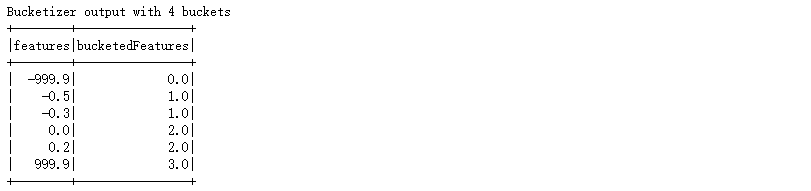
(2)By the specified boundaries 分桶Bucketizer
from __future__ import print_function
from pyspark.sql import SparkSession
from pyspark.ml.feature import Bucketizer

spark=SparkSession.builder.appName('BucketizerExample').getOrCreate()
splits=[-float('inf'),-0.5,0.0,0.5,float('inf')]
data=[(-999.9,),(-0.5,),(-0.3,),(0.0,),(0.2,),(999.9,)]
dataFrame=spark.createDataFrame(data,['features'])
#Bucket discretization by given bounds——Bucket by boundary
bucketizer=Bucketizer(splits=splits,inputCol='features',outputCol='bucketedFeatures')    #splitsSpecifies the bucket boundary
bucketedData=bucketizer.transform(dataFrame)
print('Bucketizer output with %d buckets' % (len(bucketizer.getSplits())-1))
bucketedData.show()
spark.stop()
(3)Score as specified Quantile bucketsQuantileDiscretizer
from __future__ import print_function
from pyspark.sql import SparkSession
from pyspark.ml.feature import QuantileDiscretizer

spark=SparkSession.builder.appName('QuantileDiscretizerExample').getOrCreate()
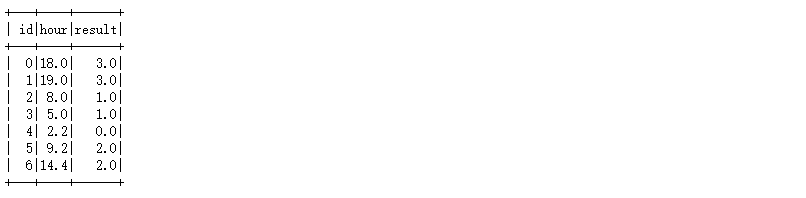
data=[(0,18.0),(1,19.0),(2,8.0),(3,5.0),(4,2.2),(5,9.2),(6,14.4)]
df=spark.createDataFrame(data,['id','hour'])
df=df.repartition(1)
#Bucket discretization by quantile——分位数离散化
discretizer=QuantileDiscretizer(numBuckets=4,inputCol='hour',outputCol='result')   #numBuckets指定分桶数
result=discretizer.fit(df).transform(df)
result.show()
spark.stop()
(4)按列 Feature absolute value normalizationMaxAbsScaler
from __future__ import print_function
from pyspark.sql import SparkSession
from pyspark.ml.linalg import Vectors
from pyspark.ml.feature import MaxAbsScaler

spark=SparkSession.builder.appName('MaxAbsScalerExample').getOrCreate()
dataFrame=spark.createDataFrame([(0,Vectors.dense([1.0,0.1,-8.0]),),
                                 (1,Vectors.dense([2.0,1.0,-4.0]),),
                                 (2,Vectors.dense([4.0,10.0,8.0]),)],['id','features'])
#把“每一列”both scaled to[-1,1]之间——Maximum absolute value scaling
scaler=MaxAbsScaler(inputCol='features',outputCol='scaledFeatures')
scalerModel=scaler.fit(dataFrame)
scaledData=scalerModel.transform(dataFrame)
scaledData.show()
spark.stop()

(5)按列 特征标准化StandardScaler
from __future__ import print_function
from pyspark.sql import SparkSession
from pyspark.ml.linalg import Vectors
from pyspark.ml.feature import StandardScaler

spark=SparkSession.builder.appName('StandScalerExample').getOrCreate()
dataFrame=spark.createDataFrame([(0.0,Vectors.dense([1.0,0.1,-8.0]),),
                                 (1.0,Vectors.dense([2.0,1.0,-4.0]),),
                                 (1.0,Vectors.dense([4.0,10.0,8.0]),)],['label','features'])
#Subtract the mean and divide the standard deviation by the characteristic column——标准化
scaler=StandardScaler(inputCol='features',outputCol='scaledFeatures',withStd=False,withMean=True)
scalerModel=scaler.fit(dataFrame)
scaledData=scalerModel.transform(dataFrame)
scaledData.show(truncate=False)
spark.stop()

(6)按列 构造多项式特征PolynomialExpansion
from __future__ import print_function
from pyspark.sql import SparkSession
from pyspark.ml.linalg import Vectors
from pyspark.ml.feature import PolynomialExpansion

spark=SparkSession.builder.appName('PolynomialExpansionExample').getOrCreate()
df=spark.createDataFrame([(Vectors.dense([2.0,1.0]),),
                          (Vectors.dense([0.0,0.0]),),
                          (Vectors.dense([3.0,-1.0]),)],['features'])
#Constructs polynomial features by column intersection
#1 x1 x2
#2 x1 x2 x1x2 x1^2 x2^2
#3 x1 x2 x1x2 x1^2 x2^2 x1^2x2 x1x2^2 x1^3 x2^3
polyExpasion=PolynomialExpansion(degree=2,inputCol='features',outputCol='polyFeatures')
polyDF=polyExpasion.transform(df)
polyDF.show(truncate=False)
spark.stop()

(7)类别列 独热编码OneHotEncoder
from __future__ import print_function
from pyspark.sql import SparkSession
from pyspark.ml.feature import OneHotEncoder,StringIndexer

spark=SparkSession.builder.appName('OneHotEncoderExample').getOrCreate()
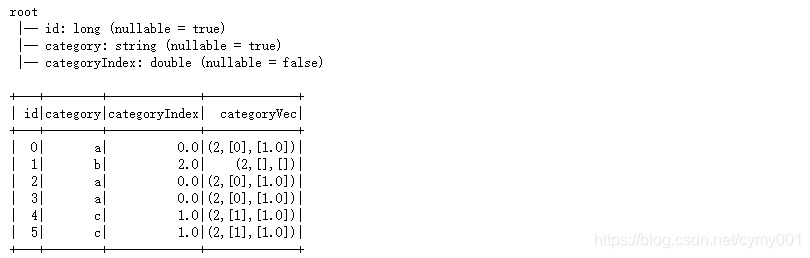
df=spark.createDataFrame([(0,'a'),(1,'b'),(2,'a'),(3,'a'),(4,'c'),(5,'c')],['id','category'])

#string类型转化成double类型
stringIndexer=StringIndexer(inputCol='category',outputCol='categoryIndex')
model=stringIndexer.fit(df)
indexed=model.transform(df)
indexed.printSchema()

#One-hot encoding of categorical features represented by numeric values
encoder=OneHotEncoder(inputCol='categoryIndex',outputCol='categoryVec')   #inputCol类型必须是numeric
encoded=encoder.transform(indexed)   #The encoded data is storedlibsvmThe format represents a sparse vector:向量大小 索引列 值
encoded.show()
spark.stop()
(8)去停用词StopWordsRemover
from __future__ import print_function
from pyspark.sql import SparkSession
from pyspark.ml.feature import StopWordsRemover

spark=SparkSession.builder.appName('StopWordsRemoverExample').getOrCreate()
sentenceData=spark.createDataFrame([(0,['I','saw','the','red','balloon']),
                                    (1,['Mary','had','a','little','lamb'])],['id','raw'])
#去停用词
remover=StopWordsRemover(inputCol='raw',outputCol='filtered')
remover.transform(sentenceData).show(truncate=False)
spark.stop()

(9)按行 分词Tokenizer Regular matching wordsRegexTokenizer
from __future__ import print_function
from pyspark.sql import SparkSession
from pyspark.ml.feature import Tokenizer,RegexTokenizer
from pyspark.sql.types import IntegerType
#pyspark.sql.functions.col(col) Returns a Column based on the given column name.
from pyspark.sql.functions import col,udf

spark=SparkSession.builder.appName('TokenizerExample').getOrCreate()
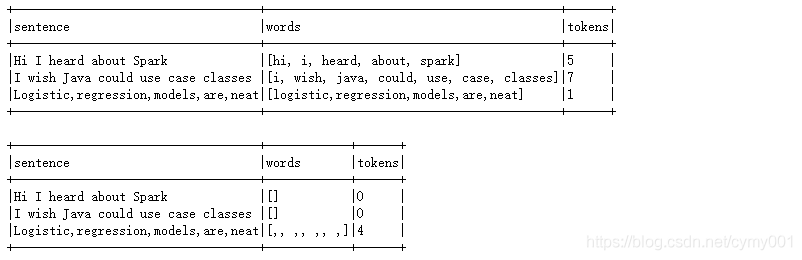
sentenceDataFrame=spark.createDataFrame([(0,'Hi I heard about Spark'),
                                         (1,'I wish Java could use case classes'),
                                         (2,'Logistic,regression,models,are,neat')],['id','sentence'])

#A tokenizer that converts the input string to lowercase and then splits it by white spaces.
tokenizer=Tokenizer(inputCol='sentence',outputCol='words')

#按pattern分割[非单词字符]; gaps参数设置为false,Indicates that a regular expression is used to match tokens,instead of using the regex as a delimiter.
regexTokenizer=RegexTokenizer(inputCol='sentence',outputCol='words',pattern=',',gaps=False)

countTokens=udf(lambda words:len(words),IntegerType())   #The return value type isInteger

tokenized=tokenizer.transform(sentenceDataFrame)
#对words列调用countTokens udf处理
tokenized.select('sentence','words').withColumn('tokens',countTokens(col('words'))).show(truncate=False)

regexTokenized=regexTokenizer.transform(sentenceDataFrame)
regexTokenized.select('sentence','words').withColumn('tokens',countTokens(col('words'))).show(truncate=False)
#regexTokenized.show()
spark.stop()
(10)Coded by word frequency
from __future__ import print_function
from pyspark.sql import SparkSession
from pyspark.ml.feature import CountVectorizer

spark=SparkSession.builder.appName('CountVectorizerExample').getOrCreate()
df=spark.createDataFrame([(0,'d a b c d d d'.split(' ')),
                          (1,'a b c c b'.split(' ')),
                          (2,'a b d d'.split(' '))],['id','words'])

#Sort by word frequency in the corpus,Select from high to low to keep
#vocabSizeIndicates the maximum content of the vocabulary,minDFIndicates the number of times that must appear in the text
cv=CountVectorizer(inputCol='words',outputCol='features',vocabSize=2,minDF=3.0)
model=cv.fit(df)
result=model.transform(df).show(truncate=False)
spark.stop()

(11)TF-IDF词编码
I D F = log ∣ D ∣ + 1 D F ( t , D ) + 1 \displaystyle IDF=\log\frac{|D|+1}{DF(t,D)+1} IDF=logDF(t,D)+1∣D∣+1,
∣ D ∣ |D| ∣D∣is the total number of documents the corpus contains, D F ( t , D ) DF(t,D) DF(t,D)是包含词语t的文档数
词频 T F ( t , D ) TF(t,D) TF(t,D)是词语t在文档中出现的次数
pyspark的IDFThe interface calculates yes T F ( t , D ) ∗ I D F TF(t,D)*IDF TF(t,D)∗IDF
from __future__ import print_function
from pyspark.sql import SparkSession
from pyspark.ml.feature import Tokenizer, HashingTF, IDF

spark=SparkSession.builder.appName('TFidfExample').getOrCreate()
sentenceData=spark.createDataFrame([(1.0,'Logistic regression models are neat'),
                                    (0.0,'I wish Java could use case classes'),
                                    (0.0,'I heard about Spark and I like Spark')],['label','sentence'])

tokenizer=Tokenizer(inputCol='sentence',outputCol='words')   #按空格分词
wordsData=tokenizer.transform(sentenceData)

#在文本处理中,Receives a collection of terms,These sets are then converted into fixed-length feature vectors.这个算法在哈希的同时会统计各个词条的词频.
hashingTF=HashingTF(inputCol='words',outputCol='rawFeatures',numFeatures=2000)   #numFeature表示哈希表的桶数
featurizedData=hashingTF.transform(wordsData)
featurizedData.show(truncate=False)   #rawFeaturesFeature columns are sparse representations 维数 索引 词频

#TF-IDF
idf=IDF(inputCol='rawFeatures',outputCol='features')
idfModel=idf.fit(featurizedData)
rescaledData=idfModel.transform(featurizedData)
rescaledData.select('label','features').show(truncate=False)
spark.stop()

import math
math.log((3+1)/(1+1)), math.log((3+1)/(2+1))
#(0.6931471805599453, 0.28768207245178085)
(12)构造ngram词
from __future__ import print_function
from pyspark.sql import SparkSession
from pyspark.ml.feature import NGram

spark=SparkSession.builder.appName('NGramExample').getOrCreate()
wordDataFrame=spark.createDataFrame([(0,['Hi','I','heard','about','Spark']),
                                     (1,['I','wish','Java','could','use','case','classes']),
                                     (2,['Logistic','regression','models','are','neat'])],['id','words'])
#according to the given vocabulary 构造n-gram
ngram=NGram(n=2,inputCol='words',outputCol='ngrams')
ngramDataFrame=ngram.transform(wordDataFrame)
ngramDataFrame.select('ngrams').show(truncate=False)
spark.stop()

(12)按列 用SQLVariation in structural characteristics
from __future__ import print_function
from pyspark.sql import SparkSession
from pyspark.ml.feature import SQLTransformer

spark=SparkSession.builder.appName('SQLTransformerExample').getOrCreate()
df=spark.createDataFrame([(0,1.0,3.0),
                          (2,2.0,5.0)],['id','v1','v2'])
#According to the existing characteristic column,利用SQLVariation constructs a new feature column
sqlTrans=SQLTransformer(statement='SELECT *, (v1+v2) AS v3, (v1*v2) AS v4 FROM __THIS__')
sqlTrans.transform(df).show()
spark.stop()

(13)按列 用RThe formula constructs the feature
~ separate target and terms  分割标签与特征
+ concat terms, “+ 0” means removing intercept 将两个特征相加
- remove a term, “- 1” means removing intercept 减去一个特征
: interaction (multiplication for numeric values, or binarized categorical values) 将多个特征相乘变成一个特征
. all columns except target 选取所有特征
from __future__ import print_function
from pyspark.sql import SparkSession
from pyspark.ml.feature import RFormula

spark=SparkSession.builder.appName('RFormulaExample').getOrCreate()
dataset=spark.createDataFrame([(7,'US',18,1.0),
                               (8,'CA',12,0.0),
                               (9,'NZ',15,0.0)],['id','country','hour','clicked'])
#Constructs from the specified columnlabel和feature——R公式变换
formula=RFormula(formula='clicked ~ country + hour',featuresCol='features',labelCol='label')
output=formula.fit(dataset).transform(dataset).show()
spark.stop()

边栏推荐
猜你喜欢

flutter 混合开发 module 依赖
Notes on creating a new virtual machine in Hyper-V

Nmap的下载与安装

Pytorch每日一练——预测泰坦尼克号船上的生存乘客

ROS之service编程的学习和理解
wangeditor编辑器内容传至后台服务器存储

The browser looks for events bound or listened to by js
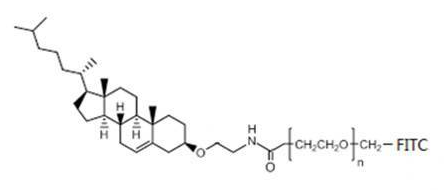
Introduction to CLS-PEG-FITC Fluorescein-PEG-CLS Cholesterol-PEG-Fluorescein

Understanding of objects and functions in js

random.randint函数用法
随机推荐
Attention based ASR(LAS)
科学研究用磷脂-聚乙二醇-活性酯 DSPE-PEG-NHS CAS:1445723-73-8
VS通过ODBC连接MYSQL(一)
SSH automatic reconnection script
np.fliplr与np.flipud
mysql common commands
Introduction to CLS-PEG-FITC Fluorescein-PEG-CLS Cholesterol-PEG-Fluorescein
Numpy常用函数
数据预处理、特征工程和特征学习-摘抄
MySQL 入门:Case 语句很好用
flutter arr dependencies
Tencent Cloud GPU Desktop Server Driver Installation
活体检测CDCN学习笔记
评估机器学习模型-摘抄
softmax函数详解
使用 OpenCV 提取图像的 HOG、SURF 及 LBP 特征 (含代码)
自然语言处理相关list
cocoscreator 显示刘海内容
Pytorch学习笔记7——处理多维特征的输入
应用usb_cam同时打开多个摄像头方法