当前位置:网站首页>Three versions realize black-and-white theme switching
Three versions realize black-and-white theme switching
2022-06-21 14:28:00 【Advanced mathematics volume II half price】
We wrote a very simple black-and-white switch button before , See link
ordinary js Code to achieve theme color switching
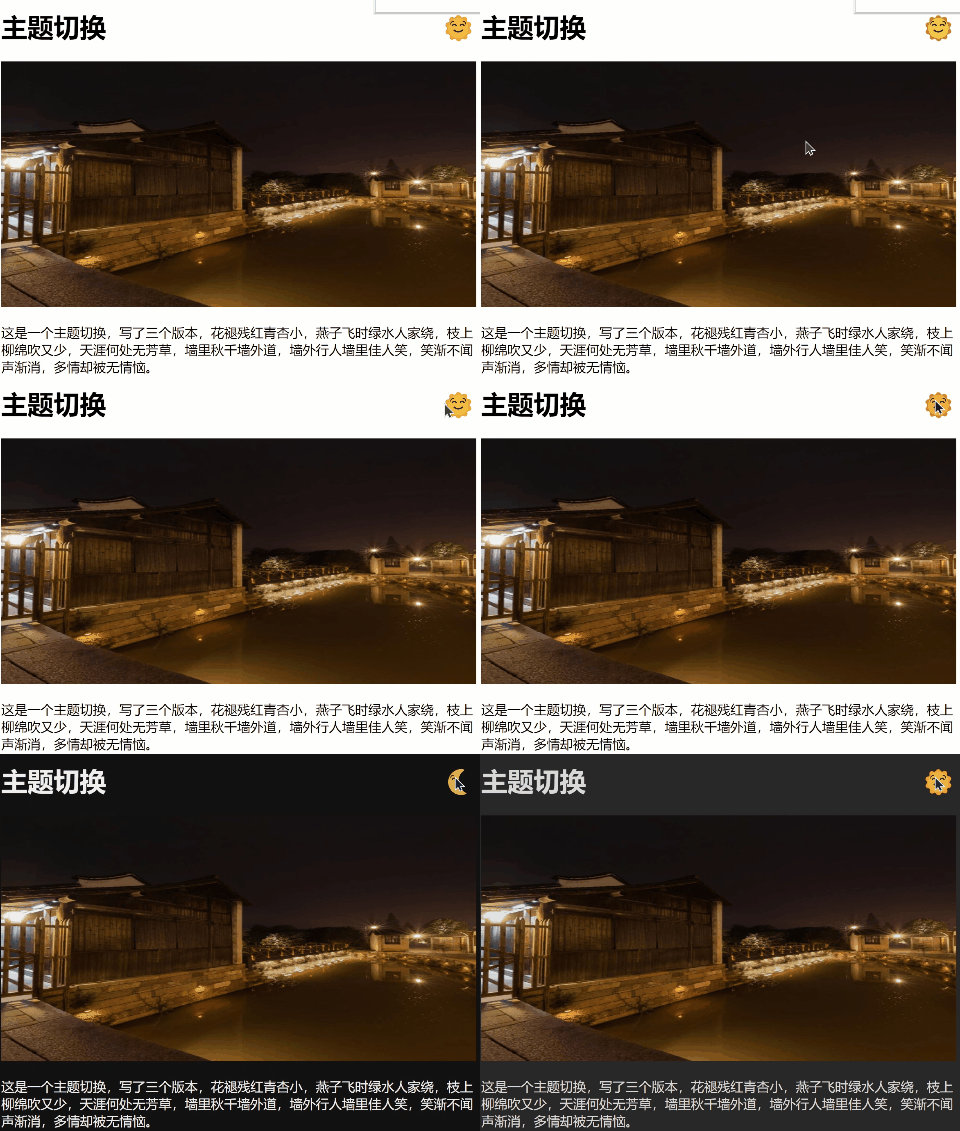
Today, let's continue to write about topic switching , The final effect is shown in the figure
Let's take a look at how the code can be better implemented :
html part :
<header>
   <button id="modeBtn"></button>
   <h1> Topic switching </h1>
</header>
<main>
   <div class="pic">
       <img src=" Picture links ">
   </div>
   <div class="description">
       <p>
          Written content , A little
       </p>
    </div>
</main>
Version of a
When clicking the button to switch ,js The code determines whether the content of the current button is the sun or the moon , After judgment, make color switching between day and night on the page
const btn = document.getElementById('modeBtn');
btn.addEventListener('click', (e) => {
  const body = document.body;
  if(e.target.innerHTML === '') {
    body.style.backgroundColor = 'black';
    body.style.color = 'white';
    e.target.innerHTML = '';
  } else {
    body.style.backgroundColor = 'white';
    body.style.color = 'black';
    e.target.innerHTML = '';
  }
});
The code written in this way is very easy to understand , Very easy to read , But this code , In fact, they are using JavaScript Instead of css To manipulate the style of elements , We all know JavaScript Is used to manipulate behavior ,css Is to operate the style . So if the project is big , use JavaScript To operate the style , It's hard to see what the code is doing after a while or when someone else takes over the code . So how can we make css and JavaScript Each performs his own duties , Next, let's look at version 2 .
Version 2 :
We simply refactor this code to optimize , use css Of class To represent two states , The buttons sun and moon are not written directly in text html Inside , It is , Wrote a button, And then in css A pseudo element has been added to , So all the style questions are left to css, When reading code, you can quickly get To code is to switch between two states , use js To switch state changes .
css Code :
body.night {
  background-color: black;
  color: white;
  transition: all 1s;
}

#modeBtn::after {
  content: '';
}
body.night #modeBtn::after {
  content: '';
}
JavaScript Code :
const btn = document.getElementById('modeBtn');
btn.addEventListener('click', (e) => {
  const body = document.body;
  if(body.className !== 'night') {
    body.className = 'night';
  } else {
    body.className = '';
  }
});
Actually , Pure visual display , Show class requirements , Don't have to js,js It's about operational behavior , It can be used directly css and html To achieve , Let's see how version 3 is implemented , no need js Code to achieve theme color switching
Version 3 : Don't write a line js Code
stay html in , The structure of is different from that before , stay body There's a layer in it content, And then in content I put a before input Elements checkbox, But there's nothing on the page , Because in css Hide it in the , Used a sibling element selector , The following elements will be selected ,
html Code : Pay attention to the added input Elements
<input id="modeCheckBox" type="checkbox">
  <div class="content">
    <header>
      <label id="modeBtn" for="modeCheckBox"></label>
      <h1> Dining room in the middle of the night </h1>
    </header>
    <main>
      <div class="pic">
        <img src=" This is the picture url">
      </div>
      <div class="description">
        <p>
             This is a text paragraph , A little .
        </p>
      </div>
    </main>
  </div>
css part
.content {
  padding: 10px;
  transition: background-color 1s, color 1s;
}

div.pic img {
  width: 100%;
}

#modeCheckBox {
  display: none;
}

#modeCheckBox:checked + .content {
  background-color: black;
  color: white;
  transition: all 1s;
}

#modeBtn {
  font-size: 2rem;
  float: right;
}

#modeBtn::after {
  content: '';
}

#modeCheckBox:checked + .content #modeBtn::after {
  content: '';
}
In this way, the theme color can be switched , There are a lot of pure display functions , If you don't want to JavaScript Realize style switching , You can use html Inside lable add checkbox.
summary :
The above is the theme color switching method of the three versions . Version 2 and version 3 have their own advantages , Version 2 js It's easier , He will also be more adaptable , Version 3 is not so adaptable , But absolutely not bug Of . Version 2 , such as , If we want to do cross section , Small program , The old version of the browser can , But version three is not very good .
边栏推荐
- T32 custom menu bar
- What fun things can a desk service do
- How to unit test non pure functions -- unittest
- Dplayer development barrage background
- Lamp Architecture 3 -- compilation and use of PHP source code
- Route add add route
- Pyqt environment in pycharm
- Automatic operation and maintenance 4 - variables and encryption in ansible
- Web3.js connection to metamask wallet transfer
- [untitled] fish pond forwarding command
猜你喜欢

Alibaba cloud log service is available in Net project

A blazor webassembly application that can automatically generate page components based on objects or types

Summary of the most basic methods of numpy

Chapter 6 - application layer

Analysis of ROC and AUC

USB message capture tcpdump

Lamp architecture 5 - MySQL Cluster and master-slave structure

The code remotely calls aria2 to download URL resources or BT seeds

Chapter 3 - data link layer

Installation of oracle19c under alicloud lightweight application server linux-centos7
随机推荐
Alibaba cloud link tracking is on the Net project (Jaeger trace)
Qt-6-file IO
DP question brushing record
Redis learning (1) -- overview and common commands
Pyqt environment in pycharm
Why is epoll efficient?
[untitled] fish pond forwarding command
Redis学习(1)——概述和常用命令
How is the redemption time of financial products stipulated?
Tcp/ip Basics
Write a code hot deployment
Declare war on uncivilized code I
Win10 installation and configuration mongodb
Compile time annotation
How is the network connected
Redis cluster deployment manual that Xiaobai can understand
[how to install MySQL 8.0 to a non system disk] [how to create a new connection with Navicat and save it to a non system disk] and [uninstall MySQL 8.0]
Blazer page element authorization -- use of the authorizeview component
Mr. Ali taught you how to use JMeter for pressure test (detailed drawing)
Tcp/ip FAQs