当前位置:网站首页>Solution to missing in unity script
Solution to missing in unity script
2022-06-12 03:28:00 【_ YiFei】
Doing it unity Project time , We may encounter the problem of missing scripts as shown below :
This problem occurs when we use software git During cooperative development , Finally, after investigation , Found to be .meta There's something wrong with the document , The reason is our gitignore Accidentally added *.meta( The official ignore The file doesn't notice this ), Then when developing ,pull Others' commit when ,meta The file was saved locally before the conflict was resolved :
You can see that there is a pile of... In this file git Conflict information for , So if there is missing The situation of , You can go to your own .meta In the document , See if there are any inappropriate git Conflict information , If there are any problems, they can be solved as above .
Of course, only modifying this may not completely solve the problem , There may be guid There was a disorder . Let's talk about manual modification guid To restore the script , So you don't have to drag scripts one by one , It's troublesome .
Manual modification guid To load correctly miss Script
Of course , If not git The cause , Still there miss Words , So that's the script meta Medium guid There is a problem . Let's first take a brief look at meta Principle :
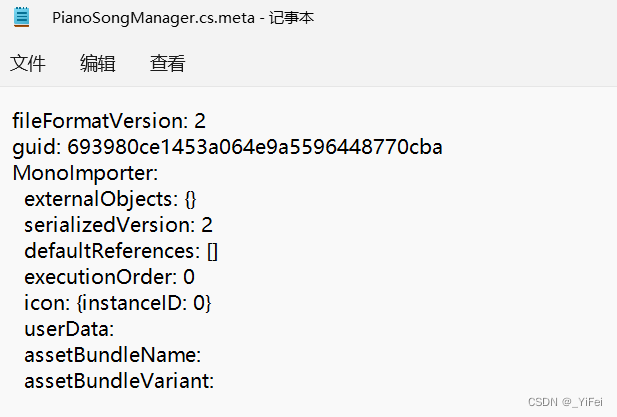
You can see that this script actually has a guid,.unity This is actually how files find scripts . So if we know there are many places where we use this script , You can go to one first miss The place of , Drag the script to miss Where to go , Then check it out .unity Changes in the file , Manually modify :
1、 Drag the correct script to miss The place of :

You can see the direct drag , Some settings of the script are still null Of , If you want to drag it all over again , Very trouble . But let's modify it directly guid To solve this problem .
2、 see .unity Changes in documents

You can see , In fact, the scene is .unity Mapping of scripts in the file guid Changed , The reason why the scenario cannot find the script , Because of the script .meta In the file guid Changed , We just need to put this guid Change to the previous in the scene guid that will do , For example, the scene changes now :
from
m_Script: {fileID: 11500000, guid: 4324dfer1453a2343445596123450cba, type: 3}
Change for
m_Script: {fileID: 11500000, guid: 693980ce1453a064e9a5596448770cba, type: 3}
3、 Modify the script .meta Medium guid, Simultaneous recovery .unity file
take 693980ce1453a064e9a5596448770cba Change it to 4324dfer1453a2343445596123450cba that will do , Pay attention to .unity File change removal for , Because we are the first 2 Step is just to find the correct script guid.

Now the scenarios that reference this script are back to normal , Because it can pass the previous guid Found the script , The parameters in the script will not be cleared .
边栏推荐
- Community Conference | the mosn community will release version 1.0 and promote the evolution of the next generation architecture
- The road of global evolution of vivo global mall -- multilingual solution
- In 2022, don't you know the difference between arrow function and ordinary function?
- TCP three handshakes and four waves
- How do I make the mouse wheel work in the VB6 ide- How can I make mousewheel work in VB6 IDE?
- Data flow diagram of Flink
- 2020-12-07
- Go 语法 变量
- oracle之用户和表空间
- 根據變換矩陣進行圖像拼接
猜你喜欢

Evolution and practice of Unicom real-time computing platform

Wechat applet project example - renju for two

tcp 三次握手与四次挥手

Domestic mobile phones are snubbing low-end consumers, and Nokia provides them with high-quality products

Batch automated e-mail: Vika Vige table x Tencent Qianfan scene connector has made new moves, and business communication and event marketing only need 3 steps

Special materials | household appliances, white electricity, kitchen electricity

Community Conference | the mosn community will release version 1.0 and promote the evolution of the next generation architecture

In 2022, why is there a market for Shanzhai products?
string manipulation:
顺序表与链表-----进阶
随机推荐
[Business Research Report] the salary growth rate report of each industry in 2022 includes regional growth rate - download link is attached
What is the difference between the gin framework of golang and the various methods of receiving parameters and various bindings?
The idea of setting the flash memory management and resource size, and the quantitative relationship among parallelism, slot, and taskmanager quantity
Cryptology Summary
微信小程序项目实例——体质计算器
Final summary of addition, deletion, modification and query - 2.2 (knowledge points in mapper.xml)
[untitled]
【点云压缩】Variational Image Compression with A Scale Hyperprior
【鸿蒙】 使用定时器做一个简单的抢红包小游戏
2020-12-12
2020-12-17
Simple database connection example
laravel 8 选用 jwt 进行接口验证
[Business Research Report] Research Report on super automation technology and application (2022) -- download link attached
2020-12-07
绝对定位使盒子居中显示的三种方式
PHP life cycle and swoole life cycle
VIM command Encyclopedia
【点云压缩】Sparse Tensor-based Point Cloud Attribute Compression
字符串处理: