当前位置:网站首页>UNET deployment based on deepstream
UNET deployment based on deepstream
2022-07-02 04:27:00 【hello_ dear_ you】
0. sample Background introduction
deepstream-segmentation-test This example explains how to deepstream Deploy semantic segmentation algorithm in the middle U-Net. According to the output category of the network , It is divided into semantic segmentation( Output four categories ) and industrial segmentation( Single category forecast ).
Source path :/opt/nvidia/deepstream/deepstream-6.0/sources/apps/sample_apps/deepstream-segmentation-test
1. Code explanation
1.1 Enter command line parsing
The sample in , The command line format for executing reasoning is as follows :
./deepstream-segmentation-app [-t infer-type] config_file <file1> [file2] ... [fileN]The first parameter " -t " And the second parameter " infer-type " Used to specify the network type of reasoning [infer, inferserver], By default [infer] state . The third parameter is nvinfer Reasoning needs to be specified config File path , The next step is the data path to be processed , Therefore, the commonly used command line is as follows :
// for semantic segmentation
./deepstream-segmentation-app dstest_segmentation_config_semantic.txt sample_720p.mjpeg sample_720p.mjpeg

// for industrial segmentation
./deepstream-segmentation-app dstest_segmentation_config_industrial.txt sample_industrial.jpg
Implementation of the above input command line parsing function , It mainly involves the following code
  /* Parse infer type and file names */
  for (gint k = 1; k < argc;)
  {
    if (!strcmp("-t", argv[k]))   //  The first parameter should be  -t, Used to indicate the category of reasoning 【infer, infer-server】
    {
      if (k + 1 >= argc)
      {
        usage(argv[0]);
        return -1;
      }
      if (!strcmp("infer", argv[k+1]))
      {
        is_nvinfer_server = FALSE;
      }
      else if (!strcmp("inferserver", argv[k+1]))
      {
        is_nvinfer_server = TRUE;
      } else
      {
        usage(argv[0]);
        return -1;
      }
      k += 2;
    }
    else if (!infer_config_file) // nvinfer Of config File path
    {
      infer_config_file = argv[k];
      k++;
    }
    else //  Path of data to be processed
    {
      files = g_list_append (files, argv[k]);
      num_sources++;
      k++;
    }
  }
1.2 Pipeline structure
The sample in ,pipeline The plug-in process of adding links is as follows :
filesrc -> jpegparse -> nvv4l2decoder -> nvstreammux -> nvinfer/nvinferserver (segmentation)
nvsegvidsual -> nvmultistreamtiler -> (nvegltransform) -> nveglglessink.
Following pair pipeline Some of the main elements To introduce :
1. jpegparse element
Because in pipeline Used in jpegparse Parser , So it's time to sample Support only jpg Pictures and mjpeg Format video input . stay DeepStream How to use image Reasoning as input ,SDK One is also provided in example,deepstream-image-decode-test, For specific usage, please refer to blog :【deepstream-image-decode-test analysis 】.
2. nvinfer element
In previous applications ,nvinfer Plug ins are often used for object detection and reasoning of classification models , And the sample The task of the model in is semantic segmentation , therefore , Some parameters in the configuration file are different from those before , The important parameters are as follows :


3. nvsegvidsual element
In the semantic segmentation task ,nvsegvidsual Plug ins are used to replace nvosd, To render the final mask Output . here , Output mask The size of the result is the same as that of the network input .

The picture above shows nvsegvidsual Rendering output of , meanwhile , What we need to pay attention to nvsegvidsual The input of the plug-in contains NvDsInferSegmentationMeta object , The final inference output is described mask Information about .

2. The output of the network
For semantic segmentation tasks , The output dimension of the network is generally 【N, C, H, W】, among N Indicates the size of the batch ,C Represents the number of categories of the dataset ,H and W Is the height and width of the output image , Usually, it is equal to the network input size , Its content describes the probability that each pixel belongs to each category .
therefore , The subsequent processing flow is : First, a threshold is given to determine whether the pixel belongs to the foreground or background , If it is the future , Find the position with the highest probability value , Indicates its category . And then you get a class map, Describes the category of each pixel . Last , We passed a color map Set different colors for each category to get the final mask Images .
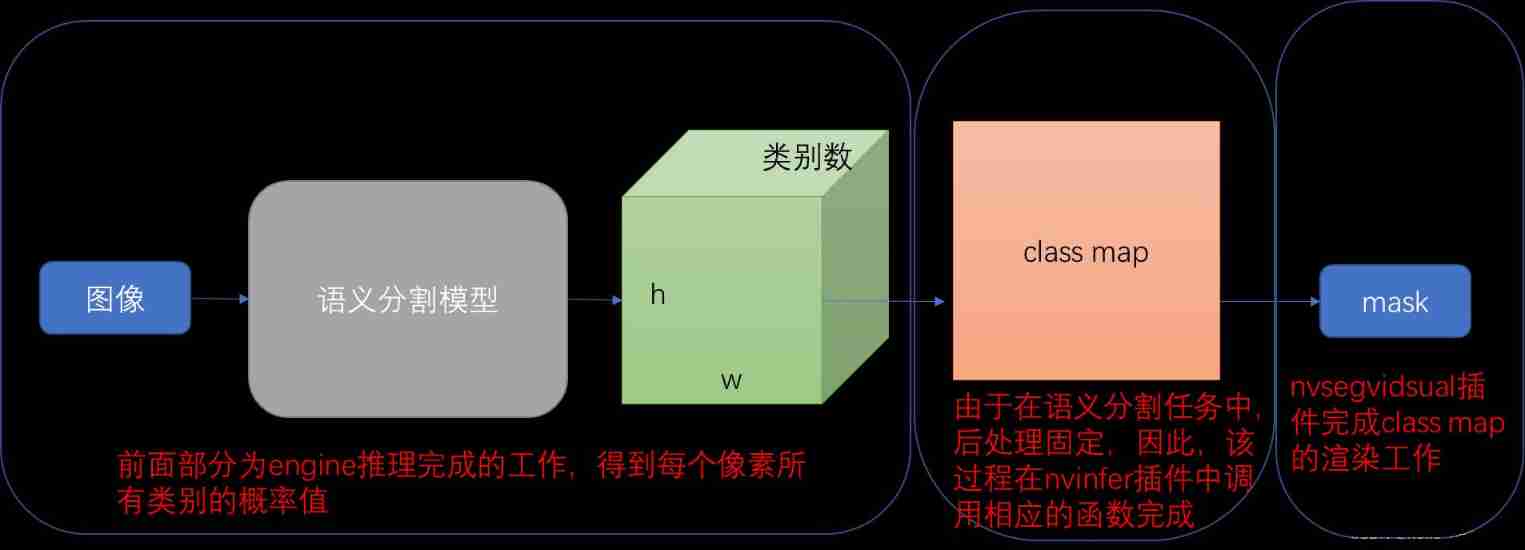
The image above depicts the deepstream in , Semantic segmentation model in the reasoning process , Complete the corresponding position of each stage . therefore , When we deploy the semantic segmentation model , It is necessary to ensure that the output dimension of the model should 【N, C, H, W】, Indicates the probability that each pixel belongs to all categories . And then through config Configured in the file segmentation-threshold, Get the corresponding class map.
3. Get the output information
Through the sample Given pipeline, We can get a rendered mask Image as the final result , But sometimes we don't want to just get mask The image is over , In more cases, we want to further analyze the output probability and category information , So how to be in deepstream Get the output information of the semantic segmentation network ?
The following figure for nvinfer Output description of the plug-in , Therefore, we know that the output information of semantic segmentation network should be saved in NvDsInferSegmentationMeta in .

The following figure for NvDsInferSegmentationMeta Introduction to , It's important to pay attention to , The Meta In order to NvDsUserMeta Link to frame_meta Of frame_user_meta_list perhaps obj_meta Of object_user_meta_list in , And its meta_type Is defined as NVDSINFER_SEGMENTATION_META.
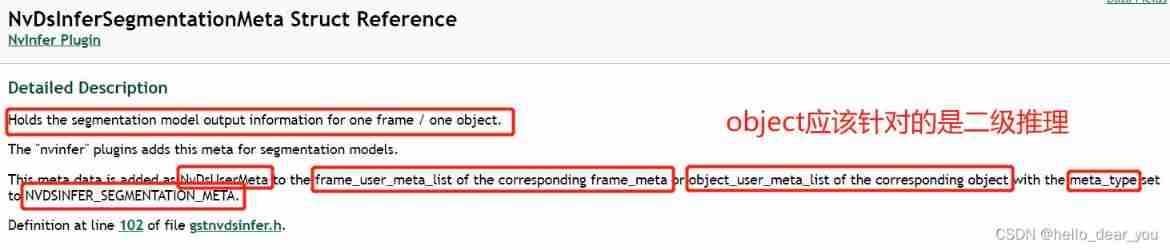
Besides , Also want to be right NvDsInferSegmentationMeta in class_map and class_probabilities_map Explain the meaning of two important parameters ,class_map Is a two-dimensional array , Represents the category predicted by each pixel value ,class_probabilities_map It should be engine Output ,[c, h, w] dimension , Indicates the probability that each pixel belongs to all categories .
therefore , We can link to the output of the network through the following code :
static GstPadProbeReturn
tiler_src_pad_buffer_probe (GstPad * pad, GstPadProbeInfo * info,
    gpointer u_data)
{
    GstBuffer *buf = (GstBuffer *) info->data;
    NvDsMetaList * l_frame = NULL;
    NvDsBatchMeta *batch_meta = gst_buffer_get_nvds_batch_meta (buf);

    for (l_frame = batch_meta->frame_meta_list; l_frame != NULL;
      l_frame = l_frame->next) {
        NvDsFrameMeta *frame_meta = (NvDsFrameMeta *) (l_frame->data);
        NvDsUserMetaList *usrMetaList = frame_meta->frame_user_meta_list;
         while (usrMetaList != NULL)
         {
            NvDsUserMeta *usrMetaData = (NvDsUserMeta *) usrMetaList->data;
            if (usrMetaData->base_meta.meta_type == NVDSINFER_SEGMENTATION_META)
            {
              NvDsInferSegmentationMeta* segMetaData = (NvDsInferSegmentationMeta*)(usrMetaData->user_meta_data);
              int classes = segMetaData->classes;
              int width = segMetaData->width;
              int height = segMetaData->height;
              int* class_ids = segMetaData->class_map;
              float* scores = segMetaData->class_probabilities_map;
              g_print("segmentation. classes: %d width: %d, height: %d\n", classes, width, height);
              usrMetaList = usrMetaList->next;
            }
            else
            {
              g_print("others.\n");
              usrMetaList = usrMetaList->next;
          }
        }
    }
    return GST_PAD_PROBE_OK;
}
4. Deploy customized UNet Model
In blogs U-Net be based on TensorRT Deploy in , Introduced how to in tensorrt Deployment in China unet Model , Also generated based on this blog engine Files can be used for deepstream in , To realize the present deepstream Deploy custom UNet Model .
When using Pytorch Train well UNet Model , And then we get the corresponding onnx Model , because UNet The network does not contain some complex operations , A simple way to get TensorRT engine The method is to use the self-contained trtexec Tools .
./trtexec --onnx=path-to-onnx-file --workspace=4096 --saveEngine=path-to-save-engine
modify deepstream_segmentation_app.cpp In the code , About the setting of image and model dimensions , recompile .
//  Image unification resize dimension
#define MUXER_OUTPUT_WIDTH 1280
#define MUXER_OUTPUT_HEIGHT 720


// network Input dimensions
#define TILED_OUTPUT_WIDTH 960
#define TILED_OUTPUT_HEIGHT 640
about UNet The Internet ,nvinfer The content of the configuration file should be as follows :
# dstest_unet_config_industrial.txt
[property]
gpu-id=0
net-scale-factor=0.003921568627451
maintain-aspect-ratio=0
scaling-filter=1
scaling-compute-hw=0
# Integer 0: RGB 1: BGR 2: GRAY
model-color-format=0

# onnx-file=unet.onnx
model-engine-file=unet.trt

infer-dims=3;640;960

force-implicit-batch-dim=1
batch-size=1
## 0=FP32, 1=INT8, 2=FP16 mode
network-mode=0

num-detected-classes=1

interval=0

gie-unique-id=1

network-type=2
process-mode=1
segmentation-threshold=0.5


[class-attrs-all]
pre-cluster-threshold=0.5
roi-top-offset=0
roi-bottom-offset=0
detected-min-w=0
detected-min-h=0
detected-max-w=0
detected-max-h=0
Run the following command to reason ( Only receive jpep and mjpeg Format data input ):
./deepstream-segmentation-app dstest_unet_config_industrial.txt image.jpg5. Useful links
U-Net be based on TensorRT Deploy _hello_dear_you The blog of -CSDN Blog _unet Deploy
边栏推荐
- Demonstration description of integrated base scheme
- cs架构下抓包的几种方法
- Free drawing software recommended - draw io
- [JS -- map string]
- MySQL error: expression 1 of select list is not in group by claim and contains nonaggre
- Thinkphp內核工單系統源碼商業開源版 多用戶+多客服+短信+郵件通知
- Yyds dry goods inventory kubernetes introduction foundation pod concept and related operations
- 10 minutes to understand CMS garbage collector in JVM
- How muddy is the water in the medical beauty industry with a market scale of 100 billion?
- Pytoch yolov5 runs bug solution from 0:
猜你喜欢

社交媒体搜索引擎优化及其重要性
Keil compilation code of CY7C68013A

Go language introduction

Playing with concurrency: what are the ways of communication between threads?
WiFi 5GHz frequency
Thinkphp Kernel wo system source Commercial Open source multi - user + multi - Customer Service + SMS + email notification

Pytorch---使用Pytorch进行图像定位
Pytoch --- use pytoch for image positioning
Realizing deep learning framework from zero -- Introduction to neural network

Pytorch---使用Pytorch进行鸟类的预测
随机推荐
[untitled]
【leetcode】74. Search 2D matrix
Landing guide for "prohibit using select * as query field list"
Pytorch---使用Pytorch进行图像定位
Wechat applet calculates the distance between the two places
Yyds dry goods inventory kubernetes introduction foundation pod concept and related operations
Exposure X8标准版图片后期滤镜PS、LR等软件的插件
CorelDRAW Graphics Suite2022免费图形设计软件
Sword finger offer II 006 Sort the sum of two numbers in the array
[source code analysis] NVIDIA hugectr, GPU version parameter server - (1)
云服务器的安全设置常识
【提高课】ST表解决区间最值问题【2】
Three years of experience in Android development interview (I regret that I didn't get n+1, Android bottom development tutorial
Bitmap principle code record
IDEA xml中sql没提示,且方言设置没用。
Www 2022 | rethinking the knowledge map completion of graph convolution network
[improvement class] st table to solve the interval maximum value problem [2]
Go language naming specification
Shenzhen will speed up the cultivation of ecology to build a global "Hongmeng Oula city", with a maximum subsidy of 10million yuan for excellent projects
Common sense of cloud server security settings