当前位置:网站首页>Introduction to FPGA (I) - the first FPGA project
Introduction to FPGA (I) - the first FPGA project
2022-07-26 12:02:00 【TARS_ 90%Honesty】
Verilog Code writing and related grammar
test.v
//  The module name is consistent with the file name
module test(
		input				port_a				, //  Only wire, No, reg, Default wire
		input				port_b				,
		input				port_c				,
		output	wire		port_d				, //  Default wire( conductor ), Also have reg( register )
		output	wire		port_e				,
		output	wire		port_f				,
		output	wire		port_g				,
		output	wire		port_h
);

// assign : Yes wire Type
// always : Yes reg  Type

assign port_d	=		port_a & port_b;	//  Bitwise AND
assign port_e	=		port_a | port_c;    //  Press bit or
assign port_f	=		~port_a;            //  Bitwise non
assign port_g	=		port_b ^ port_c;    //  Exclusive or
assign port_h	=		port_a ^~ port_c;   //  Same as or

endmodule
tb_test.v
 // `timescale 1ns/1ps //  Time unit  /  Time precision ( Similar to the scale , Company cm, precision ms)
 `timescale		1ns / 1ns           //  Time precision can also be equal to time units

 module tb_test;                    //  The test module has no input and output ports

 //  Three wires of the signal source
 reg			test_a;
 reg 			test_b;
 reg 			test_c;
 //  Connect the five wires of the oscilloscope
 wire			rslt_d;
 wire			rslt_e;
 wire			rslt_f;
 wire			rslt_g;
 wire			rslt_h;

 // initial  Assigned signal , Must be defined as reg type
 initial begin
		test_a	=			1;  	//  stay 0 Time gives initial value
		test_b	=			0;
		test_c	=			1;
		#5							//  Time delay 5ns
		test_a	=			0;
		test_b	=			1;
		test_c	=			1;
		#5
		test_a	=			0;
		test_b	=			0;
		test_c	=			0;
 end

 //  Modularization ( Similar to function call )
 test			test_inst(
		.port_a					(test_a),
		.port_b					(test_b),
		.port_c					(test_c),
		.port_d					(rslt_d),
		.port_e					(rslt_e),
		.port_f					(rslt_f),
		.port_g					(rslt_g),
		.port_h					(rslt_h)
);

 endmodule
Modelsim Simulation steps
- First step : New project .

- The second step : Specify the project name and save path , The rest remain unchanged by default .
- Project Name:aaa
- Project Location:./sim

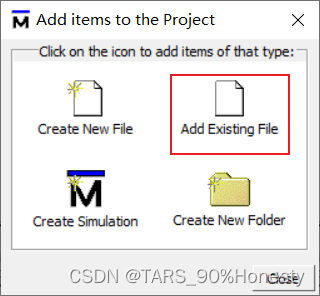
- The third step : Add an existing file test.v and tb_test.v.

- Step four : Compile the added file .

- After successful compilation , You can see the file status Turn to green check .

The prompt message is displayed successfully .
- After successful compilation , You can see the file status Turn to green check .
- Step five : Switch to Library Next , find work file , Click on + Number , Find out test and tb_test file .


- Step six : Yes tb_test File start simulation , Right click on the file ,
Simulate without Optimization
- Step seven : Pop up sim Window , You can see the name of the instantiated module

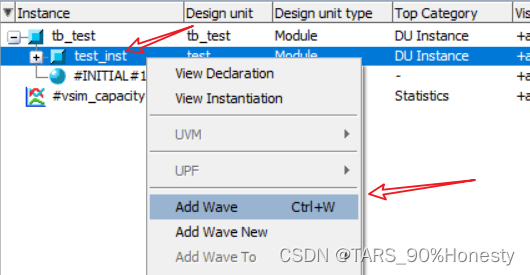
- Step eight : stay tb_test Right click to add Wave, stay test_inst Right click to add Wave.

- Step nine : take Wave The window is displayed independently , Click the following icon in the default layout .

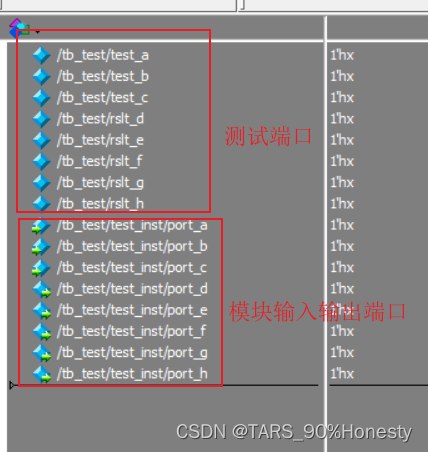
- Step 10 :Wave Left side of window , Test ports and module ports have been shown in the form of a list .
- Click on the icon in the lower left corner , Don't show paths , More concise

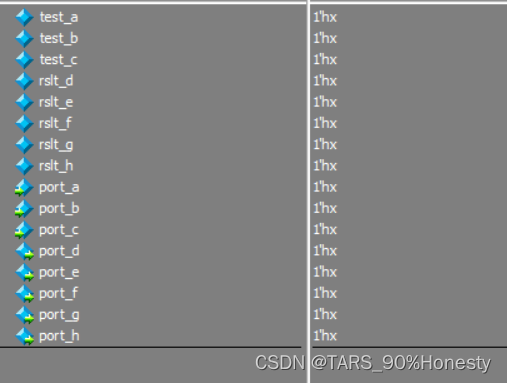
- Click on the icon in the lower left corner , Don't show paths , More concise
- Step 11 : Smart grouping ,Ctrl + A,Ctrl + G.

- The twelfth step : Modify the running time , Click on Run
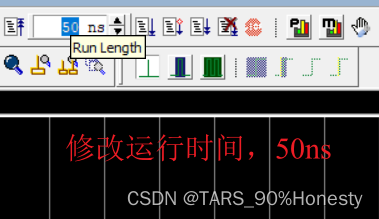

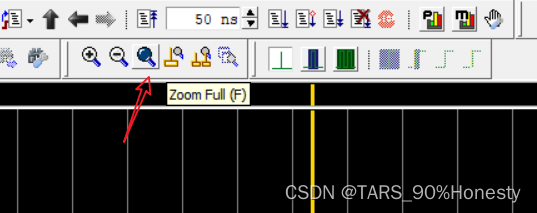
- Thirteenth Step : Click on Run after , The waveform is not obvious , Click global preview
- Zoom in at the cursor

- Zoom in at the cursor
- The fourteenth step : Check whether the waveform is correct , So as to check whether the code logic is correct .
边栏推荐
- RFID的工作原理
- Harbor2.2 quick check of user role permissions
- Transactional事务传播行为?
- Pytest interface automated testing framework | using multiple fixtures
- Server memory failure prediction can actually do this!
- 什么是Per-Title编码?
- 4.1 configure MySQL and register login module
- V01 - XX,记录美好生活从日志开始
- FPGA入门学习(三)- 38译码器
- pytest接口自动化测试框架 | pytest获取执行数据、pytest禁用插件
猜你喜欢
![[download attached] a powerful web automated vulnerability scanning tool - Xray](/img/5e/1db72ce9bf758b1e68e8d6d2026302.png)
[download attached] a powerful web automated vulnerability scanning tool - Xray

pytest接口自动化测试框架 | pytest常用插件

Sword finger offer 25. merge two sorted linked lists

PyCharm是真的强

Network protocol: tcp/ip protocol

Why BGP server is used in sunflower remote control? Automatic optimal route and high-speed transmission across operators

Hou Peixin, chairman of the openharmony Working Committee of the open atom open source foundation, sent a message to the openatom openharmony sub forum
SSJ-21B时间继电器

最新心形拼图小程序源码+带流量主

了解string类
随机推荐
V01 - XX,记录美好生活从日志开始
。。。。。。
常用的 list.isEmpty() 为何突然报null?
Metauniverse gamefi chain game system development NFT Technology
音视频+
Fineos announced the open registration of grouptech connect activities in 2022
【倒计时10天】腾讯云音视频专场即将见面,千元大奖等你来拿!
Flink's real-time data analysis practice in iFLYTEK AI marketing business
Pytest interface automated testing framework | confitest.py
System call capture and analysis conclusion making system call log collection system
System call capture and analysis - ring layer kprobe hijacks system calls
Redisson分布式锁流程详解(二)
[ten thousand words long text] Based on LSM tree thought Net 6.0 C # realize kV database (case version)
MATLAB中strjoin函数使用
浅谈低代码技术在物流运输平台中的搭建与管理
DS-112时间继电器
国内11所“袖珍”大学!在校园跑步,还没加速就出校门了...
MILA旗下初创企业Ubenwa获得250万美元投资,研究婴儿健康AI诊断
Flink cdc 是不是只支持 sql-client的方式提交SQL脚本啊
V00 - 年纪大了,想做啥就做啥吧