当前位置:网站首页>Win software - (net framework) processed the certificate chain but terminated in a root certificate that is not trusted by the trusted provider
Win software - (net framework) processed the certificate chain but terminated in a root certificate that is not trusted by the trusted provider
2022-06-23 05:31:00 【Sheep yard】
The story background
After a new installation Windows 7 after , Install through offline package .Net Framework when , Encounter error prompt : Certificate chain processed , However, it terminates in a root certificate that is not trusted by the trusted provider .

Solution
Scheme 1 : The reason is that there is no corresponding trusted certificate in the computer , By importing Microsoft certificates , Successfully solved this problem . A link to download the installation package is attached at the end of the article .
Download Microsoft official certificate :microsoftrootcertificateauthority2011.cer- Desktop system document resources -CSDN download
Press Windows + R Turn on run , Input MMC

Open console , Click on file → add to / Delete snap in (Ctrl+M)
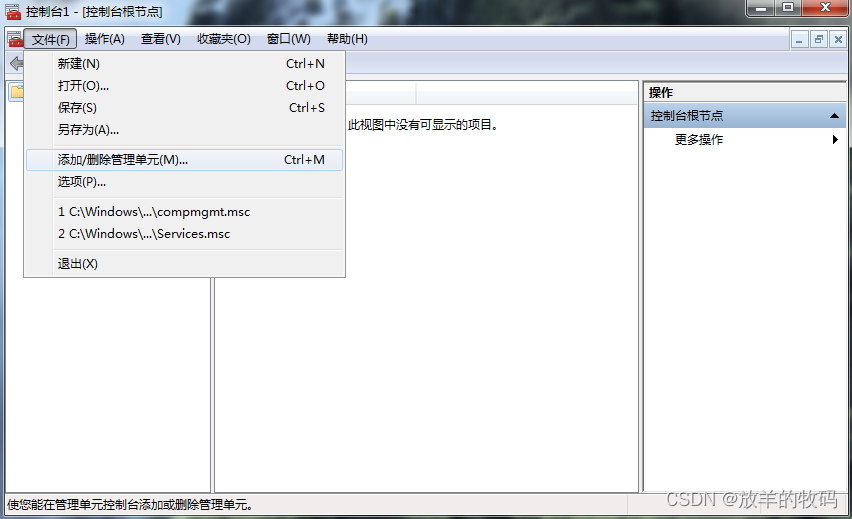
Choose Certificate → add to → Computer account ( Others remain default , All the way to the next step )


Return to the main console window , Expand one by one : certificate → Trusted root certification authority → certificate , Click the small arrow for more actions , Select all tasks → Import ; Next, select step 1 Download all right from cer Certificate file , Then keep clicking next , Import successfully .


Now reinstall .Net Framework Will not prompt questions ~
Option two : Download Microsoft official certificate :microsoftrootcertificateauthority2011.cer- Desktop system document resources -CSDN download
Right click the downloaded certificate , choice “ Installation certificate ”, Click in the open interface “ next step ”


choice ” Put all the certificates in the following storage (P)“, Click on ” Browse “, choice ” Trusted root certification authority “, Click on “ determine ”,“ next step ”

Click on “ complete ”
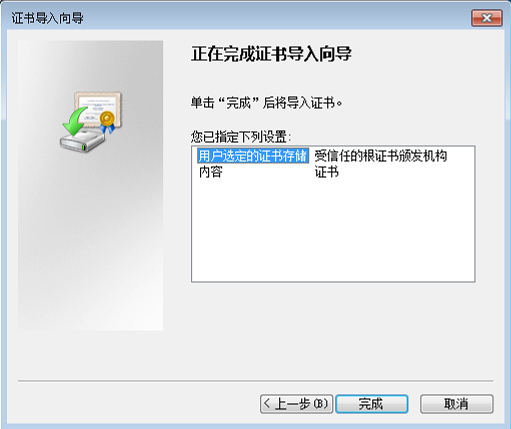
Wait a moment , In the pop-up import warning window , Click on “ yes ”, Installation certificate .

Now reinstall .Net Framework Will not prompt questions ~
Option three : Both of the above schemes are based on importing a certificate MicrosoftRootCertificateAuthority2011.cer, There are a lot of steps . later , Found another way , Just install one Windows Just patch it , Easy and convenient .
32 Bit system patch download address :Windows6.1-KB2813430-x86.msu- Desktop system document resources -CSDN download
64 Bit system patch download address :Windows6.1-KB2813430-x64.msu- Desktop system document resources -CSDN download
Hit one first Windows6.1-KB2813430 Patch for , And then install it net-framework You can succeed !
边栏推荐
- LeetCode-1757. Recyclable and low-fat products_ SQL
- 云原生架构(04)-CNCF
- Mysql入门学习(三)之视图
- 物联网开源开发平台 Shifu 开放内测!第一版技术文档发布
- Go language - custom error
- Economic development is driven by new technology
- (IntelliJ) plug in background image plus
- 英文字母pc是什么意思,互联网的pc指的是什么
- C语言栈实现
- PHP move_ uploaded_ File failed to upload mobile pictures
猜你喜欢

Today's sleep quality record 80 points

Win11应用商店下载的软件怎么移到桌面

The tiobe programming language ranking is an indicator of the popular trend of programming languages

IDEA 代码开发完毕后,提交代码,提交后发现分支不对,怎么撤回

数据库连接异常:create connection error, url: jdbc:mysql://ip/数据库名, errorCode 0, state 08S01问题处理

组合式API-composition-api
H5 适配全面屏

JVM原理之完整的一次GC流程

牛B程序员在“创建索引”时都会注意啥?

Web application security testing guide
随机推荐
左侧固定,右侧自适应 三种实现办法(Flex,float + BFC ,float-margin-left)
Spark 离线开发框架设计与实现
投资风险管理
After the idea code is developed, the code is submitted. If the branch is found to be incorrect after submission, how can I withdraw it
pygame音乐相关的功能实现
物联网开源开发平台 Shifu 开放内测!第一版技术文档发布
【opencv450】 图像相减、二值化、阈值分割
Image noise reduction denoise AI
基金业绩评价
TIOBE 编程语言排行榜是编程语言流行趋势的一个指标
Introduction to JDBC (I) DML operation
What do Niu B programmers pay attention to when "creating an index"?
Database connection exception: create connection error, url: jdbc: mysql://ip/ Database name, errorcode 0, state 08s01 problem handling
Economic development is driven by new technology
STM32cube CMSIS_ V2 FreeRTOS queue usage
LeetCode-1757. 可回收且低脂的产品_SQL
Event日志关键字:EventLogTags.logtags
Penetration test basis | attached test points and test scenarios
STM32cube 串口使用DMA+IDLE接收不定长数据
关于重放攻击和防御