当前位置:网站首页>Installation and configuration of window version pytorch entry depth learning environment
Installation and configuration of window version pytorch entry depth learning environment
2022-06-12 18:04:00 【Longqi Liuhe River】
Take the material from b Stop video
Some commonly used Conda command
First of all, your computer should have anaconda, open anaconda terminal 
anaconda The advantage of is the ability to configure multiple virtual environments , Easy to manage and use environment and package conda env list
Show all environments 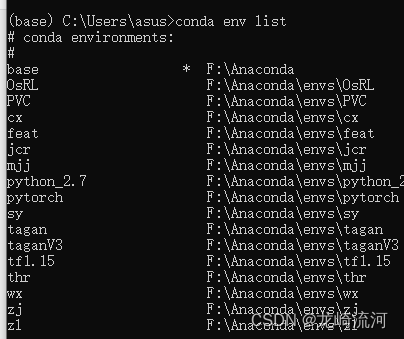
conda activate ***
Use *** Environment 
conda list
Show packages in this environment 
conda install matplotlib==3.4.2
Download the specified version of the package , for example 3.4.2 Version of matplotlibconda search matplotlib
Search all versions of the package , Search for example matplotlib All versions of 
Check which versions of the package the mirror channel has conda search pytorch -c https://mirrors.tuna.tsinghua.edu.cn/anaconda/cloud/pytorch/win-64/
Check the image channel to find the package of the feature version conda search pytorch=1.8 -c https://mirrors.tuna.tsinghua.edu.cn/anaconda/cloud/pytorch/win-64/
conda create -n nb --clone pytorch
conda Environment replication , take pytorch The environment is copied to a newly created environment nb
conda remove -n your_env_name --all
conda Delete environment , Delete... For example nb Environmental Science 
Found no nb The environment 
pycharm
New projects , Select the previously configured environment 

belt envs Is what we created before 

The existing project modification environment is here 
If default Terminal You can open your own environment, so you don't have to do the following
Continuous open file location , find cmd.exe The address of 
pycharm stay setting Mid search Terminal, Change the address to the one just found cmd.exe Address 
About Cuda And gpu
Cuda runtime version <= Cuda driver version
Task manager view gpu( My server is 3090 Of )
The relationship between various software in deep learning 
GPU Version configuration environment
install anaconda
Get ready first Anaconda, If you want to download the historical version anaconda, You can click this link , The installation path should be in English
Creating a virtual environment
Create a virtual environment and add images to speed up the download conda create -n A virtual environment python= edition -c Mirror address 
https://mirrors.tuna.tsinghua.edu.cn/anaconda/cloud/pytorch/win-64/https://mirrors.bfsu.edu.cn/anaconda/cloud/pytorch/win-64/http://mirrors.aliyun.com/anaconda/cloud/pytorch/win-64/https://mirror.nju.edu.cn/pub/anaconda/cloud/pytorch/win-64/
Delete virtual environment conda remove -n Virtual environment name --all
GPU And CUDA preparation
The first step is to determine the model of the graphics card
The second step is to determine the computing power of the graphics card link
for example : The uniqueness of my thin book is MX450, So my calculating power is 7.5
For example, the graphics card of my server is 3090, So the server computing power is 8.6
determine CUDA Runtime
We look at our own thin book drive CUDA Driver Version - 11.4nvidia-smi
Finally, it is determined that my thin and light book is suitable for CUDA 10 11-11.4
Finally open pytorch Official website confirmation Cuda Runtime edition ( It is required to be less than or equal to Cuda Driver edition )
I finally chose Cuda Runtime 11.3( choice 10.2 It's OK, too )
Conda Channel and image address of

View the configuration file conda config --show
conda config --get
The reason why we download these packages slowly in China is that there is only one channel in our configuration file , And its channel is abroad , So we download very slowly , We can take the form of image acceleration mentioned earlier -c Mirror address . We can also add channels in the form of persistence , For example, add an alicloud image channel , So we have two channels , One is the Alibaba cloud channel , Another default mirror channel ( The lowest priority ), Therefore, when these two channels exist, the newly added channel, that is, the Alibaba cloud channel, will be preferred for downloading packages , The package cannot be found on this channel , Then find the default channel .
https://mirrors.tuna.tsinghua.edu.cn/anaconda/pkgs/mainhttps://mirrors.bfsu.edu.cn/anaconda/pkgs/mainhttp://mirrors.aliyun.com/anaconda/pkgs/main
Persistent add channel conda config --add channels Channel address
Delete channel conda config --remove channels Channel address 
Judge CUDA Runtime edition
Install the latest version of the graphics card driver , website
take 1060 6GB Desktop example :
Download and install the default
Last nvidia-smi To make sure cuda driver edition (11.6)
open pytorch Official website confirmation cuda runtime edition , Choose the latest 11.3(<=11.6)
install GPU Version of pytorch
from Official website Using command line download conda install pytorch torchvision torchaudio cudatoolkit=11.3 -c pytorch
No need to download separately cudnn 了 ,pytorch Has been integrated in cudnn
Add image source , Speed up the download conda install pytorch torchvision torchaudio -c Mirror address conda install cudatoolkit= edition -c Mirror address
Mirror address :
https://mirrors.tuna.tsinghua.edu.cn/anaconda/cloud/pytorch/win-64/https://mirrors.bfsu.edu.cn/anaconda/cloud/pytorch/win-64/http://mirrors.aliyun.com/anaconda/cloud/pytorch/win-64/https://mirror.nju.edu.cn/pub/anaconda/cloud/pytorch/win-64/
https://mirrors.tuna.tsinghua.edu.cn/anaconda/pkgs/mainhttps://mirrors.bfsu.edu.cn/anaconda/pkgs/mainhttp://mirrors.aliyun.com/anaconda/pkgs/main
If the above method still fails to download , Then try the following method :
pip3 install torch torchvision torchaudio --extra-index-url https://download.pytorch.org/whl/cu113
pip Just install these three packages torch torchvision torchaudio That's it
The command line download speed is still very slow , We can use Thunderbolt download, that is Local installation
Download address red box 
Thunderbolt download completed 
pip install Drag the file directly to display the file path 
This is just the end of the installation torch, also torchvision torchaudio No installation pip3 install torchvision torchaudio --extra-index-url https://download.pytorch.org/whl/cu113
verification pytorch Is the installation successful 
conda listtorch.cuda.is_available()

边栏推荐
- 机器学习系列(3):Logistic回归
- Error record: illegalstateexception: optional int parameter 'XXXX' is
- This shift, I still have to go
- Typescript type declaration file (III)
- 用好IDE,研发效能提速100%
- Codeforces Round #398 (Div. 2) D. Cartons of milk
- Continued 2 asp Net core router basic use demonstration 0.2 acquisition of default controller data
- The server time zone value ‘� й ��� ʱ ��‘ is unrecognized or represents more than one time zone. ......
- Schematic diagram of active differential crystal oscillator and differences among lv-pecl, LVDS and HCSL
- PHP:Fatal error: Allowed memory size of 262144 bytes exhausted (tried to allocat
猜你喜欢

USB to serial port - maximum peak serial port baud rate vs maximum continuous communication baud rate

Use applet to quickly generate app in seven steps

迄今微软不同时期发布的SQL Server各版本之间的大致区别,供参考查阅

机器学习系列(5):朴素贝叶斯

Typescript common types (I)

Continued 2 asp Net core router basic use demonstration 0.2 acquisition of default controller data

vant3+ts+pinia tab选项卡列表页面点击进详情,详情页返回tab高亮在原位置,刷新高亮默认在第一项

Tutoriel de démarrage rapide JDBC
Click the list page of vant3+ts+pinia tab to enter the details. The tab on the details page is highlighted in the original position, and the refresh highlight is in the first item by default

SSM integrates FreeMarker and common syntax
随机推荐
js求斐波那契数列
App中快速复用微信登录授权的一种方法
js二分法
Eve-ng installation (network device simulator)
Extreme Programming -- Practice of root cause analysis
HTTP缓存<强缓存与协商缓存>
JS中的字符串(含leetcode例题)<持续更新~>
ES7 does not use parent-child and nested relationships to implement one to many functions
73. matrix zeroing (marking method)
有源差分晶振原理圖以及LV-PECL、LVDS、HCSL區別
About datasets
Changes in the third generation dri
Schematic diagram of active differential crystal oscillator and differences among lv-pecl, LVDS and HCSL
Getting started with grpc swift
TypeScript常用类型(一)
leetcode 718 最长公共子串
Stream流注意点
Vant3+ts encapsulates uploader upload image component
USB转串口那些事儿—串口驱动类型
Section qemu+gdb