当前位置:网站首页>微信小程序 28 热搜榜的完善①
微信小程序 28 热搜榜的完善①
2022-07-25 19:10:00 【牟泉禹[Dark Cat]】
28.1 热搜榜、placeholder 动态数据
接口 http://localhost:3000/search/default

onLoad(options) {

        this.getInitData();
    },

    // 获取初始化的数据
    async getInitData() {

        let placeholderData = await request("search/default",{
    });
        this.setData({

            placeholderContent: placeholderData.data.showKeyword
        });
    },
<input type="text" placeholder="{
     {placeholderContent}}" placeholder-class="placeholder"></input>

接口 http://localhost:3000/search/hot/detail

    onLoad(options) {

        this.getInitData();
    },

    // 获取初始化的数据
    async getInitData() {

        let placeholderData = await request("search/default",{
    });
        let hotListData = await request("search/hot/detail");
        this.setData({

            placeholderContent: placeholderData.data.showKeyword,
            hotList: hotListData.data
        });
    },
<view class="searchContainer">
<!-- 头部-->
    <view class="header">
        <view class="searchInput">
            <text class="iconfont icon-search searchIcon"></text>
            <input type="text" placeholder="{
     {placeholderContent}}" placeholder-class="placeholder"></input>
        </view>
        <text class="cancel">取消</text>
    </view>
<!--热搜榜-->
    <view class="hotContainer">
        <view class="title">热搜榜</view>
<!-- 热搜列表-->
        <view class="hotList">
            <view class="hotItem" wx:for="{
     {hotList}}" wx:key="score">
                <text class="order">{
   {index + 1}}</text>
                <text>{
   {item.searchWord}}</text>
                <image class="iconImg" wx:if="{
     {item.iconUrl}}" src="{
     {item.iconUrl}}"></image>
            </view>
        </view>
    </view>

</view>

28.2 模糊匹配搜索数据
bindinput 事件:无论是否失去焦点,只要改变内容,都触发。
bindcheck 事件:要失去焦点才能触发这个事件。
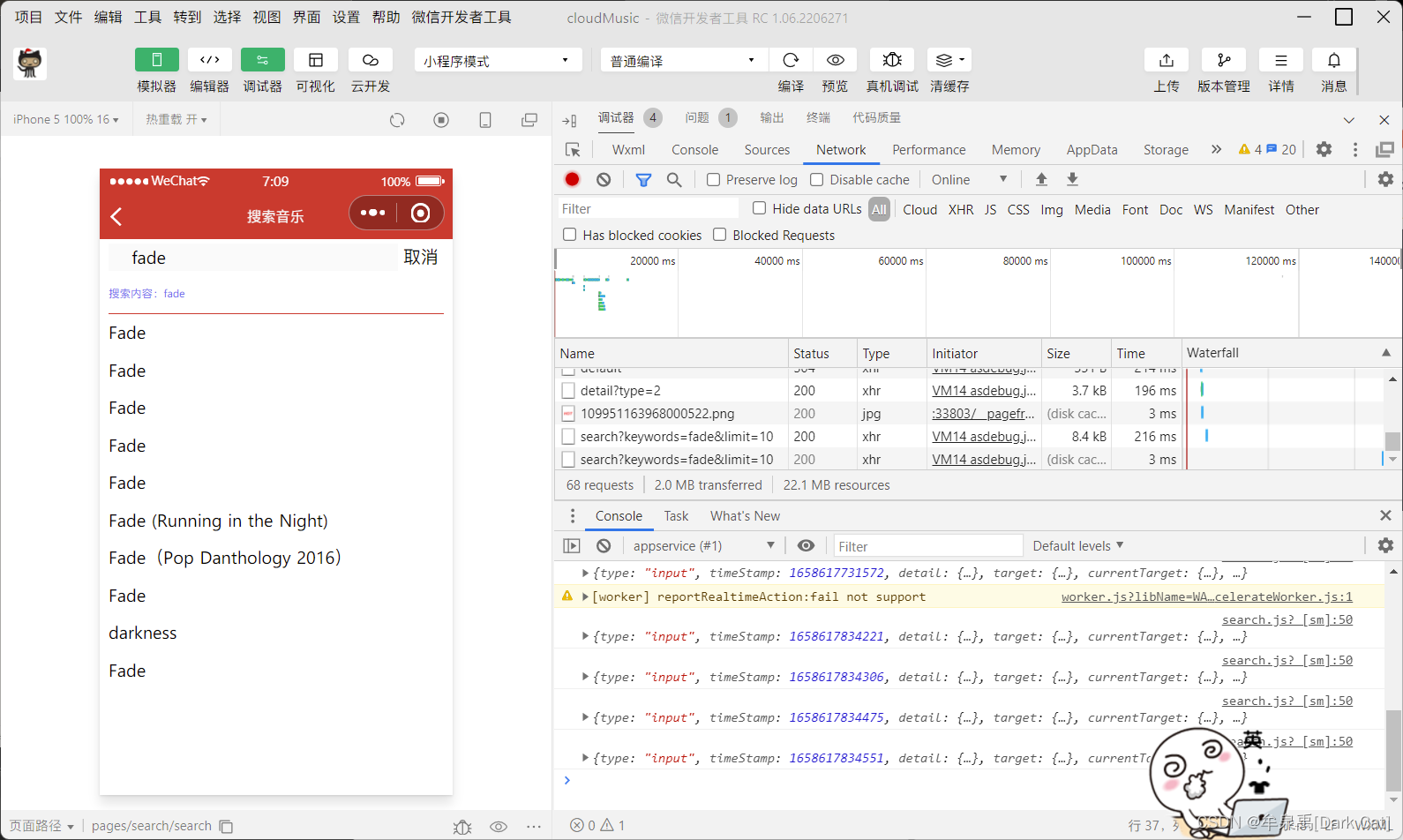
接口 http://localhost:3000/search?keywords=fade&limit=10

<input bindinput="handelInputChange" type="text" input placeholder="{
     {placeholderContent}}" placeholder-class="placeholder"></input>
    data: {

        placeholderContent: '', // placeholder 内容
        hotList: [], // 热搜榜数据
        searchContent: '', // 用户输入的表单项数据
        searchList: [], // 关键字模糊匹配的数据
    },

// 获取 搜索数据的功能函数

    async getSearchList(){

        let searchListData = await request("search", {
    keywords: this.data.searchContent, limit: 10});
        this.setData({

            searchList: searchListData.result.songs
        })
    },

    // 表单内容发生改变的事件
    handelInputChange(event) {

        console.log(event);
        this.setData({

            searchContent: event.detail.value.trim()
        });

        // 函数节流
        if (isSend) {

            return;
        }
        isSend = true;

        setTimeout(() => {

            isSend = false;
            this.getSearchList();
        }, 1000);

    },

28.3 搜索内容展示
写它的 html 大体架构
<view class="searchContainer">
<!-- 头部-->
    <view class="header">
        <view class="searchInput">
            <text class="iconfont icon-search searchIcon"></text>
            <input bindinput="handelInputChange" type="text" input placeholder="{
     {placeholderContent}}" placeholder-class="placeholder"></input>
        </view>
        <text class="cancel">取消</text>
    </view>
    <block wx:if="{
     {searchList.length}}">
        <!-- 搜索内容展示-->
        <view class="showSearchContent">
            <view class="searchContent">搜索内容:{
   {searchContent}}</view>
            <view class="searchList">
                <view class="searchItem" wx:for="{
     {searchList}}" wx:key="id">
                    <text class="iconfont icon-search"></text>
                    <text>{
   {item.name}}</text>
                </view>
            </view>
        </view>
    </block>

    <block wx:else>
        <!--热搜榜-->
        <view class="hotContainer">
            <view class="title">热搜榜</view>
            <!-- 热搜列表-->
            <view class="hotList">
                <view class="hotItem" wx:for="{
     {hotList}}" wx:key="score">
                    <text class="order">{
   {index + 1}}</text>
                    <text>{
   {item.searchWord}}</text>
                    <image class="iconImg" wx:if="{
     {item.iconUrl}}" src="{
     {item.iconUrl}}"></image>
                </view>
            </view>
        </view>
    </block>

</view>
/* pages/search/search.wxss */

.searchContainer {

    padding: 0 20rpx;
}

.header {

    display: flex;
    height: 60rpx;
    line-height: 60rpx;
    padding: 10rpx 0;
}

.searchInput {

    position: relative;
    flex: 1;
    background: rgba(237,237,237,0.3);
    border-right: 30rpx;
}

.cancel {

    width: 100rpx;
    text-align: center;
}

.searchIcon {

    position: absolute;
    left: 15rpx;
}

.searchInput input{

    margin-left: 50rpx;
    height: 60rpx;
}

/*h5 新特性之一,可以将 placeholder 设置 class 和 样式*/
.placeholder {

    color: #d43c33;
    font-size: 28rpx;
}

/*热搜榜*/
.hotContainer .title {

    font-size: 28rpx;
    height: 80rpx;
    line-height: 80rpx;
    border-bottom: 1rpx solid #eee;
}

.hotList {

    display: flex;
    flex-wrap: wrap;
}

.hotItem {

    width: 50%;
    height: 80rpx;
    line-height: 80rpx;
    font-size: 26rpx;
}

.hotItem .order {

    margin: 0 10rpx;
}

.hotItem .iconImg {

    width: 35rpx;
    height: 20rpx;
    margin-left: 10rpx;
}

/*搜索内容展示*/

.searchContent {

    color: rgba(107, 100, 238, 0.96);
    height: 80rpx;
    line-height: 82rpx;
    font-size: 24rpx;
    border-bottom: 1rpx solid #d43c33;
}

.searchItem {

    height: 80rpx;
    line-height: 80rpx;
    display: flex;
}

.searchItem .content {

    flex: 1;
    margin-left: 20rpx;
    border-bottom: 1rpx solid #eee;
    font-size: 26rpx;
}
// pages/search/search.js
import request from "../../utils/request";
let isSend = false; // 用于 函数 节流使用
Page({


    /** * 页面的初始数据 */
    data: {

        placeholderContent: '', // placeholder 内容
        hotList: [], // 热搜榜数据
        searchContent: '', // 用户输入的表单项数据
        searchList: [], // 关键字模糊匹配的数据
    },

    /** * 生命周期函数--监听页面加载 */
    onLoad(options) {

        this.getInitData();
    },

    // 获取初始化的数据
    async getInitData() {

        let placeholderData = await request("search/default",{
    });
        let hotListData = await request("search/hot/detail");
        this.setData({

            placeholderContent: placeholderData.data.showKeyword,
            hotList: hotListData.data
        });
    },

    // 获取 搜索数据的功能函数

    async getSearchList(){

        if(!this.data.searchContent){

            this.setData({

                searchList: []
            });
            return;
        }
        let searchListData = await request("search", {
    keywords: this.data.searchContent, limit: 10});
        this.setData({

            searchList: searchListData.result.songs
        })
    },

    // 表单内容发生改变的事件
    handelInputChange(event) {

        console.log(event);
        this.setData({

            searchContent: event.detail.value.trim()
        });

        // 函数节流
        if (isSend) {

            return;
        }
        isSend = true;

        setTimeout(() => {

            isSend = false;
            this.getSearchList();
        }, 500);

    },

    /** * 生命周期函数--监听页面初次渲染完成 */
    onReady() {


    },

    /** * 生命周期函数--监听页面显示 */
    onShow() {


    },

    /** * 生命周期函数--监听页面隐藏 */
    onHide() {


    },

    /** * 生命周期函数--监听页面卸载 */
    onUnload() {


    },

    /** * 页面相关事件处理函数--监听用户下拉动作 */
    onPullDownRefresh() {


    },

    /** * 页面上拉触底事件的处理函数 */
    onReachBottom() {


    },

    /** * 用户点击右上角分享 */
    onShareAppMessage() {


    }
})

边栏推荐
- “未来杯”第二届知识图谱锦标赛正式启动
- 7/24 training log
- Clip can also do segmentation tasks? The University of Gottingen proposed a model clipseg that uses text and image prompt and can do three segmentation tasks at the same time, squeezing out the clip a
- Fearless of high temperature and rainstorm, how can Youfu network protect you from worry?
- MES管理系统有什么应用价值
- 聊聊sql优化的15个小技巧
- 小程序毕设作品之微信校园维修报修小程序毕业设计成品(1)开发概要
- CLIP还能做分割任务?哥廷根大学提出一个使用文本和图像prompt,能同时作三个分割任务的模型CLIPSeg,榨干CLIP能力...
- 小程序毕设作品之微信校园维修报修小程序毕业设计成品(6)开题答辩PPT
- InTouch advanced alarm (alarm filtering)
猜你喜欢

歌曲转调之后和弦如何转换
![[encryption weekly] has the encryption market recovered? The cold winter has not thawed yet! Check the major events in the encryption market last week!](/img/6d/b037208996ce52016d014062deaa1f.jpg)
[encryption weekly] has the encryption market recovered? The cold winter has not thawed yet! Check the major events in the encryption market last week!

小程序毕设作品之微信校园维修报修小程序毕业设计成品(7)中期检查报告

JS 基本类型 引用类型 深/浅克隆复制

Baklib: make excellent product instruction manual

Intouch高级报警(报警筛选)

Actual combat of MySQL database design project of online mall system
Alibaba cloud technology expert Qin long: reliability assurance is a must - how to carry out chaos engineering on the cloud?
Basic music theory -- configuring chords

“未来杯”第二届知识图谱锦标赛正式启动
随机推荐
SQL Server 2019 installation tutorial
SQL 实现 Excel 的10个常用功能,附面试原题
Yarn installation and use tutorial [easy to understand]
The difference between QT exec and show
In the first half of the year, the shipment volume has exceeded that of the whole year of last year, and centritec millimeter wave radar has "captured" the international giant
[iniparser] simple use of the project configuration tool iniparser
【iniparser】项目配置工具iniparser的简单使用
【小程序开发】宿主环境详解
How to prohibit the use of 360 browser (how to disable the built-in browser)
How to create an effective help document?
Interface automation test platform fasterrunner series (IV) - continuous integration and solution of multi domain names
鸿蒙-大喵计算画板-简介
PyQt5单击QTableView垂直表头verticalHeader获取行数据以及单击单元格获取行数据操作
【阅读笔记】《深度学习》第一章:引言
【加密周报】加密市场有所回温?寒冬仍未解冻!盘点上周加密市场发生的重大事件!
【小程序开发】你了解小程序开发吗?
JS basic type reference type deep / shallow clone copy
telnet安装以及telnet(密码正确)无法登录!
[applet development] do you know about applet development?
Basic music theory -- configuring chords