当前位置:网站首页>【Express接收Get、Post、路由请求参数】
【Express接收Get、Post、路由请求参数】
2022-07-26 16:31:00 【꒰ঌsnail໒꒱】
前言:
使用原生Node.js处理GET和POST请求参数是非常麻烦的,例如,为了获取GET请求参数,需要使用url模块对请求地址进行解析。为了降低开发的难度,Express通过req.query、req.body和第 三方模块body-parser对请求参数进行了处理。下面来了解Express如何接收请求参数。
回顾前面知识,在webstorm创建express项目(项目名称:express-params)
第一步:

第二步:
第三步:

第四步:运行
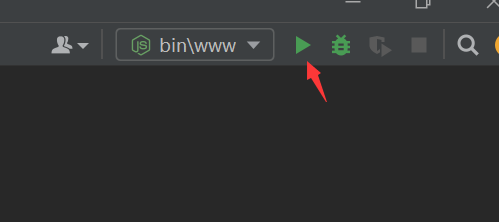
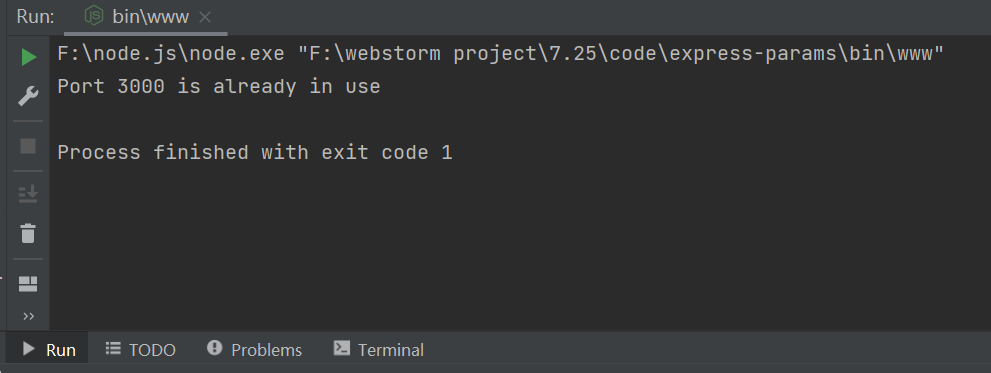
第五步:检查服务器是否已经在3000端口上成功运行:
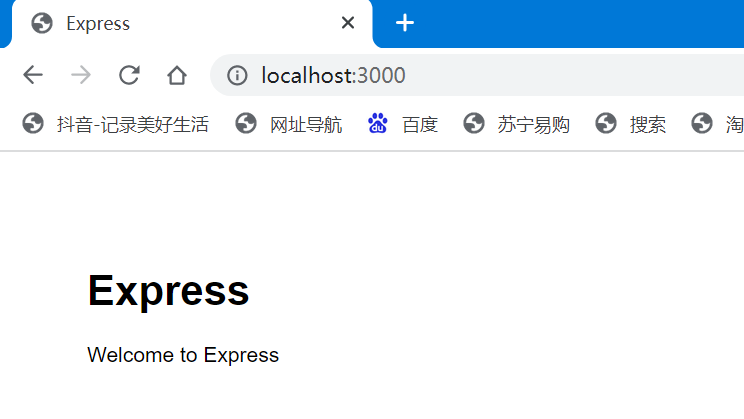 出现上述界面,表明已成功创建。
一、Express接收请求参数
1、接收get请求参数:使用req.query接收
req.query.参数名
首先:创建路由 命名为:getparams.js
var express =require('express')
var router=express.Router()

//创建get请求的处理代码,get中间件
//http://localhost:3000/params/gets
router.get('/gets',((req, res) =>{

    //通过req.query接收Get请求的参数
    res.send(req.query)
    console.log('姓名:'+req.query.userName)
    console.log('年龄:'+req.query.userPwd)
} ))

module.exports =router
其次:配置app.js
var getparamsRouter=require('./routes/getparams');
app.use('/params',getparamsRouter);
然后:在postman软件上进行调试
最后:在客户端浏览器上进行访问

2、接收post请求参数:使用req.body接收
req.body.参数名
getparams.js:
var express =require('express')
var router=express.Router()

//创建post请求的处理代码,post中间件
//http://localhost:3000/params/posts
router.post('/posts',(req, res) => {

    res.send(req.body)
    console.log('姓名:'+req.body.userName)
    console.log('年龄:'+req.body.userPwd)

})
module.exports =router
在postman软件进行调试:

出现下列信息,表名请求成功: 在客户端进行请求验证:
创建一个登录页面login.html:
<!DOCTYPE html>
<html lang="en">
<head>
<meta charset="UTF-8">
<meta http-equiv="X-UA-Compatible" content="IE=edge">
<meta name="viewport" content="width=device-width, initial-scale=1.0">
<title>Document</title>
</head>
<style> div{
width: 300px; margin: 100px 600px 500px 400px; } </style>
<body>
<div>
<form action="http://localhost:3000/params/posts" method="post">
<label>
用户名:<input type="text" name="userName">
</label>
<br><br>
<label>
密 码:<input type="password" name="userPwd">
</label>
<br><br>
<button type="submit">登录</button>
</form>
</div>
</body>
</html>

输入用户名,和密码,点击登录,跳转成功:

3、接收路由参数:定义路由时,在请求路径中传递的参数
例如:请求路径“/find/:id”中的“:id”是一个参数占位符,
当浏览器向“/find/:id”地址发送请求时,“:id”对应的值就是参数值。
在接收参数时,使用req.params
getparams.js:
var express =require('express')
var router=express.Router()

//http://localhost:8000/params/find/123/西安
    router.get('/find/:id/:addr',((req, res) =>{

        //通过req.query接收Get请求的参数
        res.send(req.params)
        console.log('路由参数:'+req.params.id)
        console.log('路由参数:'+req.params.addr)

    } ))
module.exports =router
在postman软件进行调试:
边栏推荐
- 最终一致性性分布式事务 TCC
- Differences between the use of structs and classes
- 2022软件测试技能 Postman+newman+jenkins 持续集成 实战教程
- The process and harvest of developing browser plug-ins with clojurescript
- guetzli简单使用
- 【飞控开发基础教程2】疯壳·开源编队无人机-定时器(LED 航情灯、指示灯闪烁)
- 广东首例!广州一公司未履行数据安全保护义务被警方处罚
- Video media video
- Nacos win10 installation and configuration tutorial
- 极大似然估计
猜你喜欢

Singleton mode

Chapter 1 Overview - Section 1 - 1.3 composition of the Internet
It turns out that cappuccino information security association does this. Let's have a look.

What is the complexity often said during the interview?

【飞控开发基础教程2】疯壳·开源编队无人机-定时器(LED 航情灯、指示灯闪烁)

工作流引擎在vivo营销自动化中的应用实践

结构体和类使用的区别

guetzli简单使用

Nacos win10 installation and configuration tutorial
Final consistency distributed transaction TCC


随机推荐
Packet capturing and streaming software and network diagnosis
PyQt5快速开发与实战 3.4 信号与槽关联
Alibaba Cloud Toolkit —— 项目一键部署工具
It turns out that cappuccino information security association does this. Let's have a look.
Set up typera drawing bed
Guangzhou Municipal Safety Committee Office issued warnings and reminders on safety precautions in hot weather
Definition and relationship of derivative, differential, partial derivative, total derivative, directional derivative and gradient
Oracle创建表分区后,查询的时候不给出partition,但是会给分区字段指定的值,会不会自动按照分区查询?
如何借助自动化工具落地DevOps|含低代码与DevOps应用实践
From SiCp to LISP video replay
Matlab论文插图绘制模板第40期—带偏移扇区的饼图
How to balance open utilization and privacy security compliance of public data?
接口比较器
操作系统迁移实战之在openEuler上部署MySQL数据库
The process and harvest of developing browser plug-ins with clojurescript
Re7:读论文 FLA/MLAC Learning to Predict Charges for Criminal Cases with Legal Basis
搭建typora图床
匿名方法和lambda表达式使用的区别
工作流引擎在vivo营销自动化中的应用实践
TensorFlow Lite源码解析