当前位置:网站首页>Talking about canvas and three rendering modes in unity
Talking about canvas and three rendering modes in unity
2022-07-28 20:37:00 【_ Mr orange】
Talking about Unity Medium Canvas And three rendering modes
Catalog
Orange Preface
Doing in recently Unity Performance optimization , involves Canvas This aspect , Think of taking it out alone , Let's talk about Canvas This thing , What is it , In order to solve the doubts in the novice Xiaobai's heart .
Of course , If you are 0 Basics , Let's see how to use it first , This tutorial is suitable for entry level .
Tips : The following is the main body of this article , The following cases can be used for reference
One 、Canvas What is it? ?
Canvas: The interpretation after translation is : canvas
What I understand is : Use UGUI To carry out UI Development , Cannot do without Canvas Components , be-all UI Elements , Or include Canvas Components , Or Canvas Component location GameObject Child nodes of .
Two 、 How to create Canvas
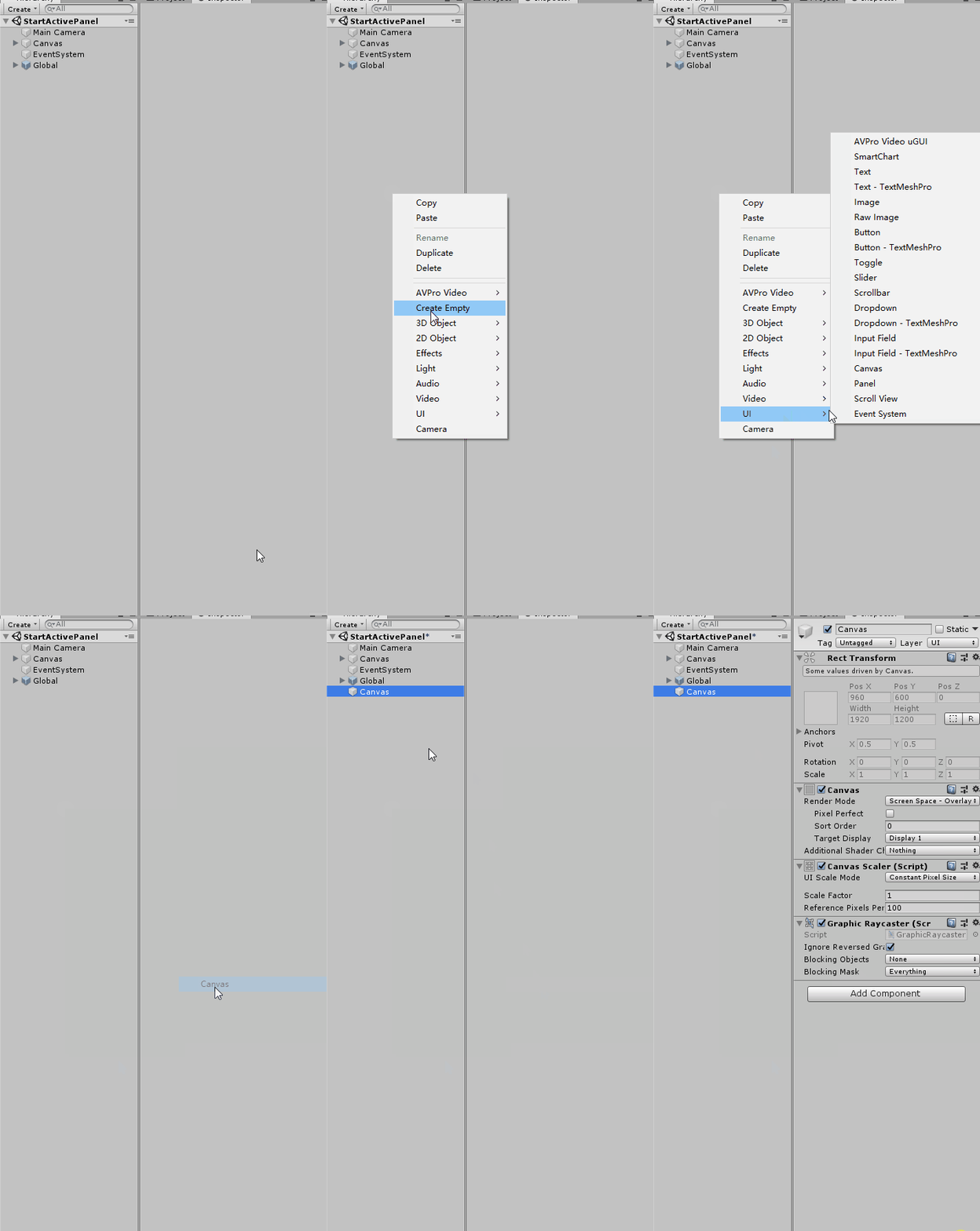
you are here Hierarchy Right click the blank space of the view ->UI->Canvas You can create a Canvas, Then add others UI Element as its child node .
3、 ... and 、Canvas Component's RenderMode Parameters

1.Screen Space - Overlay Pattern
Canvas Cover the screen , And always cover the upper layer of other elements , in other words UI It will obscure other elements in the scene .
When RenderMode by Screen Space - Overlay when ,Canvas Other parameters of include :
- Pixel Perfect:UI Elements are aligned exactly to pixels , The edges are clearer , But in UI There will be more calculation when adjusting and adapting ( Personal understanding )
- Sort Order:Canvas The depth of the . Multiple There are multiple Canvas when ,Sort Order More valuable Canvas Will cover Sort
Order Low value Canvas - notes : Multiple Canvas When the depth values are equal ,Hierarchy Behind in the view Canvas Show below , This is related to UI
Elements ( Such as Image The rules are the opposite )
2.Screen Space - Camera Pattern
and Overlay Similar pattern ,Canvas Covering the whole screen space, the canvas also fills the whole screen space . The difference is ,Canvas Placed in front of the designated camera .
In this mode UI It may not be able to render in 3d Above the elements 
And
- It must be between the near and far planes of the camera to be rendered
- Even if the camera is Perspective Pattern ,Canvas The distance from the camera will still not affect its display size
- Other 3 Elements can be combined with Canvas Create occlusion relationship , Elements closer to the camera will cover Canvas above UI
- Zoom of camera / translation / rotate , as well as fov The change of , Does not affect the Canvas Show results ,Canvas
Always place it at a certain distance from the camera viewport , And perpendicular to the horizontal line of sight of the camera
Screen Space - Camera The parameters of include :
- Pixel Perfect : Same as Overlay Pattern meaning
- Render Camera : The specified is used to render Canvas The video camera
- Plane Distance:Canvas The distance between the plane and the camera
- Sorting Layer: instructions Canvas The depth of the , Can be added manually . When there are multiple modes, it is Screen Space Of Canvas
when ,Sorting Layer Determines the priority of display . - Order in Layer: Multiple Canvas Have the same Sorting Layer when , according to Order in Layer
To determine the display priority .
3.World Space Pattern
In this mode ,Canvas And other in the scene 3D There is no difference between elements 
here
- Canvas You can adjust RectTransform The numerical
- Camera translation, rotation, zoom and fov Will affect Canvas Display of
- need EventCamera To specify the camera that accepts the event
Four 、 summary
Different models of Canvas Between ,Screen Space - Overlay Of Canvas Always show in the front ,Screen Space
-Camera and World The display relationship of depends on World Canvas Distance from the camera and Screen Space - Camera Canvas Of Plane Distancesame Screen Space - Overlay Canvas : The display priority is determined by Sort Order determine
same Screen Space - Camera: The display priority is determined by Sorting Layer and Order in Layer determine
5、 ... and 、 Conclusion
Inferior to silicon step , A thousand miles .
Don't product the little stream , Beyond into the sea .
Make a little progress every day Thank you for watching .
Feel helpful to yourself , Welcome to your attention 、 Collection 、 forward ! See you next time
边栏推荐
- LeetCode-297-二叉树的序列化与反序列化
- TCP.IP
- [pytorch] LSTM neural network
- Leetcode-297 serialization and deserialization of binary tree
- MySQL startup error 1607 unexpected process termination
- Classes and objects (medium)
- Wust-ctf2021-re school match WP
- 产品力大幅提升 新款福特探险者发布
- Product manager interview | innovation and background of the fifth generation verification code
- Voice controlled robot based on ROS (II): implementation of upper computer
猜你喜欢

LVS deployment Dr cluster
![[task02: SQL basic query and sorting]](/img/10/c2a936c882cd77f422396840282ed5.png)
[task02: SQL basic query and sorting]

Product manager interview | innovation and background of the fifth generation verification code

一个程序员的水平能差到什么程度?尼玛,都是人才呀...

Quick sort template

How to make the design of governance structure more flexible when the homogenization token is combined with NFT?

LeetCode-297-二叉树的序列化与反序列化

TCP.IP

Tree row expression

一碰撞就自燃,谁来关心电池安全?上汽通用有话说
随机推荐
平均海拔4000米!我们在世界屋脊建了一朵云
Character device drive structure
微信公众号授权登录后报redirect_uri参数错误的问题
Raspberry pie 4B parsing PWM
Raspberry pie uses the command line to configure WiFi connections
Vivado designs PC and ram
树行表达方式
Classes and objects (medium)
DSACTF7月re
Solve the problem that the nocturnal simulator cannot access the Internet after setting an agent
leetcode:2141. 同时运行 N 台电脑的最长时间【最值考虑二分】
一碰撞就自燃,谁来关心电池安全?上汽通用有话说
字符设备驱动结构
Solve the kangaroo crossing problem (DP)
产品经理访谈 | 第五代验证码的创新与背景
Clock distribution of jesd204 IP core (ultrascale Series)
LeetCode_ Bit operation_ Medium_ 260. Number III that appears only once
Product manager interview | innovation and background of the fifth generation verification code
太空射击第11课: Sound and Music
Raspberrypico analytic PWM