当前位置:网站首页>五分钟快速搭建一个实时人脸口罩检测系统(OpenCV+PaddleHub 含源码)
五分钟快速搭建一个实时人脸口罩检测系统(OpenCV+PaddleHub 含源码)
2022-06-25 06:44:00 【Color Space】
导读
本文主要介绍如何使用OpenCV和PaddleHub实现一个实时人脸口罩检测系统。(公众号:OpenCV与AI深度学习)
背景介绍
从19年疫情爆发到现在,佩戴口罩对大家来说已是常态。应运而生的就有了很多相关应用,如病毒发展预测、口罩佩戴检测以及戴口罩的人脸识别等。
今天介绍的人脸口罩佩戴检测系统主要使用OpenCV和百度飞浆(PaddlePaddle)的PaddleHub提供的检测模型。PaddleHub提供了很多实用的模型,包括图像处理、文字处理、音频处理、视频处理和工业应用等。github地址:https://github.com/PaddlePaddle/PaddleHub

人脸口罩检测
人脸检测部分的模型如下:

红框内的两个模型支持人脸口罩检测,这里选择pyramidbox_lite_server_mask,实现详细步骤:
【1】安装PaddlePaddle、PaddleHub和OpenCV(opencv-python)
pip install paddlepaddle -i https://pypi.tuna.tsinghua.edu.cn/simple --trusted-host https://pypi.tuna.tsinghua.edu.cnpip install paddlehub -i https://pypi.tuna.tsinghua.edu.cn/simple --trusted-host https://pypi.tuna.tsinghua.edu.cnpip install opencv-python -i https://pypi.tuna.tsinghua.edu.cn/simple --trusted-host https://pypi.tuna.tsinghua.edu.cn本文使用的版本:
PaddlePaddle---2.3.0
PaddleHun---2.2.0
opencv-python---4.6.0.66
注意:安装PaddlePaddle可能会遇到一些问题,导致import paddle失败,大家根据报错信息搜索解决方法即可。
【2】图片人脸口罩检测
准备待测图,运行下面代码,修改图片路径即可:
import paddlehub as hub
import cv2

mask_detector = hub.Module(name="pyramidbox_lite_server_mask")
img_path = './imgs/A0.png'
img = cv2.imread(img_path)

input_dict = {"data": [img]}
result = mask_detector.face_detection(data=input_dict)

count = len(result[0]['data'])
if count < 1:
  print('There is no face detected!')
else:
  for i in range(0,count):

    #print(result[0]['data'][i])
    label = result[0]['data'][i].get('label')
    score = float(result[0]['data'][i].get('confidence'))
    x1 = int(result[0]['data'][i].get('left'))
    y1 = int(result[0]['data'][i].get('top'))
    x2 = int(result[0]['data'][i].get('right'))
    y2 = int(result[0]['data'][i].get('bottom'))
    cv2.rectangle(img,(x1,y1),(x2,y2),(255,200,0),2)
    if label == 'NO MASK':
      cv2.putText(img,label,(x1,y1),0,0.8,(0,0,255),2)
    else:
      cv2.putText(img,label,(x1,y1),0,0.8,(0,255,0),2)

cv2.imwrite('result.jpg',img)
cv2.imshow('mask-detection', img)
cv2.waitKey()
cv2.destroyAllWindows()
print('Done!')
代码开始第一次会先下载对应的模型到如下位置:
C:\Users\xxx\.paddlehub\modules,以后不用再下载

测试图1:

运行结果:

测试图2:

运行结果:
测试图3:

运行结果:

测试图4:

运行结果:

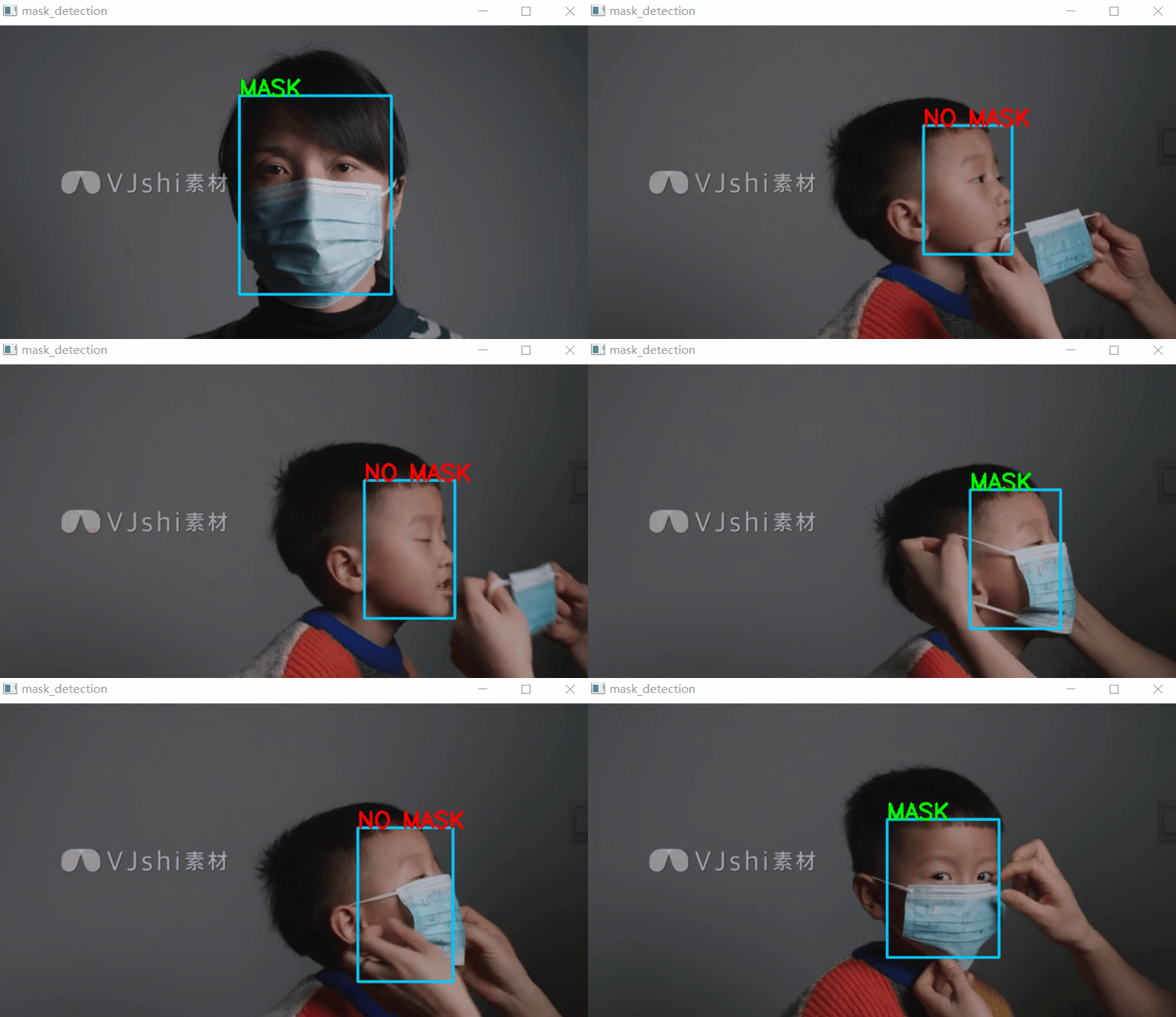
从上面测试结果来看,效果还不错!
【3】视频或摄像头实时人脸口罩检测
准备测试视频或直接打开摄像头检测,选择对应的代码即可:
cap = cv2.VideoCapture('2.mp4') #视频文件检测# cap = cv2.VideoCapture(0) #摄像头检测
完整代码:
import paddlehub as hub
import cv2

mask_detector = hub.Module(name="pyramidbox_lite_server_mask")

def mask_detecion(img):
  input_dict = {"data": [img]}
  result = mask_detector.face_detection(data=input_dict)
  count = len(result[0]['data'])
  if count < 1:
    #print('There is no face detected!')
    pass
  else:
    for i in range(0,count):
      #print(result[0]['data'][i])
      label = result[0]['data'][i].get('label')
      score = float(result[0]['data'][i].get('confidence'))
      x1 = int(result[0]['data'][i].get('left'))
      y1 = int(result[0]['data'][i].get('top'))
      x2 = int(result[0]['data'][i].get('right'))
      y2 = int(result[0]['data'][i].get('bottom'))
      cv2.rectangle(img,(x1,y1),(x2,y2),(255,200,0),2)
      if label == 'NO MASK':
        cv2.putText(img,label,(x1,y1),0,0.8,(0,0,255),2)
      else:
        cv2.putText(img,label,(x1,y1),0,0.8,(0,255,0),2)
  return img


if __name__ == '__main__':
  cap = cv2.VideoCapture('2.mp4') #视频文件检测
  #cap = cv2.VideoCapture(0) #摄像头检测
  if(cap.isOpened()): #视频打开成功
    while(True):
      ret,frame = cap.read()#读取一帧
      result = mask_detecion(frame)
      cv2.imshow('mask_detection',result)
      if cv2.waitKey(1)&0xFF ==27: #按下Esc键退出
        break
  else:
    print ('open video/camera failed!')
  cap.release()
  cv2.destroyAllWindows()
测试结果:
下载1:Pytoch常用函数手册
在「OpenCV与AI深度」号后台回复:Pytorch函数手册,能够学习下载全网第一份Pytorch函数常用手册,包括Tensors介绍、基础函数介绍、数据处理函数、优化函数、CUDA编程、多处理等十四章内容。
下载2:145个OpenCV实例应用代码
在「OpenCV与AI深入」公众号后台回复:OpenCV145,能够学习下载145个OpenCV实例应用代码(Python和C++双语言实现)。
边栏推荐
- 【补题】2021牛客暑期多校训练营1-3
- 深度学习系列48:DeepFaker
- 电子学:第013课——实验 14:可穿戴的脉冲发光体
- The first game of 2021 ICPC online game
- To understand the difference between Gram-positive and Gram-negative bacteria and the difference in pathogenicity
- Drawing of clock dial
- Electronics: Lesson 009 - Experiment 7: study relays
- Ubuntu18下登录mysql 5.7设置root密码
- 什么是SKU和SPU,SKU,SPU的区别是什么
- 牛客:飞行路线(分层图+最短路)
猜你喜欢
![Luogu p1073 [noip2009 improvement group] optimal trade (layered diagram + shortest path)](/img/cb/046fe4b47898fd6db86edc8a267c34.png)
Luogu p1073 [noip2009 improvement group] optimal trade (layered diagram + shortest path)
电子学:第012课——实验 13:烧烤 LED

深度学习系列45:图像恢复综述

417-二叉树的层序遍历1(102. 二叉树的层序遍历、107.二叉树的层次遍历 II、199.二叉树的右视图、637.二叉树的层平均值)

企业全面云化的时代——云数据库的未来

【论文学习】《VQMIVC》
Matlab code format one click beautification artifact

50 pieces of professional knowledge of Product Manager (IV) - from problem to ability improvement: amdgf model tool
Mr. Tang's lecture on operational amplifier (Lecture 7) -- Application of operational amplifier

STM32CubeMX 学习(5)输入捕获实验
随机推荐
【Unexpected token o in JSON at position 1出错原因及解决方法】
【补题】2021牛客暑期多校训练营9-n
函数尽量不要通过变量指定操作类型
Determine whether the user is entering a page for the first time
网络模型——OSI模型与TCP/IP模型
27. remove elements
【补题】2021牛客暑期多校训练营1-3
Sword finger offer II 027 Palindrome linked list
电子学:第010课——实验 9:时间与电容器
电子学:第008课——实验 6:非常简单的开关
Analysis and utilization of Microsoft Office Word remote command execution vulnerability (cve-2022-30190)
c#ColorDialog更改文本颜色和FontDialog更改文本字体的使用示例
初体验完全托管型图数据库 Amazon Neptune
Machine learning notes linear regression of time series
取消word文档中某些页面的页眉
Number theory template
Vscode is good, but I won't use it again
Allgero reports an error: program has encoded a problem and must exit The design will be saved as a . SAV file
Opencv daily function structure analysis and shape descriptor (8) Fitline function fitting line
现在通过开户经理发的开户链接股票开户安全吗?