当前位置:网站首页>Matlab code format one click beautification artifact
Matlab code format one click beautification artifact
2022-06-25 08:01:00 【studyer_ domi】
MBeautifier It's based on MATLAB Open source one click beautification of source code m Code formatter . It can be directly in MATLAB Use in editor , And can be configured according to user habits .MBeautifier Supported by Matlab The minimum version is R2013b.
MBeautifier The original download address of :https://github.com/davidvarga/MBeautifier
Readers who are inconvenient to download can send keywords in the background of the official account :MBeautifier, You can get the download link of Baidu online disk .
MBeautifier It's based on M-Script Lightweight of MATLAB Source code formatter , But directly in MATLAB Use in editor .

characteristic :
Fill operators and keywords with spaces
Configurable indent characters and levels . Use MATLAB The intelligent indent function of the editor
remove / Add consecutive blank lines
Insert missing element delimiters in matrix and cell array initialization ( comma )
Insert missing consecutive symbolic rows in matrix and cell array initialization
In-lining Continuous line
format MATLAB The current page of the editor or only in MATLAB Select an option in the editor or file
And everything above can be in one XML Configuration in file
Deployment and configuration
Just download zip Extract the file to a specific directory , And then put MBeautifier Add root of to MATLAB route .


To configure Configuration
You can edit MBeautifier\resources\settings\MBeautyConfigurationRules.xml File to modify the configuration .
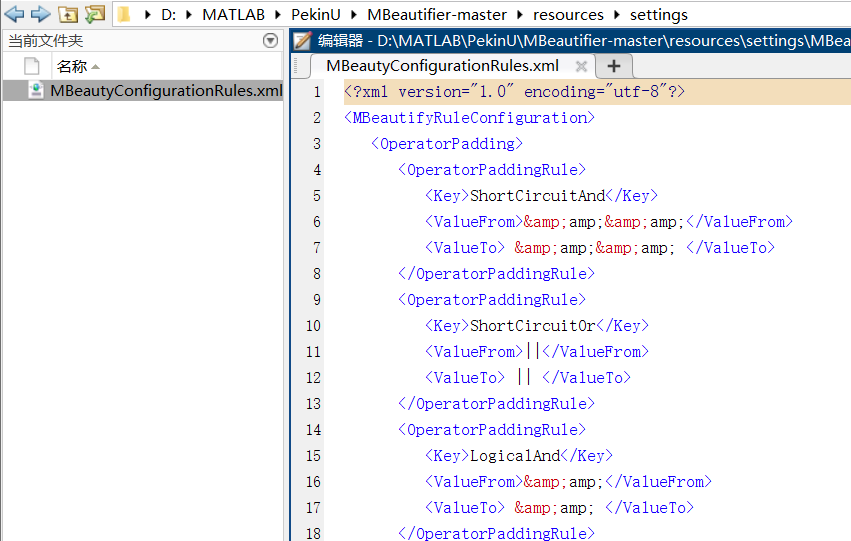
Configuration rules
At present, three configuration rules have been implemented :Operator padding rule、Keyword padding rule and Special rule.
Operator fill rule
Every OperatorPaddingRule Represents the formatting rules for a single operator , By a key 、 The string that should be replaced and the string used for replacement .
<OperatorPaddingRule>
  <Key>NotEquals</Key>
  <ValueFrom>~=</ValueFrom>
  <ValueTo> ~= </ValueTo>
</OperatorPaddingRule>
The example above shows “ It's not equal to ” Rules for operators .
ValueFrom Node storage operators ~=,
ValueTo The node stores the expected format : Operators should be preceded and followed by white-space character .
Keyword filling rules
Every KeyworPaddingRule Represents the format rules for a single keyword , And by the keyword itself and the required on the right white-space The filled values consist of .
<KeyworPaddingRule>
<Keyword>properties</Keyword>
<RightPadding>1</RightPadding>
</KeyworPaddingRule>
The above example shows the keywords “properties” The rules of .RightPadding The node stores the expected amount of right padding : Keyword should be preceded by a blank character .
Be careful : Not all keywords are listed - Only those that control the filling of meaningful keywords .
Special rules
These rules are basically MBeautifier Switches for certain functions . For details, see the... Of the compressed package README.md file ,
Usage method , Enter directly on the command line to use
At present, four methods are supported :
stay MATLAB Perform formatting on the currently active page of the editor . command :
MBeautify.formatCurrentEditorPage(). By default , The file will not be saved , But it will still open and modify in the editor . You can choose to useMBeautify.formatCurrentEditorPage(true)Syntax saves formatted files .

Yes MATLAB The editor performs formatting on the currently selected text of the active page . command :
MBeautify.formatEditorSelection(). under these circumstances , There is also an optional save mechanism as described above .( I don't know why the running time of this function is long after the actual measurement , Not recommended )Format the file . command :
MBeautify.formatFile(file). It can be done with (1) Use with one parameter : Input file is formatted , And in MATLAB Keep the editor open , Not saved ;(2) The two parameters areMBeautify.formatFile(file, outFile): If possible , Save the formatted file to the specified output file . The output can be the same as the input .file You need an absolute path
Perform formatting on multiple files in the directory . command :
MBeautify.formatFiles(directory, fileFilter). The first parameter is the absolute path to the directory , The second parameter is a wildcard expression ( be used fordircommand ), Used to filter files in the target directory . The file will be formatted in-place( Cover ).


边栏推荐
- Analysis and utilization of Microsoft Office Word remote command execution vulnerability (cve-2022-30190)
- 基于Anaconda的模块安装与注意事项
- 力扣76题,最小覆盖字串
- @Resource和@Autowired注解的不同,为什么推荐@Resource?
- Requirements for Power PCB circuit board design 2021-11-09
- 洛谷P6822 [PA2012]Tax(最短路+边变点)
- 【莫比乌斯反演】
- 1742. maximum number of small balls in the box
- 1464. maximum product of two elements in an array
- FM信号、调制信号和载波
猜你喜欢

To understand the difference between Gram-positive and Gram-negative bacteria and the difference in pathogenicity

C#中如何调整图像大小

环网冗余式CAN/光纤转换器的CAN光端机在消防火灾联网报警系统中的应用

Modular programming of LCD1602 LCD controlled by single chip microcomputer

年后求职找B端产品经理?差点把自己坑惨了......
Electronics: Lesson 013 - Experiment 14: Wearable pulsed luminaries
Can bus working condition and signal quality "physical examination"
Three Siemens fire-fighting hosts fc18 are equipped with can optical transceiver for optical fiber redundant ring network networking test

深度学习系列45:图像恢复综述
Looking for b-end product manager after years? I almost ruined myself
随机推荐
FM信号、调制信号和载波
VSCode很好,但我以后不会再用了
电子学:第012课——实验 13:烧烤 LED
产品经理专业知识50篇(四)-从问题到能力提升:AMDGF模型工具
力扣78:子集
Mining microbial dark matter -- a new idea
电子学:第014课——实验 15:防入侵报警器(第一部分)
函数尽量不要通过变量指定操作类型
This article uses pytorch to build Gan model!
Tips 𞓜 how to clean PCB boards 2021-10-22
剑指offer刷题(中等等级)
2021ICPC网络赛第一场
不怕百战失利,就怕灰心丧气
To understand the difference between Gram-positive and Gram-negative bacteria and the difference in pathogenicity
力扣 272. 最接近的二叉搜索树值 II 递归
Atlassian confluence漏洞分析合集
Solving some interesting problems with recurrence of function
Anaconda navigator启动慢的一个解决方法
洛谷P2486 [SDOI2011]染色(树链+线段树 + 树上区间合并 )
Authority design of SaaS system based on RBAC