当前位置:网站首页>celery工作原理图
celery工作原理图
2022-08-03 05:10:00 【중둑【上瘾】】
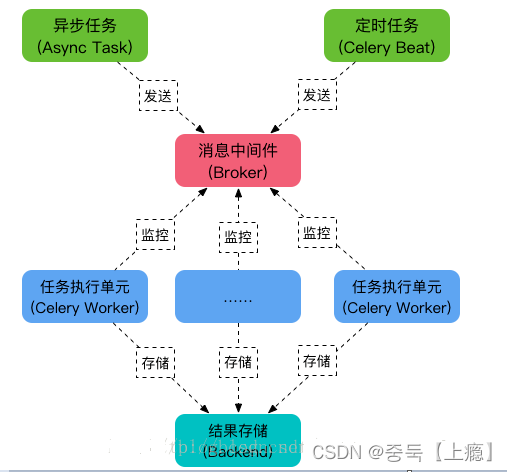
1.celery 的介绍
1.1celery的基本介绍
celery是基于python实现的一个异步任务的调用工具,同时还是一个任务队列,主要用于处理耗时的任务。
celery也被称为芹菜。
celery架构由三个模块组成:消息中间件,任务执行单元和任务执行结果储存 组成。
其实那在刚接触的时候小编的理解是 :老板把地皮交给包工头去干 让包工头把房子建好 然后包工头找了工人 把任务分配给工人让工人去干 最后工人盖好房子老板验收(这是小编自己的理解也就适合入门)

1.2什么是celery beat
celery支持定时任务,设定好任务的执行时间,celery就会定时自动帮你执行, 这个定时任务模块叫celery beat
2.celery定时任务的配置

__init__.py
里面主要是celery初始化配置
from datetime import timedelta
from celery import Celery
import os
import django
os.environ.setdefault("DJANGO_SETTINGS_MODULE", "自己的项目名.settings")
django.setup()
celery_app = Celery('mycelery')
#读取celery 的配置
celery_app.config_from_object('celery_task.config')
# 定时任务
# 文件夹名.文件名
celery_app.autodiscover_tasks(['celery_task.times'])
celery_app.conf.update(
CELERYBEAT_SCHEDULE={
'sum-task': {
# 文件夹名.文件名.方法名
'task': 'celery_task.times.my_con',
# 多少秒执行一次(eg:5秒一执行)
'schedule': timedelta(seconds=5),
# 这是传入my_con方法中的参数
'args': (5, 6)
},
'sum-task1': {
'task': 'celery_task.times.my_print',
'schedule': timedelta(seconds=3),
'args': ()
},
}
)
config.py
"""
celery 配置
"""
消息中间件 broker
BROKER_URL = 'redis://xx.xx.xx.xx:6379/11'
任务结果存储 results backend
CELERY_RESULT_BACKEND = 'redis://xx.xx.xx.xx:6379/12'
# 时区
CELERY_TIMEZONE = 'Asia/Shanghai'
# 导入指定的任务模块
CELERY_IMPORTS = (
'celery_task.tasks'
)
task.py 里面写的是异步任务就不展示了
————————————————
times.py
里面写的是定时任务
# 定时任务import time
from celery_task import celery_app
@celery_app.task()
def my_con(x,y):
print(x,y)
print('x和y相加')
return x+y
@celery_app.task()
def my_print():
print('22222222')
3.celery 启动命令
异步任务的启动命令:celery -A 任务名 worker -l info -P eventlet
定时任务的启动命令:celery -A 任务名 beat -l info
------------------------------------------------------------------------------------------------------------------------------------------
Celery有以下优点:
简单:Celery 易于使用和维护,并且它 不需要配置文件 ,并且配置和使用还是比较简单的
高可用:当任务执行失败或执行过程中发生连接中断,celery 会自动尝试重新执行任务
快速:单个 Celery 进程每分钟可处理数以百万计的任务,而保持往返延迟在亚毫秒级
灵活: Celery 几乎所有部分都可以扩展或单独使用,各个部分可以自定义。
主应用创建-----celery
from celery import Celery
from django.conf import settings
import os

os.environ.setdefault("DJANGO_SETTINGS_MODULE","p6.settings")
app = Celery("worker")
app.conf.broker_url= "redis://:/6"
app.conf.result_backend = 'redis://:/7'
app.autodiscover_tasks(settings.INSTALLED_APPS)

app.autodiscover_tasks()边栏推荐
猜你喜欢
typescript43-类型兼容性说明
数据分析 第一篇
Install IIS services (Internet Information Services (Internet Information Services, abbreviated IIS, Internet Information Services)
Talking about GIS Data (5) - Geographic Coordinate System
idea使用@Autowired注解爆红原因及解决方法
Kaggle(四)Scikit-learn
Pr第三次培训笔记

VSO Downloader Ultimate 5.0.1.45 中文多语免费版 在线视频下载工具
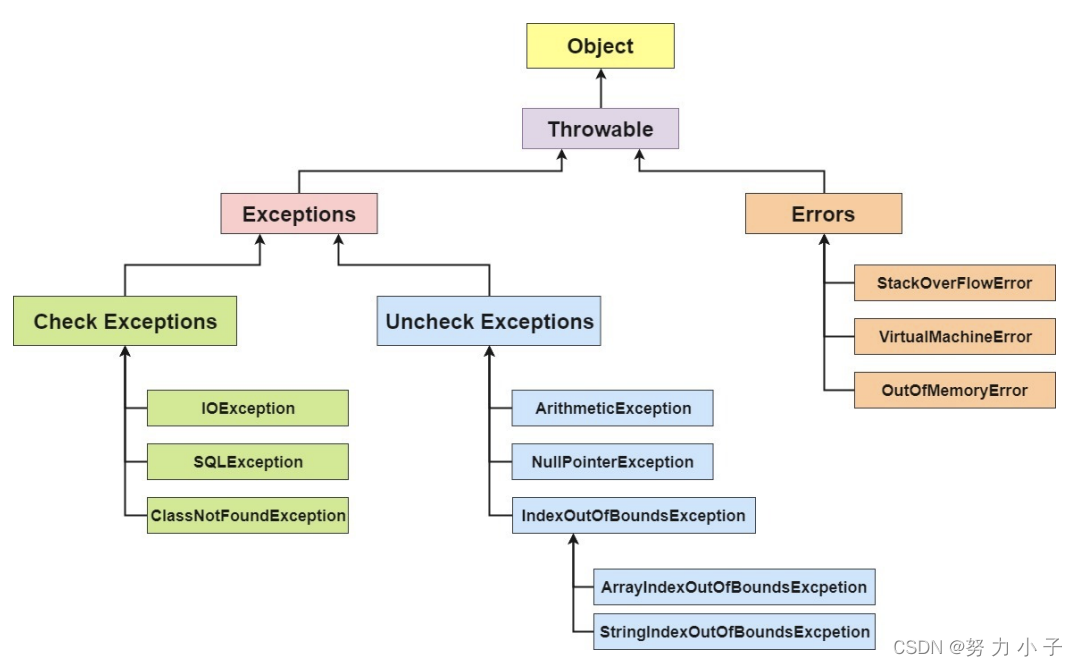
Exception (abnormal) and Error (error) difference analysis
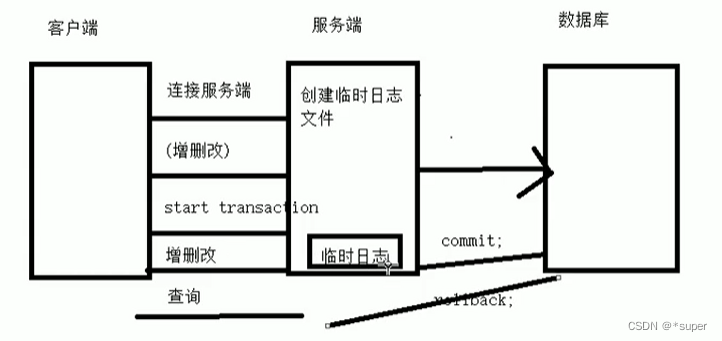
MySql数据库
随机推荐
Flink状态
BIOTIN ALKYNE CAS: 773888-45-2 Price, Supplier
【Harmony OS】【ARK UI】ets use startAbility or startAbilityForResult to invoke Ability
tag单调栈-单调栈预备知识-lt.739. 每日温度
shell脚本循环语句
Detailed explanation of MOSN reverse channel
Lambda表达式案例
User password verification
建造者模式(Builder Pattern)
Redis6学习笔记
odps的临时查询能在写sql的时候就给结果一个命名不?
高效率科研神器——小软件、大能量
GIS数据漫谈(六)— 投影坐标系统
js实现一个 bind 函数
Harmony OS Date ano UI 】 【 】 the basic operation
反射注解基础
Interface testing framework of actual combat (2) | interface request assertion
JS bottom handwriting
VSO Downloader Ultimate 5.0.1.45 中文多语免费版 在线视频下载工具
CAD有生僻字如何打出来、如何提交软件相关问题或建议?