当前位置:网站首页>HTA入门基础教程 | VBS脚本的GUI界面 HTA简明教程 ,附带完整历程及界面美化
HTA入门基础教程 | VBS脚本的GUI界面 HTA简明教程 ,附带完整历程及界面美化
2022-06-30 02:37:00 【CDamogu】
背景知识
HTA是 HTML Application的缩写(HTML应用程序),是软件开发的新概念,直接将HTML保存成HTA的格式,就是一个独立的应用软件,与VB、C++等程序语言所设计的软件界面没什么差别。
- HTA与普通的网页结构差不多,所以设计出来很容易,当然HTA还有许多自己独特的属性:
- HTA 虽然用HTML、JS和CSS编写,却比普通网页权限大得多。
- HTA 具有桌面程序的所有权限(读写文件、操作注册表等),HTA本来就是被设计为桌面程序的。
- HTA对语法的要求比HTML还要松,甚至连
<html>、<body>等标记都可以省略: - 可以用
<HTA:Application>来设定HTA应用程序的外观,如标题栏、边框大小等,必须放在中。
属性一览
推荐html表格代码生成 https://www.tablesgenerator.com/html_tables
由于CSDN无法展示样式 ,故以截图形式展示,阅读更直观,下述表格源文件 CSDN下载-HTA.tgn ,下载后打开上述链接,点击File,Load Table即可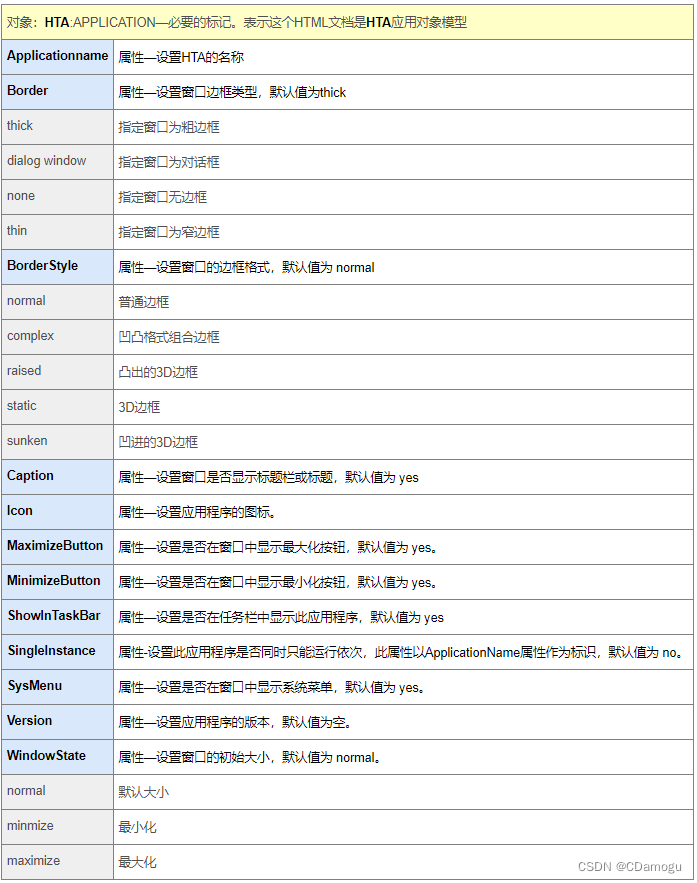
界面效果
效果如下:LOGO+公司LOGO自行添加链接即可,以下仅为从网上寻找的图片添加,若造成任何侵权请告知删除.
代码
新建文件,并命名为 Example.hta 即可在Windows中直接打开使用
<html>
    <head>
        <title style="padding: 1px;margin: 1px;"> HTA Example GUI</title>
        <meta content="text/html;charset=utf-8" style="background:Aqua;text-align:center;">

        <HTA:APPLICATION ID="oHTA" APPLICATIONNAME="myApp" ICON="http://stackoverflow.com/favicon.ico"/>


        <img src=" https://m-todo.gitee.io/m-todo-img/logo/bosch/BOSCH.png" style="width:17%;"></img>
        <img src=" https://m-todo.gitee.io/m-todo-img/logo/bosch/BoschHuayu.png" style="width:25%;"></img>

    </head>


    <script> window.resizeTo(1500,500); var fso; var wsh; fso = new ActiveXObject("Scripting.FileSystemObject"); wsh = new ActiveXObject("WScript.Shell"); function checkcli(e){
       fso.GetStandardStream(1).Write(e.type); window.close(); } function Run(strPath){
       wsh.Run(strPath,1,true); } function Close(){
       window.close(); } function Web(){
       wsh.Run("cmd.exe /k start firefox http://www.dooccn.com/c/ &&\ echo complete"); } function MakeHexOnly(){
       wsh.Run("cmd.exe /k C: && cd C:/Users/test && OnlyHex.bat &&\ echo The Hex Documents are saved in C:\Users\test "); } function MakeComplete(){
       wsh.Run("cmd.exe /k C: && cd C:/Users/test && CompleteHex.bat &&\ echo The Hex Documents are saved in C:\Users\test "); } </script>


    <style> body {
      padding:0; margin:0;} ul {
       list-style-type: none; margin: 0; padding: 0; overflow: hidden; background-color: #333; position: fixed; top: 0; width: 100%; } li {
       float: left; } li a {
       display: block; color: white; text-align: center; padding: 14px 16px; text-decoration: none; } li a:hover {
       background-color: #4CAF50; color: white; } .labeltxt {
       background-color: #480000; } h1{
       font-family:"Times New Roman",Georgia,Serif; } </style>


    <body style="background:light; text-align:left; padding: 1px;margin: 1px;" SCROLL="no">
        <meta content="text/html;charset=utf-8" style="background:Aqua; text-align:left;">

        <ul>
            <li class="labeltxt"><a href="#">快捷方式</a></li>
            <li onclick="Run('file:///C:/Program%20Files%20(x86)/Microsoft%20Office/Office16/Outlook.exe')"><a href="#">快捷方式1</a></li>
            <li onclick="Run('file:///C:/Program%20Files%20(x86)/Microsoft%20Office/Office16/Outlook.exe')"><a href="#">快捷方式2</a></li>
            <li onclick="Run('file:///C:/Program%20Files%20(x86)/Microsoft%20Office/Office16/Outlook.exe')"><a href="#">快捷方式3</a></li>
            <li onclick="Run('file:///C:/Program%20Files%20(x86)/Microsoft%20Office/Office16/Outlook.exe')"><a href="#">快捷方式4</a></li>
            <li onclick="Run('file:///C:/Program%20Files%20(x86)/Microsoft%20Office/Office16/Outlook.exe')"><a href="#">快捷方式5</a></li>
            <li onclick="Run('file:///C:/Program%20Files%20(x86)/Microsoft%20Office/Office16/Outlook.exe')"><a href="#">快捷方式6</a></li>
            <li onclick="Run('file:///C:/Program%20Files%20(x86)/Microsoft%20Office/Office16/Outlook.exe')"><a href="#">快捷方式7</a></li>
            <li onclick="Web()"><a href="#">快捷方式8</a></li>
        </ul>

        <div style="padding:0px;margin-top:02px;background-color:#C0C0C0;height:800px;">

        <ul>
            <li class="labeltxt"><a href="#">调用脚本</a></li>
            <li onclick="MakeHexOnly()"><a href="#">调用程序1</a></li>
            <li onclick="MakeComplete()"><a href="#">调用程序2</a></li>
        </ul>

        <div style="padding:0px;margin-top:02px;background-color:#C0C0C0;height:800px;">

        <ul>
            <li class="labeltxt"><a href="#">关闭程序</a></li>
            <li onclick="Close()"><a href="#Close">关闭</a></li>
        </ul>

        <div style="padding:0px;margin-top:02px;background-color:#C0C0C0;height:800px;">

        <MARQUEE>Hello Mushroomer</B><br><br>
    </body>


</html>
边栏推荐
- What is an X.509 certificate? 10. 509 certificate working principle and application?
- Le Code autojs peut - il être chiffré? Oui, présentation des techniques de chiffrement autojs
- 冒泡排序
- Simple distinction between break and continue
- IBM WebSphere channel connectivity setup and testing
- Global and Chinese market of Kanban software 2022-2028: Research Report on technology, participants, trends, market size and share
- DigiCert Smart Seal是什么?
- 直接插入排序
- 微信小程序页面跳转以及参数传递
- Day_ 19 multithreading Basics
猜你喜欢

How to use SMS to deliver service information to customers? The guide is here!

Five cheapest wildcard SSL certificate brands

Summary of knowledge points about eigenvalues and eigenvectors of matrices in Chapter 5 of Linear Algebra (Jeff's self perception)

Insert sort directly
直接插入排序

Linear algebra Chapter 4 Summary of knowledge points of linear equations (Jeff's self perception)

Time complexity analysis

Linear algebra Chapter 3 summary of vector and vector space knowledge points (Jeff's self perception)

Differences among digicert, SECTIONO and globalsign code signing certificates

What is a self signed certificate? Advantages and disadvantages of self signed SSL certificates?
随机推荐
Time complexity analysis
What is digicert smart seal?
How difficult is the PMP Exam under the new syllabus? Comprehensive analysis
2. < tag dynamic programming and 0-1 knapsack problem > lt.416 Split equal sum subset + lt.1049 Weight of the last stone II
Select sort
Alphassl digital certificate
Global and Chinese market for defense network security 2022-2028: Research Report on technology, participants, trends, market size and share
Merge sort
模板参数包和函数参数包
Template parameter package and function parameter package
RAII内存管理
day33
FDA邮件安全解决方案
论文回顾:Playful Palette: An Interactive Parametric Color Mixer for Artists
Network neuroscience——网络神经科学综述
Jupyter notebook显示k线图集合
What should academic presentation /ppt do?
走进江苏作家诗人胭脂茉莉|世界读书日
【postgres】postgres 数据库迁移
代码签名、驱动签名的常见问题解答