当前位置:网站首页>(the slow download speed of cifar10 in torchvision has been solved) how to download and use torchvision import
(the slow download speed of cifar10 in torchvision has been solved) how to download and use torchvision import
2022-06-11 08:10:00 【Interval】
    train_set = torchvision.datasets.CIFAR10(root='./data', train=True,
                                             download=True, transform=transform)
Super slow , Too slow to report errors directly :
urllib.error.URLError: urlopen error [Errno 11001] getaddrinfo failed
The official website is super fast http://www.cs.toronto.edu/~kriz/cifar.html
Download the first one :

Unzip it , Then the directory will look like this
cifar-10-python/cifar-10-batches-py/*
among * Number is the following files .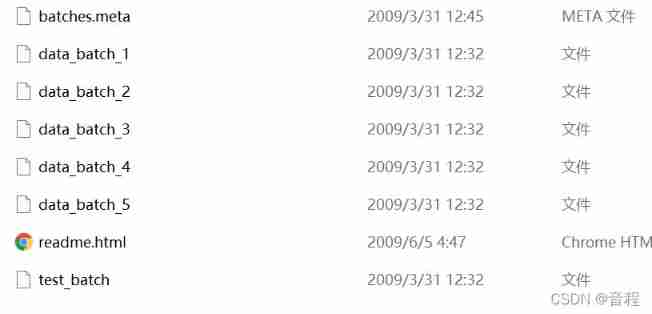
We just need to copy the above files to data Under the table of contents :
data/cifar-10-batches-py/*
And then use torchvision Handle , And set up download=False that will do .
    train_set = torchvision.datasets.CIFAR10(root='./data', train=True,
                                             download=False, transform=transform)
success .
边栏推荐
- Use guidelines in constraintlayout to limit the maximum width of controls
- Receive ontrimmemory and other callbacks through componentcallbacks2 and mock the corresponding scenario
- Tidb cloud launched Google cloud marketplace, empowering global developers with a new stack of real-time HTAP databases
- Understanding of Poisson distribution and Poisson process and Erlang distribution and their relations (important theories in queuing theory and operational research)
- Servlet、ServletConfig、ServletContext
- Activity中,View#postDelay会导致内存泄漏,但是不会影响Activity的生命周期执行。
- Scrape captures 51job Recruitment Information (static page)
- Solution to the occurrence interval (space) of latex manual numbering documents
- Return in foreach and break in for
- Printing diamond of beginner C
猜你喜欢




随机推荐
Storage of floating point in memory
TypeScript-键盘映射
Development of sylixos SD device driver
Summary of knowledge points of customized ViewGroup - continuously updated
Bubble sorting with C language
Servlet、ServletConfig、ServletContext
Activity中,View#postDelay会导致内存泄漏,但是不会影响Activity的生命周期执行。
Thoroughly remember the difference between ImageView background and SRC
Using Tkinter to realize guessing numbers game
C language - Growth Diary -01- count primes and sum
About static keyword
Js基础学习Script
Typescript enumeration
Summary of evaluation index knowledge points in target detection: summary of IOU cross overlap unit and map/ap/tp/fp/np
SylixOS SD设备驱动开发
[untitled] Weng_ C lesson 1
Socket [5] - struct linker usage
Shell Programming Notes
TypeScript-声明合并
如何做好空状态设计?来看这份全面总结