当前位置:网站首页>Open source oauth2 framework for SSO single sign on
Open source oauth2 framework for SSO single sign on
2022-06-23 06:54:00 【zetor_ major】
One 、 summary
This article USES the Oauth2 Open source architecture (tkey)、 Realize single sign on system .
1. Tkey:
- OAuth 2.0 Standard single sign on system for interface design principle (SSO);
- Pure HTTP, Any device 、 Any scene ;
- Cross domain stateless , Free lateral expansion , High service availability .
2. choice Tkey
tkey Open source framework , Easy to use , extensible , High degree of completion , Document details .
This paper is based on the original architecture , The server persistence layer is added 、 increase client management 、 Add login page A / C set query 、 Optimize login page 、 Realize client jump .
Please refer to the original architecture for more functions
3. Tkey Download address :
This article code address , See the end of the article .
Two 、 Realize single sign on server
1) Use architecture
- springboot 2.1
- mybatisPlus (mysql)
- tkey (oauth2)
- swagger
- redis
- thymeleaf( The login page )
2) The code reference is as follows
The following focuses on the modified part :
- Add persistence layer mybatis
        <dependency>
            <groupId>com.baomidou</groupId>
            <artifactId>mybatis-plus-boot-starter</artifactId>
            <version>3.0.5</version>
        </dependency>
        <dependency>
            <groupId>mysql</groupId>
            <artifactId>mysql-connector-java</artifactId>
        </dependency>
@EnableTransactionManagement
@Configuration
public class MybatisPlusConfig {
/**
* Paging plug-ins
*/
@Bean
public PaginationInterceptor paginationInterceptor() {
return new PaginationInterceptor();
}
}- ClientController.java
@Slf4j
@RestController
@RequestMapping("/client")
public class ClientController {
	@Autowired
	private StringRedisService<String, String> clientRedisService;

	@Autowired
	private OauthClientService oauthClientService;

	@PostMapping("/save")
	public ResponseEntity<?> save(@RequestBody @Valid OauthClientCreateRequestParam param) {
		OauthClientToRedisBO oauthClientToRedisBO = new OauthClientToRedisBO();
		BeanUtils.copyProperties(param, oauthClientToRedisBO);
		clientRedisService.set(GlobalVariable.REDIS_CLIENT_ID_KEY_PREFIX + oauthClientToRedisBO.getClientId(), JsonUtil.toJson(oauthClientToRedisBO));
		return R.success(oauthClientToRedisBO);
	}

	@GetMapping("/query")
	private ResponseEntity<?> query(@RequestParam String clientId) {
		return R.success(oauthClientService.findByClientId(clientId));
	}

	@GetMapping("/delete")
	private ResponseEntity<?> delete(@RequestParam String clientId) {
		String clientIdRedisKey = GlobalVariable.REDIS_CLIENT_ID_KEY_PREFIX + clientId;
		clientRedisService.delete(clientIdRedisKey);
		return R.success();
	}
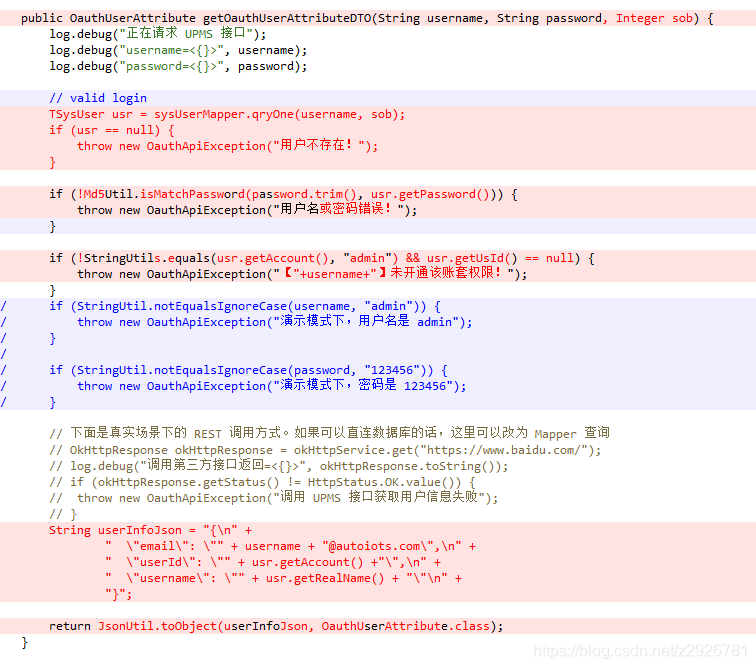
}- Login initialization

- Login verification
- The login page
<div class="login-wrapper">

    <div class="content-left">

    </div>
    <div class="content-right">
        <div class="right-header">
            <h1 class="right-header-h2" th:text="${oauthClient != null and oauthClient.clientName != null ? oauthClient.clientName : ' Sign in '}"></h1>
        </div>
        <div class="right-form-wrapper">
            <form onclick="this.disabled=false" onsubmit="return handleSubmit()" method="POST" action="/oauth/authorize" th:action="${#request.getQueryString() != null ? #request.getRequestURL() + '?' + #request.getQueryString() : #request.getRequestURL()}">
                <div class="username-wrapper">
                    <input onfocus="usernameInputFocus()" class="username username-input-default" type="text" name="username" id="username" value="admin" th:value="admin" placeholder=" mobile phone  /  mailbox ">
                    <p class="username-error opacity0" th:text="${errorMsg}"></p>
                </div>

                <div class="password-wrapper">
                    <input onfocus="passwordInputFocus()" class="password password-input-default" type="password" name="password" id="password" value="123456" th:value="123456" placeholder=" Please input a password ">
                    <p class="password-error opacity0"> Password is required </p>
                </div>
                <div class="form-group">
                    <select class="username username-input-default" name="sob" id="sob">
                        <option th:each="ss:${sobs}" th:value="${ss.id}" th:text="${ss.sobName}"></option>
                    </select>
                </div>
                <div class="checkMe">
                    <span>
                        <input type="checkbox" value="false" name="bool_is_remember_me" id="bool_is_remember_me">
                        <label for="bool_is_remember_me" class="ml5"> Remember me </label>
                    </span>
                    <a class="text-login"> Forget the password ?</a>
                </div>

                <div class="submit-btn-wrapper">
                    <img class="btn-loading" th:src="@{/images/loading.svg}" alt="">
                    <button type="submit" onclick="handleSubmit()" class="submit-btn"> Sign in </button>
                </div>
                <div class="mt15 tac">
                    <span class="right-header-span"> There is no account ? <a> Click here to register </a></span>
                </div>
            </form>
        </div>
    </div>
</div>
3、 ... and 、 Implement client
- pom.xml
        <!-- sso -->
        <dependency>
            <groupId>com.cdk8s.tkey</groupId>
            <artifactId>tkey-sso-client-starter-rest</artifactId>
            <version>1.0.0</version>
</dependency>- Custom interceptors
@Configuration
public class InterceptorConfig implements WebMvcConfigurer {
    @Bean
    public LoginInterceptor loginInterceptor() {
        return new LoginInterceptor();
    }


    @Override
    public void addInterceptors(InterceptorRegistry registry) {
        registry.addInterceptor(loginInterceptor())
                .addPathPatterns("/**")
                .excludePathPatterns("/error", "/logoutSuccess", "login/**","/logout/**","/codeCallback/**","/css/**", "/js/**", "/fonts/**")
                .excludePathPatterns("/swagger-resources/**", "/webjars/**", "/v2/**", "/swagger-ui.html/**");
    }
}

@Slf4j
public class LoginInterceptor extends HandlerInterceptorAdapter {

    @Value("${front_url}")
    private String front_url;

    @Autowired
    private TkeyProperties tkeyProperties;

    //===================================== Business processing  start=====================================
    private boolean resp(final HttpServletRequest request, final HttpServletResponse response) throws IOException {
        if (tkeyProperties.getEnableCodeCallbackToFront()) {
            responseJson(response);
        } else {
            response.sendRedirect(getRedirectUrl(request));
        }
        return false;
    }

    @SneakyThrows
    @Override
    public boolean preHandle(final HttpServletRequest request, final HttpServletResponse response, Object handler) {

        String accessToken = CookieUtil.getValue(request, AuthVariable.SSO_SESSIONID);
        if (StringUtils.isBlank(accessToken)) {
            log.error("【SSO】Local token is null, to login...");
            return resp(request, response);
        }
        //  This machine does not verify
        String local_url = InetAddress.getLocalHost().getHostAddress();
        if (request.getRemoteAddr().contains(local_url)) {
            log.info("【SSO】Local to pass...");
            return true;
        }
        String token = request.getHeader(AuthVariable.HEADER_TOKEN_KEY);
        if (StringUtils.isBlank(token) || !token.equals(accessToken)) {
            response.sendRedirect(front_url + accessToken);
            return false;
        }
        return true;
    }

    @Override
    public void postHandle(HttpServletRequest request, HttpServletResponse response, Object handler, ModelAndView modelAndView) {
    }


    private String getRedirectUrl(final HttpServletRequest request) {
        return tkeyProperties.getFinalRedirectUri(request);
    }

    @SneakyThrows
    private void responseJson(final HttpServletResponse response) {
        response.setStatus(HttpStatus.UNAUTHORIZED.value());
        response.setCharacterEncoding("UTF-8");
        response.setContentType("application/json; charset=utf-8");
        Map<String, Object> responseMap = new HashMap<>(4);
        responseMap.put("isSuccess", false);
        responseMap.put("msg", " You haven't signed in yet , Please log in first ");
        responseMap.put("timestamp", Instant.now().toEpochMilli());
        responseMap.put("code", "0");
        ObjectMapper mapper = new ObjectMapper();
        String json = mapper.writeValueAsString(responseMap);
        PrintWriter out = response.getWriter();
        out.print(json);
    }

}
Authentication callback controller
   /**
     *  receive  code, Then in exchange  token
     */
    @SneakyThrows
    @RequestMapping(value = "/codeCallback", method = RequestMethod.GET)
    public void codeCallback(final HttpServletRequest request, final HttpServletResponse response, @RequestParam(value = "redirect_uri", required = true) String redirectUri) {
        String code = request.getParameter("code");

        if (StringUtils.isBlank(code)) {
            return;
        }

        getAccessToken(request, response, code);
        //  Redirect to the original request address
        redirectUri = CodecUtil.decodeURL(redirectUri);
		response.sendRedirect(redirectUri);
    }

    @RequestMapping(value = "/logout", method = RequestMethod.GET)
    public String logout(final HttpServletRequest request, final HttpServletResponse response) {
        String finalLogoutUri = tkeyProperties.getFinalLogoutUri();
        CookieUtil.remove(request, response, AuthVariable.SSO_SESSIONID);
        return "redirect:" + finalLogoutUri;
    }


    private TkeyToken getAccessToken(HttpServletRequest request, HttpServletResponse response, String code) {
        OAuth2AccessToken oauthToken = tkeyService.getAccessToken(code);
        String accessToken = oauthToken.getAccessToken();

        TkeyToken tkeyToken = new TkeyToken();
        tkeyToken.setAccessToken(accessToken);
        tkeyToken.setRefreshToken(oauthToken.getRefreshToken());
        OauthUserProfile user = tkeyService.getUserProfile(oauthToken);
        tkeyToken.setAttributes(user);

        CookieUtil.set(response, AuthVariable.SSO_SESSIONID, accessToken, false);
        return tkeyToken;
    }
home page controller( Support front and rear end separation )
    @RequestMapping("/")
    public String index(HttpServletRequest request, Model model) {
        String accessToken = CookieUtil.getValue(request, AuthVariable.SSO_SESSIONID);
        if (front_flag) {
            return "redirect:" + front_url + accessToken;
        } else {
            model.addAttribute("token", accessToken);
            return "index";
        }
    }
Four 、 Start the program
1. start-up redis;
2. start-up mysql: Create database , Run script .
notes : Script reference code at the end of the text
3. Start the program . ServerApp、2.ClientApp
client port:8081
Server side port:8086
4. Insert client:
The calling interface is shown in the figure :

The message is as follows :
{
        "id": 1001,
        "client_name": "client_id_sso_client",
        "client_id": "client_id_sso_client",
        "client_secret": "client_secret_sso_client",
        "client_url": "^(http|https)://.*",
        "client_desc": "Client System "
}
5. Call client
Type in the browser address bar :http://127.0.0.1:8081/client
Jump to the authentication server uniformly , Pictured

notes : The A / C set is the user-defined information in this article , Delete as appropriate .
user name :admin 、 password :123456
Login successful :
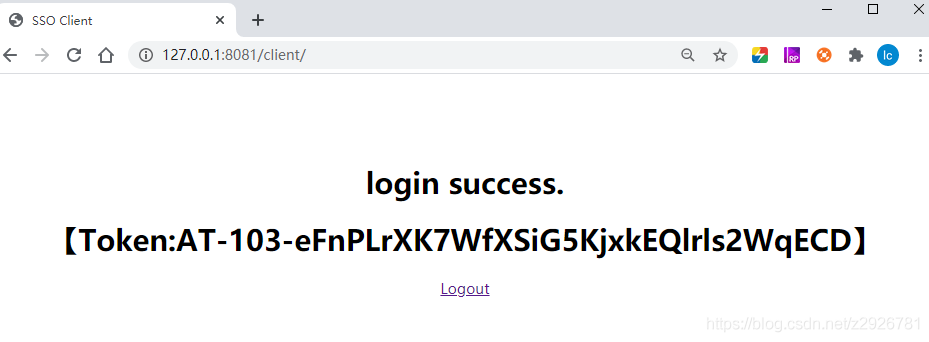
above , Login successful .
notes : If a front and rear end separation system is used , Please add the front page address in the configuration
After successful login , take token Just go back to the front end .

This article source address :
https://gitee.com/zetor2020/ym-paas-sso-tkey.git
Download code friends click star, Thank you for your support

Like this article , Thank you again for

边栏推荐
- English语法_副词 - ever / once
- Some difficulties in making web pages
- Measurement principle and thickness measurement mode of spectral confocal
- 二叉树的遍历及相关知识
- 2022年养老理财产品有哪些?风险小的
- Focusing on the smart city, Huawei cooperates with China Science and technology Xingtu to jointly develop a new digital blue ocean
- 解决挖矿病毒 sshd2(redis未设密码、清除crontab定时任务)
- Storage mode of data in memory (C language)
- 1161 Merging Linked Lists
- Topic35——34. 在排序数组中查找元素的第一个和最后一个位置
猜你喜欢

【STL】pair用法总结

idea的去除转义的复制粘贴

Measurement principle and thickness measurement mode of spectral confocal

ssm + ftp +ueditor

常见设置模式(抽象工厂&责任链模式&观察者模式)

cmder

How to realize video call and live interaction in a small program when live broadcasting is so popular?

C语言学习总结

Sword finger offer 42 Maximum sum of successive subarrays

网页制作存在的一些难点
随机推荐
haas506 2.0开发教程-高级组件库-modem.voiceCall(仅支持2.2以上版本)
js数组的索引为何不能用负数
Miscellaneous things
Kubesphere offline deployment without network environment
1161 Merging Linked Lists
20220621 Three Conjugates of Dual Quaternions
idea自动生成serialVersionUID
haas506 2.0开发教程-sntp(仅支持2.2以上版本)
994. rotten oranges - non recursive method
Haas506 2.0 development tutorial -sntp (only versions above 2.2 are supported)
Haas506 2.0 development tutorial - Advanced Component Library -modem Voicecall (only supports versions above 2.2)
haas506 2.0开发教程-hota(仅支持2.2以上版本)
994. 腐烂的橘子-非递归法
剑指 Offer 42. 连续子数组的最大和
Drawing and resetting of mars3d point, line and surface
English语法_副词 - ever / once
Add IPAD control function into shairplay
开源OAuth2框架 实现SSO单点登录
页面嵌入iframe 点击浏览器后退问题
Mysql5.6 (5.7-8) is based on shardingsphere5.1.1 sharding proxy mode. Read / write separation