当前位置:网站首页>User login (remember the user) & user registration (verification code) [using cookie session technology]
User login (remember the user) & user registration (verification code) [using cookie session technology]
2022-06-29 00:35:00 【lwj_ 07】
Requirements are as follows : ( Compared with the previous login registration, the new functions added are as follows )

One 、 The user login :( The requirements are shown in the figure below )
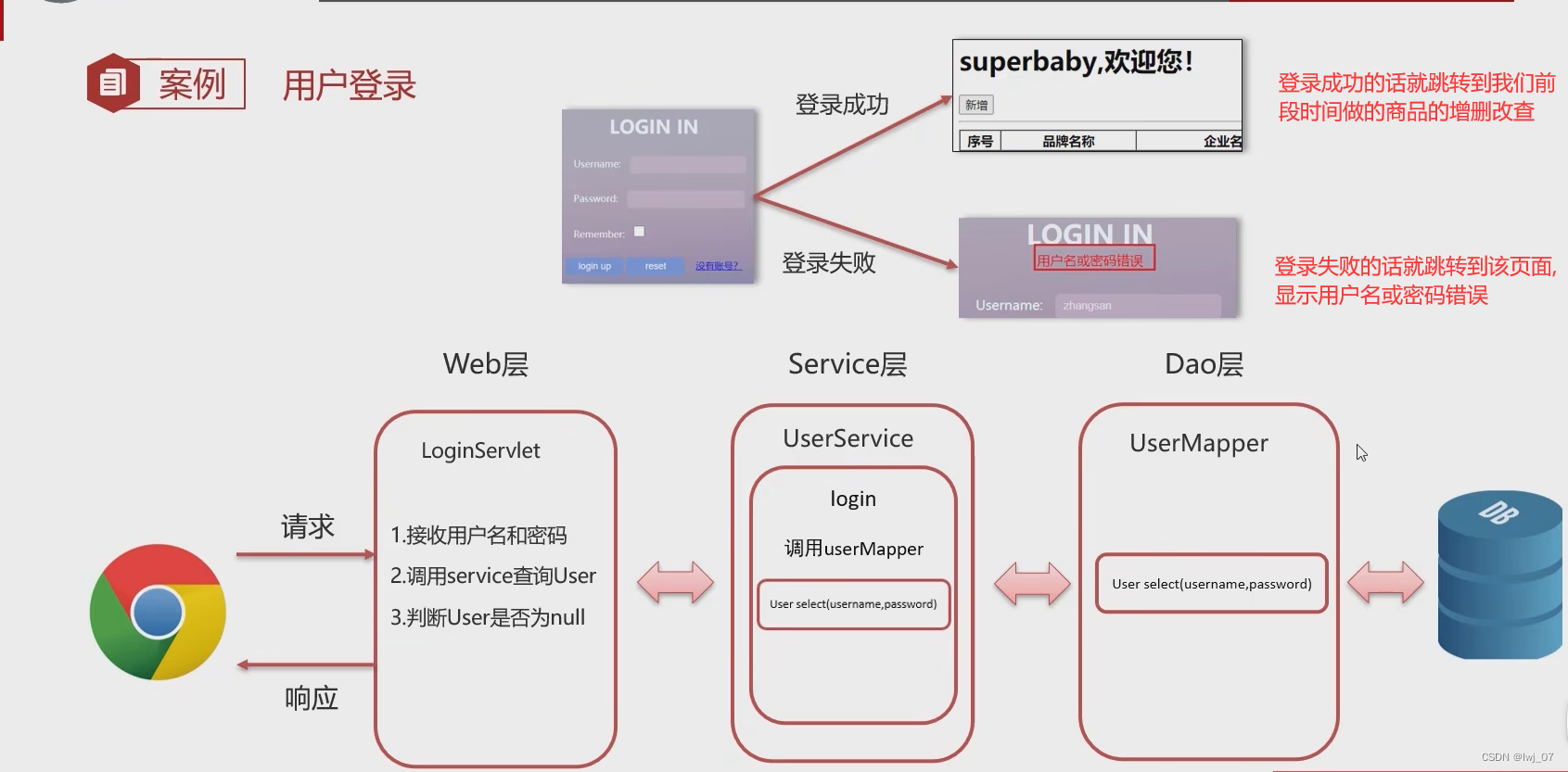
The total code structure of user login is as follows :


User Entity class :
package com.itheima.pojo;

public class User {

    private Integer id;
    private String username;
    private String password;

    public Integer getId() {
        return id;
    }

    public void setId(Integer id) {
        this.id = id;
    }

    public String getUsername() {
        return username;
    }

    public void setUsername(String username) {
        this.username = username;
    }

    public String getPassword() {
        return password;
    }

    public void setPassword(String password) {
        this.password = password;
    }

    @Override
    public String toString() {
        return "User{" +
                "id=" + id +
                ", username='" + username + '\'' +
                ", password='" + password + '\'' +
                '}';
    }
}
UserServlet:
package com.itheima.service;
import com.itheima.mapper.UserMapper;
import com.itheima.pojo.User;
import com.itheima.util.SqlSessionFactoryUtils;
import org.apache.ibatis.session.SqlSession;
import org.apache.ibatis.session.SqlSessionFactory;

/**
 *   Business logic layer
 */

public class UserService {

    SqlSessionFactory Factory =SqlSessionFactoryUtils.getSqlSessionFactory();
    /**
     *   Login method
     */
    public User login(String username,String password){

        // 1.  obtain SqlSession
        SqlSession sqlSession =Factory.openSession();
        UserMapper userMapper =sqlSession.getMapper(UserMapper.class);
        // 2.  call UserMapper Interface to query users and passwords
        User user =userMapper.select(username,password);
        // 3.  Release resources
        sqlSession.close();
        return user;
    }
}
UserMapper:
package com.itheima.mapper;
import com.itheima.pojo.User;
import org.apache.ibatis.annotations.Insert;
import org.apache.ibatis.annotations.Param;
import org.apache.ibatis.annotations.Select;

public interface UserMapper {


    /**
     *  Query the user object according to the user name and password
     * @param username   @param  Parameter placeholder mybatis Complete the addition, deletion, modification and check. There are explanations in it
     * @param password
     * @return
     */
    @Select("select * from tb_user where username = #{username} and password = #{password}")
    User select(@Param("username") String username, @Param("password") String password);

    /**
     *  Query the user object according to the user name
     * @param username
     * @return
     */
    @Select("select * from tb_user where username = #{username}")
    User selectByUsername(String username);

    /**
     *  Add users
     * @param user
     */
    @Insert("insert into tb_user values(null,#{username},#{password})")
    void add(User user);
}
Login failed / Demonstration of successful results :
Login successful :

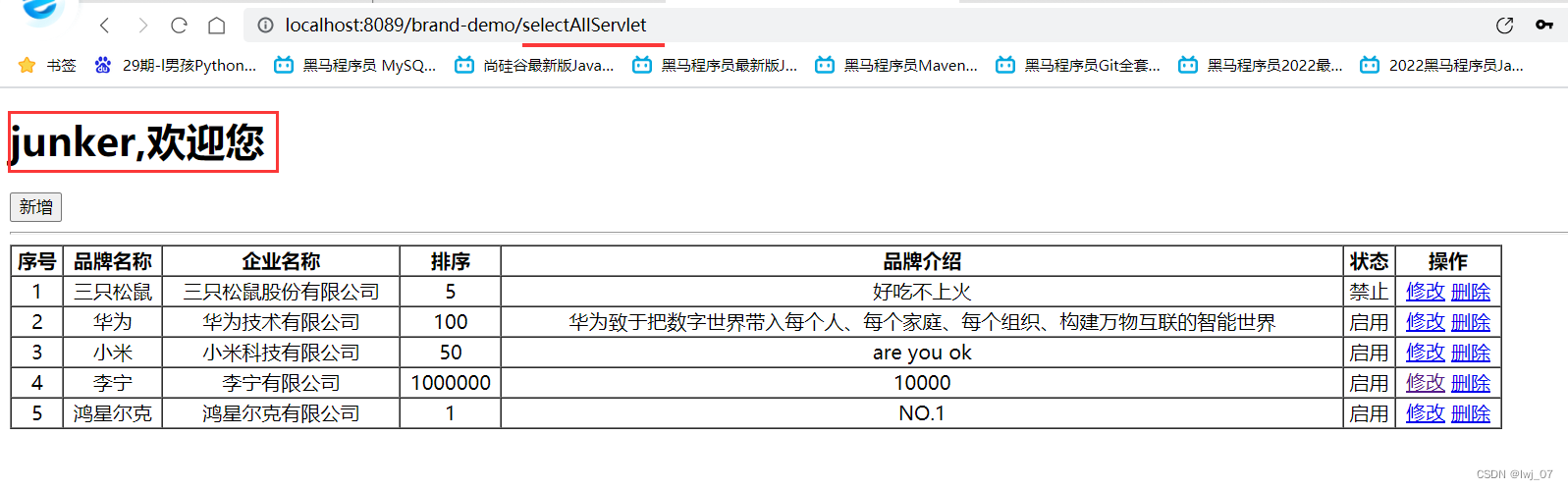
Login failed :

Remember a word : Redirection will change URL route That is, we write a path in the redirection ,URL It will become the path to write , Forwarding doesn't change URL route

The core code is as follows :
login.jsp:
First visit login.jsp Then submit to loginServlet Path resource Continue with other operations ( forward )
<%@ page contentType="text/html;charset=UTF-8" isELIgnored="false" language="java" %>
<!DOCTYPE html>
<html lang="en">
<head>
<meta charset="UTF-8">
<title>login</title>
<link href="css/login.css" rel="stylesheet">
</head>
<body>
<div id="loginDiv" style="height: 350px">
<form action="/brand-demo/loginServlet" id="form">
<h1 id="loginMsg">LOGIN IN</h1>
<div id="errorMsg">${login_msg}</div>
<%--${login_msg} Is that we are LoginServlet After login failure under resource, forward to login Page handle
The login page is displayed to the user , And save the forwarding time to request Data in the domain ( Wrong user name or password ) take
To be displayed on the login page ${login_msg}:EL expression Take the data stored in the domain
--%>
<p>Username:<input id="username" name="username" type="text"></p>
<p>Password:<input id="password" name="password" type="password"></p>
<p>Remember:<input id="remember" name="remember" type="checkbox"></p>
<div id="subDiv">
<input type="submit" class="button" value="login up">
<input type="reset" class="button" value="reset">
<a href="register.html"> There is no account ?</a>
</div>
</form>
</div>
</body>
</html>
LoginServlet:
If the login fails, you will jump to login.jsp And carry the stored data
package com.itheima.web;
import com.itheima.pojo.User;
import com.itheima.service.UserService;
import javax.servlet.ServletException;
import javax.servlet.annotation.WebServlet;
import javax.servlet.http.HttpServlet;
import javax.servlet.http.HttpServletRequest;
import javax.servlet.http.HttpServletResponse;
import javax.servlet.http.HttpSession;
import java.io.IOException;

@WebServlet("/loginServlet")
public class LoginServlet extends HttpServlet {
        @Override
        protected void doGet(HttpServletRequest request, HttpServletResponse response) throws ServletException, IOException {
            // 1、 Receive client user name and password
            String username =request.getParameter("username");
            String password =request.getParameter("password");

            // 2、 call service Layer to query
            UserService userService =new UserService();
            User user =userService.login(username,password);

            // 3、 Determine whether the query has a result
            if (user != null){
                // 2.  hold user The queried data is first encapsulated in Session In the domain  ( Data is saved and shared between servers )
                HttpSession httpSession =request.getSession();
                //  Store in Session domain
                httpSession.setAttribute("user",user);

                // 1. Login successful  ( requirement : Dynamically redirect to MVC Adding, deleting, modifying and querying commodities based on the three-tier structure :SelectAllServlet Query all resources )
                String path =request.getContextPath();
                response.sendRedirect(path+"/selectAllServlet");

            } else {
                //  Login failed
                //  Save the error message to request In the domain   Forward to login.jsp
                request.setAttribute("login_msg"," Wrong user name or password ");
                //  Jump to the logged in login.jsp page
                request.getRequestDispatcher("/login.jsp").forward(request,response);
            }

        }
        @Override
        protected void doPost(HttpServletRequest request, HttpServletResponse response) throws ServletException, IOException {
            this.doGet(request, response);
        }
    }
Login successful : Store the queried user name and password first Session In the domain ( Because I just learned a few days ago Session So here we use Session In fact, it is also stored in request Forward to... In the domain selectAllServlet It can also be under the path ), Because later, when the user logs in and successfully displays all the products, we will display xxxx Welcome
Session: Data sharing in the server ( Forward or redirect at will , All resource paths share this Session data )
The reason for using redirection here is : Redirection can change URL route ( That is to say, when we visited login.jsp route then URL Redirect to selectAllServlet route )


selectAllServlet:( Here, you can add, delete, modify, query, and echo commodities It has been written in the three-tier architecture )
package com.itheima.web1;
import com.itheima.pojo.Brand;
import com.itheima.service.BrandService;
import javax.servlet.ServletException;
import javax.servlet.annotation.WebServlet;
import javax.servlet.http.HttpServlet;
import javax.servlet.http.HttpServletRequest;
import javax.servlet.http.HttpServletResponse;
import java.io.IOException;
import java.util.List;

@WebServlet("/selectAllServlet")
public class SelectAllServlet extends HttpServlet {
    @Override
    protected void doGet(HttpServletRequest request, HttpServletResponse response) throws ServletException, IOException {
        // 1  call BrandService Complete the query
        BrandService brandService =new BrandService();
        List<Brand> brands =brandService.selectAll();

        // 2  Store the queried data in request In the domain
        request.setAttribute("brands",brands);

        // 3  Forward the stored data to brand.jsp Page for users to view data
        request.getRequestDispatcher("/brand.jsp").forward(request,response);
    }
    @Override
    protected void doPost(HttpServletRequest request, HttpServletResponse response) throws ServletException, IOException {
        this.doGet(request, response);
    }
}
brand.jsp:
<%@ page contentType="text/html;charset=UTF-8" language="java" isELIgnored="false" %>
<%@ taglib prefix="c" uri="http://java.sun.com/jsp/jstl/core" %>    <%--  Import label Library  --%>

<!DOCTYPE html>
<html lang="en">
<head>
    <meta charset="UTF-8">
    <title>Title</title>
</head>
<body>
<%--  Get Session Encapsulated data   EL The expression passes through $ You can get Session Data in the domain and request The domain is used in the same way  --%>
<h1>${user.username}, Welcome </h1>

<input type="button" value=" newly added " id="add"><br>
<hr>
<table border="1" cellspacing="0" width="80%">
    <tr>
        <th> Serial number </th>
        <th> The brand name </th>
        <th> Company name </th>
        <th> Sort </th>
        <th> Brand Introduction </th>
        <th> state </th>
        <th> operation </th>

    </tr>


    <c:forEach items="${brands}" var="brand" varStatus="status">
        <tr align="center">
            <td>${status.count}</td>
            <td>${brand.brandName}</td>
            <td>${brand.companyName}</td>
            <td>${brand.ordered}</td>
            <td>${brand.description}</td>
            <c:if test="${brand.status ==1}">
                <td>  Enable  </td>
            </c:if>
            <c:if test="${brand.status ==0}">
                <td>  prohibit  </td>
            </c:if>

                <%-- ?id  It's a id Transmit to selectByIdServlet Among the resources under the path  --%>
            <td><a href="/brand-demo/selectByIdServlet?id=${brand.id}"> modify </a>
                <a href="/brand-demo/deleteById?id=${brand.id}"> Delete </a></td>
        </tr>

    </c:forEach>

</table>


<script>
    <%--  there  href It is entered after clicking the button to add products addBrand.jsp Resource path  --%>
    document.getElementById("add").onclick = function (){
        location.href = "/brand-demo/addBrand.jsp";
    }

</script>
</body>
</html>
Two 、 Remember users
Write Cookie data :

login.jsp:
<%@ page contentType="text/html;charset=UTF-8" isELIgnored="false" language="java" %>
<!DOCTYPE html>
<html lang="en">
<head>
<meta charset="UTF-8">
<title>login</title>
<link href="css/login.css" rel="stylesheet">
</head>
<body>
<div id="loginDiv" style="height: 350px">
<form action="/brand-demo/loginServlet" id="form">
<h1 id="loginMsg">LOGIN IN</h1>
<div id="errorMsg">${login_msg}</div>
<%--${login_msg} Is that we are LoginServlet After login failure under resource, forward to login Page handle
The login page is displayed to the user , And save the forwarding time to request Data in the domain ( Wrong user name or password ) take
To be displayed on the login page ${login_msg}:EL expression Take the data stored in the domain
--%>
<p>Username:<input id="username" name="username" type="text"></p>
<p>Password:<input id="password" name="password" type="password"></p>
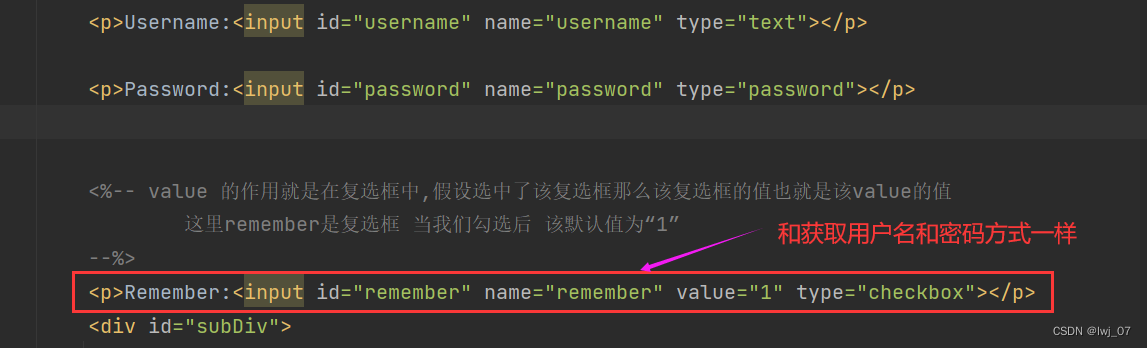
<%-- value The function of is in the check box , Assuming that the check box is selected, the value of the check box is the value Value
here remember It's a check box When we check The default value is “1”
--%>
<p>Remember:<input id="remember" name="remember" value="1" type="checkbox"></p>
<div id="subDiv">
<input type="submit" class="button" value="login up">
<input type="reset" class="button" value="reset">
<a href="register.html"> There is no account ?</a>
</div>
</form>
</div>
</body>
</html>

LoginServlet:
After the user logs in successfully , Judge whether the user has clicked remember me , Click and send Cookie Data to the client browser , If you don't click, you can execute the login function normally , Just didn't send Cookie It's just data
package com.itheima.web;
import com.itheima.pojo.User;
import com.itheima.service.UserService;
import javax.servlet.ServletException;
import javax.servlet.annotation.WebServlet;
import javax.servlet.http.*;
import java.io.IOException;

@WebServlet("/loginServlet")
public class LoginServlet extends HttpServlet {
        @Override
        protected void doGet(HttpServletRequest request, HttpServletResponse response) throws ServletException, IOException {
            // 1、 Receive client user name and password
            String username =request.getParameter("username");
            String password =request.getParameter("password");

            //  Get checkbox data
            String remember =request.getParameter("remember");

            // 2、 call service Layer to query
            UserService userService =new UserService();
            User user =userService.login(username,password);

            // 3、 Determine whether the query has a result
            if (user != null){
                //  Judge user Not for null It means the login is successful

                //  Judge whether the user has checked remember me  remember
                //  Here we use :"1".equals(remember)  without remember.equals("1")
                //  To prevent null pointer exceptions   because remember It is possible that the user did not check   by null  Then the comparison will result in a null pointer
                if ("1".equals(remember)){
                    //  Checked , send out Cookie

                    // 1  establish Cookie object
                    Cookie c_username =new Cookie("username",username);
                    Cookie c_password =new Cookie("password",password);
                    //  Set up Cookie How long does the data live on the client
                    c_username.setMaxAge(60*60*24*60);
                    c_password.setMaxAge(60*60*24*60);
                    // 2  send out Cookie
                    response.addCookie(c_username);
                    response.addCookie(c_password);

                }

                // 2.  hold user The queried data is first encapsulated in Session In the domain  ( Data is saved and shared between servers )
                HttpSession httpSession =request.getSession();
                //  Store in Session domain
                httpSession.setAttribute("user",user);

                // 1. Login successful  ( requirement : Dynamically redirect to MVC Adding, deleting, modifying and querying commodities based on the three-tier structure :SelectAllServlet Query all resources )
                String path =request.getContextPath();
                response.sendRedirect(path+"/selectAllServlet");

            } else {
                //  Login failed
                //  Save the error message to request In the domain   Forward to login.jsp
                request.setAttribute("login_msg"," Wrong user name or password ");
                //  Jump to the logged in login.jsp page
                request.getRequestDispatcher("/login.jsp").forward(request,response);
            }

        }
        @Override
        protected void doPost(HttpServletRequest request, HttpServletResponse response) throws ServletException, IOException {
            this.doGet(request, response);
        }
    }
client / The browser carries the encapsulated user name and password Cookie data :

obtain Cookie data :(EL expression )

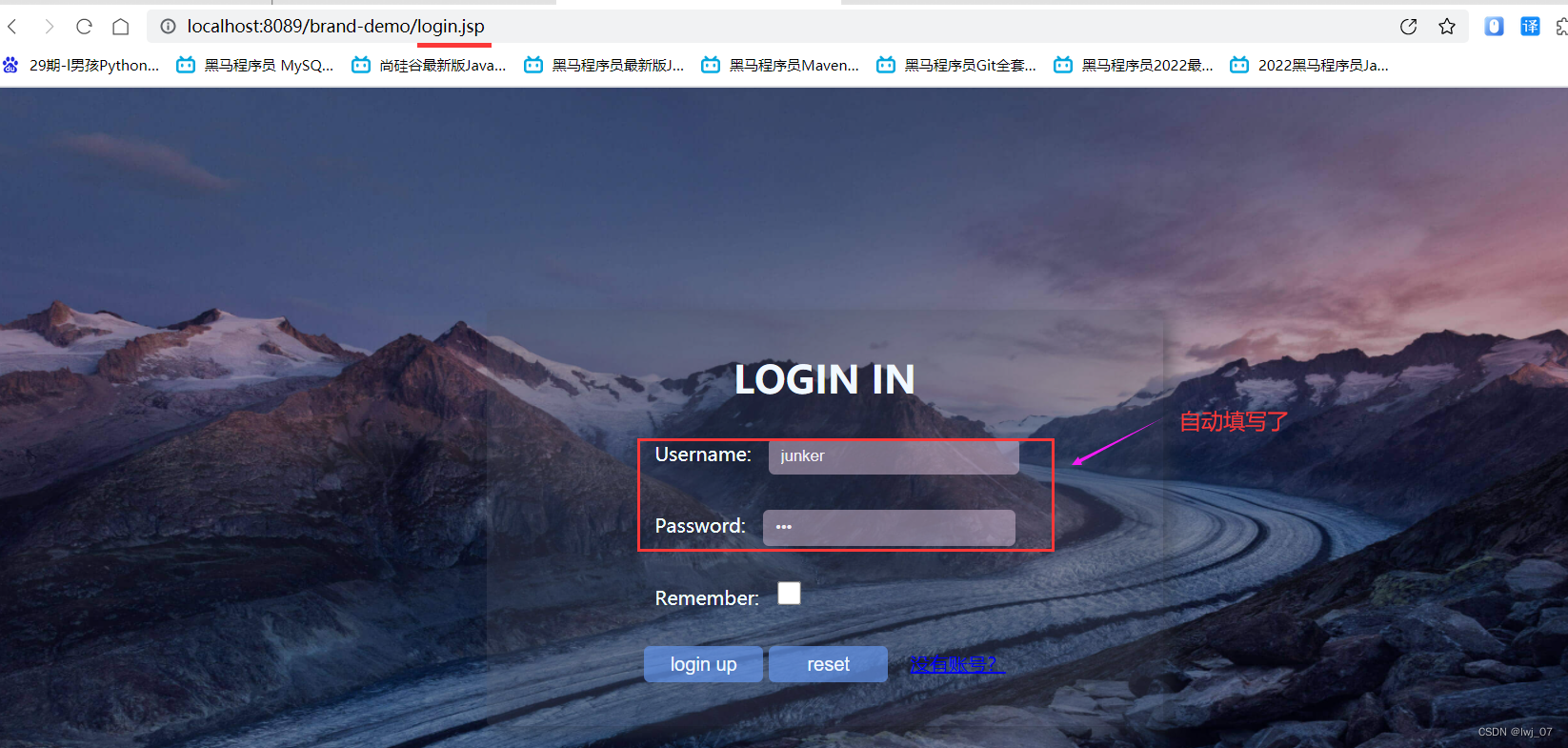
For example, the browser has already logged in once , That is to say, it carries Cookie Encapsulated data :

At this point we login.jsp adopt EL Expression to get the username and password data :
<%@ page contentType="text/html;charset=UTF-8" isELIgnored="false" language="java" %>
<!DOCTYPE html>
<html lang="en">
<head>
<meta charset="UTF-8">
<title>login</title>
<link href="css/login.css" rel="stylesheet">
</head>
<body>
<div id="loginDiv" style="height: 350px">
<form action="/brand-demo/loginServlet" id="form">
<h1 id="loginMsg">LOGIN IN</h1>
<div id="errorMsg">${login_msg}</div>
<%--${login_msg} Is that we are LoginServlet After login failure under resource, forward to login Page handle
The login page is displayed to the user , And save the forwarding time to request Data in the domain ( Wrong user name or password ) take
To be displayed on the login page ${login_msg}:EL expression Take the data stored in the domain
--%>
<p>Username:<input id="username" name="username" value="${cookie.username.value}" type="text"></p>
<p>Password:<input id="password" name="password" value="${cookie.password.value}" type="password"></p>
<%-- value The function of is in the check box , Assuming that the check box is selected, the value of the check box is the value Value
here remember It's a check box When we check The default value is “1”
--%>
<p>Remember:<input id="remember" name="remember" value="1" type="checkbox"></p>
<div id="subDiv">
<input type="submit" class="button" value="login up">
<input type="reset" class="button" value="reset">
<a href="register.html"> There is no account ?</a>
</div>
</form>
</div>
</body>
</html>

We will visit again login.jsp Page will help us automatically fill in the user name and password :
3、 ... and 、 User registration
register.jsp:
<%@ page contentType="text/html;charset=UTF-8" isELIgnored="false" language="java" %>
<!DOCTYPE html>
<html lang="en">
<head>
    <meta charset="UTF-8">
    <title> Welcome to register </title>
    <link href="css/register.css" rel="stylesheet">
</head>
<body>

<div class="form-div">
    <div class="reg-content">
        <h1> Welcome to register </h1>
        <span> There is an account number ?</span> <a href="login.jsp"> Sign in </a>
    </div>
    <form id="reg-form" action="/brand-demo/registerServlet" method="get">

        <table>

            <tr>
                <td> user name </td>
                <td class="inputs">
                    <input name="username" type="text" id="username">
                    <br>
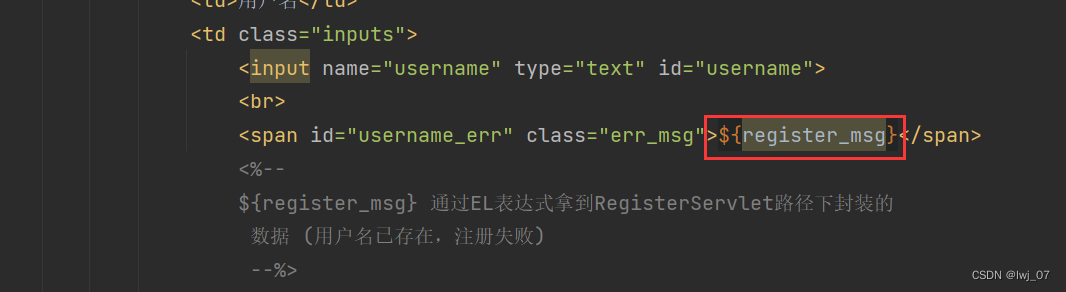
                    <span id="username_err" class="err_msg">${register_msg}</span>
                    <%--
                    ${register_msg}  adopt EL The expression gets RegisterServlet The path is encapsulated and forwarded
                      data  ( User name already exists , Registration failed )
                     --%>
                </td>

            </tr>

            <tr>
                <td> password </td>
                <td class="inputs">
                    <input name="password" type="password" id="password">
                    <br>
                    <span id="password_err" class="err_msg" style="display: none"> The password format is wrong </span>
                </td>
            </tr>

        </table>

        <div class="buttons">
            <input value=" notes   book " type="submit" id="reg_btn">
        </div>
        <br class="clear">
    </form>

</div>
</body>
</html>
RegisterServlet:
package com.itheima.web;
import com.itheima.pojo.User;
import com.itheima.service.UserService;
import javax.servlet.ServletException;
import javax.servlet.annotation.WebServlet;
import javax.servlet.http.HttpServlet;
import javax.servlet.http.HttpServletRequest;
import javax.servlet.http.HttpServletResponse;
import java.io.IOException;

@WebServlet("/registerServlet")
public class RegisterServlet extends HttpServlet {
    @Override
    protected void doGet(HttpServletRequest request, HttpServletResponse response) throws ServletException, IOException {
        // 1. Get the user name and password registered by the user
        String username =request.getParameter("username");
        String password =request.getParameter("password");

        // 2.  Pass user name
        UserService userService =new UserService();
        User user =userService.register_u(username);


        // 3.  Judge the of query user Whether the object is null   Not for null This indicates that the user has been queried   Description has been registered
        if (user !=null){
            //  The user already exists , Description registration failed
            //  After registration failure , Also jump to the registration page
            request.setAttribute("register_msg"," User name already exists , Registration failed ");
            request.getRequestDispatcher("/register.jsp").forward(request,response);
        }else {
            //  The user doesn't exist , Encapsulate into User Data in object insert Register in the database
            User user1 =new User();
            user1.setUsername(username);
            user1.setPassword(password);
            userService.register_i(user1);

            //  After successful registration , Go to the login page
            request.setAttribute("register_msg"," Registered successfully , Please log in ");// Data stored in request domain
            request.getRequestDispatcher("/login.jsp").forward(request,response);
        }
    }
    @Override
    protected void doPost(HttpServletRequest request, HttpServletResponse response) throws ServletException, IOException {
        this.doGet(request, response);
    }
}
UserServlet:
package com.itheima.service;
import com.itheima.mapper.UserMapper;
import com.itheima.pojo.User;
import com.itheima.util.SqlSessionFactoryUtils;
import org.apache.ibatis.session.SqlSession;
import org.apache.ibatis.session.SqlSessionFactory;

/**
 *   Business logic layer
 */

public class UserService {

    SqlSessionFactory Factory =SqlSessionFactoryUtils.getSqlSessionFactory();
    /**
     *   Login method
     */
    public User login(String username,String password){

        // 1.  obtain SqlSession
        SqlSession sqlSession =Factory.openSession();
        UserMapper userMapper =sqlSession.getMapper(UserMapper.class);
        // 2.  call UserMapper Interface to query users and passwords
        User user =userMapper.select(username,password);
        // 3.  Release resources
        sqlSession.close();
        return user;
    }

    /**
     *   Registration method
     *  1  First, query the database through the user name passed by the user to determine whether there is such a user
     */
    // 1.  obtain SqlSession
    public User register_u(String username){
        SqlSession sqlSession =Factory.openSession();
        UserMapper userMapper =sqlSession.getMapper(UserMapper.class);
        // 2.  call UserMapper Interface query user method
        User user =userMapper.selectByUsername(username);
        // 3.  Release resources
        sqlSession.close();
        return user;
    }

    /**
     *  Registration method
     * 2  When the user does not exist   The user name and password registered by the user insert Add to the database
     *   Be careful : Don't forget to commit
     */
    public void register_i(User user){
        SqlSession sqlSession =Factory.openSession();
        UserMapper userMapper =sqlSession.getMapper(UserMapper.class);
        // 2.  call UserMapper Interface query user method
        userMapper.add(user);

        sqlSession.commit();    //  Commit transaction
        // 3.  Release resources
        sqlSession.close();

    }

}
login.jsp:
<%@ page contentType="text/html;charset=UTF-8" isELIgnored="false" language="java" %>
<!DOCTYPE html>
<html lang="en">
<head>
<meta charset="UTF-8">
<title>login</title>
<link href="css/login.css" rel="stylesheet">
</head>
<body>
<div id="loginDiv" style="height: 350px">
<form action="/brand-demo/loginServlet" id="form">
<h1 id="loginMsg">LOGIN IN</h1>
<div id="errorMsg">${login_msg} ${register_msg}</div>
<%--
${login_msg} Is that we are LoginServlet After login failure under resource, forward to login Page handle
The login page is displayed to the user , And save the forwarding time to request Data in the domain ( Wrong user name or password ) take
To be displayed on the login page ${login_msg}:EL expression Take the data stored in the domain
${register_msg} Get is RegisterServlet Resources are encapsulated in request The data in the domain is forwarded
( Registered successfully , Please log in ) Displayed on the login page
--%>
<p>Username:<input id="username" name="username" value="${cookie.username.value}" type="text"></p>
<p>Password:<input id="password" name="password" value="${cookie.password.value}" type="password"></p>
<%-- value The function of is in the check box , Assuming that the check box is selected, the value of the check box is the value Value
here remember It's a check box When we check The default value is “1”
--%>
<p>Remember:<input id="remember" name="remember" value="1" type="checkbox"></p>
<div id="subDiv">
<input type="submit" class="button" value="login up">
<input type="reset" class="button" value="reset">
<a href="register.html"> There is no account ?</a>
</div>
</form>
</div>
</body>
</html>

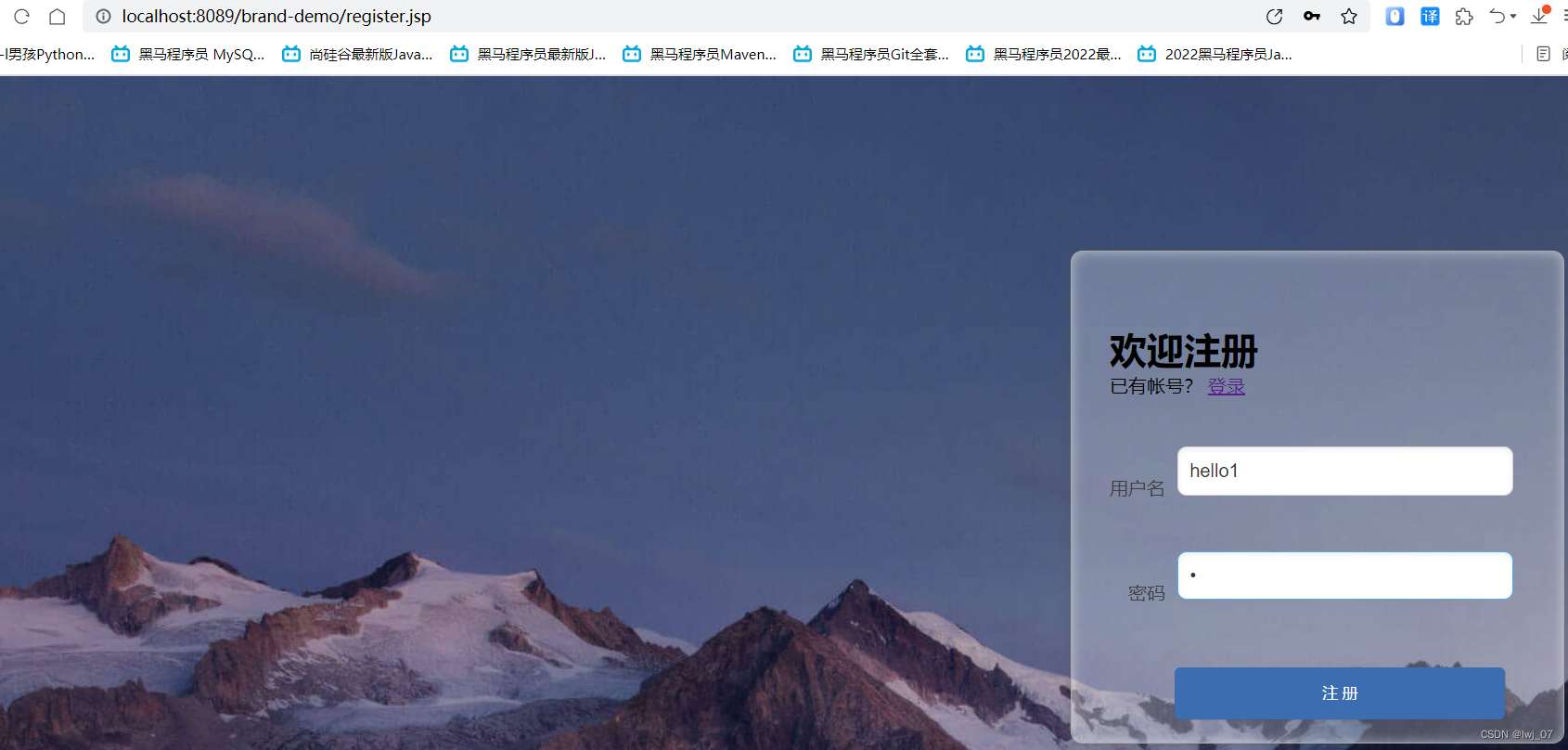
Result demonstration :
When the user already exists :


When the user does not exist :

Four 、 Verification Code Exhibition & check

Display of verification code :
The code is as follows :
Verification code tool class :

package com.itheima.util;
import javax.imageio.ImageIO;
import java.awt.*;
import java.awt.geom.AffineTransform;
import java.awt.image.BufferedImage;
import java.io.*;
import java.util.Arrays;
import java.util.Random;

/**
 *  Generate captcha tool class
 */
public class CheckCodeUtil {

    public static final String VERIFY_CODES = "123456789ABCDEFGHIJKLMNOPQRSTUVWXYZ";
    private static Random random = new Random();


    public static void main(String[] args) throws IOException {
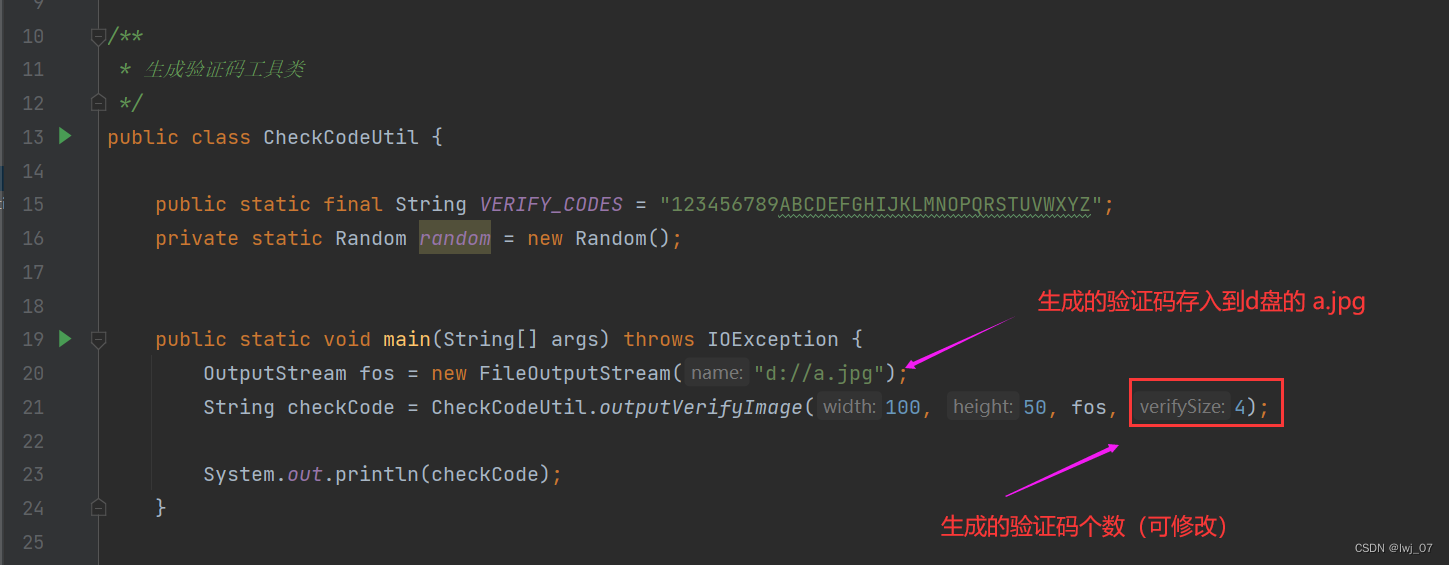
        OutputStream fos = new FileOutputStream("d://a.jpg");
        String checkCode = CheckCodeUtil.outputVerifyImage(100, 50, fos, 4);

        System.out.println(checkCode);
    }


    /**
     *  Output random verification code picture stream , And return the verification code value ( Generally, the input and output streams , Respond to response Page side ,Web The project uses more )
     *
     * @param width  Image width
     * @param height  Picture height
     * @param os   Output stream
     * @param verifySize  Data length
     * @return  Verification code data
     * @throws IOException
     */
    public static String outputVerifyImage(int width, int height, OutputStream os, int verifySize) throws IOException {
        String verifyCode = generateVerifyCode(verifySize);
        outputImage(width, height, os, verifyCode);
        return verifyCode;
    }

    /**
     *  Use the system default character source to generate the verification code
     *
     * @param verifySize  Length of verification code
     * @return
     */
    public static String generateVerifyCode(int verifySize) {
        return generateVerifyCode(verifySize, VERIFY_CODES);
    }

    /**
     *  Generate the verification code using the specified source
     *
     * @param verifySize  Length of verification code
     * @param sources     Verify source of codeword
     * @return
     */
    public static String generateVerifyCode(int verifySize, String sources) {
        //  The word code of the display source is not set , Assign default uppercase letters + Numbers
        if (sources == null || sources.length() == 0) {
            sources = VERIFY_CODES;
        }
        int codesLen = sources.length();
        Random rand = new Random(System.currentTimeMillis());
        StringBuilder verifyCode = new StringBuilder(verifySize);
        for (int i = 0; i < verifySize; i++) {
            verifyCode.append(sources.charAt(rand.nextInt(codesLen - 1)));
        }
        return verifyCode.toString();
    }

    /**
     *  Generate random verification code file , And return the verification code value  ( Generate picture form , Use less )
     *
     * @param w
     * @param h
     * @param outputFile
     * @param verifySize
     * @return
     * @throws IOException
     */
    public static String outputVerifyImage(int w, int h, File outputFile, int verifySize) throws IOException {
        String verifyCode = generateVerifyCode(verifySize);
        outputImage(w, h, outputFile, verifyCode);
        return verifyCode;
    }


    /**
     *  Generate the specified captcha image file
     *
     * @param w
     * @param h
     * @param outputFile
     * @param code
     * @throws IOException
     */
    public static void outputImage(int w, int h, File outputFile, String code) throws IOException {
        if (outputFile == null) {
            return;
        }
        File dir = outputFile.getParentFile();
        // file does not exist
        if (!dir.exists()) {
            // establish
            dir.mkdirs();
        }
        try {
            outputFile.createNewFile();
            FileOutputStream fos = new FileOutputStream(outputFile);
            outputImage(w, h, fos, code);
            fos.close();
        } catch (IOException e) {
            throw e;
        }
    }

    /**
     *  Output the specified captcha picture stream
     *
     * @param w
     * @param h
     * @param os
     * @param code
     * @throws IOException
     */
    public static void outputImage(int w, int h, OutputStream os, String code) throws IOException {
        int verifySize = code.length();
        BufferedImage image = new BufferedImage(w, h, BufferedImage.TYPE_INT_RGB);
        Random rand = new Random();
        Graphics2D g2 = image.createGraphics();
        g2.setRenderingHint(RenderingHints.KEY_ANTIALIASING, RenderingHints.VALUE_ANTIALIAS_ON);

        //  Create a color set , Use java.awt Class under package
        Color[] colors = new Color[5];
        Color[] colorSpaces = new Color[]{Color.WHITE, Color.CYAN,
                Color.GRAY, Color.LIGHT_GRAY, Color.MAGENTA, Color.ORANGE,
                Color.PINK, Color.YELLOW};
        float[] fractions = new float[colors.length];
        for (int i = 0; i < colors.length; i++) {
            colors[i] = colorSpaces[rand.nextInt(colorSpaces.length)];
            fractions[i] = rand.nextFloat();
        }
        Arrays.sort(fractions);
        //  Set border color
        g2.setColor(Color.GRAY);
        g2.fillRect(0, 0, w, h);

        Color c = getRandColor(200, 250);
        //  Set background color
        g2.setColor(c);
        g2.fillRect(0, 2, w, h - 4);

        //  Draw interference line
        Random random = new Random();
        //  Set the color of the line
        g2.setColor(getRandColor(160, 200));
        for (int i = 0; i < 20; i++) {
            int x = random.nextInt(w - 1);
            int y = random.nextInt(h - 1);
            int xl = random.nextInt(6) + 1;
            int yl = random.nextInt(12) + 1;
            g2.drawLine(x, y, x + xl + 40, y + yl + 20);
        }

        //  Add noise
        //  Noise rate
        float yawpRate = 0.05f;
        int area = (int) (yawpRate * w * h);
        for (int i = 0; i < area; i++) {
            int x = random.nextInt(w);
            int y = random.nextInt(h);
            //  Get random colors
            int rgb = getRandomIntColor();
            image.setRGB(x, y, rgb);
        }
        //  Add picture distortion
        shear(g2, w, h, c);

        g2.setColor(getRandColor(100, 160));
        int fontSize = h - 4;
        Font font = new Font("Algerian", Font.ITALIC, fontSize);
        g2.setFont(font);
        char[] chars = code.toCharArray();
        for (int i = 0; i < verifySize; i++) {
            AffineTransform affine = new AffineTransform();
            affine.setToRotation(Math.PI / 4 * rand.nextDouble() * (rand.nextBoolean() ? 1 : -1), (w / verifySize) * i + fontSize / 2, h / 2);
            g2.setTransform(affine);
            g2.drawChars(chars, i, 1, ((w - 10) / verifySize) * i + 5, h / 2 + fontSize / 2 - 10);
        }

        g2.dispose();
        ImageIO.write(image, "jpg", os);
    }

    /**
     *  Random color
     *
     * @param fc
     * @param bc
     * @return
     */
    private static Color getRandColor(int fc, int bc) {
        if (fc > 255) {
            fc = 255;
        }
        if (bc > 255) {
            bc = 255;
        }
        int r = fc + random.nextInt(bc - fc);
        int g = fc + random.nextInt(bc - fc);
        int b = fc + random.nextInt(bc - fc);
        return new Color(r, g, b);
    }

    private static int getRandomIntColor() {
        int[] rgb = getRandomRgb();
        int color = 0;
        for (int c : rgb) {
            color = color << 8;
            color = color | c;
        }
        return color;
    }

    private static int[] getRandomRgb() {
        int[] rgb = new int[3];
        for (int i = 0; i < 3; i++) {
            rgb[i] = random.nextInt(255);
        }
        return rgb;
    }

    private static void shear(Graphics g, int w1, int h1, Color color) {
        shearX(g, w1, h1, color);
        shearY(g, w1, h1, color);
    }

    private static void shearX(Graphics g, int w1, int h1, Color color) {

        int period = random.nextInt(2);

        boolean borderGap = true;
        int frames = 1;
        int phase = random.nextInt(2);

        for (int i = 0; i < h1; i++) {
            double d = (double) (period >> 1)
                    * Math.sin((double) i / (double) period
                    + (6.2831853071795862D * (double) phase)
                    / (double) frames);
            g.copyArea(0, i, w1, 1, (int) d, 0);
            if (borderGap) {
                g.setColor(color);
                g.drawLine((int) d, i, 0, i);
                g.drawLine((int) d + w1, i, w1, i);
            }
        }

    }

    private static void shearY(Graphics g, int w1, int h1, Color color) {

        int period = random.nextInt(40) + 10; // 50;

        boolean borderGap = true;
        int frames = 20;
        int phase = 7;
        for (int i = 0; i < w1; i++) {
            double d = (double) (period >> 1)
                    * Math.sin((double) i / (double) period
                    + (6.2831853071795862D * (double) phase)
                    / (double) frames);
            g.copyArea(i, 0, 1, h1, 0, (int) d);
            if (borderGap) {
                g.setColor(color);
                g.drawLine(i, (int) d, i, 0);
                g.drawLine(i, (int) d + h1, i, h1);
            }

        }

    }
}
Analyze the tool class :

register.jsp:
<%@ page contentType="text/html;charset=UTF-8" isELIgnored="false" language="java" %>
<!DOCTYPE html>
<html lang="en">
<head>
    <meta charset="UTF-8">
    <title> Welcome to register </title>
    <link href="css/register.css" rel="stylesheet">
</head>
<body>

<div class="form-div">
    <div class="reg-content">
        <h1> Welcome to register </h1>
        <span> There is an account number ?</span> <a href="login.jsp"> Sign in </a>
    </div>
    <form id="reg-form" action="/brand-demo/registerServlet" method="get">

        <table>

            <tr>
                <td> user name </td>
                <td class="inputs">
                    <input name="username" type="text" id="username">
                    <br>
                    <span id="username_err" class="err_msg">${register_msg}</span>
                    <%--
                    ${register_msg}  adopt EL The expression gets RegisterServlet Path
                      data  ( User name already exists , Registration failed )
                     --%>
                </td>

            </tr>

            <tr>
                <td> password </td>
                <td class="inputs">
                    <input name="password" type="password" id="password">
                    <br>
                    <span id="password_err" class="err_msg" style="display: none"> The password format is wrong </span>
                </td>
            </tr>

            <tr>
                <td> Verification Code </td>
                <td class="inputs">
                    <input name="checkCode" type="text" id="checkCode">
                    <img id="checkCodeImg" src="/brand-demo/checkCodeServlet">
                    <a href="#" id="changeImg"> Can't see ?</a>
                </td>
            </tr>


        </table>

        <div class="buttons">
            <input value=" notes   book " type="submit" id="reg_btn">
        </div>
        <br class="clear">
    </form>
</div>

<script>
    /*  I can't see clearly ? Add click event   That is to say, you can't see clearly every time you click ?  Will jump back to /brand-demo/checkCodeServlet
    *    Remember to add a timestamp    Because there is a cache condition
    * */
    document.getElementById("changeImg").onclick =function (){
        document.getElementById("checkCodeImg").src ="/brand-demo/checkCodeServlet?"+new Date().getMilliseconds();
    }
</script>
</body>
</html>

CheckCodeServlet:
The role of this resource : Generate randomly on the page 4 Digit verification code ( The number of digits can be modified )
package com.itheima.web;

import com.itheima.util.CheckCodeUtil;

import javax.servlet.ServletException;
import javax.servlet.ServletOutputStream;
import javax.servlet.annotation.WebServlet;
import javax.servlet.http.HttpServlet;
import javax.servlet.http.HttpServletRequest;
import javax.servlet.http.HttpServletResponse;
import java.io.IOException;

@WebServlet("/checkCodeServlet")
public class CheckCodeServlet extends HttpServlet {
        @Override
        protected void doGet(HttpServletRequest request, HttpServletResponse response) throws ServletException, IOException {

            /**
            *      Generate verification code
            *         Access through paths   Displayed on the registration page  ( Back number 4  Represents the number of verification codes   Modifiable )
            */
            ServletOutputStream os =response.getOutputStream();
            String checkCode = CheckCodeUtil.outputVerifyImage(100, 50, os, 4);

        }


        @Override
        protected void doPost(HttpServletRequest request, HttpServletResponse response) throws ServletException, IOException {
            this.doGet(request, response);
        }
}
Turn on server access register.jsp:

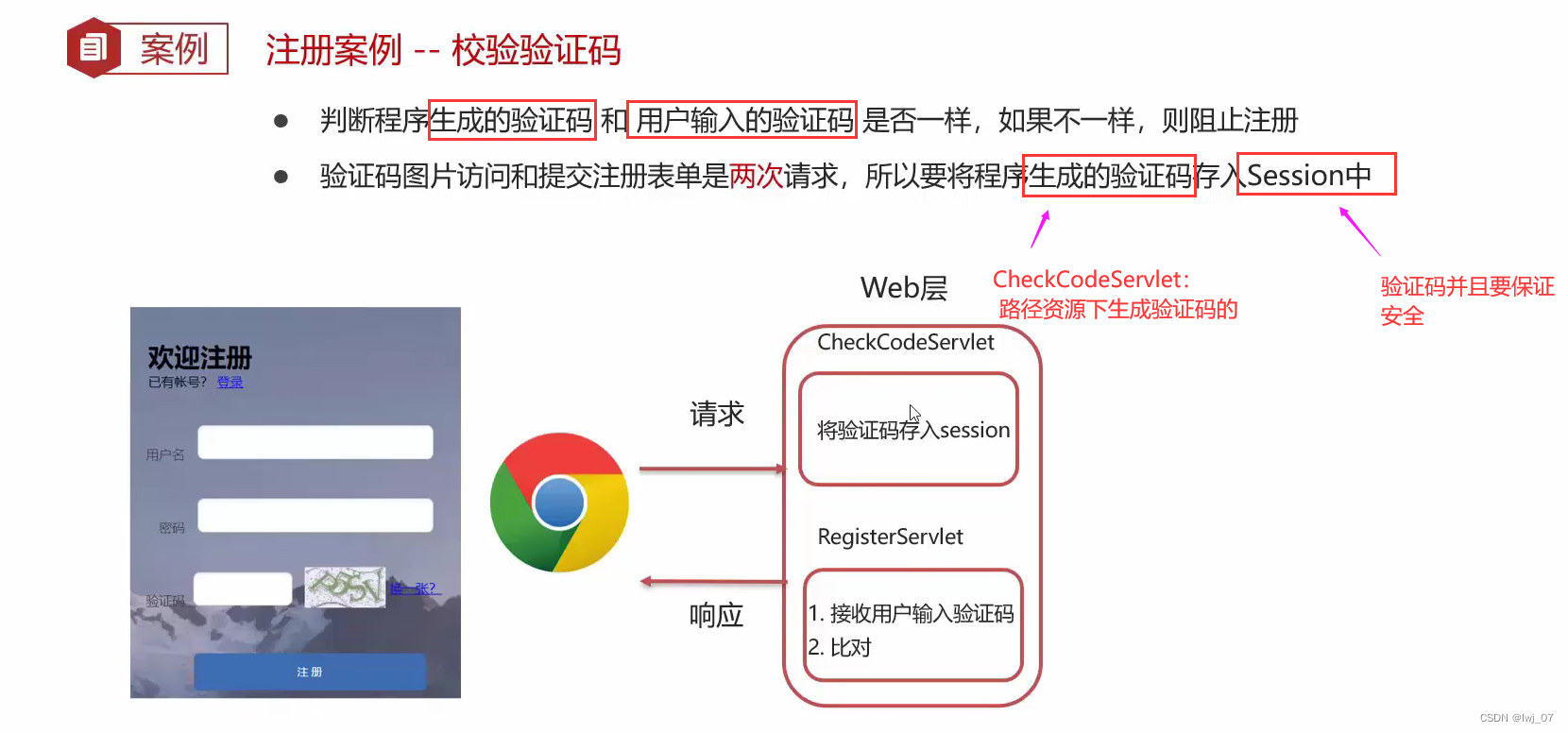
Verification of verification code :
CheckCodeServlt:
The verification code generated by the program :
Store the verification code generated by the program in Session domain ( Resource sharing between servers )
package com.itheima.web;
import com.itheima.util.CheckCodeUtil;
import javax.servlet.ServletException;
import javax.servlet.ServletOutputStream;
import javax.servlet.annotation.WebServlet;
import javax.servlet.http.HttpServlet;
import javax.servlet.http.HttpServletRequest;
import javax.servlet.http.HttpServletResponse;
import javax.servlet.http.HttpSession;
import java.io.IOException;

@WebServlet("/checkCodeServlet")
public class CheckCodeServlet extends HttpServlet {
        @Override
        protected void doGet(HttpServletRequest request, HttpServletResponse response) throws ServletException, IOException {

            //  The program randomly generates the verification code
            ServletOutputStream os =response.getOutputStream();
            String checkCode = CheckCodeUtil.outputVerifyImage(100, 50, os, 4);

            //  Store the verification code randomly generated by the program into Session domain  ( It is used to compare with the verification code entered by the user )
            HttpSession session =request.getSession();
            session.setAttribute("checkCodeGen",checkCode);

        }


        @Override
        protected void doPost(HttpServletRequest request, HttpServletResponse response) throws ServletException, IOException {
            this.doGet(request, response);
        }
}
RegisterServlet:( Look at the code carefully There are details )
package com.itheima.web;
import com.itheima.pojo.User;
import com.itheima.service.UserService;
import javax.servlet.ServletException;
import javax.servlet.annotation.WebServlet;
import javax.servlet.http.HttpServlet;
import javax.servlet.http.HttpServletRequest;
import javax.servlet.http.HttpServletResponse;
import javax.servlet.http.HttpSession;
import java.io.IOException;

@WebServlet("/registerServlet")
public class RegisterServlet extends HttpServlet {
    @Override
    protected void doGet(HttpServletRequest request, HttpServletResponse response) throws ServletException, IOException {
        // 1. Get the user name and password registered by the user
        String username =request.getParameter("username");
        String password =request.getParameter("password");

        //  Get the verification code entered by the user
        String checkCode =request.getParameter("checkCode");

        //  Get the verification code randomly generated by the program     ( according to key Get value )
        HttpSession session =request.getSession();
        // Object Type conversion to String type  ( The user input is String type   Turn into String comparing )
        String checkCodeGen = (String) session.getAttribute("checkCodeGen");

        //  Compare before registration   If the verification code is not correct, there is no need to judge the next code   Judge the of query user Whether the object is null 了
        //  The verification code generated by the program will certainly not be null  So the comparison is put in the front   effect : Prevent null pointer exception
        // equalsIgnoreCase :  Is a case insensitive comparison method  ( Generally, the verification code does not need to compare case )
        if (!checkCodeGen.equalsIgnoreCase(checkCode)){
            request.setAttribute("register_msg"," Verification code error ");
            request.getRequestDispatcher("/register.jsp").forward(request,response);
            return; //  Just end the code
        }


        // 2.  Pass user name
        UserService userService =new UserService();
        User user =userService.register_u(username);


        // 3.  Judge the of query user Whether the object is null   Not for null This indicates that the user has been queried   Description has been registered
        if (user !=null){
            //  The user already exists , Description registration failed
            //  After registration failure , Also jump to the registration page
            request.setAttribute("register_msg"," User name already exists , Registration failed ");
            request.getRequestDispatcher("/register.jsp").forward(request,response);
        }else {
            //  The user doesn't exist , Encapsulate into User Data in object insert Register in the database
            User user1 =new User();
            user1.setUsername(username);
            user1.setPassword(password);
            userService.register_i(user1);

            //  After successful registration , Go to the login page
            request.setAttribute("register_msg"," Registered successfully , Please log in ");// Data stored in request domain
            request.getRequestDispatcher("/login.jsp").forward(request,response);
        }
    }
    @Override
    protected void doPost(HttpServletRequest request, HttpServletResponse response) throws ServletException, IOException {
        this.doGet(request, response);
    }
}
register.jsp:
<%@ page contentType="text/html;charset=UTF-8" isELIgnored="false" language="java" %>
<!DOCTYPE html>
<html lang="en">
<head>
    <meta charset="UTF-8">
    <title> Welcome to register </title>
    <link href="css/register.css" rel="stylesheet">
</head>
<body>

<div class="form-div">
    <div class="reg-content">
        <h1> Welcome to register </h1>
        <span> There is an account number ?</span> <a href="login.jsp"> Sign in </a>
    </div>
    <form id="reg-form" action="/brand-demo/registerServlet" method="post">

        <table>

            <tr>
                <td> user name </td>
                <td class="inputs">
                    <input name="username" type="text" id="username">
                    <br>
                    <span id="username_err" class="err_msg" >${register_msg}</span>

                    <%--
                    ${register_msg}  adopt EL The expression gets RegisterServlet The path is encapsulated and forwarded
                      data  ( User name already exists , Registration failed )
                     --%>

                </td>

            </tr>

            <tr>
                <td> password </td>
                <td class="inputs">
                    <input name="password" type="password" id="password">
                    <br>
                    <span id="password_err" class="err_msg" style="display: none"> The password format is wrong </span>
                </td>
            </tr>


            <tr>
                <td> Verification Code </td>
                <td class="inputs">
                    <input name="checkCode" type="text" id="checkCode">
                    <img id="checkCodeImg" src="/brand-demo/checkCodeServlet">
                    <a href="#" id="changeImg" > Can't see ?</a>
                </td>
            </tr>

        </table>

        <div class="buttons">
            <input value=" notes   book " type="submit" id="reg_btn">
        </div>
        <br class="clear">
    </form>

</div>

<script>

    /*  I can't see clearly ? Add click event   That is to say, you can't see clearly every time you click ?  Will jump back to /brand-demo/checkCodeServlet
    *    Remember to add a timestamp    Because there is a cache condition
    * */

    document.getElementById("changeImg").onclick = function () {
        document.getElementById("checkCodeImg").src = "/brand-demo/checkCodeServlet?"+new Date().getMilliseconds();
    }

</script>
</body>
</html>
Turn on server access register.jsp:


边栏推荐
- var、let、const 三者的区别
- Reprint: VTK notes - clipping and segmentation - irregular closed loop clipping -vtkselectpolydata class (black mountain old demon)
- Xiaobai's e-commerce business is very important to choose the right mall system!
- Comparison between winding process and lamination process
- Es6:let, const, arrow functions
- Install MySQL on Windows platform (with Navicat premium 12 "using" tutorial)
- 每日一题: 数组中数字出现的次数
- 点击劫持:X-Frame-Options未配置
- 每日一题:数组中数字出现的次数2
- sql入门
猜你喜欢
Baidu online disk login verification prompt: unable to access this page, or the QR code display fails, the pop-up window shows: unable to access this page, ensure the web address....

每日一题:数组中数字出现的次数2
How the slip ring motor works

单机多实例MYSQL主从复制

卷绕工艺与叠片工艺的对比
![[Gym 102423]-Elven Efficiency | 思维](/img/cf/b65f3db1580a83478f8351cea22040.png)
[Gym 102423]-Elven Efficiency | 思维

Redis是什么

Matrix compression
旋转接头安装使用注意事项

11.目标分割
随机推荐
Is it safe to open an account on great wisdom
FATAL ERROR: Could not find ./ bin/my_ print_ Solutions to defaults
[image denoising] matlab code for removing salt and pepper noise based on fast and effective multistage selective convolution filter
Reference materials in the process of using Excel
每日一题:消失的数字
EditText监听焦点
MapReduce case
12. object detection mask RCNN
Easy to use free ppt template
6.28 学习内容
Operation level smart campus system source code smart campus applet source code + electronic class card + face recognition system
[gym 102423]-elven efficiency | thinking
养老年金险是理财产品吗?预期收益在哪看?
ES6:let、const、箭头函数
单机多实例MYSQL主从复制
[image detection] recognition of the front and back of a coin based on texture features with matlab code attached
be based on. NETCORE development blog project starblog - (13) add friendship link function
mysql 8.0以上报2058 解决方式
Sampling with VerilogA module
旋转接头安装使用注意事项