当前位置:网站首页>An idea of solving div adapting to screen
An idea of solving div adapting to screen
2022-07-25 19:25:00 【@I don't know you】
Preface
A small component that simply wrote a verification code because of work needs before vue Add canvas Generate verification code , Pictured 
At the beginning, the screen is 1920 * 1080 The developers did not consider adaptation , So there are a lot of problems .
1、 When dragging the browser , The browser is not full screen 
2、 The computer display is not 100%, Instead, the recommended size , Generally, the default size is the recommended size , Cause the computer is not 100%
3、 Computers are not at all 1920 * 1080 Of , For example, some old computers are 1366 * 768 , I remember that little broken computer I bought in college is like this .
solve
There are many ways online 、, But there is no solution for big factories , Later, I came across an article using zoom To solve the
Basic knowledge of
window.screen
Get information about the user screen , You can get some content 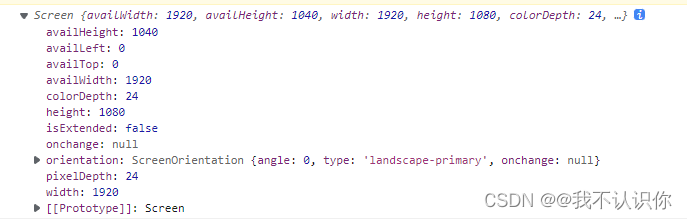
width、height、 Is the size of the current display at the current resolution ,availWidth、availHeight Is the usable size ( Generally, the size of the toolbar is removed )
next
window.outerHeight;// The outer frame width of the browser
window.outerWidth;// The browser frame is high
window.innerWidth;// The inner frame width of the browser ( It is usually consistent with the outer frame width , Turn on F12 When , Remove the space occupied by developer tools )
window.innerHeight;// The inner frame of the browser is high ( Remove label bar , Address bar , Favorites bar, etc )
Solve the problem of resolution and scaling size
Take a look at different resolutions and zoom sizes window.screen Will your information change
The following is done when only one variable changes .
Screen press 125% Show 
You can see that the information has changed ,1920/1520 be equal to 1.25, It just corresponds to the magnification .1520/1920 be equal to 0.8, This is what we need to use scale Function to enlarge the scale
The screen resolution is 1600 * 900
Solve the problem of browser size change
browser 125% Show window.screen The value of will not change , We can go through window.outerWidth and window.innerWidth To get
window.outerWidth/window.innerWidth=1.25,window.innerWidth/window.outerWidth=0.8
adopt resize To determine whether the browser window has changed , The browser will execute when zooming or dragging .
window.addEventListener('resize', () => {

    console.log(" Changed the ")
})
Code
adjustWindow (dom) {

      //  Get screen parameters
      let screen = window.screen;
      //  Screen scale
      let screenZoom = screen.width / 1920;
      //  Window scale
      let windowZoom = window.innerWidth / window.outerWidth;
      //  Here we need to consider whether the browser is full screen
      if(screen.width > window.outerWidth) {

          //  At this time, the browser is not full
          windowZoom = window.outerWidth / screen.width;
      }
      //  Retain 3 Decimal place
      let zoom = parseFloat((screenZoom * windowZoom).toFixed(3));
      //  change dom Of style
      dom.style.zoom = zoom;


      //  Listen for changes in the window
      window.addEventListener('resize', () => {

          //  Screen scale
          screenZoom = screen.width / 1920;
          //  Window scale
          windowZoom = window.innerWidth / window.outerWidth;
          //  Here we need to consider whether the browser is full screen
          if(screen.width > window.outerWidth) {

              //  At this time, the browser is not full
              windowZoom = window.outerWidth / screen.width;
          }
          //  Keep three decimal places
          zoom = parseFloat((screenZoom * windowZoom).toFixed(3));
          //  change dom Of style
          dom.style.zoom = zoom;
      });
  }
problem :
In full screen mode : The scale is in 50~150 It can be displayed normally
In the non full screen state :100 It can be displayed normally
Basically, it can meet the normal use , If you randomly change the zoom ratio, it is not a display problem , But you are deliberately finding fault .
CSS Medium zoom Properties and scale Usage and differences of attributes
zoom attribute
grammar :
- The default value is :normal
- Apply to : All the elements
- inheritance : Yes
Value :
- normal: Use the actual size of the object .
- Use floating point numbers to define scaling . Negative value not allowed
- Use percentage to define the scale . Negative value not allowed
explain :
Set or retrieve the scaling of an object . The corresponding script feature is zoom.
Scale attribute
scale(x,y) Scaling elements
- X Represents a multiple of horizontal scaling Y Represents the scaling factor in the vertical direction
- Y Is an optional parameter , If it's not set up , said X,Y The scaling times are the same in both directions . And X Subject to .
scaleX() The element is only in the X Axis ( horizontal direction ) Zoom elements
- The default value is 1, The base point is usually at the center of the element . Can pass
transform-originTo change the base point
scaleY() The element is only in the Y Axis ( vertical direction ) Zoom elements
The base point is at the center of the element . Can pass transform-origin To change the base point .
zoom and scale Of . difference
zoom and scale Both of these things are used to scale elements , But there are some differences between the two in addition to compatibility .zoom Scaling keeps the element in the upper left corner , and scale The default is the middle position , Can pass transform-origin To set up . In addition, the rendering order they perform is also different zoom It may affect the calculation of the box .
边栏推荐
- 哪吒 D1-H 测试 microbench
- Huawei recruited "talented teenagers" twice this year; 5.4 million twitter account information was leaked, with a selling price of $30000; Google fired engineers who believed in AI consciousness | gee
- Fearless of high temperature and rainstorm, how can Youfu network protect you from worry?
- Fruit chain "siege": it's a journey of sweetness and bitterness next to apples
- Common development software download addresses
- Introduction of this course (Introduction to machine learning)
- JS learning notes 17: DOM query exercise
- 【阅读笔记】《深度学习》第一章:引言
- telnet安装以及telnet(密码正确)无法登录!
- JS 基本类型 引用类型 深/浅克隆复制
猜你喜欢

The degree of interval of basic music theory

聊聊接口性能优化的11个小技巧

Leetcode skimming: dynamic programming 07 (different binary search trees)
基础乐理之音程的度数

Monitor MySQL based on MySQL exporter

Hongmeng - Damiao computing Sketchpad - Introduction
鸿蒙-大喵计算画板-简介

小程序毕设作品之微信校园维修报修小程序毕业设计成品(8)毕业设计论文模板

聊聊sql优化的15个小技巧

JS basic type reference type deep / shallow clone copy
随机推荐
GBASE 8s UDR内存管理_01_mi_alloc
QIIME2得到PICRUSt2结果后如何分析
The second "future Cup" knowledge map championship was officially launched
ERROR: role “admin“ cannot be dropped because some objects depend on itDETAIL:
Selenium 设置元素等待的三种方式详解
Have you ever seen this kind of dynamic programming -- the stock problem of state machine dynamic programming (Part 1)
【DETR用于3D目标检测】3DETR: An End-to-End Transformer Model for 3D Object Detection
Wechat campus maintenance and repair applet graduation design finished product of applet completion work (4) opening report
Talk about 15 tips of SQL optimization
小程序毕设作品之微信校园维修报修小程序毕业设计成品(7)中期检查报告
Wechat campus maintenance application applet graduation design finished product of applet completion work (3) background function
哪吒 D1-H 测试 microbench
Real estate enterprises have launched a "war of guarantee"
600000 pieces of data are made from March 1 to March 31. Videodate requires starting time from 00:00 to 24:00 on March 1 to 31, which is only for notes
小程序毕设作品之微信校园维修报修小程序毕业设计成品(2)小程序功能
The finished product of wechat campus maintenance and repair applet graduation design (1) development outline
ERROR: role “admin“ cannot be dropped because some objects depend on itDETAIL:
平衡二叉树
【小程序开发】宿主环境详解
Youth, oh, youth