当前位置:网站首页>WinDbg practice -- Introduction
WinDbg practice -- Introduction
2022-07-23 20:56:00 【A Sheng】
WinDbg It literally means Windows+Debug The combination of , namely Windows Debugging tools on the platform , You can debug user mode 、 Kernel mode 、dump Documents, etc. , In short, it's OK to know that its debugging function is very powerful .WinDbg Debugging commands are divided into 3 Kind of , They are basic commands 、 Metacommand and extension commands . The basic and meta commands come with the debugger , Meta command always takes "." start , The extension command always takes "!" start . The following series is mainly through examples + Command to practice WinDbg.
One . Configure Microsoft symbol server [ Failed to succeed ]
WinDbg stay Windows In the program , There is usually an and XXX.exe Of the same name XXX.pdb,pdb The whole competition is Program Debug Database.pdb It has its own file format , It mainly contains debugging information , This file is a symbol file generated by the linker . Symbol server [Symbol Server] It is essentially a file server , It centrally stores the symbols to be debugged , So just put WinDbg Point to the symbol server to resolve the symbol name . The common symbol server is Microsoft's symbol server , namely http://msdl.microsoft.com/download/symbols, This is debugging Windows Applications and Windows Kernel programs are essential . Of course, you can also build your own symbol server .
1.WinDbg Default setting path
File -> Settings -> Debugging settings, Default source path 、 The symbol path and cache path are as follows : 
2. Set up _NT_SYMBOL_PATH environment variable
Set up _NT_SYMBOL_PATH The value of the environment variable is SRV*D:\mysymbol*https://msdl.microsoft.com/download/symbols:  stay WinDbg Middle execution command !sym noisy[ Display detailed loading information ] and .reload /f[ Load symbols ] as follows :
  From the above figure, we can see the problem of network connection . article [6] Talk about setting proxy Talent , Set up _NT_SYMBOL_PROXY The value of the environment variable is 127.0.0.1:19180:
  Follow the instructions proxy Also set and open , perform .reload /f The command is still wrong , And no solution can be found online . open https://msdl.microsoft.com/download/symbols The tips are as follows :
  explain : In short, no one can download data from Microsoft's symbol server , And there is no effective solution on the Internet . Because I can't use this for the time being , Let's end it like this , There are informed partners who can share the solution .
Two .WinDbg Common commands
1. command .cls
Input .cls Empty Command The contents of the window : 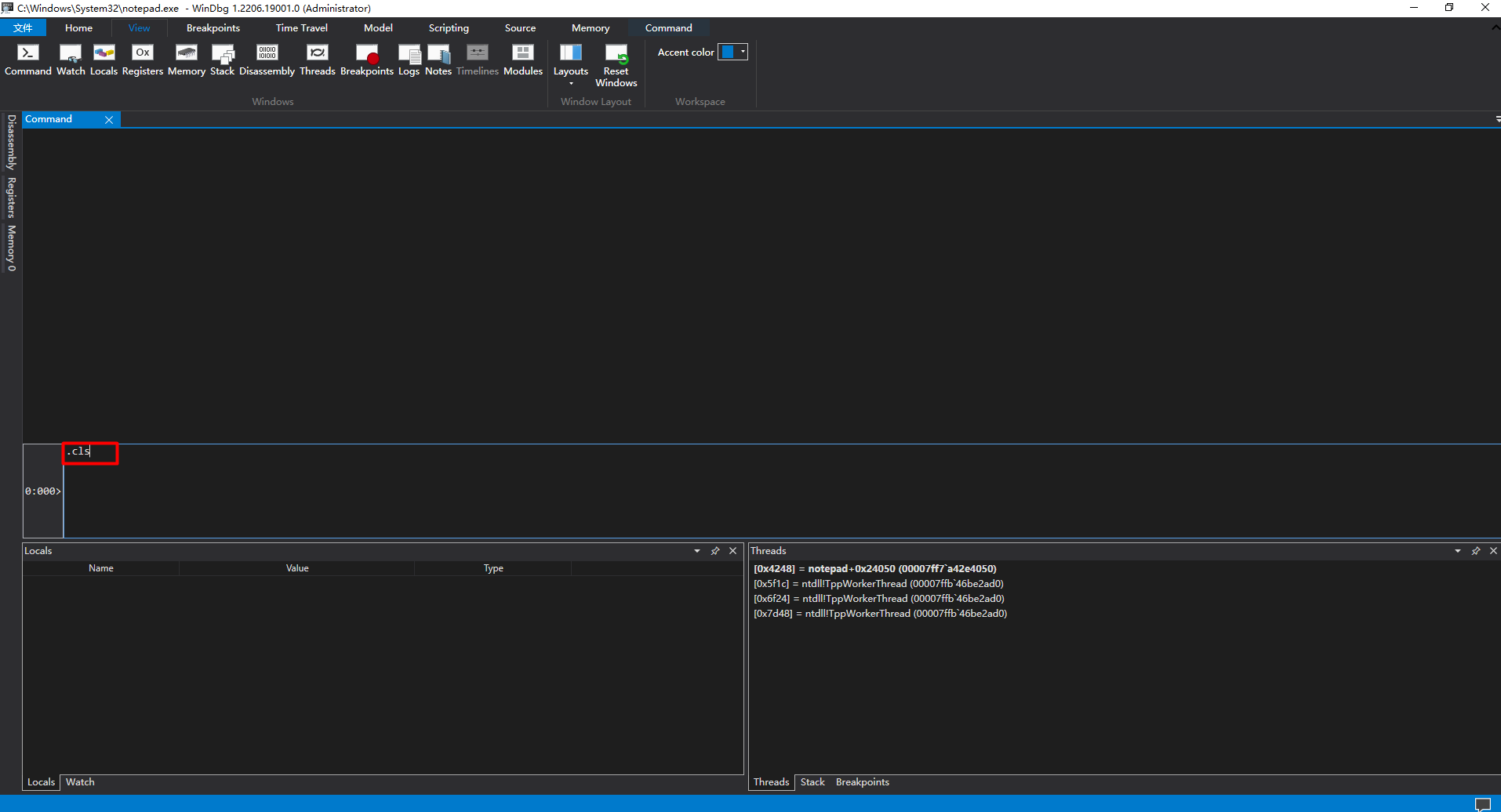
2. command version
Use version Command to view version information : 
3. command vertarget
Use vertarget Command to view the version information of the target computer : 
4. command lm
Use lm View module information : 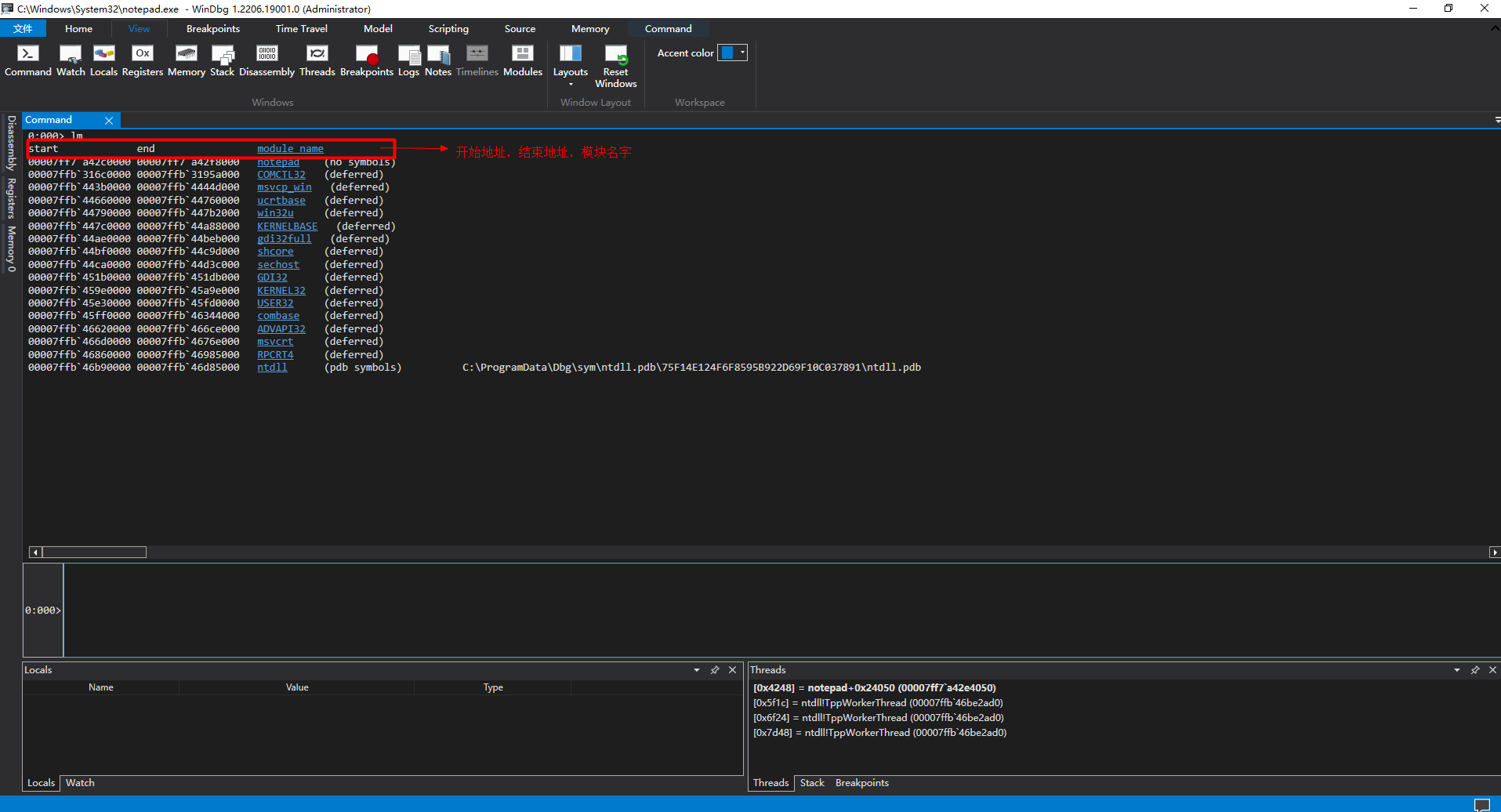 It mainly displays the module name , Module start address , Module end address , Module path and other information .
5. command !dlls
Use !dlls Command to view module information : 
6. command .process
Use .process Display current process information : 
7. command .thread
Use .thread Display current thread information : 
8. command !peb
Use !peb The command displays the process environment block information : 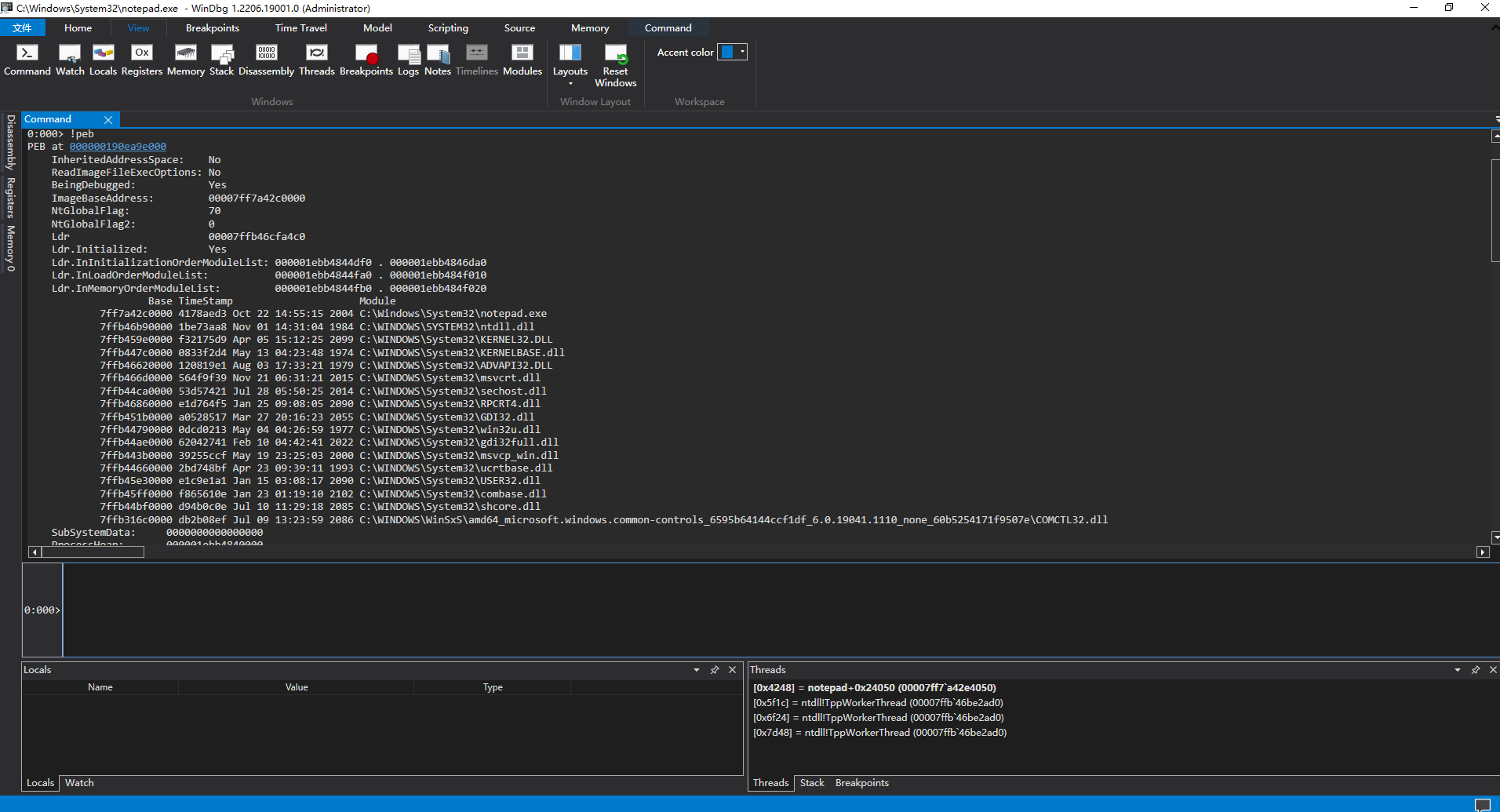
9. command !teb
Use !teb Command displays thread environment block information : 
10. command !address -summary
Use !address -summary The command displays content address summary information : 
11. command .sympath
Use .sympath View the current symbol search path and other information : 
3、 ... and . Use WinDbg open notepad.exe
WinDbg There are many ways to start debugging , Here we use the method of opening executable file : 
 Use WinDbg open notepad.exe after ,Command The window shows the following :
 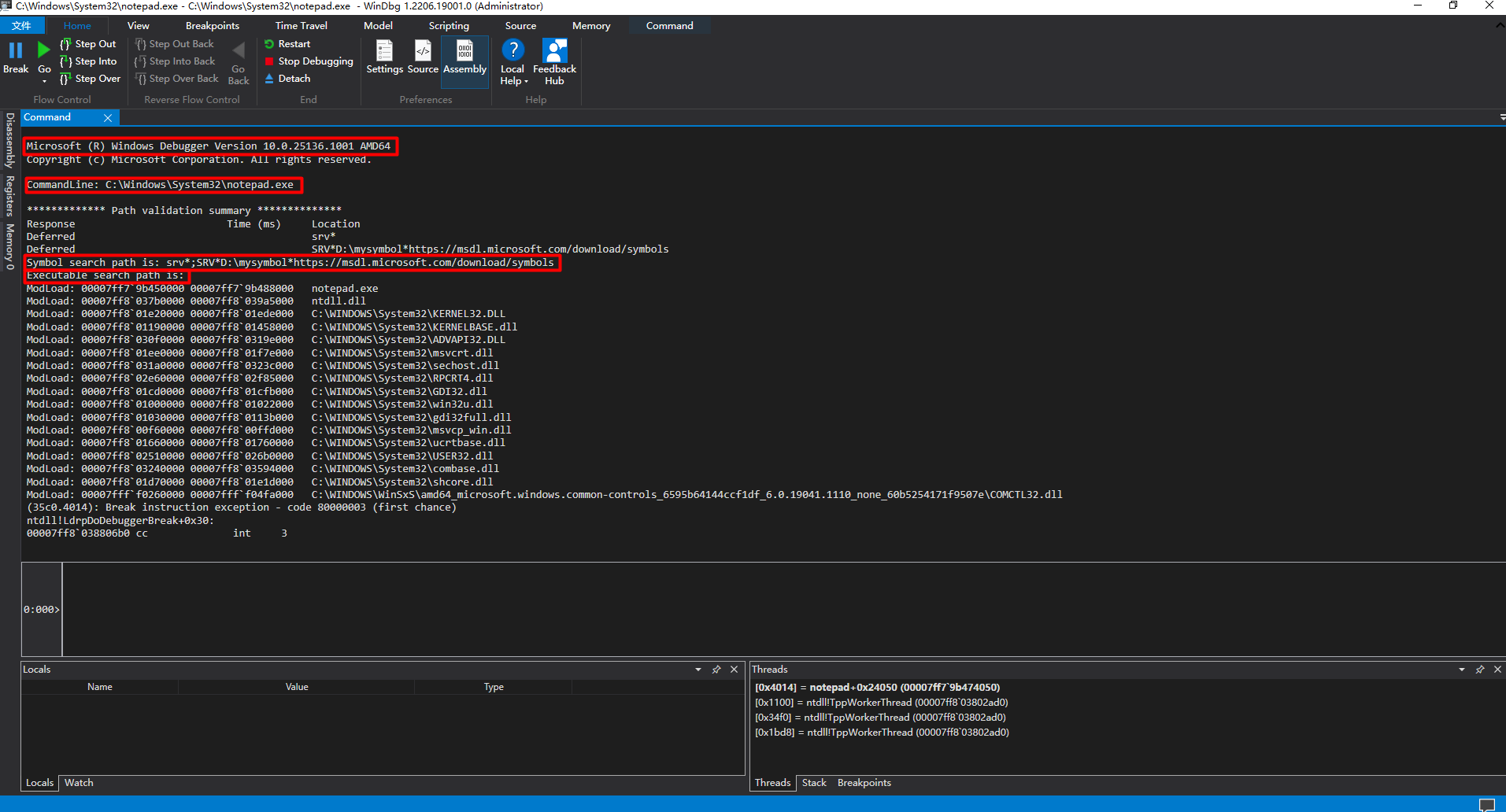 Main display Windows Debugger edition , Executable file path , Symbol search path and other information .
Four ..NET explore a mystery :MSIL Authoritative guide
A good and old book recommended today is 《.NET explore a mystery :MSIL Authoritative guide 》, This book is written with .NET2.0 Based on , It's interpretation MSIL The authoritative works of , Interested partners can download [12]. We need to put it in the back WinDbg Operation and MSIL Practice is integrated into daily .NET Software development , To improve the security of the software .
reference :
[1]WinDbg User mode debugging tutorial :https://bbs.pediy.com/thread-34379.htm
[2]Windbg Novice guide to the pit :https://www.52pojie.cn/thread-924116-1-1.html
[3]Windbg Debug command details :http://yiiyee.cn/blog/2013/08/23/windbg/
[4]WinDbg Usage details :https://wenku.baidu.com/view/ca16ec6a306c1eb91a37f111f18583d049640fdc.html
[5]Good tutorial for WinDbg:https://stackoverflow.com/questions/4946685/good-tutorial-for-windbg
[6]WinDbg Set debug symbol path and debug symbol download :https://blog.csdn.net/qq_41252520/article/details/123095105
[7]dotnet/symreader-portable:https://github.com/dotnet/symreader-portable
[8] Build your own symbol server :https://bbs.pediy.com/thread-262537.htm
[9]Windows Debugging tools :https://docs.microsoft.com/zh-cn/windows-hardware/drivers/debugger/
[10]WinDbg Online Help:http://www.dbgtech.net/windbghelp/index.html
[11]WinDbg Official documents :http://www.windbg.org/
[12].NET explore a mystery :MSIL Authoritative guide :https://url39.ctfile.com/f/2501739-623685565-48209f?p=2096 ( Access password : 2096)
边栏推荐
- 【着色器实现RoundWave圆形波纹效果_Shader效果第六篇】
- 手机股票开户安全吗?
- Identify some positions in the parenthesis sequence
- Jetson nano recording stepping on the pit (it will definitely solve your problem)
- OpenLayers实例-Advanced Mapbox Vector Tiles-高级Mapbox矢量贴图
- OpenLayers实例-Animated GIF-GIF动画
- 2022.7.11 MySQL job
- CDR插件开发之Addon插件002 - 用1分钟编写一个可双击运行的EXE程序
- Cesium 事件详解(鼠标事件、相机事件、键盘事件、场景触发事件)
- 1309_STM32F103上增加GPIO的翻转并用FreeRTOS调度测试
猜你喜欢

OOM机制

Read the five flow indicators of R & D efficiency insight

Chapter 3 business function development (creating clues)

Unity解决动画不可用:The AnimationClip ‘XXX‘ used by the Animation component ‘XXX‘ must be marked as Legacy.

TROPOMI(哨兵5P)数据介绍及下载方法

Today's sleep quality record 81 points

MySQL(3)

If the order is not paid within 30 minutes, it will be automatically cancelled

Addon plug-in 002 of CDR plug-in development - write an EXE program that can be run by double clicking in 1 minute
![[continuous update] collection of raspberry pie startup and failure series](/img/f3/706a625cdc214960e2d9ca0c7ea41c.jpg)
[continuous update] collection of raspberry pie startup and failure series
随机推荐
游戏服务器中的排行榜设计
KubeVela离线安装
最小生成树:Prim
[continuous update] collection of raspberry pie startup and failure series
从哪些维度评判代码质量的好坏?如何具备写出高质量代码的能力?
HDU - 2586 How far away ?(倍增LCA)
如何在面试中介绍自己的项目经验
STM32c8t6驱动激光雷达(一)
初识js(适合新手的编程)
高数下|二重积分的计算4|高数叔|手写笔记
【云享读书会第13期】第四章 音频文件的封装格式和编码格式
Detailed explanation of MSTP protocol for layer 3 switch configuration [Huawei ENSP experiment]
LU_ Asr01 voice module usage
CDR插件开发之Addon插件002 - 用1分钟编写一个可双击运行的EXE程序
"Pulse" to the future! Huawei cloud Mrs helps smooth migration to the cloud
第3章业务功能开发(创建线索)
OpenLayers实例-Accessible Map-可访问的地图
现在完全不知道怎么同步
[cloud co creation] what magical features have you encountered when writing SQL every day?
三层交换机配置MSTP协议详解【华为eNSP实验】