当前位置:网站首页>[shutter] shutter resource file use (import resource pictures | use image resources)
[shutter] shutter resource file use (import resource pictures | use image resources)
2022-07-02 22:05:00 【Programmer community】
List of articles
- One 、Flutter Import resource pictures
- Two 、Flutter Use resource pictures
- 3、 ... and 、 Complete code example
- Four 、 Related resources
One 、Flutter Import resource pictures
Flutter Resource path configuration : The resource path is in the root directory pubspec.yaml Configuration in profile ;
take flutter Node under assets The comment of the node opens , That is to delete the previous # Annotation symbols ;
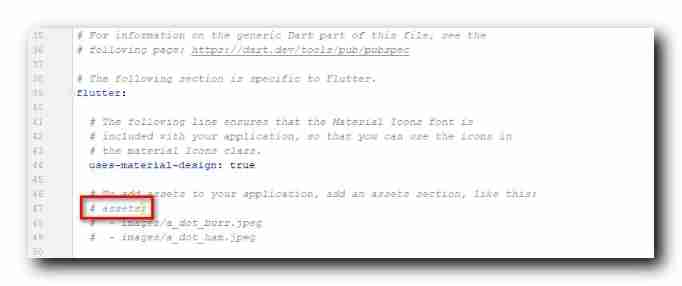
And then in flutter Project root creation images Catalog , The picture hunter.png Copy to this images Directory ;
And in pubspec.yaml Profile's assets Under node configuration - images/hunter.png Information ;
# The following section is specific to Flutter.flutter: # The following line ensures that the Material Icons font is # included with your application, so that you can use the icons in # the material Icons class. uses-material-design: true # To add assets to your application, add an assets section, like this: assets: - images/hunter.pngAnd then you can go in flutter This file is used in the project ;
The following figure shows the directory structure of the resource file and the configuration information in the configuration file ;
Import resource picture styles :

Two 、Flutter Use resource pictures
Image Use resource images in components , In its image Fields use AssetImage Type of picture is enough ;
Code example : Set up a 200 x 200 The size of Image Components , Show images/hunter.png Resource pictures ;
Image( width: 200, height: 200, image: AssetImage("images/hunter.png"),)3、 ... and 、 Complete code example
Complete code example :
import 'package:flutter/material.dart';class ResourcePage extends StatefulWidget {
      @override  _ResourcePageState createState() => _ResourcePageState();}class _ResourcePageState extends State<ResourcePage> {
      @override  Widget build(BuildContext context) {
        return MaterialApp(      title: " Resource file usage ",      theme: ThemeData(primarySwatch: Colors.blue),      home: Scaffold(        appBar: AppBar(          title: Text(" Resource file usage "),          leading: GestureDetector(            onTap: (){
                  Navigator.pop(context);            },            child: Icon(Icons.arrow_back_ios),          ),        ),        body: Container(          //  centered           alignment: Alignment.center,          //  Vertical linear layout           child: Column(            mainAxisAlignment: MainAxisAlignment.center,            children: <Widget>[              Image(                width: 200,                height: 200,                image: AssetImage("images/hunter.png"),              )            ],          ),        ),      ),    );  }}
Running effect :

Four 、 Related resources
Reference material :
- Flutter Official website : https://flutter.dev/
- Flutter Developing documents : https://flutter.cn/docs ( Strongly recommend )
- official GitHub Address : https://github.com/flutter
- Flutter The Chinese community : https://flutter.cn/
- Flutter Practical tutorial : https://flutter.cn/docs/cookbook
- Flutter CodeLab : https://codelabs.flutter-io.cn/
- Dart Chinese document : https://dart.cn/
- Dart Developer website : https://api.dart.dev/
- Flutter Chinese net ( unofficial , The translation is very good ) : https://flutterchina.club/ , http://flutter.axuer.com/docs/
- Flutter Related issues : https://flutterchina.club/faq/ ( It is recommended to watch it at the introductory stage )
Blog source download :
GitHub Address : https://github.com/han1202012/flutter_cmd ( Keep updating with the progress of the blog , There may not be the source code of this blog )
Blog source snapshot : https://download.csdn.net/download/han1202012/15539996 ( The source code snapshot of this blog , You can find the source code of this blog )
边栏推荐
- Five message formats of OSPF
- About test cases
- D4:非成对图像去雾,基于密度与深度分解的自增强方法(CVPR 2022)
- Summary of the first week of summer vacation
- 攻防世界pwn题:Recho
- Reading experience of just because
- Daily book -- analyze the pain points of software automation from simple to deep
- The web version of xshell supports FTP connection and SFTP connection [detailed tutorial] continued from the previous article
- Gbase 8s database basic syntax
- Jar package startup failed -mysql modify the default port number / set password free enter
猜你喜欢

How do I access the kubernetes API?
Secondary development of ANSYS APDL: post processing uses command flow to analyze the result file

Basic IO interface technology - microcomputer Chapter 7 Notes
Scrcpy this software solves the problem of sharing mobile screen with colleagues | community essay solicitation
The difference between include < > and include ""

Etcd raft protocol

地理探测器原理介绍

LightGBM原理及天文数据中的应用

From personal heroes to versatile developers, the era of programmer 3.0 is coming
How to write a good program when a big book speaks every day?
随机推荐
Image segmentation using pixellib
服务可见可观测性
System (hierarchical) clustering method and SPSS implementation
Official announcement! The golden decade of new programmers and developers was officially released
Error in PIP installation WHL file: error: is not a supported wheel on this platform
Sql service intercepts string
What is it that makes you tremble? Those without fans can learn
Pyqt picture decodes and encodes and loads pictures
Oriental Aesthetics and software design
Gbase8s database type
Ransack组合条件搜索实现
一周生活
PIP version update timeout - download using domestic image
VictoriaMetrics 简介
Bridge emqx cloud data to AWS IOT through the public network
如何访问kubernetes API?
基本IO接口技术——微机第七章笔记
MySQL learning record (8)
Five message formats of OSPF
Technical solution of vision and manipulator calibration system