当前位置:网站首页>Quickly build a real-time face mask detection system in five minutes (opencv+paddlehub with source code)
Quickly build a real-time face mask detection system in five minutes (opencv+paddlehub with source code)
2022-06-25 08:14:00 【Color Space】
Reading guide
This article mainly introduces how to use OpenCV and PaddleHub Realize a real-time face mask detection system .( official account :OpenCV And AI Deep learning )
Background introduction
from 19 The epidemic broke out in and now , It is normal for everyone to wear masks . There are many related applications , Such as virus development prediction 、 Mask wearing detection and face recognition with mask .
The face mask wearing detection system introduced today mainly uses OpenCV And Baidu feijiang (PaddlePaddle) Of PaddleHub Detection model provided .PaddleHub It provides many practical models , Including image processing 、 word processing 、 Audio processing 、 Video processing and industrial applications .github Address :https://github.com/PaddlePaddle/PaddleHub

Face mask detection
The model of face detection part is as follows :

The two models in the red box support face mask detection , Choose here pyramidbox_lite_server_mask, Detailed implementation steps :
【1】 install PaddlePaddle、PaddleHub and OpenCV(opencv-python)
pip install paddlepaddle -i https://pypi.tuna.tsinghua.edu.cn/simple --trusted-host https://pypi.tuna.tsinghua.edu.cnpip install paddlehub -i https://pypi.tuna.tsinghua.edu.cn/simple --trusted-host https://pypi.tuna.tsinghua.edu.cnpip install opencv-python -i https://pypi.tuna.tsinghua.edu.cn/simple --trusted-host https://pypi.tuna.tsinghua.edu.cnVersion used in this article :
PaddlePaddle---2.3.0
PaddleHun---2.2.0
opencv-python---4.6.0.66
Be careful : install PaddlePaddle There may be some problems , Lead to import paddle Failure , You can search for solutions according to the error information .
【2】 Picture face mask detection
Prepare the map to be measured , Run the following code , Modify the image path :
import paddlehub as hub
import cv2

mask_detector = hub.Module(name="pyramidbox_lite_server_mask")
img_path = './imgs/A0.png'
img = cv2.imread(img_path)

input_dict = {"data": [img]}
result = mask_detector.face_detection(data=input_dict)

count = len(result[0]['data'])
if count < 1:
  print('There is no face detected!')
else:
  for i in range(0,count):

    #print(result[0]['data'][i])
    label = result[0]['data'][i].get('label')
    score = float(result[0]['data'][i].get('confidence'))
    x1 = int(result[0]['data'][i].get('left'))
    y1 = int(result[0]['data'][i].get('top'))
    x2 = int(result[0]['data'][i].get('right'))
    y2 = int(result[0]['data'][i].get('bottom'))
    cv2.rectangle(img,(x1,y1),(x2,y2),(255,200,0),2)
    if label == 'NO MASK':
      cv2.putText(img,label,(x1,y1),0,0.8,(0,0,255),2)
    else:
      cv2.putText(img,label,(x1,y1),0,0.8,(0,255,0),2)

cv2.imwrite('result.jpg',img)
cv2.imshow('mask-detection', img)
cv2.waitKey()
cv2.destroyAllWindows()
print('Done!')
The first time the code starts, the corresponding model will be downloaded to the following location :
C:\Users\xxx\.paddlehub\modules, No more downloads in the future

Test chart 1:

Running results :

Test chart 2:

Running results :
Test chart 3:

Running results :

Test chart 4:

Running results :

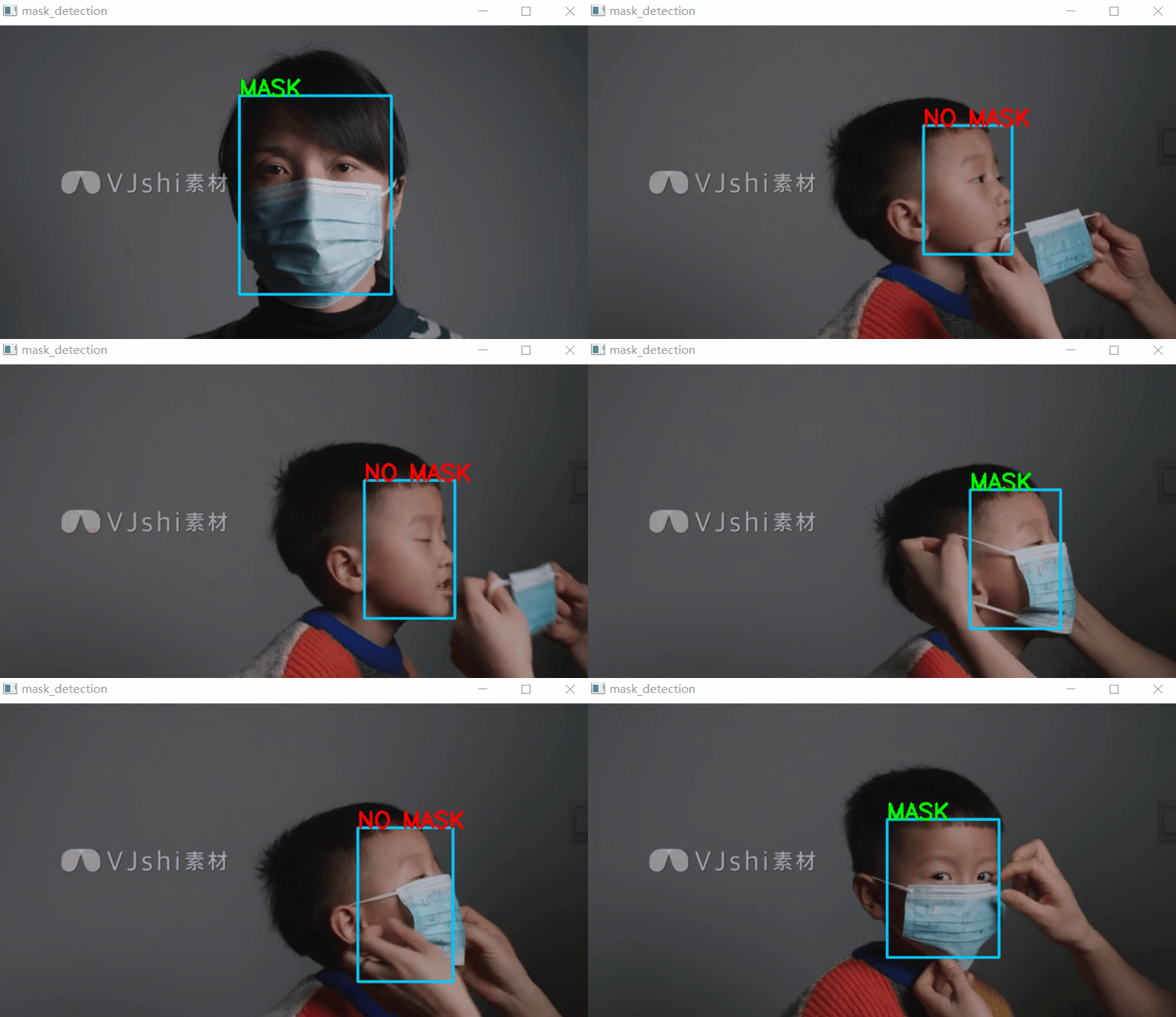
From the above test results , It's not bad !
【3】 Video or camera real-time face mask detection
Prepare to test the video or directly open the camera to detect , Select the corresponding code :
cap = cv2.VideoCapture('2.mp4') # Video file detection# cap = cv2.VideoCapture(0) # Camera detection
Complete code :
import paddlehub as hub
import cv2

mask_detector = hub.Module(name="pyramidbox_lite_server_mask")

def mask_detecion(img):
  input_dict = {"data": [img]}
  result = mask_detector.face_detection(data=input_dict)
  count = len(result[0]['data'])
  if count < 1:
    #print('There is no face detected!')
    pass
  else:
    for i in range(0,count):
      #print(result[0]['data'][i])
      label = result[0]['data'][i].get('label')
      score = float(result[0]['data'][i].get('confidence'))
      x1 = int(result[0]['data'][i].get('left'))
      y1 = int(result[0]['data'][i].get('top'))
      x2 = int(result[0]['data'][i].get('right'))
      y2 = int(result[0]['data'][i].get('bottom'))
      cv2.rectangle(img,(x1,y1),(x2,y2),(255,200,0),2)
      if label == 'NO MASK':
        cv2.putText(img,label,(x1,y1),0,0.8,(0,0,255),2)
      else:
        cv2.putText(img,label,(x1,y1),0,0.8,(0,255,0),2)
  return img


if __name__ == '__main__':
  cap = cv2.VideoCapture('2.mp4') # Video file detection
  #cap = cv2.VideoCapture(0) # Camera detection
  if(cap.isOpened()): # Video opened successfully
    while(True):
      ret,frame = cap.read()# Read a frame
      result = mask_detecion(frame)
      cv2.imshow('mask_detection',result)
      if cv2.waitKey(1)&0xFF ==27: # Press down Esc Key to exit
        break
  else:
    print ('open video/camera failed!')
  cap.release()
  cv2.destroyAllWindows()
test result :
download 1:Pytoch Common function manual
stay 「OpenCV And AI depth 」 Back office reply No :Pytorch Function manual , Can learn to download the first copy of the whole network Pytorch Function common manual , Include Tensors Introduce 、 Introduction to basic functions 、 Data processing functions 、 Optimization function 、CUDA Programming 、 Deal with more Wait for Chapter 14 .
download 2:145 individual OpenCV Example application code
stay 「OpenCV And AI thorough 」 Official account back office reply :OpenCV145, Can learn to download 145 individual OpenCV Example application code (Python and C++ Dual language implementation ).
边栏推荐
猜你喜欢

Sword finger offer (medium level)
Electronics: Lesson 010 - Experiment 9: time and capacitors

Stm32cubemx learning (5) input capture experiment
电子学:第012课——实验 13:烧烤 LED

Debugging mipi-dsi screen based on stm32mp157

420 sequence traversal of binary tree 2 (429. sequence traversal of n-ary tree, 515. find the maximum value in each tree row, 116. fill in the next right node pointer of each node, 104. maximum depth

Opencv daily function structure analysis and shape descriptor (8) Fitline function fitting line
TCP stuff

Deep learning series 48:deepfaker

The era of enterprise full cloud -- the future of cloud database
随机推荐
Luogu p1073 [noip2009 improvement group] optimal trade (layered diagram + shortest path)
洛谷P3313 [SDOI2014]旅行(树链+边权转点权)
CVPR 2022 Oral 2D图像秒变逼真3D物体
初体验完全托管型图数据库 Amazon Neptune
[thesis study] vqmivc
【补题】2021牛客暑期多校训练营1-3
FFT【模板】
Luogu p2048 [noi2010] super Piano (rmq+ priority queue)
現在通過開戶經理發的開戶鏈接股票開戶安全嗎?
Authority design of SaaS system based on RBAC
自制坡道,可是真的很香
使用apt-get命令如何安装软件?
Set the textalign property of the label control in C to control the method of text centering
Three Siemens fire-fighting hosts fc18 are equipped with can optical transceiver for optical fiber redundant ring network networking test
What is SKU and SPU? What is the difference between SKU and SPU
企业全面云化的时代——云数据库的未来
什么是SKU和SPU,SKU,SPU的区别是什么
【莫比乌斯反演】
RMQ interval maximum subscript query, interval maximum
双周投融报:资本埋伏Web3基础设施