当前位置:网站首页>C language actual combat guessing game
C language actual combat guessing game
2022-07-26 00:03:00 【Midnight star】
Detailed explanation of the guessing game
Preface
The knowledge involved
1.switch Branch statement
2. The generation of random numbers and the change of seeds
3.do Loop statement
4. Pointer array 
Game design
Basic design logic
In order to realize the guessing game , We simply design the following basic process .
1. Determine the gesture of the computer .
2. Show ” Rock-paper-scissors “ , Then the player inputs his own gesture .
3. Make a win or lose judgment , Show results .
4. Ask if you want to continue , If you want to continue, go back to 1 .
Let's explain how to complete each step one by one :
Determine computer gestures
You can use random numbers to determine computer gestures
Show ” Rock-paper-scissors “, How can players input the gesture they want to make
Show gestures , We'd better use numbers instead of strings , Because strings are prone to input errors . To avoid this kind of mistake , We design stone scissors and cloth as numbers . Such as : stone (0) scissors (1) cloth (2)
Judge , Show results
Let's set the variable human and comp To represent the gestures of players and computers respectively , Then according to the common expression (human - comp +3)% 3 To carry out , If the result is 0 It's a draw ,1 Is the computer victory ,2 Is the player wins
Whether or not to continue
We should use do sentence
Code display :
#include<stdio.h>
#include<time.h>
#include<stdlib.h>
int main()
{

	int human; /* Player's gesture */
	int comp;/* Computer gestures */
	int judge;/* Judging the outcome */
	int retry;/* Do you want to do it again */
	srand(time(NULL));
	puts(" Start the game !");
	do
	{

		comp = rand() % 3;/* Set the gesture of the computer to represent the range of numbers (0~2)*/
		printf("\a\n Rock-paper-scissors ··· stone (0)  scissors (1)  cloth (2):");
		scanf("%d", &human);
		printf(" The computer is :");
		switch (comp)
		{

		case 0:printf(" stone \n"); break;
		case 1:printf(" scissors \n"); break;
		case 2:printf(" cloth \n");   break;
		}
		judge = (human - comp + 3) % 3;
		switch (judge)
		{

		case 0:printf(" We are in a draw !"); break;
		case 1:printf(" You lost !"); break;
		case 2:printf(" You won !"); break;
		}
		printf(" Do you want to do it again ?·· no (0) yes (1)");
		scanf("%d", &retry);
	} while (retry == 1);
	return 0;
}
Let's take a look at the specific operation results :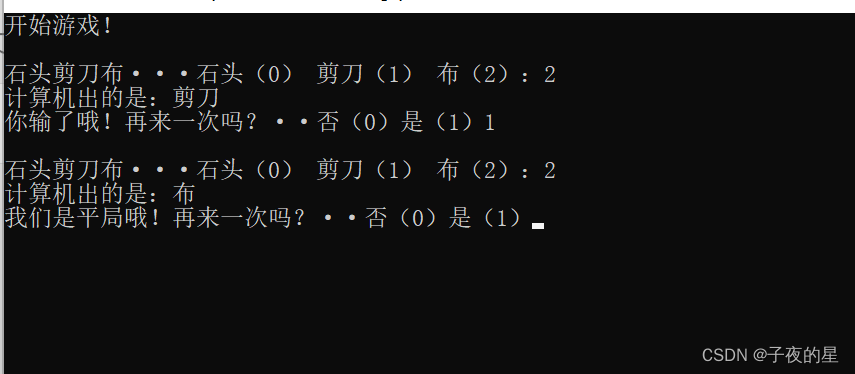
The above code uses branch statements switch
How to better display gestures
The above code only shows the gestures of the computer , No player's gestures are displayed , Such a program is obviously not playable , Next, we will show the player's gestures according to the above idea .
Code display :
#include<stdio.h>
#include<time.h>
#include<stdlib.h>
int main()
{

	int human; /* Player's gesture */
	int comp;/* Computer gestures */
	int judge;/* Judging the outcome */
	int retry;/* Do you want to do it again */
	srand(time(NULL));
	puts(" Start the game !");
	do
	{

		comp = rand() % 3;/* Set the gesture of the computer to represent the range of numbers (0~2)*/
		do
		{

			printf("\a\n Rock-paper-scissors ··· stone (0)  scissors (1)  cloth (2):");
			scanf("%d", &human);
		} while (human < 0 || human>2);/* Display the player's input number , Prevent players from entering randomly */
		printf(" The program is :");
		switch (comp)
		{

		case 0:printf(" stone \n"); break;
		case 1:printf(" scissors \n"); break;
		case 2:printf(" cloth \n");   break;
		}
		printf(" What the players bring out is :");
		switch (human)
		{

		case 0:printf(" stone \n"); break;
		case 1:printf(" scissors \n"); break;
		case 2:printf(" cloth \n");   break;
		}
		judge = (human - comp + 3) % 3;
		switch (judge)
		{

		case 0:printf(" We are in a draw !"); break;
		case 1:printf(" You lost !"); break;
		case 2:printf(" You won !"); break;
		}
		printf(" Do you want to do it again ?·· no (0) yes (1)");
		scanf("%d", &retry);
	} while (retry == 1);
	return 0;
}
Running results :

Although the above code can solve the problem , But the string representing stone scissors and paper should exist as an array , Instead of writing it every time . Let's show the code first .
Code display :
#include<stdio.h>
#include<time.h>
#include<stdlib.h>
int main()
{

	int i;
	int human; /* Player's gesture */
	int comp;/* Computer gestures */
	int judge;/* Judging the outcome */
	int retry;/* Do you want to do it again */
	const char *hd[] = {
     " stone "," scissors "," cloth " }; /* gesture */
	srand(time(NULL));
	puts(" Start the game !");
	do
	{

		comp = rand() % 3;/* Set the gesture of the computer to represent the range of numbers (0~2)*/
		do
		{

			printf(" Rock-paper-scissors ···");
			for (i = 0; i < 3; i++)
			{

				printf("(%d) %s ", i, hd[i]);
			}
			printf(":");
			scanf("%d", &human);
		} while (human < 0 || human>2);
		printf(" Program out %s, Player out %s\n", hd[comp], hd[human]);
		judge = (human - comp + 3) % 3;
		switch (judge)
		{

		case 0:printf(" We are in a draw !"); break;
		case 1:printf(" You lost !"); break;
		case 2:printf(" You won !"); break;
		}
		printf(" Do you want to do it again ?·· no (0) yes (1)");
		scanf("%d", &retry);
	} while (retry == 1);
	return 0;
}
We use an array of pointers to strings , The effect of this writing will be better than two-dimensional array
It is worth mentioning that if we write like this :char *hd [ ]={“ stone ”,“ scissors ”,“ cloth ”} Some of our compilers will report errors , The reason is because : character string “ Rock-paper-scissors ” Is a string constant , It needs to be saved in the global const Memory area , So we should write this way :const char *hd [ ]={“ stone ”,“ scissors ”,“ cloth ”}
Increase the display of the number of wins and losses
With the increase of our functions , We will find that , The program is getting bigger , If all functions are required main Function to complete , Obviously a little too much , So we should use functions , Classify the corresponding functions , This will make the program easier to understand .
Let's take a look at the modified code :
#include<stdio.h>
#include<time.h>
#include<stdlib.h>
int human;/* Player gestures */
int comp;/* Computer gestures */
int win_no;/* Number of victories */
int lose_no;/* Number of failures */
int draw_no;/* The number of draws */

const char* hd[] = {
     " stone "," scissors "," cloth " };

/*--- Initialization treatment ---*/
void initialize()
{

	win_no = 0;
	lose_no = 0;
	draw_no = 0;
	srand(time(NULL));/* Random number seed */
	printf(" The guessing game begins !\n");
}
/*--- Read / Generate gestures ---*/
void jyanken()
{

	int i;
	comp = rand() % 3;/* Random number range */
	do
	{

		printf(" Rock-paper-scissors ···");
		for (i = 0; i < 3; i++)
		{

			printf("(%d) %s ", i, hd[i]);
		}
		printf(":");
		scanf("%d", &human);/* Read player gestures */
	} while (human < 0 || human>2);
}
/*--- Update failed / victory / The number of draws ---*/
void count_no(int result)
{

	switch ( result)
	{

	case 0:draw_no++; break;
	case 1:lose_no++; break;
	case 2:win_no++; break;
	}
}
/*--- Display the judgment result ---*/
void disp_result(int result)
{

	switch (result)
	{

	case 0:puts(" It ends in a draw !"); break;
	case 1:puts(" You failed !"); break;
	case 2:puts(" You won !"); break;
	}
}
/*--- Whether to continue the game ---*/
int confirm_retry()
{

	int x;
	printf(" Do you want to do it again ?··· no (0) yes (1)");
	scanf("%d", &x);
	return x;
}


int main()
{

	int judge = 0;
	int retry = 0;
	initialize();
	do
	{

		jyanken();
		printf(" Program out %s, Player out %s\n", hd[comp], hd[human]);
		judge = (human - comp + 3) % 3;
		count_no(judge);
		disp_result(judge);
		retry = confirm_retry();

	} while (retry == 1);
	printf("%d - %d negative %d flat .\n", win_no, lose_no, draw_no);
	return 0;
}
Operation result display :

So we can write different functions , Will be originally bloated main Functions become easy to understand .
Perfect version of guessing game
In order to make the guessing game more perfect , We have added the function of automatically ending the game by winning three times , In this way, there is no need to ask the player whether to continue .
Add this function , Can better show , We divide the function of a large program into a single function , It is a great help for the later code addition and modification . The smaller functions that divide the functions of large programs , The more times this function can be reused , It will be more convenient for maintaining stability in the later stage !
Code display :
#include<stdio.h>
#include<time.h>
#include<stdlib.h>
int human;/* Player gestures */
int comp;/* Computer gestures */
int win_no;/* Number of victories */
int lose_no;/* Number of failures */
int draw_no;/* The number of draws */

const char* hd[] = {
     " stone "," scissors "," cloth " };

/*--- Initialization treatment ---*/
void initialize()
{

	win_no = 0;
	lose_no = 0;
	draw_no = 0;
	srand(time(NULL));/* Random number seed */
	printf(" The guessing game begins !\n");
}
/*--- Read / Generate gestures ---*/
void jyanken()
{

	int i;
	comp = rand() % 3;/* Random number range */
	do
	{

		printf(" Rock-paper-scissors ···");
		for (i = 0; i < 3; i++)
		{

			printf("(%d) %s ", i, hd[i]);
		}
		printf(":");
		scanf("%d", &human);/* Read player gestures */
	} while (human < 0 || human>2);
}
/*--- Update failed / victory / The number of draws ---*/
void count_no(int result)
{

	switch ( result)
	{

	case 0:draw_no++; break;
	case 1:lose_no++; break;
	case 2:win_no++; break;
	}
}
/*--- Display the judgment result ---*/
void disp_result(int result)
{

	switch (result)
	{

	case 0:puts(" It ends in a draw !"); break;
	case 1:puts(" You failed !"); break;
	case 2:puts(" You won !"); break;
	}
}
/*--- Whether to continue the game ---*/
int confirm_retry()
{

	int x;
	printf(" Do you want to do it again ?··· no (0) yes (1)");
	scanf("%d", &x);
	return x;
}


int main()
{

	int judge = 0;
	int retry = 0;
	initialize();
	do
	{

		jyanken();
		printf(" Program out %s, Player out %s\n", hd[comp], hd[human]);
		judge = (human - comp + 3) % 3;
		count_no(judge);
		disp_result(judge);
		retry = confirm_retry();

	} while (win_no < 3 && lose_no < 3);
	printf(win_no == 3 ? "\n You won !\n" : "\n I won !\n");
	printf("%d - %d negative %d flat .\n", win_no, lose_no, draw_no);
	return 0;
}

We didn't even rewrite more than three lines of code , But we have added a new function . The reason is that the function we split above is sufficiently detailed , Therefore, we only need to add main Modify the final judgment in the function .
summary
Game code
#include<stdio.h>
#include<time.h>
#include<stdlib.h>
int human;/* Player gestures */
int comp;/* Computer gestures */
int win_no;/* Number of victories */
int lose_no;/* Number of failures */
int draw_no;/* The number of draws */

const char* hd[] = {
     " stone "," scissors "," cloth " };

/*--- Initialization treatment ---*/
void initialize()
{

	win_no = 0;
	lose_no = 0;
	draw_no = 0;
	srand(time(NULL));/* Random number seed */
	printf(" The guessing game begins !\n");
}
/*--- Read / Generate gestures ---*/
void jyanken()
{

	int i;
	comp = rand() % 3;/* Random number range */
	do
	{

		printf(" Rock-paper-scissors ···");
		for (i = 0; i < 3; i++)
		{

			printf("(%d) %s ", i, hd[i]);
		}
		printf(":");
		scanf("%d", &human);/* Read player gestures */
	} while (human < 0 || human>2);
}
/*--- Update failed / victory / The number of draws ---*/
void count_no(int result)
{

	switch ( result)
	{

	case 0:draw_no++; break;
	case 1:lose_no++; break;
	case 2:win_no++; break;
	}
}
/*--- Display the judgment result ---*/
void disp_result(int result)
{

	switch (result)
	{

	case 0:puts(" It ends in a draw !"); break;
	case 1:puts(" You failed !"); break;
	case 2:puts(" You won !"); break;
	}
}
/*--- Whether to continue the game ---*/
int confirm_retry()
{

	int x;
	printf(" Do you want to do it again ?··· no (0) yes (1)");
	scanf("%d", &x);
	return x;
}


int main()
{

	int judge = 0;
	int retry = 0;
	initialize();
	do
	{

		jyanken();
		printf(" Program out %s, Player out %s\n", hd[comp], hd[human]);
		judge = (human - comp + 3) % 3;
		count_no(judge);
		disp_result(judge);
		retry = confirm_retry();

	} while (win_no < 3 && lose_no < 3);
	printf(win_no == 3 ? "\n You won !\n" : "\n I won !\n");
	printf("%d - %d negative %d flat .\n", win_no, lose_no, draw_no);
	return 0;
}
Knowledge summary
Branch statement
if Statement and switch Statements are all branch statements , But if a single expression is used to branch the program , here switch Sentences are obviously better than if sentence .
Pointer array
in the majority of cases , Use an array of pointers to strings to implement a collection of strings of different lengths , It's more convenient than using a two-dimensional array .
character string “xxx” Is a string constant , It needs to be saved in the global const Memory area , So we should write this way :const char *hd [ ].
Scope
Identifiers are the names of variables and functions , Its general scope is scope .
In block { } Identifier declared in , Is valid within the block , It is invalid outside the block . Once the variables in the block are invalid outside the block , This kind of variable is also called local variable .
Function segmentation
When a program has enough functions , When complex enough , We should divide the function of each small block into a function , This will facilitate later maintenance and add new functions . And the less function a function has , Then it can be used in a wider range !
边栏推荐
猜你喜欢
回溯——17. 电话号码的字母组合

智牛股--09

A brief introduction to OWASP

Part 66: monocular 3D reconstruction point cloud

Practical experience of pair programming

Topsis与熵权法

面试重点——传输层的TCP协议

Part 74: overview of machine learning optimization methods and superparameter settings
如何用yolov5 做个闯红灯监控的智能交通系统(1)

The GUI interface of yolov3 (3) -- solve the out of memory problem and add camera detection function
随机推荐
浅识 OWASP
STM32 pit encountered when using timer to do delay function
Fixed and alternate sequential execution of modes
@Autowired注解的底层原理
sftp和ftp的区别
老旧笔记本电脑变服务器(笔记本电脑+内网穿透)
你还在用浏览器自带书签?这款书签插件超赞
下一代终端安全管理的关键特征与应用趋势
栈与队列——150. 逆波兰表达式求值
调用钉钉api报错:机器人发送签名过期;solution:签名生成时间和发送时间请保持在 timestampms 以内
[day.2] Joseph Ring problem, how to use arrays to replace circular linked lists (detailed explanation)
注解@Autowired源码解析
Typescript TS basic knowledge and so on
Dead letter queue and message TTL expiration code
二叉树相关知识
arcgis根据矢量范围裁取tif影像(栅格数据)、批量合并shp文件、根据矢量范围裁取区域内的矢量,输出地理坐标系、转换16位TIF影像的像素深度至8位、shp文件创建和矢量框标绘设置
SIGIR '22 recommendation system paper graph network
统计之歌 歌词
C - readonly and const keywords
Storage of data in memory