当前位置:网站首页>vm虛擬機中使用NAT模式特別說明
vm虛擬機中使用NAT模式特別說明
2022-06-12 08:08:00 【喜歡打籃球的普通人】
1.環境
- VM
- VM中使用ubuntu虛擬機
- 宿主機環境:win10
2.問題:vm配置了NAT,但是還是無法ping通宿主機,也無法連接外網
vm使用NAT模式需要,ubuntu靜態配置ip,靜態配置的ip配置方法:
打開VMware WorkStation的“編輯”-“虛擬網絡編輯器”:
選擇更改設置,打開VMnet8,打開DHCP設置,DHCP裏面的內容按照默認生成即可,別自己分配
然後在ubuntu中按照上述DHCP配置重新配置個靜態IP即可
這樣,然後在ubuntu中保存下配置網絡配置,即可連接外網咯

重啟網絡的方式如下:
在ubuntu中可以看到結果
3.VM使用NAT模式下實現ssh互通
本機主機:win10+vm(使用ubuntu,裏面已安裝好ssh服務)
ssh中注意修改/etc/ssh/sshd_config中如下的配置:以支持root登錄
PermitRootLogin yes
其他主機:win10
- win10查看所有端口映射
netstat -ano
- vm配置
打開 Vmware — 點擊「編輯」— 選擇「虛擬網絡編輯器」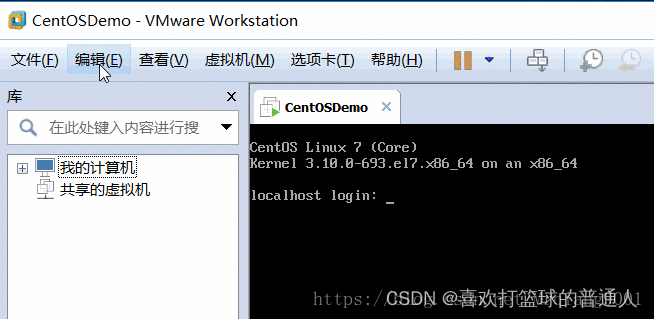
在彈出框選擇「NAT模式」 — 點擊「更改設置」— 點擊之後可以根據自己需要修改虛擬機網關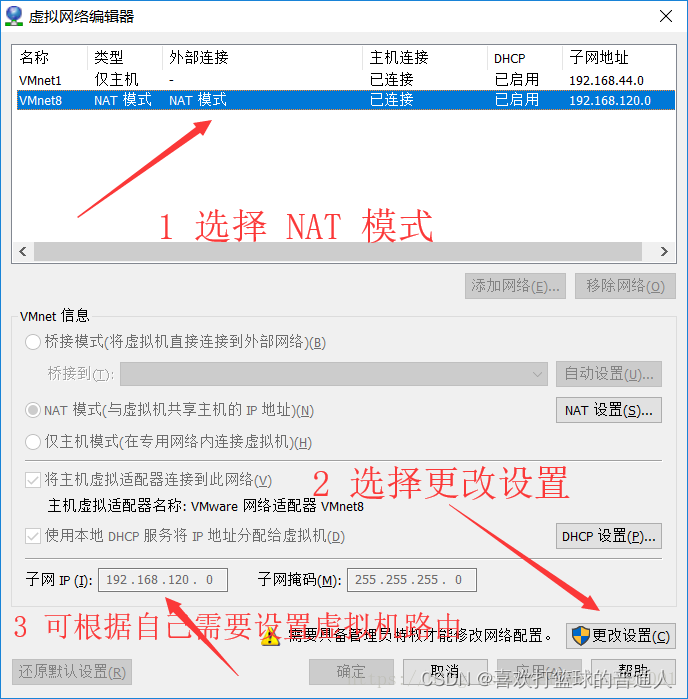
點擊「NAT模式」— 選擇「NAT設置」
在「端口轉發」下邊選擇「添加」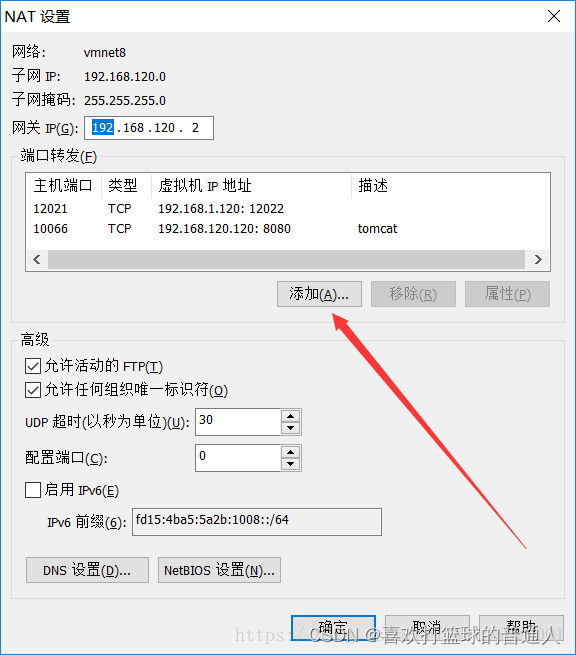
添加端口,然後進行保存
4.通過映射的端口進行連接測試
端口連接測試
SSH 連接: ssh [email protected] -p 10022
登錄之後查看 ip: ip addr
- git自帶ssh的客戶端


5.主機防火牆開放端口
同時按 Win + R ,輸入 control 進入控制面板
選擇「系統和安全」
選擇「防火牆」設置
選擇左側的「高級設置」
進入防火牆的「高級設置」之後,選擇「入站規則」,然後點擊「新建規則」
選擇「端口」
選擇「TCP」— 選擇「特定本地端口」,並填寫端口(需要和前邊 Vmware 中設置的一致)


給新建的規則起名
边栏推荐
- 2021.10.27-28 scientific research log
- System service configuration service - detailed version
- Cookies and sessions
- Ten important properties of determinant
- Leetcode notes: Weekly contest 280
- OpenMP task 原理與實例
- Compiling principle on computer -- function drawing language (II): lexical analyzer
- Detailed explanation of window refresh function in MFC
- uni-app用canvas截屏并且分享好友
- Record the treading pit of grain Mall (I)
猜你喜欢

MATLAB image processing - Otsu threshold segmentation (with code)

Detailed explanation of Google open source sfmlearner paper combining in-depth learning slam -unsupervised learning of depth and ego motion from video

Search and rescue strategy of underwater robot (FISH)

(P17-P18)通过using定义基础类型和函数指针别名,使用using和typedef给模板定义别名

Three data exchange modes: line exchange, message exchange and message packet exchange

Vision transformer | arXiv 2205 - TRT vit vision transformer for tensorrt
C # hide the keyboard input on the console (the input content is not displayed on the window)
Servlet advanced

802.11 protocol: wireless LAN protocol

Transformation from AC5 to AC6 (1) - remedy and preparation
随机推荐
The pit of FANUC machine tool networking
2021.11.2 scientific research log
uni-app用canvas截屏并且分享好友
Process terminated
Literature reading: deep neural networks for YouTube recommendations
System service configuration service - detailed version
Leetcode notes: Weekly contest 280
Three data exchange modes: line exchange, message exchange and message packet exchange
Ceres optimizer usage (self use)
. net mysql Too many connections
Mathematical knowledge - matrix - matrix / vector derivation
The Poisson regression model (posion) is constructed by GLM function of R language, and the poisgof function of epidisplay package is used to test the goodness of fit of the fitted Poisson regression
Literature reading: raise a child in large language model: rewards effective and generalizable fine tuning
2.2 linked list - Design linked list (leetcode 707)
EasyExcel导出Excel表格到浏览器,并通过Postman测试导出Excel【入门案例】
El expression and JSTL
GTEST/GMOCK介绍与实战
The R language converts the data of the specified data column in the dataframe data from decimal to percentage representation, and the data to percentage
FPGA to flip video up and down (SRAM is61wv102416bll)
Ecmascript6 interview questions