当前位置:网站首页>Dolphin-2.0.3 cluster deployment document
Dolphin-2.0.3 cluster deployment document
2022-06-12 21:56:00 【Interest e family】
DolphinScheudler-2.0.3 Cluster deployment documentation
1. Cluster service planning
Cluster machines :hadoop1,hadoo2,hadoop3;
Cluster planning :

2. Pre deployment environment preparation
       Centos7.6          #  The system environment of each machine is the same


Jdk1.8+            #  Every machine has


MySQL-5.7.16       # hadoop3 On the machine


Zookeeper-3.5.7    #  Cluster mode deployment , Every machine has


Hadoop-3.1.3       #  Cluster mode deployment , Every machine has ,NameNode  yes HA Pattern


Yarn-3.1.3         # HA Cluster mode deployment ,HA Corresponding machine :hadoop1,hadoop2
- 1.
- 2.
- 3.
- 4.
- 5.
- 6.
3. Configure user password free login and permission
       #  stay hadoop1,hadoop2,hadoop3 The machine silly girl creates hadoop Users need to use  root  Sign in


useradd hadoop


#  add to password


echo "hadoop" | passwd --stdin hadoop


#  To configure  sudo  Unclassified


sed -i '$ahadoop  ALL=(ALL)  NOPASSWD: NOPASSWD: ALL' /etc/sudoers


sed -i 's/Defaults    requirett/#Defaults    requirett/g' /etc/sudoers
- 1.
- 2.
- 3.
- 4.
- 5.
- 6.
- 7.
Be careful :
Because the task execution service is based on sudo -u {linux-user} Switching is different linux User's way to achieve multi tenant running jobs , So deployment users need to have sudo jurisdiction , And it's Secret free . If you find that /etc/sudoers In file "Defaults requirett" This line , Please comment out .
4. Machine configuration SSH Avoid secret landing
       # stay hadoop1 The machine entered my home Catalog ,


su - hadoop


ssh-keygen -t rsa ( Press enter four times in succession )


# After executing this order , Two files will be generated id_rsa( Private key )、id_rsa.pub( Public key )


# Copy the public key to the machine to log in without secret


ssh-copy-id hadoop1


ssh-copy-id hadoop2


ssh-copy-id hadoop3
- 1.
- 2.
- 3.
- 4.
- 5.
- 6.
- 7.
- 8.
Be careful : When the configuration is complete , You can run the command ssh hadoop1 Judge success , If you do not need to enter mima can ssh Landing proves successful .
5. start-up Zookeeper service
# stay hadoop1,hadoop2,hadoop3 Start up respectively
./bin/zkServer.sh start
- 1.
6. Download installation package
Installation package version :2.0.3
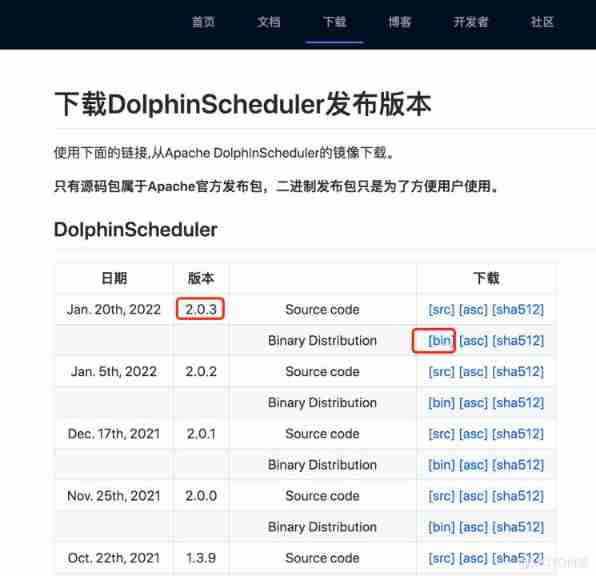
       #  Download address :


wget https://www.apache.org/dyn/closer.lua/dolphinscheduler/2.0.3/apache-dolphinscheduler-2.0.3-bin.tar.gz
- 1.
- 2.
take apache-dolphinscheduler-2.0.3-bin.tar.gz Put it in /home/hadoop/apps Under the table of contents
Use the previously created hadoop Users to perform subsequent operations .
7. decompression
# decompression tar package
tar -zxvf apache-dolphinscheduler-2.0.3-bin.tar.gz
- 1.
# rename
mv apache-dolphinscheduler-2.0.3-bin dolphinscheduler-2.0.3
- 1.
8. Modify the configuration file
       vim dolphinscheduler-2.0.3/conf/config/install_config.conf


ips="hadoop1,hadoop2,hadoop3"


masters="hadoop1,hadoop2"


workers="hadoop1:default,hadoop2:default,hadoop3:default"


alertServer="hadoop1"


apiServers="hadoop2"


pythonGatewayServers="hadoop3"


installPath="/home/hadoop/data/dolphinschedulerInstallPath"


deployUser="hadoop"


dataBasedirPath="/home/hadoop/data/dolphinschedulerData"


javaHome="/opt/jdk1.8.0_212"


DATABASE_TYPE=${DATABASE_TYPE:-"mysql"}


SPRING_DATASOURCE_URL=${SPRING_DATASOURCE_URL:-"jdbc:mysql://hadoop3:3306/dolphinscheduler?useUnicode=true&characterEncoding=UTF-8"}


SPRING_DATASOURCE_USERNAME=${SPRING_DATASOURCE_USERNAME:-"dolphinscheduler"}


SPRING_DATASOURCE_PASSWORD=${SPRING_DATASOURCE_PASSWORD:-"dolphinscheduler"}


registryPluginName="zookeeper"


registryServers="hadoop1:2181,hadoop2:2181,hadoop3:2181"


registryNamespace="dolphinscheduler"


resourceUploadPath="/dolphinscheduler"


defaultFS="hdfs://ns1:8020"


resourceManagerHttpAddressPort="8088"


# yarn yes HA Mode with this


yarnHaIps="hadoop1,hadoop2"


singleYarnIp="yarnIp1"


# yarn No HA Mode with this


yarnHaIps=""


singleYarnIp="hadoop1"


hdfsRootUser="hadoop"
- 1.
- 2.
- 3.
- 4.
- 5.
- 6.
- 7.
- 8.
- 9.
- 10.
- 11.
- 12.
- 13.
- 14.
- 15.
- 16.
- 17.
- 18.
- 19.
- 20.
- 21.
- 22.
- 23.
- 24.
- 25.
- 26.
- 27.
- 28.
- 29.
- 30.
- 31.
- 32.
modify dolphinscheduler_env.sh, Configure according to the service on the machine .
       vim  dolphinscheduler-2.0.3/conf/env/dolphinscheduler_env.sh


export HADOOP_HOME=/home/hadoop/apps/hadoop-3.1.3


export HADOOP_CONF_DIR=/home/hadoop/apps/hadoop-3.1.3/etc/hadoop


export JAVA_HOME=/opt/jdk1.8.0_212


export HIVE_HOME=/home/hadoop/apps/hive-3.1.2


export PATH=$HADOOP_HOME/bin:$JAVA_HOME/bin:$HIVE_HOME/bin:$PATH
- 1.
- 2.
- 3.
- 4.
- 5.
- 6.
9. HDFS Profile copy
Hadoop Clustered NameNode Configured with HA, Need to open HDFS Type of resource upload , At the same time, we need to Hadoop Under the cluster core-site.xml and hdfs-site.xml Copied to the dolphinscheduler/conf, Not NameNode HA Skip the next step .
       cp /home/hadoop/apps/hadoop-3.1.3/etc/hadoop/core-site.xml /home/hadoop/apps/dolphinscheduler-2.0.3/conf/


cp /home/hadoop/apps/hadoop-3.1.3/etc/hadoop/hdfs-site.xml /home/hadoop/apps/dolphinscheduler-2.0.3/conf/
- 1.
- 2.
10. New database 、 to grant authorization
DolphinScheduler Metadata is stored in a relational database , At present, we support PostgreSQL and MySQL, If you use MySQL You need to download it manually mysql-connector-java drive (8.0.16) And move to DolphinScheduler Of lib Under the table of contents . Let's say MySQL For example , Explains how to initialize the database
# Move mysql Of jar To lib Under the table of contents
cp mysql-connector-java-8.0.16.jar dolphinscheduler-2.0.3/lib
- 1.
# New database
       mysql -uroot -p


mysql> CREATE DATABASE dolphinscheduler DEFAULT CHARACTER SET utf8 DEFAULT COLLATE utf8_general_ci;


#  to grant authorization


mysql> GRANT ALL PRIVILEGES ON dolphinscheduler.* TO 'dolphinscheduler'@'%' IDENTIFIED BY 'dolphinscheduler';


mysql>GRANT ALL PRIVILEGES ON dolphinscheduler.* TO 'dolphinscheduler'@'localhost' IDENTIFIED BY 'dolphinscheduler';


mysql> flush privileges;
- 1.
- 2.
- 3.
- 4.
- 5.
- 6.
11. Copy directories to other machines
       scp dolphinscheduler-2.0.3/ hadoop2:/home/hadoop/apps


scp dolphinscheduler-2.0.3/ hadoop3:/home/hadoop/apps
- 1.
- 2.
12. Initialize database
# stay hadoop1 Carry out the order
sh script/create-dolphinscheduler.sh
- 1.
13. start-up DolphinScheduler colony
stay hadoop1 Start on the machine DolphinScheduler colony
sh install.sh
- 1.
After startup jps see DolphinScheduler The related process
       =====192.168.62.161=====


11607 MasterServer


11657 WorkerServer


11759 AlertServer


11697 LoggerServer


=====192.168.62.162=====


10585 MasterServer


10631 WorkerServer


11801 ApiApplicationServer


10671 LoggerServer


=====192.168.62.163=====


10410 WorkerServer


10275 LoggerServer


11850 PythonGatewayServer
- 1.
- 2.
- 3.
- 4.
- 5.
- 6.
- 7.
- 8.
- 9.
- 10.
- 11.
- 12.
- 13.
- 14.
14. Sign in DolphinScheduler
Browser access address http://hadoop2:12345/dolphinscheduler Log in to the system UI.
The default user name and mima yes admin/dolphinscheduler123
hadoop2 by ApiApplicationServer Location machine .
15. Start stop service
       #  One click to stop all services in the cluster


sh ./bin/stop-all.sh


#  One click to start all services in the cluster


sh ./bin/start-all.sh


#  Start stop  Master


sh ./bin/dolphinscheduler-daemon.sh stop master-server


sh ./bin/dolphinscheduler-daemon.sh start master-server


#  Start stop  Worker


sh ./bin/dolphinscheduler-daemon.sh start worker-server


sh ./bin/dolphinscheduler-daemon.sh stop worker-server


#  Start stop  Api


sh ./bin/dolphinscheduler-daemon.sh start api-server


sh ./bin/dolphinscheduler-daemon.sh stop api-server


#  Start stop  Logger


sh ./bin/dolphinscheduler-daemon.sh start logger-server


sh ./bin/dolphinscheduler-daemon.sh stop logger-server


#  Start stop  Alert


sh ./bin/dolphinscheduler-daemon.sh start alert-server


sh ./bin/dolphinscheduler-daemon.sh stop alert-server


#  Start stop  Python Gateway


sh ./bin/dolphinscheduler-daemon.sh start python-gateway-server


sh ./bin/dolphinscheduler-daemon.sh stop python-gateway-server
- 1.
- 2.
- 3.
- 4.
- 5.
- 6.
- 7.
- 8.
- 9.
- 10.
- 11.
- 12.
- 13.
- 14.
- 15.
- 16.
- 17.
- 18.
- 19.
- 20.
- 21.
- 22.
- 23.
- 24.
- 25.
- 26.
- 27.
- 28.
- 29.
边栏推荐
- jsonUtils
- What is your understanding of thread priority?
- Cloning PDB with ADG standby
- Is it safe to open an account in tonghuashun? How to open an account
- Npoi create word
- Role of volatile keyword
- SQL tuning guide notes 11:histograms
- "Oracle database parallel execution" technical white paper reading notes
- 六月集训(第11天) —— 矩阵
- A puzzle about + =
猜你喜欢

Xingda easy control ModbusRTU to modbustcp gateway

The ifeq, filter and strip of makefile are easy to use

“Oracle数据库并行执行”技术白皮书读书笔记

SQL tuning guide notes 15:controlling the use of optimizer statistics

Oracle livelabs experiment: introduction to Oracle Spatial

Things about the kotlin collaboration process - pipeline channel

【概率论与数理统计】期末复习抱佛脚:公式总结与简单例题(完结)

Design and practice of Hudi bucket index in byte skipping

SQL调优指南笔记14:Managing Extended Statistics

Compiling process of OpenSSL and libevent on PC
随机推荐
logstash时间戳转换为unix 纳秒nano second time
MySQL介绍和安装(一)
Preliminary use of jvisualvm
Kotlin collaboration process - flow
How do I create a daemon thread? And where to use it?
同花顺能开户吗,在同花顺开户安全么,证券开户怎么开户流程
Palindrome linked list and linked list intersection problem (intersecting with Xinyi people) do you really know?
动态规划之如何将问题抽象转化为0-1背包问题(详解利用动态规划求方案数)
Xingda easy control ModbusRTU to modbustcp gateway
SQL tuning guide notes 17:importing and exporting optimizer statistics
[Jianzhi offer simple] Jianzhi offer 06 Print linked list from end to end
PE installation win10 system
Can tonghuashun open an account? Is it safe to open an account in tonghuashun? How to open a securities account
Jdbctemplate inserts and returns the primary key
Ansible playbook和Ansible Roles(三)
#yyds干货盘点# 解决剑指offer:字符流中第一个不重复的字符
【QNX Hypervisor 2.2 用户手册】4.3 获取host组件
Turing prize winner: what should I pay attention to if I want to succeed in my academic career?
How to implement a simple publish subscribe mode
OceanBase 社区版 OCP 功能解读