当前位置:网站首页>Reflow and repaint
Reflow and repaint
2022-06-10 22:35:00 【Little sheep fighting bug】
Preface
This article is still a summary of daily learning , Mainly to understand the rearrangement and redrawing of the browser .
One 、 The browser parses the process of rendering the page
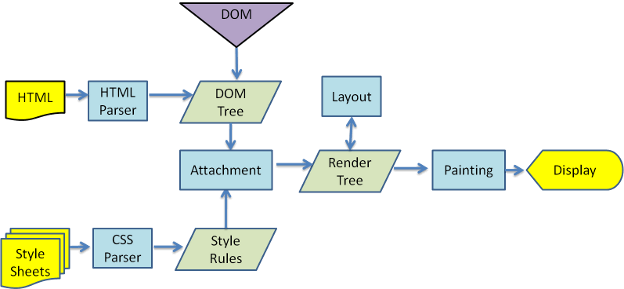
When the browser gets a html When you file , Meeting " From top to bottom " load , And in the loading process for analytical rendering .
- obtain HTML File and parse , Generate DOM Trees ;
- analysis HTML At the same time, it will also parse CSS, Generate CSSOM Trees ;
- take DOM Trees and CSSOM Tree combined with , Generate render tree (Render Tree);
- According to the generated render tree , Make a layout (Layout) ( rearrangement ), Get the geometric information of the node ( Location , size );
- According to the rendering tree and the geometric information obtained by rearrangement , Drawing (Painting) ( Repaint ), call GPU ( Graphics processor ) Render elements .
Two 、 rearrangement (reflow)
Rearrangement is also called reflow , When DOM The changes in the geometry of the elements affect the geometric information of the elements ( Location 、 Size, etc ), The browser needs to recalculate the geometric properties of the elements , Place it in the correct position on the interface , This process is called rearrangement .
Rearrange trigger timing :
- Initial rendering of the page , This is the most expensive rearrangement , And it can't be avoided ;
- Add or remove visible DOM Elements ;
- The position of the element changes ;
- The size of the element changes ( Including margins 、 padding 、 The frame size 、 Height and width, etc );
- Element content changes ( For example, the number of words 、 Picture size, etc );
- Element font size changes ;
- Change the browser window size ( for example resize Event time );
- Activate CSS pseudo-classes ( for example :hover);
- Set up style The value of the property , Because by setting style Attribute to change the node style , Each setting triggers a rearrangement ;
- Query some properties or call some calculation methods :offsetWidth、offsetHeight etc. , besides , When we call getComputedStyle Method , perhaps IE Inside currentStyle when , It also triggers a rearrangement , The principle is the same , All for one “ Immediacy ” and “ accuracy ” .
| width | height | margin | padding |
| display | border-width | border | position |
| overflow | font-size | vertical-align | min-height |
| clientWidth | clientHeight | clientTop | clientLeft |
| offsetWidth | offsetHeight | offsetTop | offsetLeft |
| scrollWidth | scrollHeight | scrollTop | scrollLeft |
| scrollIntoView() | scrollTo() | getComputedStyle() | scrollIntoViewIfNeeded() |
| getBoundingClientRect() |
Range of rearrangement effects :
Because the browser rendering interface is based on the layout model , So triggering rearrangement will affect the surrounding DOM Rearrange , There are two areas of influence :
- Global scope : From the root node html Start to rearrange the entire rendering tree ;
- Local scope : Rearrange a part of the rendering tree or a rendering object .
3、 ... and 、 Repaint (repaint)
When the appearance of an element changes , But it didn't change the layout , The process of redrawing the appearance of an element , It's called redrawing .
Redraw trigger timing :
- The change of color ;
- Change of text direction ;
- Change of shadow, etc .
| color | border-style | visibility | background |
| text-decoration | background-image | background-position | background-repeat |
| outline-color | outline | outline-style | border-radius |
| outline-width | box-shadow | background-size |
Four 、 The relationship between rearrangement and redrawing
Rearrangement must lead to redrawing , Redrawing does not necessarily lead to rearrangement .
Each page triggers at least one rearrangement and redrawing when it initializes rendering .
Rearrangement and redrawing are expensive , Frequent rearrangement and redrawing , It will destroy the user experience , Make the page slow .
So we should try to avoid frequently triggering rearrangement and redrawing , Especially rearrangement .
5、 ... and 、 How to avoid rearrangement and redrawing
️、 Browser optimization for rearrangement and redrawing
The browser maintains a queue , Put everything that will cause rearrangement 、 Redraw operations are put into this queue , Wait for a certain number of operations in the queue or a certain time interval , The browser will flush queue , Do a batch . This will allow multiple rearrangements 、 Redraw becomes a rearrangement redraw .
But when you get the layout information , for example offsetTop Other methods , To ensure the accuracy of the obtained results , Will break the browser's optimization strategy , Force the browser to advance flush queue .
️、css Avoid rearranging and redrawing
- Reduce the scope of rearrangement , Try to fix the content that needs to be rearranged in the local scope .
- Do not use table Layout , Maybe a small change will cause the whole table relayout . Have to use table Scene , You can set table-layout: auto; perhaps table-layout: fixed; This will allow table Line by line rendering , At the same time, the influence range of rearrangement can be limited .
- Focus on changing styles . In this way, the optimization mechanism of the browser can be used as much as possible , One rearrangement and redrawing completes the rendering .
- Avoid multiple inline styles .
- If you want to set the style of the element , You can change the element's class Class name ( As far as possible DOM The innermost layer of the tree ).
- take DOM offline . By setting element properties display: none; Remove it from the page , Then follow up , These subsequent operations will not start to rearrange and redraw , Finally through display Property display . in addition ,visibility: hidden The elements of have an effect only on redrawing , It doesn't affect the rearrangement .
- Use position: absolute / fixed; Off stream . For example, those complex animations , Set it up position: absolute / fixed; Keep elements out of the document stream as much as possible , So as to reduce the impact on other elements .
- utilize transform translate To replace left top Transformation of .
- Use css3 Hardware acceleration , It can make transform、opacity、filters These animations do not cause rearrangement and redrawing .
- Avoid using css Of JavaScript expression .
- Set nodes that are frequently rearranged or redrawn as layers . Set the node to video or iframe; Add... To the node will-change attribute .
️、js Avoid rearranging and redrawing
- Reduce direct operation DOM Elements . Don't modify... One by one DOM The style of , change to the use of sth. className To control .
- Separate read and write operations . When you need to js When manipulating element styles , The operation to obtain style attributes will be executed in a centralized way , And cache values , When style attributes need to be set, they are also handled centrally , Avoid getting and setting operations mixed with each other . Because get 、 The operation of setting will cause rearrangement .
- When dynamically inserting multiple nodes , You can use document fragments (DocumnetFragment), Insert once after creation , Avoid multiple render performance .DocumnetFragment Is a container object that holds multiple elements ( Save in memory ), When updating one or more of these elements , The page will not be updated .
- Don't put the DOM Node offsetLeft And other attribute values are placed in a loop as variables in the loop .
- Use resize When an event is , Anti shake and throttling treatment .
边栏推荐
- [tcapulusdb knowledge base] tcapulusdb machine initialization and launch introduction
- Variables (automatic variables, static variables, register variables, external variables) and memory allocation of C malloc/free, calloc/realloc
- 【TcaplusDB知识库】TcaplusDB巡检统计介绍
- Solution de gestion de la zone pittoresque intelligente pour la réunion des baleines
- [tcapulusdb knowledge base] tcapulusdb viewing online operation
- JVM runtime data area
- 【TcaplusDB知识库】TcaplusDB引擎参数调整介绍
- [MySQL] Table constraints
- Tcapulusdb Jun · industry news collection (VI)
- [applet] vant sliding cell adds the function of clicking other positions to close automatically
猜你喜欢

1.Tornado简介&&本专栏搭建tornado项目简介
![[MySQL] Table constraints](/img/13/b97679cd4ca36d4b8e19acf23df404.png)
[MySQL] Table constraints

鲸会务为智能化防疫工作赋能

GMPNN:Drug-drug interaction prediction with learnable size-adaptive molecular substructures.

Back to table query of MySQL? How to avoid it?

罗永浩:我要是负责人 能让苹果产品上去三个台阶不止

【TcaplusDB知识库】TcaplusDB刷新tbus通道介绍
Tcapulusdb Jun · industry news collection (IV)

中小型会议如何进行数字化升级?
Visio to high quality pdf
随机推荐
[tcapulusdb knowledge base] Introduction to tcapulusdb patrol inspection statistics
【TcaplusDB知识库】TcaplusDB TcapDB扩缩容介绍
Qt自定义委托
鲸会务为智能化防疫工作赋能
Icml2022 | sharp maml: model independent meta learning for sharpness perception
鲸会务会议分享:大会难办怎么办?
重排 (reflow) 与重绘 (repaint)
[tcapulusdb knowledge base] tcapulusdb viewing online operation
自己搞了一个相亲软件的源码,用兴趣的可以聊聊
JVM runtime data area
中小型会议如何进行数字化升级?
torch_ geometric
LeetCode - 5. 最长回文子串
CCF CSP 202109-1数组推导
在D天内送达包裹的能力[抽象类二分--抽象判定方式]
IDEA出现“XXX has broken path”报错解决方法
[tcapulusdb knowledge base] Introduction to the machine where the tcapulusdb viewing process is located
[debug] could not find ref wiht POC XXX
【小程序】Vant-Weapp Radio单选框组件无法触发bind:Change事件
Bitwise and shift operators