当前位置:网站首页>C#网络应用编程,实验一:WPF练习
C#网络应用编程,实验一:WPF练习
2022-07-27 17:19:00 【华为云】
实验一:WPF练习
1、创建一个WPF应用程序项目
2、将App.xaml中的Application.Resources节内容改为
<Application x:Class="实验1_WPF练习.App" xmlns="http://schemas.microsoft.com/winfx/2006/xaml/presentation" xmlns:x="http://schemas.microsoft.com/winfx/2006/xaml" xmlns:local="clr-namespace:实验1_WPF练习" StartupUri="MainWindow.xaml"> <Application.Resources> <Style x:Key="LabelStyle" TargetType="Label"> <Setter Property="FontSize" Value="14"/> <Setter Property="HorizontalContentAlignment" Value="Center"/> <Setter Property="HorizontalAlignment" Value="Center" /> <Setter Property="Background" Value="AliceBlue"/> </Style> <Style x:Key="BorderStyle" TargetType="Border"> <Setter Property="Height" Value="35"/> <Setter Property="VerticalAlignment" Value="Center"/> <Setter Property="Background" Value="AliceBlue"/> </Style> </Application.Resources></Application>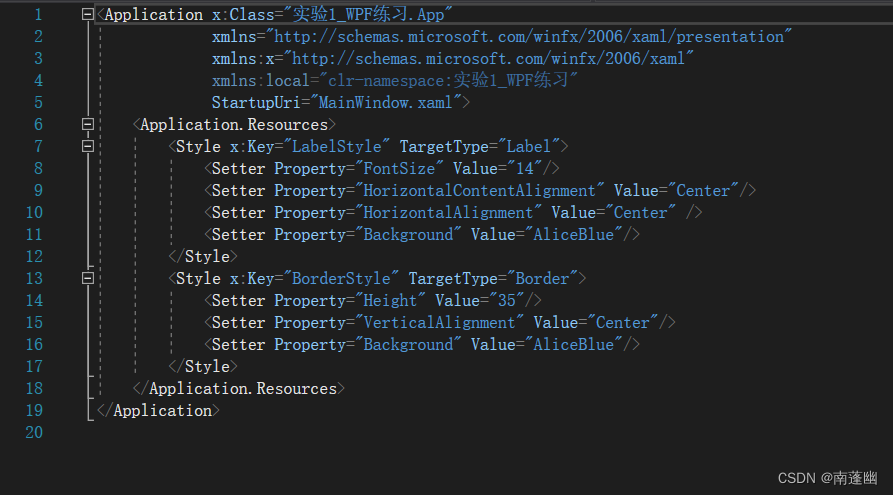
3、修改MainWindow.xaml及代码隐藏类
MainWindow.xaml
<Window x:Class="实验1_WPF练习.MainWindow" xmlns="http://schemas.microsoft.com/winfx/2006/xaml/presentation" xmlns:x="http://schemas.microsoft.com/winfx/2006/xaml" xmlns:d="http://schemas.microsoft.com/expression/blend/2008" xmlns:mc="http://schemas.openxmlformats.org/markup-compatibility/2006" xmlns:local="clr-namespace:实验1_WPF练习" mc:Ignorable="d" Title="MainWindow" Height="350" Width="525"> <Grid Margin="20"> <Grid.ColumnDefinitions> <ColumnDefinition Width="Auto"/> <ColumnDefinition Width="*"/> </Grid.ColumnDefinitions> <Rectangle Grid.ColumnSpan="2" Fill="White" RadiusX="14" RadiusY="14" Stroke="Blue" StrokeDashArray="3"/> <Rectangle Grid.Column="0" Margin="7" Fill="#FFF0F9D8" RadiusX="10" RadiusY="10" Stroke="Blue" StrokeDashArray="3"/> <Rectangle Grid.Column="0" Margin=" 20" Fill="White" Stroke="Blue"/> <ScrollViewer Grid.Column="0" Margin="20"> <StackPanel> <StackPanel.Resources> <Style TargetType="Button"> <Setter Property="HorizontalContentAlignment" Value="Center"/> <Setter Property="Margin" Value="5 10 5 0"/> <Setter Property="Padding" Value=" 15 0 15 0"/> <Setter Property="FontSize" Value=" 10"/> <EventSetter Event="Click" Handler="button_Click"/> </Style> </StackPanel.Resources> <Button Content="例1" Tag="/Examples/Page1.xaml"/> <Button Content="例2" Tag="/Examples/Page2.xaml"/> <Button Content="例3" Tag="/Examples/Page3.xaml"/> </StackPanel> </ScrollViewer> <Frame Name="frame1" Grid.Column="1" Margin="10" BorderThickness="1" BorderBrush="Blue" NavigationUIVisibility="Hidden"/> </Grid> </Window>
MainWindow.xaml.cs主要内容
using System;using System.Collections.Generic;using System.Linq;using System.Text;using System.Threading.Tasks;using System.Windows;using System.Windows.Controls;using System.Windows.Data;using System.Windows.Documents;using System.Windows.Input;using System.Windows.Media;using System.Windows.Media.Imaging;using System.Windows.Navigation;using System.Windows.Shapes;namespace 实验1_WPF练习{ /// <summary> /// MainWindow.xaml 的交互逻辑 /// </summary> public partial class MainWindow : Window { Button oldButton = new Button(); public MainWindow() { InitializeComponent(); } private void button_Click(object sender, RoutedEventArgs e) { Button btn = e.Source as Button; btn.Foreground = Brushes.Black; oldButton.Foreground = Brushes.Black; oldButton = btn; frame1.Source = new Uri(btn.Tag.ToString(), UriKind.Relative); } }}
4、用鼠标右键单击项目,选择【添加】-【新建文件夹】命令,在项目中添加一个名为Examples的文件夹。
5、用鼠标右键单击Examples文件夹,选择【添加】-【页】命令,在该文件夹下添加一个名为Page1.xaml的页。之后再按同样方法添加页Page2.xaml和Page3.xaml。
6、修改Page1.xaml的核心代码
<Page x:Class="实验1_WPF练习.Examples.Page1" xmlns="http://schemas.microsoft.com/winfx/2006/xaml/presentation" xmlns:x="http://schemas.microsoft.com/winfx/2006/xaml" xmlns:mc="http://schemas.openxmlformats.org/markup-compatibility/2006" xmlns:d="http://schemas.microsoft.com/expression/blend/2008" xmlns:local="clr-namespace:实验1_WPF练习.Examples" mc:Ignorable="d" d:DesignHeight="300" d:DesignWidth="300" Title="Page1"> <Grid> <DockPanel> <Label DockPanel.Dock="Top" Content="DNS域名解析和IP地址转换的基本用法" Style="{StaticResource LabelStyle}"/> <Border DockPanel.Dock="Bottom" Style="{StaticResource BorderStyle}"> <Button Name="btn" HorizontalAlignment="Center" Padding="10 0 10 0" Content="运行" Click="btn_Click"/> </Border> <ScrollViewer> <StackPanel Background="White" TextBlock.LineHeight="20"> <TextBlock x:Name="textBlock1" Margin="0 10 0 0" TextWrapping="Wrap"/> </StackPanel> </ScrollViewer> </DockPanel> </Grid></Page>
实验结果
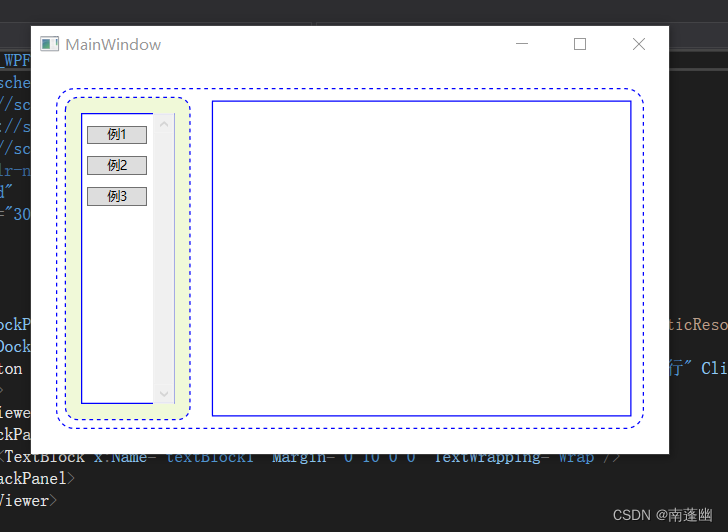

我通过本次实验,复习了上学期C#WPF的核心知识点,发现了自己的不足
和知识的欠缺,更加熟悉和掌握本教材各章例子里的前端主界面和子页面的
实现,对后面的学习有很大的帮助。
边栏推荐
- 【C#】正序、逆序、最大值、最小值和平均值
- Hyperledger caliper is built on fabric for performance test
- 函数总结
- View pagoda PHP extension directory
- The first in the field of mobile phone chip design in the world! Ziguang zhanrui won the international certification of tmmi4
- Fileoutputstream (file storage) and FileInputStream (file reading)
- Oracle 日期的转换
- VirtualBox: set shared folder
- [basic knowledge of deep learning - 41] quick start learning materials for deep learning
- 【深度学习基础知识 - 40】CNN为什么比DNN在图像领域更具优势
猜你喜欢
![[basic knowledge of deep learning - 37] solve the imbalance between positive and negative samples](/img/71/4052607951eb52862a6fd36366f216.png)
[basic knowledge of deep learning - 37] solve the imbalance between positive and negative samples

JS event listening mouse keyboard form page onclick onkeydown onchange

Application pool has been disabled

【深度学习基础知识 - 46】贝叶斯定理与条件概率公式

VS2017#include 'xxx.h'
![[basic knowledge of deep learning - 42] detailed explanation of logistic regression](/img/74/d7d1562ada4671864961721b9a1baf.png)
[basic knowledge of deep learning - 42] detailed explanation of logistic regression

Virtualbox:ssh connection

ArrayAdapter(数组适配器)与SimpleAdapter(简单适配器)

Gesturedetector (gesture recognition)

pytorch 常见报错
随机推荐
11.2DHCP
顶级“黑客”能厉害到什么地步?无信号也能上网,专家:高端操作!
Flink introduction and operation architecture
dp(动态规划)
ToggleButton(按钮开关)
IDEA:解决代码没有提示问题
ContextMenu (context menu)
File operation protection
【深度学习基础知识 - 41】深度学习快速入门学习资料
[daily accumulation - 06] view CUDA and cudnn versions
The first Xiaolong 765G! Redmi K30 5g release: support 5g dual-mode 120Hz screen, priced from 1999 yuan
Transaction log full problem handling in sqlserver 2008
JVM概述和内存管理(未完待续)
[basic knowledge of in-depth learning - 40] Why does CNN have more advantages than DNN in the field of images
[basic knowledge of deep learning - 42] detailed explanation of logistic regression
Adhering to the integration of software and hardware, one Hengke makes efforts to the intelligent educational robot market
Sqlife (database)
BroadcastReceiver(广播)
The go zero singleton service uses generics to simplify the registration of handler routes
RadioGroup(单选框)