当前位置:网站首页>Evaluate:huggingface评价指标模块入门详细介绍
Evaluate:huggingface评价指标模块入门详细介绍
2022-06-26 15:08:00 【木尧大兄弟】
一、介绍
evaluate 是huggingface在2022年5月底搞的一个用于评估机器学习模型和数据集的库,需 python 3.7 及以上。包含三种评估类型:
- Metric:用来通过预测值和参考值进行模型评价,是传统意义上的指标,比如 f1、bleu、rouge 等。
- Comparison:同一个测试集对两个(多个)模型评价,比如俩模型结果的 match 程度。
- Measurement:用来评价数据集,比如字数、去重后的词数等。
二、安装
pip安装:
pip install evaluate
源码安装:
git clone https://github.com/huggingface/evaluate.git
cd evaluate
pip install -e .
检查是否装好(会输出预测结果Dict):
python -c "import evaluate; print(evaluate.load('accuracy').compute(references=[1], predictions=[1]))"
三、使用
3.1 load方法
evaluate中的每个指标都是一个单独的Python模块,通过 evaluate.load()(点击查看文档) 函数快速加载,其中load函数的常用参数如下:
- path:必选,str类型。可以是指标名(如
accuracy或 社区的铁汁们贡献 的muyaostudio/myeval),如果源码安装还可以是路径名(如./metrics/rouge或./metrics/rogue/rouge.py)。我用的后者,因为直接传指标名会联网下载评价脚本,但单位的网不给力。 - config_name:可选,str类型。指标的配置(如 GLUE 指标的每个子集都有一个配置)
- module_type:上文三种评价类型之一,默认
metric,可选comparison或measurement - cache_dir:可选,存储临时预测和引用的路径(默认为
~/.cache/huggingface/evaluate/)
import evaluate

# module_type 默认为 'metric'
accuracy = evaluate.load("accuracy")

# module_type 显式指定 'metric','comparison','measurement',防止重名。
word_length = evaluate.load("word_length", module_type="measurement")
3.2 列出可用指标
list_evaluation_modules 列出官方(和社区)里有哪些指标,还能看到点赞信息,一共三个参数:
- module_type:要列出的评估模块类型,None是全部,可选
metric,comparison,measurement。 - include_community:是否包含社区模块,默认
True。 - with_details:返回指标的完整详细Dict信息,而不是str类型的指标名。默认
False。
print(evaluate.list_evaluation_modules(
	module_type="measurement",
	include_community=True,
	with_details=True)
)

3.3 评估模块都有的属性
所有评估模块都附带一系列有用的属性,这些属性有助于使用存储在 evaluate.EvaluationModuleInfo 对象中的模块,属性如下:
- description:指标介绍
- citation:latex参考文献
- features:输入格式和类型,比如predictions、references等
- inputs_description:输入参数描述文档
- homepage:指标官网
- license:指标许可证
- codebase_urls:指标基于的代码地址
- reference_urls:指标的参考地址
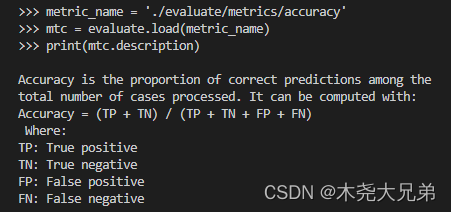
3.4 计算指标值(一次性计算/增量计算)
方式一:一次性计算
函数:EvaluationModule.compute(),传入list/array/tensor等类型的参数references和predictions。
>>> import evaluate
>>> metric_name = './evaluate/metrics/accuracy'
>>> accuracy = evaluate.load(metric_name)
>>> accuracy.compute(references=[0,1,0,1], predictions=[1,0,0,1])

{
    'accuracy': 0.5}  # 输出结果
方式二:单增量的增量计算
函数: EvaluationModule.add(),用于for循环一对一对地里添加ref和pred,添加完退出循环之后统一计算指标。
>>> for ref, pred in zip([0,0,0,1], [0,0,0,1]):
...     accuracy.add(references=ref, predictions=pred)
...
>>> accuracy.compute()

{
    'accuracy': 1.0}  # 输出结果
方式三:多增量的增量计算
函数: EvaluationModule.add_batch(),用于for循环多对多对地里添加ref和pred(下面例子是一次添加3对),添加完退出循环之后统一计算指标。
>>> for refs, preds in zip([[0,1],[0,1],[0,1]], [[1,0],[0,1],[0,1]]):
...     accuracy.add_batch(references=refs, predictions=preds)
...
>>> accuracy.compute()

{
    'accuracy': 0.6666666666666666}  # 输出结果
3.5 保存评价结果
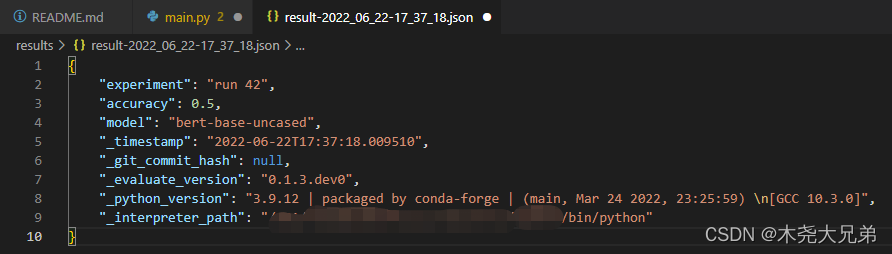
函数:evaluate.save(),参数为 path_or_file, 用于存储文件的路径或文件。如果只提供文件夹,则结果文件将以 result-%Y%m%d-%H%M%S.json的格式保存;可传 dict 类型的关键字参数 **result,**params。
>>> result = accuracy.compute(references=[0,1,0,1], predictions=[1,0,0,1])
>>> hyperparams = {
    "model": "bert-base-uncased"}
>>> evaluate.save("./results/", experiment="run 42", **result, **hyperparams)
3.6 自动评估
有点像 Trainer 的封装,可以直接把 evaluate.evaluator() 用做自动评估,且能通过strategy参数的调整来计算置信区间和标准误差,有助于评估值的稳定性:
from transformers import pipeline
from datasets import load_dataset
from evaluate import evaluator
import evaluate

pipe = pipeline("text-classification", model="lvwerra/distilbert-imdb", device=0)
data = load_dataset("imdb", split="test").shuffle().select(range(1000))
metric = evaluate.load("accuracy")
results = eval.compute(model_or_pipeline=pipe, data=data, metric=metric,
                       label_mapping={
    "NEGATIVE": 0, "POSITIVE": 1},
                       strategy="bootstrap", n_resamples=200)

print(results)
>>> {
    'accuracy':
...     {

...       'confidence_interval': (0.906, 0.9406749892841922),
...       'standard_error': 0.00865213251082787,
...       'score': 0.923
...     }
... }
边栏推荐
- The R language cartools package divides data, the scale function scales data, and the KNN function of the class package constructs a k-nearest neighbor classifier
- Redis集群消息
- Cluster addslots establish a cluster
- The DOTPLOT function in the epidisplay package of R language visualizes the frequency of data points in different intervals in the form of point graphs, specifies the grouping parameters with the by p
- [tcapulusdb knowledge base] tcapulusdb doc acceptance - create business introduction
- [CEPH] cephfs internal implementation (I): Concept -- undigested
- 【ceph】CEPHFS 内部实现(一):概念篇--未消化
- Optimizing for vectorization
- 一键安装gcc脚本
- [tcapulusdb knowledge base] tcapulusdb doc acceptance - transaction execution introduction
猜你喜欢

【ceph】mkdir|mksnap流程源码分析|锁状态切换实例

【ceph】CephFS 内部实现(三):快照

The heavyweight white paper was released. Huawei continues to lead the new model of smart park construction in the future

【ceph】CEPHFS 内部实现(一):概念篇--未消化

Halcon C# 设置窗体字体,自适应显示图片

Redis cluster

Applet: uniapp solves vendor JS is too large

1. accounting basis -- several major elements of accounting (general accounting theory, accounting subjects and accounts)

【ceph】CephFS 内部实现(四):MDS是如何启动的?--未消化
Advanced operation of MySQL database basic SQL statement tutorial

随机推荐
Pytoch deep learning code skills
Common operation and Principle Exploration of stream
Principle of TCP reset attack
The heavyweight white paper was released. Huawei continues to lead the new model of smart park construction in the future
【文件】VFS四大struct:file、dentry、inode、super_block 是什么?区别?关系?--编辑中
夏令营来啦!!!冲冲冲
Function: crypto JS encryption and decryption
MongoDB系列之适用场景和不适用场景
Pytorch深度学习代码技巧
Document 1
How to load the contour CAD drawing of the engineering coordinate system obtained by the designer into the new earth
Notes on brushing questions (19) -- binary tree: modification and construction of binary search tree
Advanced operation of MySQL database basic SQL statement tutorial
Database - sequence
Redis cluster messages
Restcloud ETL extraction de données de table de base de données dynamique
Idea shortcut key
Applet: uniapp solves vendor JS is too large
PHP file upload 00 truncation
券商经理给的开户二维码安全吗?找谁可以开户啊?