当前位置:网站首页>Huawei equipment configuration hovpn
Huawei equipment configuration hovpn
2022-06-11 21:46:00 【51CTO】
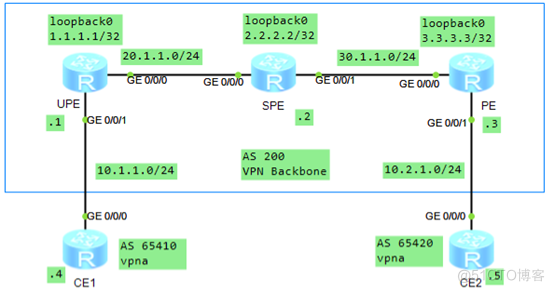
1. To configure IP Address
[UPE-LoopBack0]ip add 1.1.1.1 32
[UPE-GigabitEthernet0/0/0]ip add 20.1.1.1 24
[UPE-GigabitEthernet0/0/1]ip add 10.1.1.1 24
[SPE-LoopBack0]ip add 2.2.2.2 32
[SPE-GigabitEthernet0/0/0]ip add 20.1.1.2 24
[SPE-GigabitEthernet0/0/1]ip add 30.1.1.2 24
[PE]int LoopBack 0
[PE-LoopBack0]ip add 3.3.3.3 32
[PE-GigabitEthernet0/0/0]ip add 30.1.1.3 24
[PE-GigabitEthernet0/0/1]ip add 10.2.1.3 24
[CE1-GigabitEthernet0/0/0]ip add 10.1.1.4 24
[CE2-GigabitEthernet0/0/0]ip add 10.2.1.5 24
2. Configure on the backbone network device OSPF, Realize the backbone network IP Connectivity
[UPE]ospf 1
[UPE-ospf-1]area 0
[UPE-ospf-1-area-0.0.0.0]network 1.1.1.1 0.0.0.0
[UPE-ospf-1-area-0.0.0.0]network 20.1.1.0 0.0.0.255
[SPE]ospf 1
[SPE-ospf-1]area 0
[SPE-ospf-1-area-0.0.0.0]network 2.2.2.2 0.0.0.0
[SPE-ospf-1-area-0.0.0.0]network 30.1.1.0 0.0.0.255
[SPE-ospf-1-area-0.0.0.0]network 20.1.1.0 0.0.0.255
[PE]ospf 1
[PE-ospf-1]area 0
[PE-ospf-1-area-0.0.0.0]network 3.3.3.3 0.0.0.0
[PE-ospf-1-area-0.0.0.0]network 30.1.1.0 0.0.0.255
3. Configure on the backbone network MPLS Basic abilities and MPLS LDP, establish LDP LSP
[UPE]mpls lsr-id 1.1.1.1
[UPE]mpls
[UPE]mpls ldp
[UPE-GigabitEthernet0/0/0]mpls
[UPE-GigabitEthernet0/0/0]mpls ldp
[SPE]mpls lsr-id 2.2.2.2
[SPE]mpls
[SPE]mpls ldp
[SPE-GigabitEthernet0/0/0]mpls
[SPE-GigabitEthernet0/0/0]mpls ldp
[SPE-GigabitEthernet0/0/1]mpls
[SPE-GigabitEthernet0/0/1]mpls ldp
[PE]mpls lsr-id 3.3.3.3
[PE]mpls
[PE]mpls ldp
[PE-GigabitEthernet0/0/0]mpls
[PE-GigabitEthernet0/0/0]mpls ldp
4. To configure UPE And SPE、PE And SPE Of MP-IBGP Peer relationship
[UPE]bgp 100
[UPE-bgp]peer 2.2.2.2 as-number 100
[UPE-bgp]peer 2.2.2.2 connect-interface LoopBack 0
[UPE-bgp]ipv4-family vpnv4
[UPE-bgp-af-vpnv4]peer 2.2.2.2 enable
[SPE]bgp 100
[SPE-bgp]peer 1.1.1.1 as-number 100
[SPE-bgp]peer 1.1.1.1 connect-interface LoopBack 0
[SPE-bgp]peer 3.3.3.3 as-number 100
[SPE-bgp]peer 3.3.3.3 connect-interface LoopBack 0
[SPE-bgp]ipv4-family vpnv4
[SPE-bgp-af-vpnv4]peer 1.1.1.1 enable
[SPE-bgp-af-vpnv4]peer 3.3.3.3 enable
[PE]bgp 100
[PE-bgp]peer 2.2.2.2 as-number 100
[PE-bgp]peer 2.2.2.2 connect-interface LoopBack 0
[PE-bgp]ipv4-family vpnv4
[PE-bgp-af-vpnv4]peer 2.2.2.2 enable
5. UPE and PE To create a VPN example , And with CE Inter configuration EBGP
[UPE]ip vpn-instance vpna
[UPE-vpn-instance-vpna]ipv4-family
[UPE-vpn-instance-vpna-af-ipv4]route-distinguisher 100:1
[UPE-vpn-instance-vpna-af-ipv4]vpn-target 1:1
[UPE-GigabitEthernet0/0/1]ip binding vpn-instance vpna
[UPE-GigabitEthernet0/0/1]ip add 10.1.1.1 24
[UPE]bgp 100
[UPE-bgp]ipv4-family vpn-instance vpna
[UPE-bgp-vpna]peer 10.1.1.4 as-number 65410
[UPE-bgp-vpna]import-route direct
[CE1]bgp 65410
[CE1-bgp]peer 10.1.1.1 as-number 100
[CE1-bgp]import-route direct
[PE]ip vpn-instance vpna
[PE-vpn-instance-vpna]ipv
[PE-vpn-instance-vpna]ipv4-family
[PE-vpn-instance-vpna-af-ipv4]route-distinguisher 100:2
[PE-vpn-instance-vpna-af-ipv4]vpn-target 1:1
[PE-GigabitEthernet0/0/1]ip binding vpn-instance vpna
[PE-GigabitEthernet0/0/1]ip add 10.2.1.3 24
[PE]bgp 100
[PE-bgp]ipv4-family vpn-instance vpna
[PE-bgp-vpna]peer 10.2.1.5 as-number 65420
[PE-bgp-vpna]import-route direct
[CE2]bgp 65420
[CE2-bgp]peer 10.2.1.3 as-number 100
[CE2-bgp]import-route direct
6. SPE On the configuration VPN example , Appoint UPE, And to UPE Release VPN The default route of the instance
[SPE]ip vpn-instance vpna
[SPE-vpn-instance-vpna]route-distinguisher 200:1
[SPE-vpn-instance-vpna-af-ipv4]vpn-target 1:1
[SPE]bgp 100
[SPE-bgp]ipv4-family vpnv4
[SPE-bgp-af-vpnv4]peer 1.1.1.1 upe // Designate your own UPE
[SPE-bgp-af-vpnv4]peer 1.1.1.1 default-originate vpn-instance vpna // towards UPE Release VPN The default route of the instance
7. Check the configuration


CE1 I didn't get there CE2 Routing of interface network segment , But one of the next jumps is UPE The default route for ;CE2 There are to CE1 Interface network segment BGP route ,CE1 and CE2 Can be mutually Ping through
see  To have one VPN example vpna The default route for , The next jump is SPE
边栏推荐
- R语言书籍学习03 《深入浅出R语言数据分析》-第七章 线性回归模型
- LabVIEW控制Arduino实现红外测距(进阶篇—6)
- EndnoteX9簡介及基本教程使用說明
- All inherited features
- 「大模型」之所短,「知识图谱」之所长
- Experiment 10 Bezier curve generation - experiment improvement - control point generation of B-spline curve
- Leetcode-155-minimum stack
- 如何利用RPA机器人开启货代行业数字化转型第一步?
- How to create the simplest SAP kyma function
- JVM | runtime data area; Program counter (PC register);
猜你喜欢

《物联网开发实战》18 场景联动:智能电灯如何感知光线?(上)(学习笔记)

学习位段(1)

RPA+低代码助推品牌电商启新创变、重启增长

How to use the transaction code sat to find the name trial version of the background storage database table corresponding to a sapgui screen field

Leetcode - 第2天

Flutter series: detailed explanation of container layout commonly used in flutter

Leetcode-104- maximum depth of binary tree
How to use the transaction code sat to find the name of the background storage database table corresponding to a sapgui screen field

「大模型」之所短,「知识图谱」之所长

每日一题 -- 验证回文串
随机推荐
67. 二进制求和
Codeworks round 740 Div. 2 problem solving Report
JVM|运行时数据区;程序计数器(PC寄存器);
华为设备配置H-VPN
JVM|类加载器;双亲委派机制
自定义实现offsetof
建造者模式
Redis basic data type (list)
Flink error: multiple tasks are started, and only one task is executed
EndnoteX9简介及基本教程使用说明
LeetCode-110-平衡二叉树
Leetcode - 第2天
RPA超自动化 | 农耕记携手云扩加速财务智能化运营
LeetCode-43-字符串相乘
相对完善的单例模式
Parker plunger pump pv180r1k1t1nmmc
Carry and walk with you. Have you ever seen a "palm sized" weather station?
C语言实现八种排序(1)
Leetcode-129- sum of numbers from root node to leaf node
LeetCode-155-最小栈