当前位置:网站首页>Case sharing: basic networking configuration of QinQ
Case sharing: basic networking configuration of QinQ
2022-07-01 19:25:00 【Weisi xmws】
Configuration requirements
company A Two branches of Site 1 and Site 2 Communicate through the operator network , The company uses VLAN by VLAN 10~70; company B Two branches of Site 3 and Site 4 It also communicates through the operator network , The company uses VLAN by VLAN 30~90.
PE 1 and PE 2 Edge devices for operator networks , And both pass TPID The value is 0x8200 Network equipment of the operator .
By configuring , Take advantage of VLAN 100 Make the company A Realize interworking between the two branches of , Take advantage of VLAN 200 Make the company B Realize interworking between the two branches of .
Networking diagram
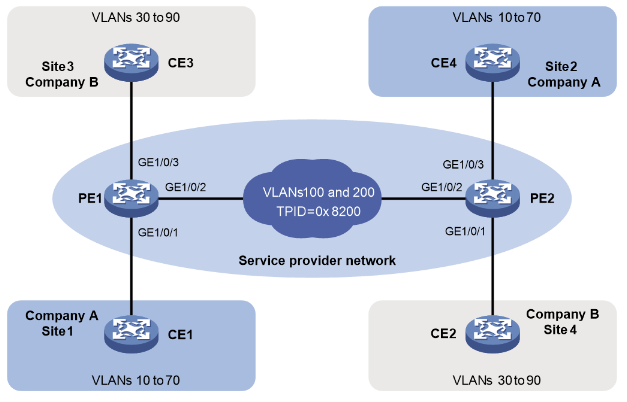
chart 1-3 QinQ Configuration network diagram
Configuration steps
(1) To configure PE 1
#  configure port GigabitEthernet1/0/1 by Trunk port , And allow VLAN 100 and VLAN 10~70 The message of .
<PE1> system-view
[PE1] interface gigabitethernet 1/0/1
[PE1-GigabitEthernet1/0/1] port link-type trunk
[PE1-GigabitEthernet1/0/1] port trunk permit vlan 100 10 to 70
#  configure port GigabitEthernet1/0/1 Of PVID by VLAN 100.
[PE1-GigabitEthernet1/0/1] port trunk pvid vlan 100
#  Open port GigabitEthernet1/0/1 Of QinQ function .
[PE1-GigabitEthernet1/0/1] qinq enable
[PE1-GigabitEthernet1/0/1] quit
#  configure port GigabitEthernet1/0/2 by Trunk port , And allow VLAN 100 and VLAN 200 The message of .
[PE1] interface gigabitethernet 1/0/2
[PE1-GigabitEthernet1/0/2] port link-type trunk
[PE1-GigabitEthernet1/0/2] port trunk permit vlan 100 200
#  In the port GigabitEthernet1/0/2 Configure outer layer on VLAN Tag Of TPID The value is 0x8200.
[PE1-GigabitEthernet1/0/2] qinq ethernet-type service-tag 8200
[PE1-GigabitEthernet1/0/2] quit
#  configure port GigabitEthernet1/0/3 by Trunk port , And allow VLAN 200 and VLAN 30~90 The message of .
[PE1] interface gigabitethernet 1/0/3
[PE1-GigabitEthernet1/0/3] port link-type trunk
[PE1-GigabitEthernet1/0/3] port trunk permit vlan 200 30 to 90
#  configure port GigabitEthernet1/0/3 Of PVID by VLAN 200.
[PE1-GigabitEthernet1/0/3] port trunk pvid vlan 200
#  Open port GigabitEthernet1/0/3 Of QinQ function .
[PE1-GigabitEthernet1/0/3] qinq enable
[PE1-GigabitEthernet1/0/3] qui
(2) To configure PE 2
#  configure port GigabitEthernet1/0/1 by Trunk port , And allow VLAN 200 and VLAN 30~90 The message of .
<PE2> system-view
[PE2] interface gigabitethernet 1/0/1
[PE2-GigabitEthernet1/0/1] port link-type trunk
[PE2-GigabitEthernet1/0/1] port trunk permit vlan 200 30 to 90
#  configure port GigabitEthernet1/0/1 Of PVID by VLAN 200.
[PE2-GigabitEthernet1/0/1] port trunk pvid vlan 200
#  Open port GigabitEthernet1/0/1 Of QinQ function .
[PE2-GigabitEthernet1/0/1] qinq enable
[PE2-GigabitEthernet1/0/1] quit
#  configure port GigabitEthernet1/0/2 by Trunk port , And allow VLAN 100 and VLAN 200 The message of .
[PE2] interface gigabitethernet 1/0/2
[PE2-GigabitEthernet1/0/2] port link-type trunk
[PE2-GigabitEthernet1/0/2] port trunk permit vlan 100 200
#  In the port GigabitEthernet1/0/2 Configure outer layer on VLAN Tag Of TPID The value is 0x8200.
[PE2-GigabitEthernet1/0/2] qinq ethernet-type service-tag 8200
[PE2-GigabitEthernet1/0/2] quit
#  configure port GigabitEthernet1/0/3 by Trunk port , And allow VLAN 100 and VLAN 10~70 The message of .
[PE2] interface gigabitethernet 1/0/3
[PE2-GigabitEthernet1/0/3] port link-type trunk
[PE2-GigabitEthernet1/0/3] port trunk permit vlan 100 10 to 70
#  configure port GigabitEthernet1/0/3 Of PVID by VLAN 100.
[PE2-GigabitEthernet1/0/3] port trunk pvid vlan 100
#  Open port GigabitEthernet1/0/3 Of QinQ function .
[PE2-GigabitEthernet1/0/3] qinq enable
[PE2-GigabitEthernet1/0/3] qui
(3) Configure public network devices
Configure in the operator network PE 1 To PE 2 The device ports on the path between are allowed VLAN 100 and VLAN 200 The message carried VLAN Tag adopt , And these ports MTU It's worth at least 1504 byte .
边栏推荐
- Games202 operation 0 - environment building process & solving problems encountered
- 241. Different Ways to Add Parentheses
- Solution: you can ping others, but others can't ping me
- Redis 实现限流的三种方式
- Gameframework eating guide
- 论文泛读【FiLM: Visual Reasoning with a General Conditioning Layer】
- Cdga | if you are engaged in the communication industry, you should get a data management certificate
- 智慧防疫系统为建筑工地复工复产提供安全保障
- 机械设备行业数字化供应链集采平台解决方案:优化资源配置,实现降本增效
- Bao, que se passe - t - il si le serveur 100 + O & M a mal à la tête? Utilisez le majordome xingyun!
猜你喜欢
![[AGC] how to solve the problem that the local display of event analysis data is inconsistent with that in AGC panel?](/img/66/674a06d8e45a31ae879b81554ef373.png)
[AGC] how to solve the problem that the local display of event analysis data is inconsistent with that in AGC panel?
![[pytorch record] automatic hybrid accuracy training torch cuda. amp](/img/a5/cf1eb2801380cf2887dfd532d3eb1e.jpg)
[pytorch record] automatic hybrid accuracy training torch cuda. amp

生鲜行业B2B电商平台解决方案,提高企业交易流程标准化和透明度

Lake Shore - crx-em-hf low temperature probe station
从零开始学 MySQL —数据库和数据表操作
ubuntu14安装MySQL并配置root账户本地与远程访问
Docker deploy mysql8.0

Detailed explanation of JUnit unit test framework

Superoptimag superconducting magnet system - SOM, Som2 series

Huawei game failed to initialize init with error code 907135000
随机推荐
web开发常用的开源框架的开源协议整理
Graduation summary
【Go ~ 0到1 】 第五天 7月1 类型别名,自定义类型,接口,包与初始化函数
3. "Create your own NFT collections and publish a Web3 application to show them" cast NFT locally
【To .NET】C#集合类源码解析
M91快速霍尔测量仪—在更短的时间内进行更好的测量
[quick application] win7 system cannot run and debug projects using Huawei ide
Team up to learn! 14 days of Hongmeng equipment development "learning, practicing and testing" practical camp, free of charge!
B2B e-commerce platform solution for fresh food industry to improve the standardization and transparency of enterprise transaction process
Gameframework eating guide
June issue | antdb database participated in the preparation of the "Database Development Research Report" and appeared on the list of information technology and entrepreneurship industries
论文阅读【Learning to Discretely Compose Reasoning Module Networks for Video Captioning】
MATLAB中subplot函数的使用
Example explanation: move graph explorer to jupyterlab
Implement a Prometheus exporter
Transform + ASM data
案例分享:QinQ基本组网配置
MFC中如何重绘CListCtrl的表头
Dlib+Opencv库实现疲劳检测
VBA simple macro programming of Excel