当前位置:网站首页>fragment实现底部导航栏不刷新切换
fragment实现底部导航栏不刷新切换
2022-06-10 10:26:00 【温正实】
安卓自带的底部导航栏每次切换fragment都会刷新数据,用户体验会很不好,
所以自己做了个不会刷新的fragment切换的底部导航栏
先看效果,我上传一个录屏,请看效果(首页时c站的一个链接):
捂脸,上传审核,于是我把录屏转成gif图片,请看
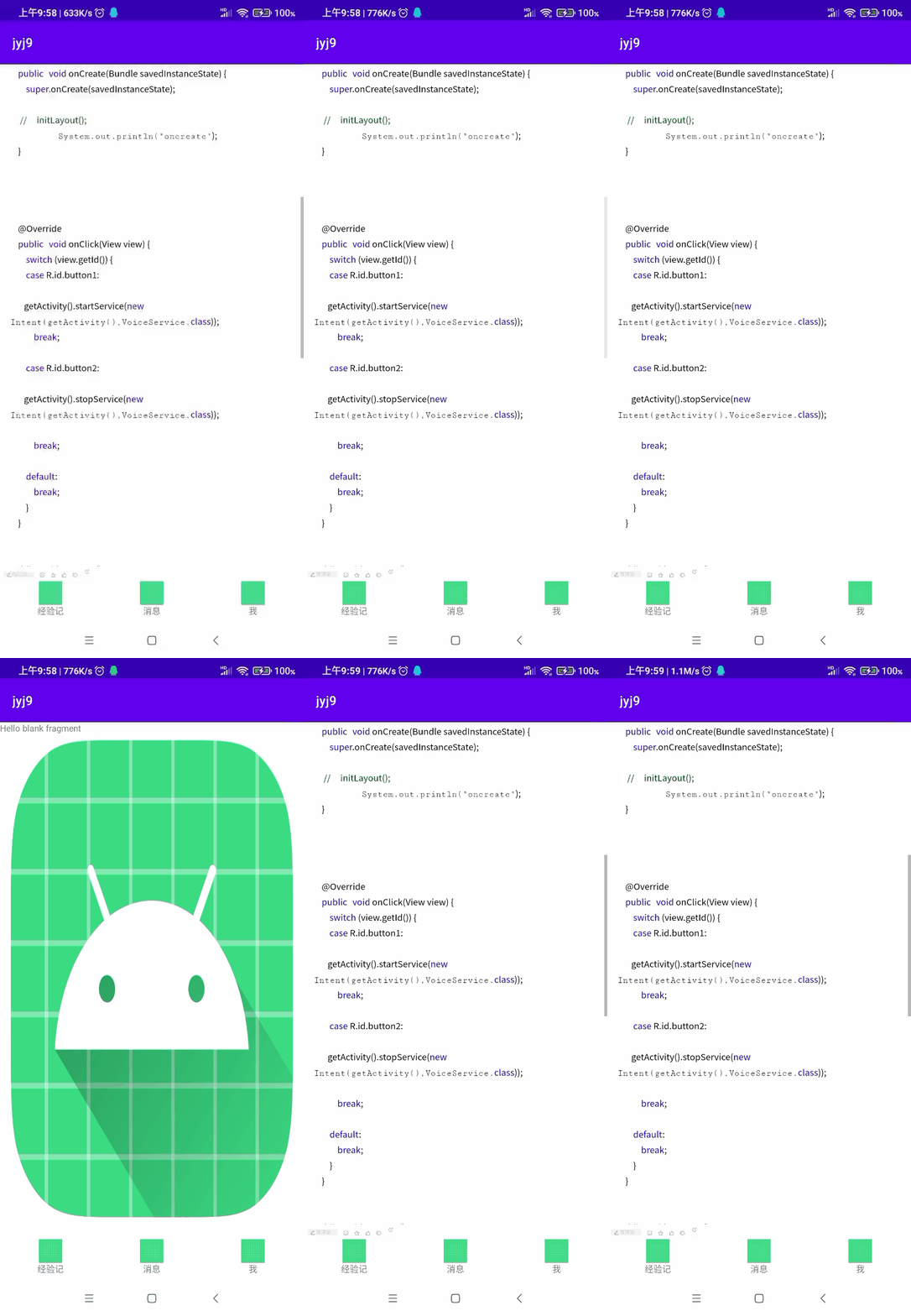
MainActivity+HomeFragment+Notificationfragment+Minefragment
1.MainActivity代码
package com.xmkjstudio.jyj9;

import androidx.appcompat.app.AppCompatActivity;
import androidx.fragment.app.FragmentManager;
import androidx.fragment.app.FragmentTransaction;

import android.os.Bundle;
import android.view.View;
import android.widget.Toast;

import com.xmkjstudio.jyj9.fragment.HomeFragment;
import com.xmkjstudio.jyj9.fragment.MineFragment;
import com.xmkjstudio.jyj9.fragment.NotificationFragment;

public class MainActivity extends AppCompatActivity  implements View.OnClickListener {

    private FragmentManager fragmentManager;


    private FragmentTransaction fragmentTransaction;
    private HomeFragment homeFragment;
    private NotificationFragment notificationFragment;
    private MineFragment mineFragment;
    private FragmentTransaction ft;

    @Override
    protected void onCreate(Bundle savedInstanceState) {
        super.onCreate(savedInstanceState);
        setContentView(R.layout.activity_main);


        findViewById(R.id.tab_1_img).setOnClickListener(this);
        findViewById(R.id.tab_1_txt).setOnClickListener(this);
        findViewById(R.id.tab1_contain).setOnClickListener(this);
        findViewById(R.id.tab_2_img).setOnClickListener(this);
        findViewById(R.id.tab_2_txt).setOnClickListener(this);
        findViewById(R.id.tab2_contain).setOnClickListener(this);
        findViewById(R.id.tab_3_img).setOnClickListener(this);
        findViewById(R.id.tab_3_txt).setOnClickListener(this);
        findViewById(R.id.tab3_contain).setOnClickListener(this);

//        addToIndex();


        homeFragment=new HomeFragment();
        notificationFragment=new NotificationFragment();
        mineFragment=new MineFragment();


        fragmentManager = getSupportFragmentManager();
        ft = fragmentManager.beginTransaction();
        ft.add(R.id.frame,homeFragment).commit();


//
//        fragmentManager=getSupportFragmentManager();
//        fragmentTransaction=fragmentManager.beginTransaction();


    }

    @Override
    public void onClick(View v) {
        fragmentTransaction=fragmentManager.beginTransaction();
        FragmentTransaction transaction = fragmentManager.beginTransaction().setCustomAnimations(
                android.R.anim.fade_in, android.R.anim.fade_out);

        switch (v.getId()){
            //tab1
            case R.id.tab_1_txt:

                break;
            case R.id.tab_1_img:


                break;
            case R.id.tab1_contain:
                if(notificationFragment.isAdded()){
                    fragmentManager = getSupportFragmentManager();
                    ft = fragmentManager.beginTransaction();
                    ft.hide(notificationFragment).commit();
                }

                if(mineFragment.isAdded()){
                    fragmentManager = getSupportFragmentManager();
                    ft = fragmentManager.beginTransaction();
                    ft.hide(mineFragment).commit();
                }
                if(homeFragment.isAdded()) {

                    if(notificationFragment.isAdded()){
                        fragmentManager = getSupportFragmentManager();
                        ft = fragmentManager.beginTransaction();
                        ft.hide(notificationFragment).commit();
                    }

                    if(mineFragment.isAdded()){
                        fragmentManager = getSupportFragmentManager();
                        ft = fragmentManager.beginTransaction();
                        ft.hide(mineFragment).commit();
                    }
                    fragmentManager = getSupportFragmentManager();
                    ft = fragmentManager.beginTransaction();
                    ft.show(homeFragment).commit();

                }else{
                    fragmentManager = getSupportFragmentManager();
                    ft = fragmentManager.beginTransaction();

                    ft.add(R.id.frame, homeFragment).commit();
                }
                break;

                //tab2
            case R.id.tab_2_txt:

                break;
            case R.id.tab_2_img:

                break;
            case R.id.tab2_contain:
                if(homeFragment.isAdded()){
                    fragmentManager = getSupportFragmentManager();
                    ft = fragmentManager.beginTransaction();
                    ft.hide(homeFragment).commit();
                }

                if(mineFragment.isAdded()){
                    fragmentManager = getSupportFragmentManager();
                    ft = fragmentManager.beginTransaction();
                    ft.hide(mineFragment).commit();
                }

                if(notificationFragment.isAdded()){
                    if(homeFragment.isAdded()){
                        fragmentManager = getSupportFragmentManager();
                        ft = fragmentManager.beginTransaction();
                        ft.hide(homeFragment).commit();
                    }

                    if(mineFragment.isAdded()){
                        fragmentManager = getSupportFragmentManager();
                        ft = fragmentManager.beginTransaction();
                        ft.hide(mineFragment).commit();
                    }
                    fragmentManager = getSupportFragmentManager();
                    ft = fragmentManager.beginTransaction();
                    ft.show(notificationFragment).commit();
                }else {
                    fragmentManager = getSupportFragmentManager();
                    ft = fragmentManager.beginTransaction();
                    ft.add(R.id.frame, notificationFragment).commit();
                }
                break;

            //tab3
            case R.id.tab_3_txt:

                break;
            case R.id.tab_3_img:

                break;
            case R.id.tab3_contain:
                if(homeFragment.isAdded()){
                    fragmentManager = getSupportFragmentManager();
                    ft = fragmentManager.beginTransaction();
                    ft.hide(homeFragment).commit();
                }

                if(notificationFragment.isAdded()){
                    fragmentManager = getSupportFragmentManager();
                    ft = fragmentManager.beginTransaction();
                    ft.hide(notificationFragment).commit();
                }
                if(mineFragment.isAdded()){
                    if(homeFragment.isAdded()){
                        fragmentManager = getSupportFragmentManager();
                        ft = fragmentManager.beginTransaction();
                        ft.hide(homeFragment).commit();
                    }

                    if(notificationFragment.isAdded()){
                        fragmentManager = getSupportFragmentManager();
                        ft = fragmentManager.beginTransaction();
                        ft.hide(notificationFragment).commit();
                    }
                    fragmentManager = getSupportFragmentManager();
                    ft = fragmentManager.beginTransaction();
                    ft.show(mineFragment).commit();
                }else {
                    fragmentManager = getSupportFragmentManager();
                    ft = fragmentManager.beginTransaction();
                    ft.add(R.id.frame, mineFragment).commit();
                }
                break;
        }
        fragmentTransaction.commit();
    }


    //提前加载
//    private  void addToIndex(){
//
//        fragmentManager=getSupportFragmentManager();
//        fragmentTransaction=fragmentManager.beginTransaction();
//        if(homeFragment==null){
//            homeFragment=new HomeFragment();
//        }
//        fragmentTransaction.replace(R.id.frame,homeFragment);
//
//
//        fragmentTransaction.commit();
//    }


}
activity_main.xml
<?xml version="1.0" encoding="utf-8"?>
<androidx.constraintlayout.widget.ConstraintLayout xmlns:android="http://schemas.android.com/apk/res/android"
    xmlns:app="http://schemas.android.com/apk/res-auto"
    xmlns:tools="http://schemas.android.com/tools"
    android:layout_width="match_parent"
    android:layout_height="match_parent"
    tools:context=".MainActivity">

   <LinearLayout
       android:layout_width="match_parent"
       android:orientation="vertical"
       android:layout_height="match_parent">


       <FrameLayout
           android:id="@+id/frame"
           android:orientation="vertical"
           android:layout_weight="0.8"
           android:layout_width="match_parent"
           android:layout_height="match_parent">

       </FrameLayout>


       <!--导航栏-->
       <LinearLayout
           android:layout_marginTop="5dp"
           android:layout_weight="9.2"
           android:orientation="horizontal"
           android:layout_width="match_parent"
           android:layout_height="match_parent">
            <!--tab1-->
           <LinearLayout
               android:id="@+id/tab1_contain"
               android:layout_weight="1"
               android:orientation="vertical"
               android:gravity="center_horizontal"
               android:layout_width="match_parent"
               android:layout_height="match_parent">
               <ImageView
                   android:id="@+id/tab_1_img"
                   android:src="@drawable/ic_launcher_background"
                   android:layout_width="30dp"
                   android:layout_height="30dp"/>
               <TextView
                   android:id="@+id/tab_1_txt"
                   android:text="经验记"
                   android:layout_width="wrap_content"
                   android:layout_height="wrap_content"/>
           </LinearLayout>

           <!--tab2-->
           <LinearLayout
               android:id="@+id/tab2_contain"
               android:orientation="vertical"
               android:gravity="center_horizontal"
               android:layout_weight="1"
               android:layout_width="match_parent"
               android:layout_height="match_parent">
               <ImageView
                   android:id="@+id/tab_2_img"
                   android:src="@drawable/ic_launcher_background"
                   android:layout_width="30dp"
                   android:layout_height="30dp"/>
               <TextView
                   android:id="@+id/tab_2_txt"
                   android:text="消息"
                   android:layout_width="wrap_content"
                   android:layout_height="wrap_content"/>

           </LinearLayout>


           <!--tab3-->
           <LinearLayout
               android:id="@+id/tab3_contain"
               android:orientation="vertical"
               android:gravity="center_horizontal"
               android:layout_weight="1"
               android:layout_width="match_parent"
               android:layout_height="match_parent">
               <ImageView
                   android:id="@+id/tab_3_img"
                   android:src="@drawable/ic_launcher_background"
                   android:layout_width="30dp"
                   android:layout_height="30dp"/>
               <TextView
                   android:id="@+id/tab_3_txt"
                   android:text="我"
                   android:layout_width="wrap_content"
                   android:layout_height="wrap_content"/>
           </LinearLayout>
       </LinearLayout>

   </LinearLayout>

</androidx.constraintlayout.widget.ConstraintLayout>
HomeFragment
package com.xmkjstudio.jyj9.fragment;

import android.os.Bundle;

import androidx.fragment.app.Fragment;

import android.view.LayoutInflater;
import android.view.View;
import android.view.ViewGroup;
import android.webkit.WebView;

import com.xmkjstudio.jyj9.R;

/**
 * A simple {@link Fragment} subclass.
 * Use the {@link HomeFragment#newInstance} factory method to
 * create an instance of this fragment.
 */
public class HomeFragment extends Fragment {


    // TODO: Rename parameter arguments, choose names that match
    // the fragment initialization parameters, e.g. ARG_ITEM_NUMBER
    private static final String ARG_PARAM1 = "param1";
    private static final String ARG_PARAM2 = "param2";

    // TODO: Rename and change types of parameters
    private String mParam1;
    private String mParam2;

    public HomeFragment() {
        // Required empty public constructor
    }

    /**
     * Use this factory method to create a new instance of
     * this fragment using the provided parameters.
     *
     * @param param1 Parameter 1.
     * @param param2 Parameter 2.
     * @return A new instance of fragment HomeFragment.
     */
    // TODO: Rename and change types and number of parameters
    public static HomeFragment newInstance(String param1, String param2) {
        HomeFragment fragment = new HomeFragment();
        Bundle args = new Bundle();
        args.putString(ARG_PARAM1, param1);
        args.putString(ARG_PARAM2, param2);
        fragment.setArguments(args);
        return fragment;
    }

    @Override
    public void onCreate(Bundle savedInstanceState) {
        super.onCreate(savedInstanceState);
        if (getArguments() != null) {
            mParam1 = getArguments().getString(ARG_PARAM1);
            mParam2 = getArguments().getString(ARG_PARAM2);
        }

    }

    @Override
    public View onCreateView(LayoutInflater inflater, ViewGroup container,
                             Bundle savedInstanceState) {
        View view = inflater.inflate(R.layout.fragment_home, container, false);

        WebView webView=view.findViewById(R.id.webview);
        webView.loadUrl("https://blog.csdn.net/b305723/ar" +
                "ticle/details/101892612?ops_request_misc=" +
                "%257B%2522request%255Fid%2522%253A%2522165" +
                "447567616782184659916%2522%252C%2522scm%25" +
                "22%253A%252220140713.130102334..%2522%257D" +
                "&request_id=165447567616782184659916&biz_i" +
                "d=0&utm_medium=distribute.pc_search_result" +
                ".none-task-blog-2~all" +
                "~sobaiduend~default-1-101892612-null-null." +
                "142^v11^control,157^v13^new_style1&utm_" +
                "term=fragment里面怎么写代码&spm=1018.2226.3001.4187");

        return view;


    }
}
fragment_home.x m l
<?xml version="1.0" encoding="utf-8"?>
<FrameLayout xmlns:android="http://schemas.android.com/apk/res/android"
    xmlns:tools="http://schemas.android.com/tools"
    android:layout_width="match_parent"
    android:layout_height="match_parent"
    tools:context=".fragment.HomeFragment">

    <!-- TODO: Update blank fragment layout -->
   <WebView
       android:id="@+id/webview"
       android:layout_width="match_parent"
       android:layout_height="match_parent"/>

</FrameLayout>
NotificationFragment代码
package com.xmkjstudio.jyj9.fragment;

import android.os.Bundle;

import androidx.fragment.app.Fragment;

import android.view.LayoutInflater;
import android.view.View;
import android.view.ViewGroup;

import com.xmkjstudio.jyj9.R;

/**
 * A simple {@link Fragment} subclass.
 * Use the {@link NotificationFragment#newInstance} factory method to
 * create an instance of this fragment.
 */
public class NotificationFragment extends Fragment {

    // TODO: Rename parameter arguments, choose names that match
    // the fragment initialization parameters, e.g. ARG_ITEM_NUMBER
    private static final String ARG_PARAM1 = "param1";
    private static final String ARG_PARAM2 = "param2";

    // TODO: Rename and change types of parameters
    private String mParam1;
    private String mParam2;

    public NotificationFragment() {
        // Required empty public constructor
    }

    /**
     * Use this factory method to create a new instance of
     * this fragment using the provided parameters.
     *
     * @param param1 Parameter 1.
     * @param param2 Parameter 2.
     * @return A new instance of fragment NotificationFragment.
     */
    // TODO: Rename and change types and number of parameters
    public static NotificationFragment newInstance(String param1, String param2) {
        NotificationFragment fragment = new NotificationFragment();
        Bundle args = new Bundle();
        args.putString(ARG_PARAM1, param1);
        args.putString(ARG_PARAM2, param2);
        fragment.setArguments(args);
        return fragment;
    }

    @Override
    public void onCreate(Bundle savedInstanceState) {
        super.onCreate(savedInstanceState);
        if (getArguments() != null) {
            mParam1 = getArguments().getString(ARG_PARAM1);
            mParam2 = getArguments().getString(ARG_PARAM2);
        }
    }

    @Override
    public View onCreateView(LayoutInflater inflater, ViewGroup container,
                             Bundle savedInstanceState) {
        // Inflate the layout for this fragment
        return inflater.inflate(R.layout.fragment_notification, container, false);
    }
}
fragment_notification.xml
<?xml version="1.0" encoding="utf-8"?>
<FrameLayout xmlns:android="http://schemas.android.com/apk/res/android"
    xmlns:tools="http://schemas.android.com/tools"
    android:layout_width="match_parent"
    android:layout_height="match_parent"
    android:background="@mipmap/ic_launcher"
    tools:context=".fragment.NotificationFragment">

    <!-- TODO: Update blank fragment layout -->
    <TextView
        android:layout_width="match_parent"
        android:layout_height="match_parent"
        android:text="@string/hello_blank_fragment" />

</FrameLayout>
Minefragment代码
package com.xmkjstudio.jyj9.fragment;

import android.os.Bundle;

import androidx.fragment.app.Fragment;

import android.view.LayoutInflater;
import android.view.View;
import android.view.ViewGroup;

import com.xmkjstudio.jyj9.R;

/**
 * A simple {@link Fragment} subclass.
 * Use the {@link MineFragment#newInstance} factory method to
 * create an instance of this fragment.
 */
public class MineFragment extends Fragment {

    // TODO: Rename parameter arguments, choose names that match
    // the fragment initialization parameters, e.g. ARG_ITEM_NUMBER
    private static final String ARG_PARAM1 = "param1";
    private static final String ARG_PARAM2 = "param2";

    // TODO: Rename and change types of parameters
    private String mParam1;
    private String mParam2;

    public MineFragment() {
        // Required empty public constructor
    }

    /**
     * Use this factory method to create a new instance of
     * this fragment using the provided parameters.
     *
     * @param param1 Parameter 1.
     * @param param2 Parameter 2.
     * @return A new instance of fragment MineFragment.
     */
    // TODO: Rename and change types and number of parameters
    public static MineFragment newInstance(String param1, String param2) {
        MineFragment fragment = new MineFragment();
        Bundle args = new Bundle();
        args.putString(ARG_PARAM1, param1);
        args.putString(ARG_PARAM2, param2);
        fragment.setArguments(args);
        return fragment;
    }

    @Override
    public void onCreate(Bundle savedInstanceState) {
        super.onCreate(savedInstanceState);
        if (getArguments() != null) {
            mParam1 = getArguments().getString(ARG_PARAM1);
            mParam2 = getArguments().getString(ARG_PARAM2);
        }
    }

    @Override
    public View onCreateView(LayoutInflater inflater, ViewGroup container,
                             Bundle savedInstanceState) {
        // Inflate the layout for this fragment
        return inflater.inflate(R.layout.fragment_mine, container, false);
    }
}
fragmen_mine.xml
<?xml version="1.0" encoding="utf-8"?>
<FrameLayout xmlns:android="http://schemas.android.com/apk/res/android"
    xmlns:tools="http://schemas.android.com/tools"
    android:layout_width="match_parent"
    android:background="@drawable/ic_launcher_background"
    android:layout_height="match_parent"
    tools:context=".fragment.MineFragment">

    <!-- TODO: Update blank fragment layout -->
    <TextView
        android:layout_width="match_parent"
        android:layout_height="match_parent"
        android:text="@string/hello_blank_fragment" />

</FrameLayout>边栏推荐
- Market development details of NFT casting trading platform
- It is very convenient to make a data analysis crosstab with one line of code
- Question bank and answers of 2022 metal and nonmetal mine hoist operation examination
- Mixer: an indispensable component of video conference recording
- Selenium distributed testing
- PV操作每日一题-考试问题
- Eg2131 test circuit
- fcpx插件:PremiumVFX Animation Presets(动画循环预设) v1.0.1特别版
- All things grow and each is noble
- 【云原生利器之Cilium】什么是Cilium
猜你喜欢

MySQL practice 45 lectures_ 8_ Deepen the understanding of MySQL repeatable reading from a problem

2023 Wangdao C language training camp (binary search tree - sequential search - half search)

Neo hacker song's award-winning list has been announced. Who owns tens of thousands of dollars of gold?

Hardcore spoiler! With 11 topics and 14 celebrities, dragon dragon dragon community entered Intel meetup and announced the agenda!

塔米狗分享|房地产企业并购只增不减,那么上哪儿找这些项目呢?

效率工具 : uTools

How to state clearly and concisely the product requirements?

基于SSH的音乐检索系统

软件测试电商项目实战(实战视频B站已发布)

Dr. jiangxiaowei, a member of hpca Hall of fame, is the chief scientist of Dayu smart core
随机推荐
Leetcode 2000. 反转单词前缀
数组目标值target两个整数,并返回它们的数组下标
MySQL - operation database
杰理之BLE timer 时钟源不能选 OSC 晶振【篇】
最大和的连续子数组
The winning list of "talking tom cat family - time light chaser" 3D digital collection was announced
Uniapp message push (push by PHP server)
创建swift颜色类
硬核剧透!11个议题、14位大咖,龙蜥社区走进 Intel MeetUp 议程公布!
Vite's public directory
EG2131测试电路
Continuous subarray of maximum sum
二分查找有序数组中的特定值
MATLAB 学习笔记(3)MATLAB 矩阵的进阶操作
A unique resume generator, open source!
Tami dog shares | real estate enterprise mergers and acquisitions are only increasing, so where to find these projects?
[FAQ] summary of common problems and solutions during the use of rest API interface of sports health service
PV操作每日一题-缓冲区问题(进阶版)
【高并发】关于乐观锁和悲观锁,蚂蚁金服面试官问了我这几个问题!!
[concurrent programming JUC] four ways to create threads