当前位置:网站首页>数据集成框架SeaTunnel学习笔记
数据集成框架SeaTunnel学习笔记
2022-06-12 05:37:00 【coder_szc】
概述
介绍
SeaTunnel 是一个简单易用的数据集成框架,在企业中,由于开发时间或开发部门不通用,往往有多个异构的、运行在不同的软硬件平台上的信息系统同时运行。数据集成是把不同来源、格式、特点性质的数据在逻辑上或物理上有机地集中,从而为企业提供全面的数据共享。SeaTunnel 支持海量数据的实时同步。它每天可以稳定高效地同步数百亿数据,并已用于近 100 家公司的生产。
SeaTunnel的前身是 Waterdrop(中文名:水滴)自2021年 10月 12日更名为 SeaTunnel。2021年 12月 9日,SeaTunnel正式通过 Apache软件基金会的投票决议,以全票通过的优秀表现正式成为 Apache 孵化器项目。2022 年 3 月 18 日社区正式发布了首个 Apache 版本v2.1.0。
本质上,SeaTunnel 不是对 Saprk 和 Flink 的内部修改,而是在 Spark 和 Flink 的基础上做了一层包装。它主要运用了 控制反转的设计模式,这也是 SeaTunnel实现的基本思想。SeaTunnel 的日常使用,就是编辑配置文件。编辑好的配置文件由 SeaTunnel 转换为具体的 Spark或 Flink 任务,如图所示
应用场景

目前 SeaTunnel 的长板是他有丰富的连接器,又因为它以 Spark 和 Flink 为引擎。所以可以很好地进行分布式的海量数据同步。通常SeaTunnel会被用来做出仓入仓工具,或者被用来进行数据集成,下图是SeaTunnel的工作流程: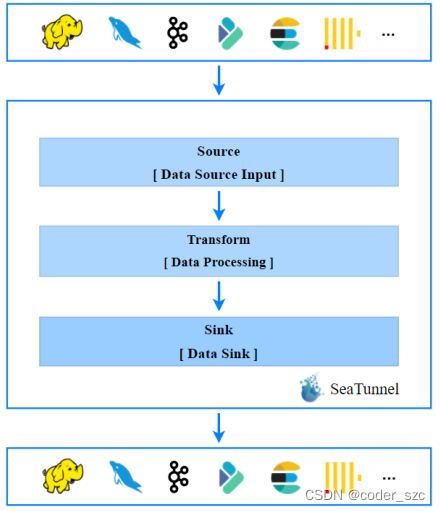
官网地址:https://seatunnel.apache.org/zh-CN/
插件支持情况
Spark连接器插件支持情况:
Flink连接器插件支持情况:
Spark-Flink转换插件支持情况:
安装和配置
安装
截至SeaTunnel2.1.0,支持的环境为Spark2.X、Flink1.9.0及以上,JDK>=1.8。
首先,下载解压SeaTunnel:
[[email protected] szc]# wget https://downloads.apache.org/incubator/seatunnel/2.1.0/apache-seatunnel-incubating-2.1.0-bin.tar.gz
[[email protected] szc]# tar -zxvf apache-seatunnel-incubating-2.1.0-bin.tar.gz
配置
进入apache-seatunnel-incubating-2.1.0/config/目录,编辑seatunnel.sh文件:
#!/usr/bin/env bash
#
# Licensed to the Apache Software Foundation (ASF) under one or more
# contributor license agreements. See the NOTICE file distributed with
# this work for additional information regarding copyright ownership.
# The ASF licenses this file to You under the Apache License, Version 2.0
# (the "License"); you may not use this file except in compliance with
# the License. You may obtain a copy of the License at
#
# http://www.apache.org/licenses/LICENSE-2.0
#
# Unless required by applicable law or agreed to in writing, software
# distributed under the License is distributed on an "AS IS" BASIS,
# WITHOUT WARRANTIES OR CONDITIONS OF ANY KIND, either express or implied.
# See the License for the specific language governing permissions and
# limitations under the License.
#

# Home directory of spark distribution.
SPARK_HOME=${SPARK_HOME:-/opt/spark}
# Home directory of flink distribution.
FLINK_HOME=${FLINK_HOME:-/opt/flink}

# Control whether to print the ascii logo
export SEATUNNEL_PRINT_ASCII_LOGO=true
默认的话,SPARK_HOME和FLINK_HOME用的都是对应的系统环境变量值,如果没有,使用:-后面的值,按需修改即可。
使用
案例1入门
创建作业配置文件example01.conf,内容如下:
# 配置 Spark 或 Flink 的参数
env {

    # You can set flink configuration here
    execution.parallelism = 1
    #execution.checkpoint.interval = 10000
    #execution.checkpoint.data-uri = "hdfs://scentos:9092/checkpoint"
}

# 在 source 所属的块中配置数据源
source {

    SocketStream{

        host = scentos
        result_table_name = "fake"
        field_name = "info"
    }
}

# 在 transform 的块中声明转换插件
transform {

    Split{

        separator = "#" # 用#将输入分割成name和age两个字段
        fields = ["name","age"]
    }
    sql {

        sql = "select info, split(info) as info_row from fake" # 调用split()函数进行分割
    }
}

# 在 sink 块中声明要输出到哪
sink {

    ConsoleSink {
    }
}
而后,先执行:
[[email protected] szc]# nc -lk 9999
再提交作业:
[[email protected] apache-seatunnel-incubating-2.1.0]# bin/start-seatunnel-flink.sh --config config/example01.conf
出现Job has been submitted with JobID XXXXXXX后,就可以在nc -lk终端里进行输入了:
[[email protected] szc]# nc -lk 9999
szc#23^H
szcc#26
dawqe
jioec*231#1
并且到Flink的webUI中查看输出:
至此,我们已经跑完了一个官方案例。它以 Socket为数据源。经过 SQL 的处理,最终输出到控制台。在这个过程中,我们并没有编写具体的flink代码,也没有手动去打jar包。我们只是将数据的处理流程声明在了一个配置文件中。在背后,是 SeaTunnel 帮我们把配置文件翻译为具体的 flink 任务。配置化,低代码,易维护是 SeaTunnel最显著的特点。
案例2传参
复制一份example01.conf:
[[email protected] config]# cp example01.conf example02.conf
修改SQL插件部分:
# 配置 Spark 或 Flink 的参数
env {

    # You can set flink configuration here
    execution.parallelism = 1
    #execution.checkpoint.interval = 10000
    #execution.checkpoint.data-uri = "hdfs://scentos:9092/checkpoint"
}

# 在 source 所属的块中配置数据源
source {

    SocketStream{

        host = scentos
        result_table_name = "fake"
        field_name = "info"
    }
}

# 在 transform 的块中声明转换插件
transform {

    Split{

        separator = "#"
        fields = ["name","age"]
    }
    sql {

        sql = "select * from (select info, split(info) as info_row from fake) where age > '"${age}"'" # 嵌套一个子查询,再通过where进行过滤
    }
}

# 在 sink 块中声明要输出到哪
sink {

    ConsoleSink {
    }
}
启动nc -lk后,通过-i对seaTunnel进行传参:
[[email protected] apache-seatunnel-incubating-2.1.0]# bin/start-seatunnel-flink.sh --config config/example02.conf -i age=25
多个参数要用多个-i进行传递,其中-i可以改成-p、-m等,只要不是–config或–variable即可。
测试输入如下:
[[email protected] szc]# nc -lk 9999
szc#26
szc002:#21
szc003#27
输出如下:
可见,21岁的szc002被过滤掉了。
边栏推荐
猜你喜欢
ESP8266 Arduino OLED

利用jieba库进行词频统计

beginning一款非常优秀的emlog主题v3.1,支持Emlog Pro

How long is the company's registered capital subscribed

Esp32-who face detection
![[getting to the bottom] five minutes to understand the combination evaluation model - fuzzy borde (taking the C question of the 2021 college students' numerical simulation national competition as an e](/img/2e/97310ec36aeb1fc1e9c82361141a36.jpg)
[getting to the bottom] five minutes to understand the combination evaluation model - fuzzy borde (taking the C question of the 2021 college students' numerical simulation national competition as an e

Towards End-to-End Lane Detection: an Instance SegmentationApproach

Vivado HLS introductory notes

Go interface oriented programming practice

Nature | make an account of the new crown casualties in the world
随机推荐
[machine learning] first day of introduction
FPGA语法的细节
Vivado HLS introductory notes
Automated testing - Po mode / log /allure/ continuous integration
Lldp protocol
GRE protocol details
Towards End-to-End Lane Detection: an Instance SegmentationApproach
分公司负责人需要承担的法律责任
About architecture (in no particular order)
Thesis reading_ Figure neural network gin
Reverse linked list
What is the project advance payment
Halcon 3D 深度图转换为3D图像
虚函数与纯虚函数的关系
67. convert string to integer
AddUser add user and mount hard disk
How does WiFi 802.11 correspond to 802.3
Field xxxxDAO in com. nero. hua. service. impl. LoginServiceImpl required a bean of type
38. 外观数列
Matlab: image rotation and interpolation and comparison of MSE before and after