当前位置:网站首页>【QT】Qt 5 的程序:打印文档
【QT】Qt 5 的程序:打印文档
2022-06-25 06:40:00 【Cappuccino-jay】
Qt 5 中的 Qt Print Support 模块提供了对打印的支持。
最简单的,只需要使用一个QPrinter 类和一个打印对话框 QPrintDialog 类就可以完成文档的打印操作。
接下来就介绍该程序可以打印文档、打印预览和生产PDF文档等操作。
更多的应用可以通过在帮助中通过 Qt Print Support 关键字查看。
1、新建一个 Qt Widgets 应用,项目名称可以自定义(例如:printFile)
类名和基类保持 MainWindow 和 QMainWindow 不变。完成后,打开 printFile.pro 文件,添加如下一行代码:
QT += printsupport
2、然后到设计模式向界面上拖入一个Text Edit 。再到 mainwindow.h 文件中先添加类的前置声明:
class QPrinter;
3、然后添加几个槽函数的声明:
private slots:
    void doPrint();
    void doPrintPreview();
    void printPreview(QPrinter * printer);
    void createPdf();
4、下面到 mainwindow.cpp 文件中添加头文件:
#include <QPrinter>
#include <QPrintDialog>
#include <QPrintPreviewDialog>
#include <QFileDialog>
#include <QFileInfo>
5、在构造函数中定义几个动作:
    QAction * action_print = new QAction(tr("打印"),this);
    QAction * action_printPreview = new QAction(tr("打印预览"),this);
    QAction * action_pdf = new QAction(tr("生成 pdf"),this);
    connect(action_print,SIGNAL(triggered()),this,SLOT(doPrint()));
    connect(action_printPreview,SIGNAL(triggered()),this,SLOT(doPrintPreview()));
    connect(action_pdf,SIGNAL(triggered()),this,SLOT(createPdf()));
    ui->mainToolBar->addAction(action_print);
    ui->mainToolBar->addAction(action_printPreview);
    ui->mainToolBar->addAction(action_pdf);
6、然后添加那几个 槽函数 的定义:
void MainWindow::doPrint()                          //打印
{

    QPrinter printer;                               //创建打印机对象
    QPrintDialog dlg(&printer,this);                //创建打印机对话框
    //如果编辑器中有选中区域,则打印选中区域
    if(ui->textEdit->textCursor().hasSelection())
        dlg.addEnabledOption(QAbstractPrintDialog::PrintSelection);
    if(dlg.exec() == QDialog::Accepted){
                //如果在对话框中按下了打印按钮
        ui->textEdit->print(&printer);              //则执行打印操作
    }
}
这里先建立了 QPrinter 类对象,它代表了一个打印设备。然后创建了一个打印对话框,如果编辑器中有选中的区域,则打印该区域,否则打印整个页面。
void MainWindow::doPrintPreview()                    //打印预览
{

    QPrinter printer;
    QPrintPreviewDialog preview(&printer,this);      //创建打印预览对话框
    //当要生成预览页面时,发射paintRequested()信号
    connect(&preview,&QPrintPreviewDialog::paintRequested,this,&MainWindow::printPreview);

    preview.exec();
}

void MainWindow::printPreview(QPrinter * printer)
{

    ui->textEdit->print(printer);
}
这里主要使用打印预览对话框来进行打印预览,要关联它的paintRequested()信号到自定义的槽上,须在槽中调用编辑器的打印函数,并以传来的 QPrinter 类对对象指针为参数。
void MainWindow::createPdf()                            //生成PDF文件
{

    QString fileName = QFileDialog::getSaveFileName(this,tr("导出PDF文件"),QString(),"*.pdf");

    if(!fileName.isEmpty()){

        if(QFileInfo(fileName).suffix().isEmpty())
            fileName.append(".pdf");                    //如果文件后缀为空,则默认使用.pdf
        QPrinter printer;
        printer.setOutputFormat(QPrinter::PdfFormat);   //指定输出格式为 pdf
        printer.setOutputFileName(fileName);
        ui->textEdit->print(&printer);
    }
}
在生成PDF文档的槽中,使用文件对话框来获取要保存文件的路径;如果文件名没有指定后缀,则为其添加 “.pdf” 后缀。然后为 QPrinter 对象指定输出格式和文件路径,这样就可以将文档打印成PDF格式了。
7、最后就可以运行程序了,如果电脑已经安装好了打印机,那么可以测试实际打印效果,否则只能测试PDF打印效果。
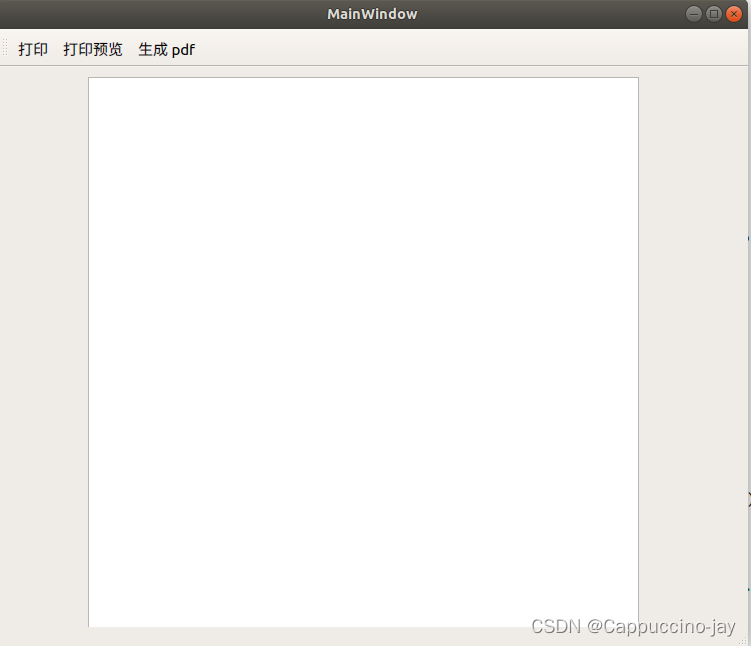
打印预览对话框效果:

边栏推荐
- [QT] shortcut key
- 我的处女作杀青啦!
- 【Qt】快捷键
- MySQL facet 01
- Misunderstanding of switching triode
- [batch dos-cmd command - summary and summary] - file and directory operation commands (MD, RD, xcopy, dir, CD, set, move, copy, del, type, sort)
- MySQL face Scripture eight part essay
- NSIS 静默安装vs2013运行时
- Runtime——methods成员变量,cache成员变量
- Harmony food menu interface
猜你喜欢

Construction of occupancy grid map

China Mobile MCU product information

npm install 报错 : gyp ERR! configure error

用太极拳讲分布式理论,真舒服!
Mysql database import SQL file display garbled code
![[batch dos-cmd command - summary and summary] - commands related to Internet access and network communication (Ping, Telnet, NSLOOKUP, ARP, tracert, ipconfig)](/img/9b/283d99adf10262c356d1a87ce01bc0.png)
[batch dos-cmd command - summary and summary] - commands related to Internet access and network communication (Ping, Telnet, NSLOOKUP, ARP, tracert, ipconfig)

Introduction to Sichuan Tuwei ca-is3082wx isolated rs-485/rs-422 transceiver
VectorDraw Web Library 10.10

How to use printf of 51 single chip microcomputer

【批处理DOS-CMD命令-汇总和小结】-CMD窗口的设置与操作命令(cd、title、mode、color、pause、chcp、exit)
随机推荐
【pytest】修改allure报告中的logo及参数化
el-input实现尾部加字
C#获取exe的版本号-文件版本and程序集版本
Sichuan Tuwei ca-is3105w fully integrated DC-DC converter
Introduction to Sichuan Tuwei ca-is3082wx isolated rs-485/rs-422 transceiver
VectorDraw Developer Framework 10.10
[batch dos-cmd command - summary and summary] - add comment command (REM or::)
13 `bs_ duixiang. Tag tag ` get a tag object
【批处理DOS-CMD命令-汇总和小结】-cmd扩展命令、扩展功能(cmd /e:on、cmd /e:off)
Chuantu microelectronics ca-if1051 can-fd transceiver
【Qt】快捷键
14 bs对象.节点名称.name attrs string 获取节点名称 属性 内容
WinForm实现窗口始终在顶层
Collection of common terms and meanings in forestry investigation based on lidar
GUI pull-down menu of unity3d evil door implementation dropdown design has no duplicate items
[batch dos-cmd command - summary and summary] - file and directory operation commands (MD, RD, xcopy, dir, CD, set, move, copy, del, type, sort)
Vscode official configuration synchronization scheme
Audio (V) audio feature extraction
搞清信息化是什么,让企业转型升级走上正确的道路
Mysql database import SQL file display garbled code