当前位置:网站首页>【物理模拟】超简单的shape matching模拟刚体运动
【物理模拟】超简单的shape matching模拟刚体运动
2022-07-26 15:51:00 【beidou111】
Github repo
https://github.com/chunleili/tiRigidBody
Demo
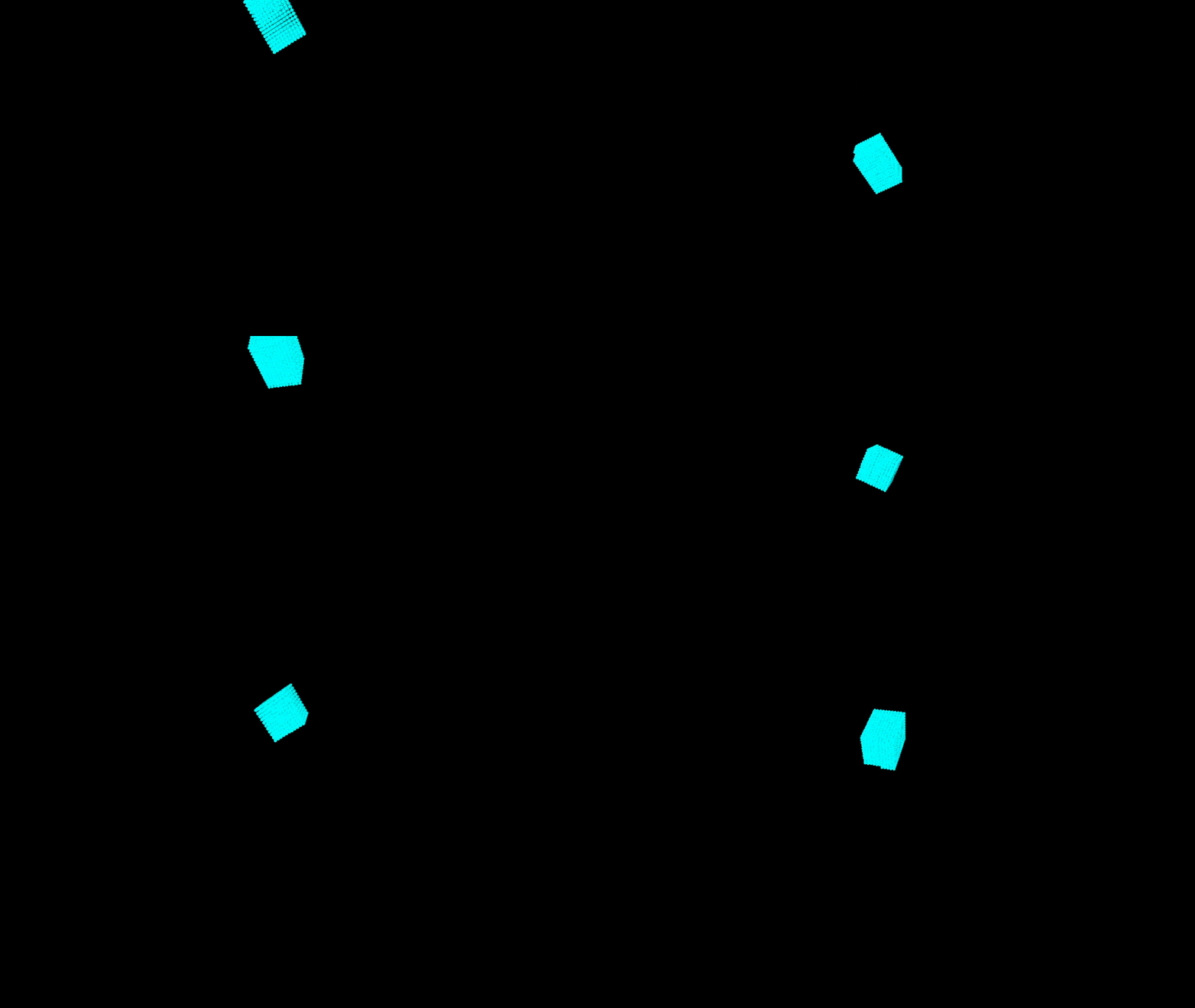
How to run
First, intall latest taichi by
pip install taichi
Then, run with
python tiRigidBody
Rember to press SPACE to start the simulation
How to play with it
Hotkeys
- Press SPACE to start or pause
- “wasd” for moving the camera
- When paused, press “p” to procceed only one step(useful for debugging)
Try different parameters
- Try to change the parameters in “init_particles()” (like init_pos, cube size etc.) or the num_particles
- Try to give another angle to the “rotation()”
- Try to change the stiffness of penalty force in “collision_response()”
Switch the branches
The different branches record the progress of coding.
Start with the simplest case, and gradually add features
- minimal_ggui: show two static particles in the screen
- init_particles: neatly stacked particles to form a box
- translation: move the box
- rotation: rotate the box
- collision_one_particle: colliding with a ramp, the collided particles are dyed to red
- bounce: the box can drop and rebounce, but no rotation
- master: the main branch
Add more features
- Add more boundary walls (now there is only a ground)
- Try to give better collision_reponse (more complex penalty forces or better)
- Try to add collision detection for collision with complex geometries
- Try to add more rigid bodies, and make them collide with each other
Want to understand the theory?
see:
- Matthias Müller, Bruno Heidelberger, Matthias Teschner, and Markus Gross. 2005. Meshless deformations based on shape matching. ACM Trans. Graph. 24, 3 (July 2005), 471–478. https://doi.org/10.1145/1073204.1073216
- GAMES103 Course, by Huamin Wang. https://games-cn.org/games103/
近期我会录个视频到B站从头讲解原理和实现方法。图文版也会放到博客里。
Codes
import taichi as ti
import math

ti.init()

num_particles = 2000
dim=3
world_scale_factor = 1.0/100.0
dt = 1e-2
mass_inv = 1.0

positions = ti.Vector.field(dim, float, num_particles)
velocities = ti.Vector.field(dim, float, num_particles)
pos_draw = ti.Vector.field(dim, float, num_particles)
force = ti.Vector.field(dim, float, num_particles)
penalty_force = ti.Vector.field(dim, float, num_particles)
positions0 = ti.Vector.field(dim, float, num_particles)
radius_vector = ti.Vector.field(dim, float, num_particles)
paused = ti.field(ti.i32, shape=())
q_inv = ti.Matrix.field(n=3, m=3, dtype=float, shape=())

@ti.kernel
def init_particles():
    init_pos = ti.Vector([70.0, 50.0, 0.0])
    cube_size = 20
    spacing = 2
    num_per_row = (int) (cube_size // spacing) + 1
    num_per_floor = num_per_row * num_per_row
    for i in range(num_particles):
        floor = i // (num_per_floor)
        row = (i % num_per_floor) // num_per_row
        col = (i % num_per_floor) % num_per_row
        positions[i] = ti.Vector([col*spacing, floor*spacing, row*spacing]) + init_pos


@ti.kernel
def shape_matching():
    # update vel and pos firtly
    gravity = ti.Vector([0.0, -9.8, 0.0])
    for i in range(num_particles):
        positions0[i] = positions[i]
        f = gravity + penalty_force[i]
        velocities[i] += mass_inv * f * dt
        positions[i] += velocities[i] * dt

    #compute the new(matched shape) mass center
    c = ti.Vector([0.0, 0.0, 0.0])
    for i in range(num_particles):
        c += positions[i]
    c /= num_particles

    #compute transformation matrix and extract rotation
    A = sum1 = ti.Matrix([[0.0] * 3 for _ in range(3)], ti.f32)
    for i in range(num_particles):
        sum1 += (positions[i] - c).outer_product(radius_vector[i])
    A = sum1 @ q_inv[None]

    R, _ = ti.polar_decompose(A)

    #update velocities and positions
    for i in range(num_particles):
        positions[i] = c + R @ radius_vector[i]
        velocities[i] = (positions[i] - positions0[i]) / dt


@ti.kernel
def compute_radius_vector():
    #compute the mass center and radius vector
    center_mass = ti.Vector([0.0, 0.0, 0.0])
    for i in range(num_particles):
        center_mass += positions[i]
    center_mass /= num_particles
    for i in range(num_particles):
        radius_vector[i] = positions[i] - center_mass


@ti.kernel
def precompute_q_inv():
    res = ti.Matrix([[0.0] * 3 for _ in range(3)], ti.f64)
    for i in range(num_particles):
        res += radius_vector[i].outer_product(radius_vector[i])
    q_inv[None] = res.inverse()


@ti.kernel
def collision_response():
    eps = 2.0 # the padding to prevent penatrating
    k = 20.0 # stiffness of the penalty force
    #boundary for skybox (xmin, ymin, zmin, xmax, ymax, zmax)
    boundary = ti.Matrix([[0.0, 0.0, 0.0], [100.0, 100.0, 100.0]], ti.f32)
    boundary[0,:] = boundary[0,:] + eps
    boundary[1,:] = boundary[1,:] - eps
    for i in range(num_particles):
        if positions[i].y < boundary[0,1]:
            n_dir = ti.Vector([0.0, 1.0, 0.0])
            phi = positions[i].y - boundary[0,1]
            penalty_force[i] = k * ti.abs(phi)  * n_dir

        #TODO: more boundaries...


@ti.kernel
def rotation(angle:ti.f32):
    theta = angle / 180.0 * math.pi
    R = ti.Matrix([
    [ti.cos(theta), -ti.sin(theta), 0.0],
    [ti.sin(theta), ti.cos(theta), 0.0],
    [0.0, 0.0, 1.0]
    ])
    for i in range(num_particles):
        positions[i] = [email protected][i]

# ---------------------------------------------------------------------------- #
# substep #
# ---------------------------------------------------------------------------- #
def substep():
    penalty_force.fill(0.0)
    collision_response()
    shape_matching()
# ---------------------------------------------------------------------------- #
# end substep #
# ---------------------------------------------------------------------------- #

@ti.kernel
def world_scale():
    for i in range(num_particles):
        pos_draw[i] = positions[i] * world_scale_factor

#init the window, canvas, scene and camerea
window = ti.ui.Window("rigidbody", (1024, 1024),vsync=True)
canvas = window.get_canvas()
scene = ti.ui.Scene()
camera = ti.ui.make_camera()

#initial camera position
camera.position(0.5, 1.0, 1.95)
camera.lookat(0.5, 0.3, 0.5)
camera.fov(55)

def main():
    init_particles()
    rotation(30)
    compute_radius_vector() #store the shape of rigid body
    precompute_q_inv()

    paused[None] = True
    while window.running:
        if window.get_event(ti.ui.PRESS):
            #press space to pause the simulation
            if window.event.key == ti.ui.SPACE:
                paused[None] = not paused[None]

            #proceed once for debug
            if window.event.key == 'p':
                substep()

        #do the simulation in each step
        if (paused[None] == False) :
            for i in range(int(0.05/dt)):
                substep()

        #set the camera, you can move around by pressing 'wasdeq'
        camera.track_user_inputs(window, movement_speed=0.03, hold_key=ti.ui.RMB)
        scene.set_camera(camera)

        #set the light
        scene.point_light(pos=(0, 1, 2), color=(1, 1, 1))
        scene.point_light(pos=(0.5, 1.5, 0.5), color=(0.5, 0.5, 0.5))
        scene.ambient_light((0.5, 0.5, 0.5))

        #draw particles
        world_scale()
        scene.particles(pos_draw, radius=0.01, color=(0, 1, 1))

        #show the frame
        canvas.scene(scene)
        window.show()

if __name__ == '__main__':
    main()
边栏推荐
- TI C6000 TMS320C6678 DSP+ Zynq-7045的PS + PL异构多核案例开发手册(3)
- 如何通过ETL调度工具 TASKCTL 使用作业插件类型调用 kettle作业?
- Zynq PS + PL heterogeneous multicore Case Development Manual of Ti C6000 tms320c6678 DSP + zynq-7045 (1)
- 基于SSM实现个性化健康饮食推荐系统
- tensorboard多个events文件显示紊乱的解决办法
- Basic specification of component development, localstorage and sessionstorage, object data to basic value, prototype chain use
- 大型仿人机器人整机构型研究与应用
- 我们被一个 kong 的性能 bug 折腾了一个通宵
- Question collection come and ask nllb authors! (Zhiyuan live issue 24)
- 13年资深开发者分享一年学习Rust经历:从必备书目到代码练习一网打尽
猜你喜欢

Google Earth Engine——MERRA-2 M2T1NXAER:1980-2022年气溶胶逐日数据集
全志A40i工业核心板,100%国产4核ARM Cortex-A7,支持“双屏异显”【显示接口能力,工业HMI首选方案】

阿里巴巴一面 :十道经典面试题解析

Paper: all models are wrong, but many are useful: all models are wrong, but many are useful: understand the importance of variables by studying a whole class of prediction models at the same time

# 工欲善其事必先利其器-C语言拓展--嵌入式C语言(十一)

Using information entropy to construct decision tree

大型仿人机器人整机构型研究与应用
Specific practice cases of "card note taking method" in Siyuan

How to use job plug-in type to call a kettle job through ETL scheduling tool taskctl?

【DSCTF2022】pwn补题记录

随机推荐
Some cutting-edge research work sharing of SAP ABAP NetWeaver containerization
哪本书才是编程领域的“九阴真经”
Google Earth engine - merra-2 m2t1nxlv: 1980 present global pressure, temperature, wind and other data sets
辨析 Ruby 中的 Method 与 Proc
基于SSM开发实现校园疫情防控管理系统
全志A40i工业核心板,100%国产4核ARM Cortex-A7,支持“双屏异显”【显示接口能力,工业HMI首选方案】
Delta controller rmc200
深度学习中图像增强技术的综合综述
基于NoCode构建简历编辑器
Musk was exposed to be the founder of Google: he broke up his best friend's second marriage and knelt down to beg for forgiveness
【DSCTF2022】pwn补题记录
Google Earth Engine——MERRA-2 M2T1NXSLV:1980-至今全球压力、温度、风等数据集
Octree establishes map and realizes path planning and navigation
# 工欲善其事必先利其器-C语言拓展--嵌入式C语言(十一)
.net get injection object manually
Coo format of adjacency matrix
绘制漂亮的中学操场轮廓,生成带经纬度数据
TKE集群节点max-pod是如何配置的
“卡片笔记法”在思源的具体实践案例
Quanzhi a40i industrial core board, 100% domestic 4-core arm cortex-a7, supports "dual screen abnormal display" [display interface capability, preferred scheme for industrial HMI]