当前位置:网站首页>Octree establishes map and realizes path planning and navigation
Octree establishes map and realizes path planning and navigation
2022-07-26 15:58:00 【Hua Weiyun】
When building semantic maps , It's using octomap_server and semantic_slam: octomap_generator, But I'd better sort out my previous study notes .
One 、Octomap Install and use Octomap_Server
1.1 Apt install Octomap library
If you don't need to modify the source code , You can directly install the compiled octomap library , Remember to ROS edition 「kinetic」 Replace with your :
sudo apt-get install ros-kinetic-octomap*The above command line is equivalent to installing the following octomap Components :
sudo apt-get install ros-kinetic-octomap ros-kinetic-octomap-mapping ros-kinetic-octomap-msgs ros-kinetic-oc Be careful : There is no installation on it ros-kinetic-octomap-server, The reason is that I want to use this package to build maps , And need to modify it , So in the next step, I will install it directly by compiling the source code !
1.2 Compilation and installation OctomapServer Mapping package
Because I want to enable octree voxel grid RGB Color support , Need to modify the source code , So you must use the source code to compile and install , The process is as follows :
Create a workspace for compilation
cd One of your directories /# Create a workspace mkdir octomap_wscd octomap_ws/# ROS Your workspace must contain src Catalog mkdir src/# establish catkin_make# Remember source environment variable source devel/setup.zshDownload and compile the source code
cd src/git clone https://github.com/OctoMap/octomap_mapping.gitReturn to your workspace home directory , Install the dependencies , Then start compiling :
cd ../rosdep install octomap_mappingcatkin_makeThere are basically no errors in the compilation process , If you have problems , Copy the error information directly, search and solve it by browser , Then start the test launch:
roslaunch octomap_server octomap_mapping.launch It should work if there is no problem rostopic list To see a octomap_full The topic of :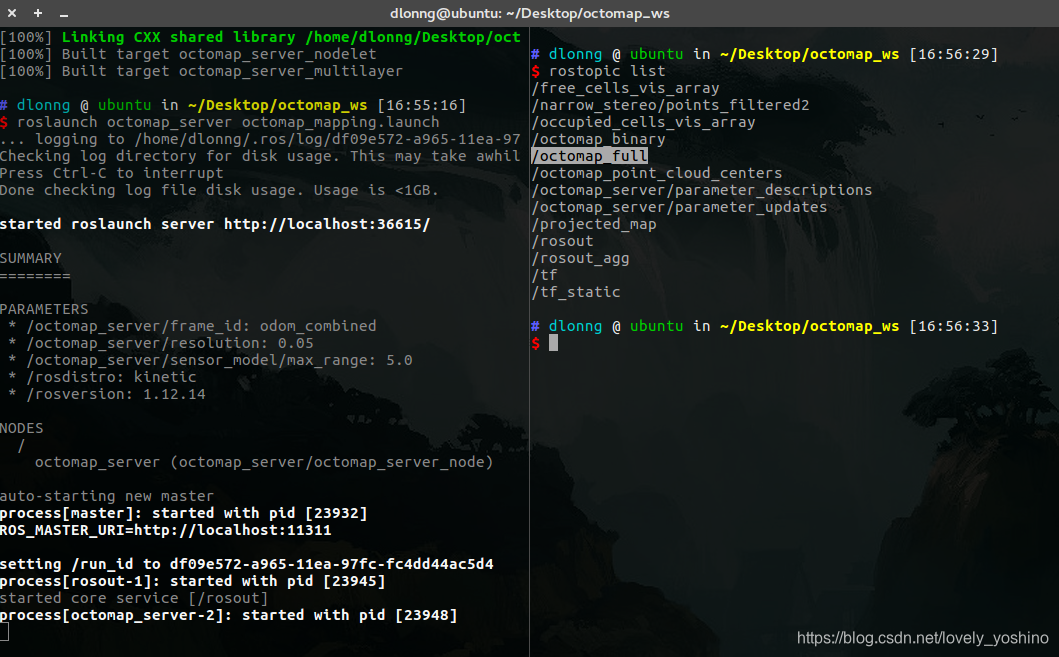
This topic shows that this mapping package can work normally :)
1.3 Rviz visualization Octomap
ROS One is provided in Rviz visualization Octomap Plug in for , If it is not installed, use the following command :
sudo apt-get install ros-kinetic-octomap-rviz-plugins Start after installation Rviz, Directly add an octree to occupy the type of grid , The first is the colored type , The second one without color :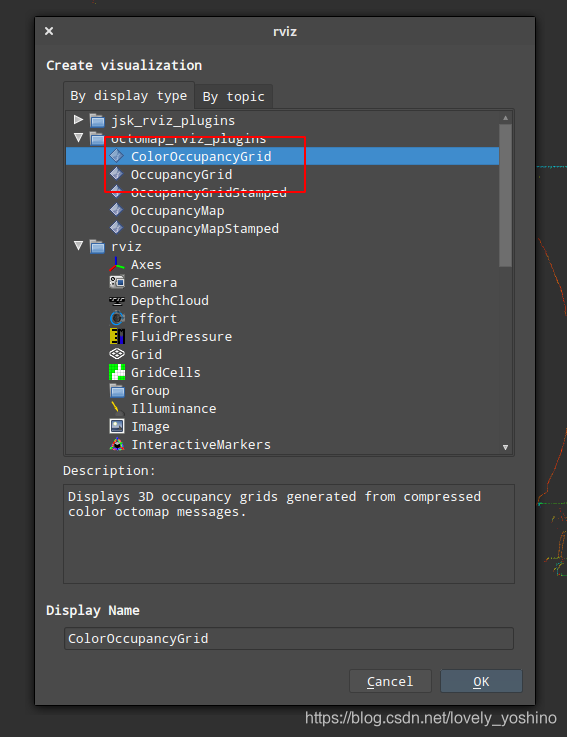
After the mapping node is started , Select the topic name as octomap_full, You can display the octree voxel grid , This is the result of my experiment , I use the first colored type :

I showed the point cloud and voxel grid together , So it overlaps . What we should pay attention to here is , If your point cloud doesn't show , To check 「Global Options」 Of 「Fixed Frame」 Is it set correctly , What I set is Robosense Radar frame_id:「rslidar」.
1.4 Enable ColorOctomap
Default compiled octomap Cannot display color , To turn on color support , need 2 A step , The first step is to edit OctomapServer.h file :
vim octomap_mapping/octomap_server/include/octomap_server/OctomapServer.h Open up below COLOR_OCTOMAP_SERVER Macro comments are sufficient :
// switch color here - easier maintenance, only maintain OctomapServer. // Two targets are defined in the cmake, octomap_server_color and octomap_server. One has this defined, and the other doesn't// Open this comment #define COLOR_OCTOMAP_SERVERThen recompile the source code :
cd octomap_ws/catkin_make The second step is when using , stay launch Disabled in file height_map, Enable colored_map, I read the source code to find this configuration , Because the official website document has not been updated for a long time , Some parameter configuration methods can only be known by reading the source code :
<param name = "height_map" value = "false" /><param name = "colored_map" value = "true" />For example, the following is what I used in my experiment launch file :
<launch> <node pkg="octomap_server" type="octomap_server_node" name="octomap_server"> <!-- resolution in meters per pixel --> <param name="resolution" value="0.10" /> <!-- name of the fixed frame, needs to be "/map" for SLAM --> <!-- When building a map incrementally , You need to provide the... Between the input point cloud frame and the static global frame TF Transformation --> <param name="frame_id" type="string" value="world" /> <param name = "height_map" value = "false" /> <param name = "colored_map" value = "true" /> <!-- topic from where pointcloud2 messages are subscribed --> <!-- Name of the point cloud topic to subscribe /fusion_cloud --> <remap from="/cloud_in" to="/fusion_cloud" /> </node></launch> I set the octree frame frame by rslidar, And will integrate the point cloud topic /fusion_cloud As the input of the node , I didn't provide it TF, Because at present, only a single frame voxel grid construction has been done , The effect is as follows :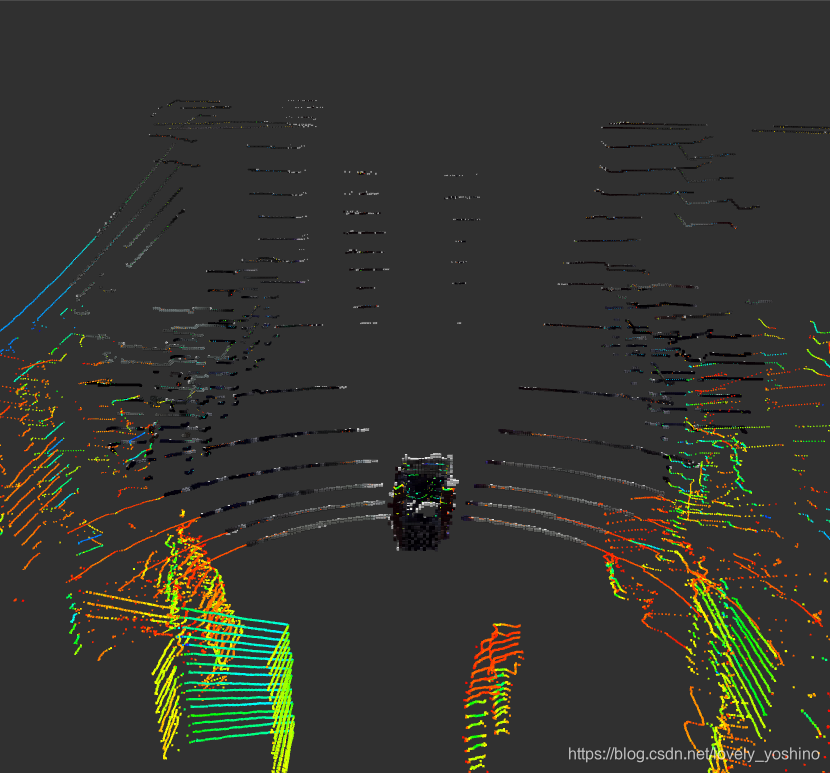
Two 、 Incremental steps to build octree map
In order to be able to make octomap_server Map building package realizes incremental map construction , Need the following 2 A step :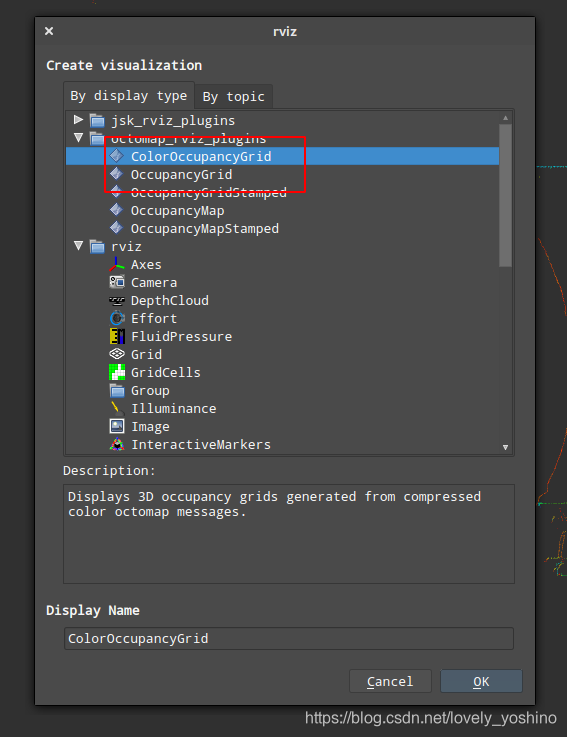
2.1 To configure launch Launch parameters
this 3 Parameters are necessary for drawing :
- Map resolution
resolution: Used to initialize map objects - Global coordinates
frame_id: The coordinate system of the global map constructed - Enter point cloud topic
cloud_in: As the data input of drawing , The mapping package is to overlay the point clouds frame by frame to the global coordinate system to realize mapping
<launch> <node pkg="octomap_server" type="octomap_server_node" name="octomap_server"> <!-- resolution in meters per pixel --> <param name="resolution" value="0.10" /> <!-- When building a map incrementally , You need to provide the... Between the input point cloud frame and the static global frame TF Transformation --> <param name="frame_id" type="string" value="map" /> <!-- Name of the point cloud topic to subscribe /fusion_cloud --> <remap from="/cloud_in" to="/fusion_cloud" /> </node></launch>The following are all configurable parameters :
frame_id(string, default: /map)resolution(float, default: 0.05)height_map(bool, default: true)color/[r/g/b/a](float)sensor_model/max_range(float, default: -1 (unlimited))sensor_model/[hit|miss](float, default: 0.7 / 0.4)sensor_model/[min|max](float, default: 0.12 / 0.97)latch(bool, default: True for a static map, false if no initial map is given)base_frame_id(string, default: base_footprint)filter_ground(bool, default: false)ground_filter/distance(float, default: 0.04)ground_filter/angle(float, default: 0.15)ground_filter/plane_distance(float, default: 0.07)pointcloud_[min|max]_z(float, default: -/+ infinity)The minimum and maximum height of the point to be inserted in the callback , Before running any insertion or ground plane filtering , Any point outside this interval will be discarded . Based on this, you can roughly filter according to the height , But if enabled ground_filter, Then this interval needs to include the grounding plane .
occupancy_[min|max]_z(float, default: -/+ infinity)filter_speckles(bool)
2.2 requirement TF Transformation
With the global coordinate system and the point cloud of each frame , But how does the mapping package know where to insert the point cloud of each frame ?
Because as the robot continues to move , New point cloud frames will be generated constantly , Each point cloud frame has a certain position when it is inserted in the global coordinate system , Otherwise, the map will be wrong , Therefore, it is necessary to provide the mapping package with a pose from the current frame point cloud to the global coordinate system , In this way, the mapping package can insert the currently obtained point cloud into the correct position according to this pose .
stay ROS Can be very convenient to use TF To represent this transformation , We only need to start the mapping package , In the system TF The tree provides 「cloud frame -> world frame」 The transformation of :
cloud frame -> world frame (static world frame, changeable with parameter frame_id)Be careful :
cloud frame: Is to enter the point cloud topic head.frame_id, such as Robosense Radar frame_id = rslidarworld frame: This is the global coordinate system frame_id, Start up launch Manual setting is required in , For example, what I give is map
If you give world frame id Specifies the input point cloud frame_id, such as fusion_cloud.head.frame_id == wolrd_frame_id == rslidar, Then only the octree of the current frame will be displayed , Instead of incrementally building the map , Pay attention to this , You can test it yourself .
So for incremental mapping , It also needs to be in the system TF The tree provides 「rslidar -> world」 Transformation of , This transformation can be achieved by other SLAM Etc , For example, one in my test TF The trees are as follows :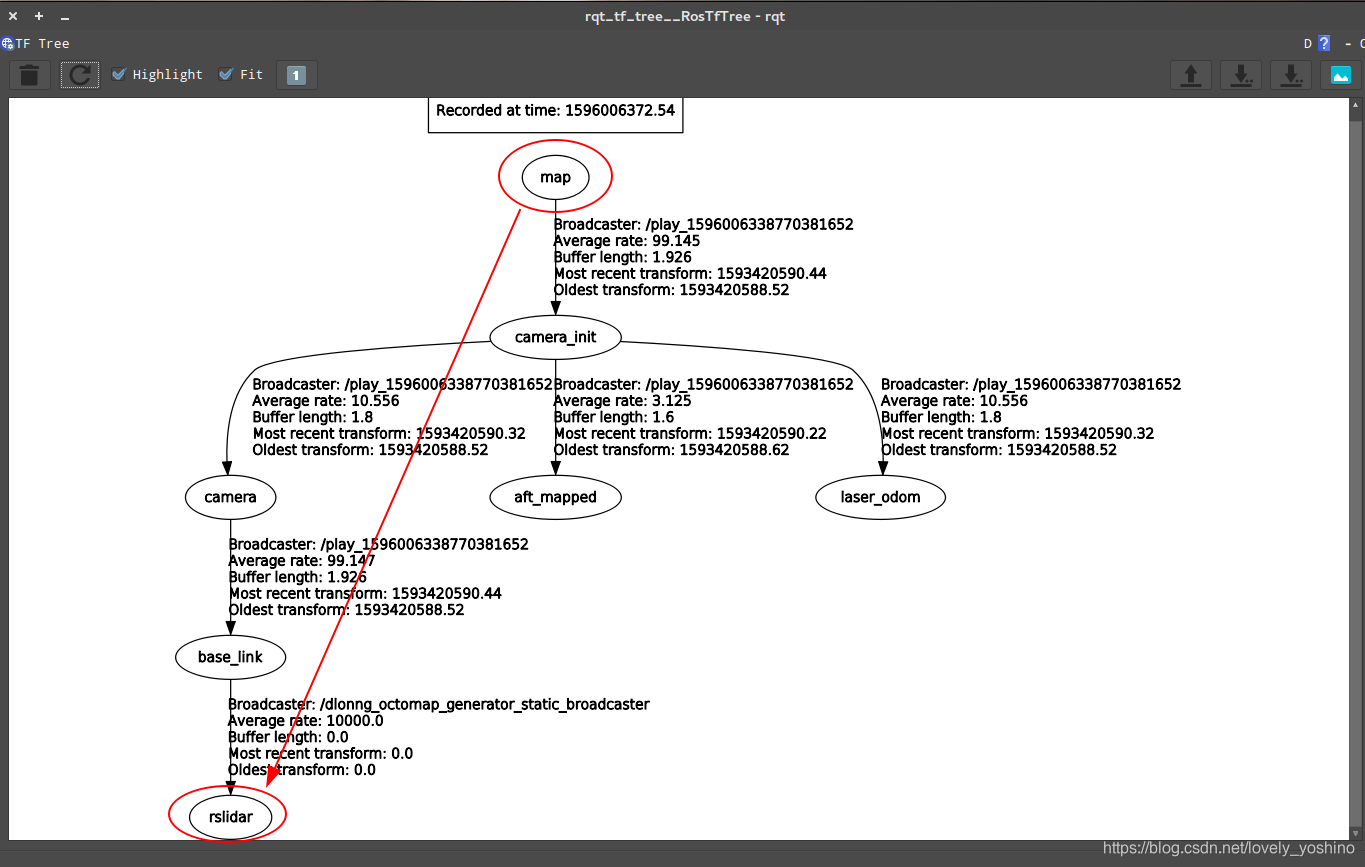
I found the source code OctomapServer.cpp Search for TF Part of :
tf::StampedTransform sensorToWorldTf; try { m_tfListener.lookupTransform(m_worldFrameId, cloud->header.frame_id, cloud->header.stamp, sensorToWorldTf); } catch(tf::TransformException& ex){ ROS_ERROR_STREAM( "Transform error of sensor data: " << ex.what() << ", quitting callback"); return; }In general, this mapping package is quite simple to use , The most important thing is to write clearly the input point cloud topic and TF Transformation .
Small Tips: No, TF What do I do ?
When I first started drawing , My classmate recorded TF There is no 「world -> rslidar」 Transformation of , Only 「world -> base_link」, So in order to test incremental mapping , Because my point cloud frame frame_id yes rslidar, So I manually released a static 「base_link -> rslidar」 Transformation of :
rosrun tf2_ros static_transform_publisher 0 0 0 0 0 0 base_link rslidar In this way, there are 「rslidar -> world」 The change of , But the posture of my hair is 0, Therefore, it has no impact on the mapping test , For the convenience of starting , Put it in launch in :
<node pkg = "tf2_ros" type = "static_transform_publisher" name = "dlonng_static_test_broadcaster" args = "0 0 0 0 0 0 base_link rslidar" />If you have this problem , Try sending a static TF Do a test , About static TF For detailed technology, please refer to the previous article :ROS robotics - static state TF Coordinate frame
3、 ... and 、ColorOctomap Enabling method
To show RGB Color , I analyzed the source code , The first step is to modify the header file , Open the annotation to switch the map type :OctomapServer.h
// switch color here - easier maintenance, only maintain OctomapServer. // Two targets are defined in the cmake, octomap_server_color and octomap_server. One has this defined, and the other doesn't// Open this comment #define COLOR_OCTOMAP_SERVER#ifdef COLOR_OCTOMAP_SERVER typedef pcl::PointXYZRGB PCLPoint; typedef pcl::PointCloud<pcl::PointXYZRGB> PCLPointCloud; typedef octomap::ColorOcTree OcTreeT;#else typedef pcl::PointXYZ PCLPoint; typedef pcl::PointCloud<pcl::PointXYZ> PCLPointCloud; typedef octomap::OcTree OcTreeT;#endifCMakeList.txt In file COLOR_OCTOMAP_SERVER Compiler options for :
target_compile_definitions(${PROJECT_NAME}_color PUBLIC COLOR_OCTOMAP_SERVER)OctomapServer.cpp There is colored_map Parameters of :
m_useHeightMap = true;m_useColoredMap = false; m_nh_private.param("height_map", m_useHeightMap, m_useHeightMap);m_nh_private.param("colored_map", m_useColoredMap, m_useColoredMap); By default, the color of the map is set according to the height , If you want to set it as a colored map , You have to disable HeightMap, And enable the ColoredMap:
if (m_useHeightMap && m_useColoredMap) { ROS_WARN_STREAM("You enabled both height map and RGB color registration. This is contradictory. Defaulting to height map."); m_useColoredMap = false; } The second step 、 Need to be in octomap_server Of launch Disabled in file height_map, And enable the colored_map :
<param name="height_map" value="false" /><param name="colored_map" value="true" />2 Core octree generating function insertCloudCallback and insertScan There are operations on colors in :
#ifdef COLOR_OCTOMAP_SERVER unsigned char* colors = new unsigned char[3];#endif// NB: Only read and interpret color if it's an occupied node#ifdef COLOR_OCTOMAP_SERVER m_octree->averageNodeColor(it->x, it->y, it->z, /*r=*/it->r, /*g=*/it->g, /*b=*/it->b);#endifFour 、 Save and display the map
start-up octomap_server After node , You can use the map saving service it provides , Save compressed binary storage format map :
octomap_saver mapfile.btSave a complete probability octree map :
octomap_saver -f mapfile.ot Install the octree visualizer octovis To view the map :
sudo apt-get install octovisRestart the terminal after installation , Use the following command to display an octree map :
octovis xxx.ot[bt]5、 ... and 、 Source reading notes
At the same time, the author sorted out the following key processes of the mapping package , Only 2 The key function is not very complicated .
The first step is to subscribe to the callback of point cloud :
The second step is to insert a single frame point cloud to build an octree , I won't introduce the process in detail here , Because it involves octree database octomap The renewal principle of :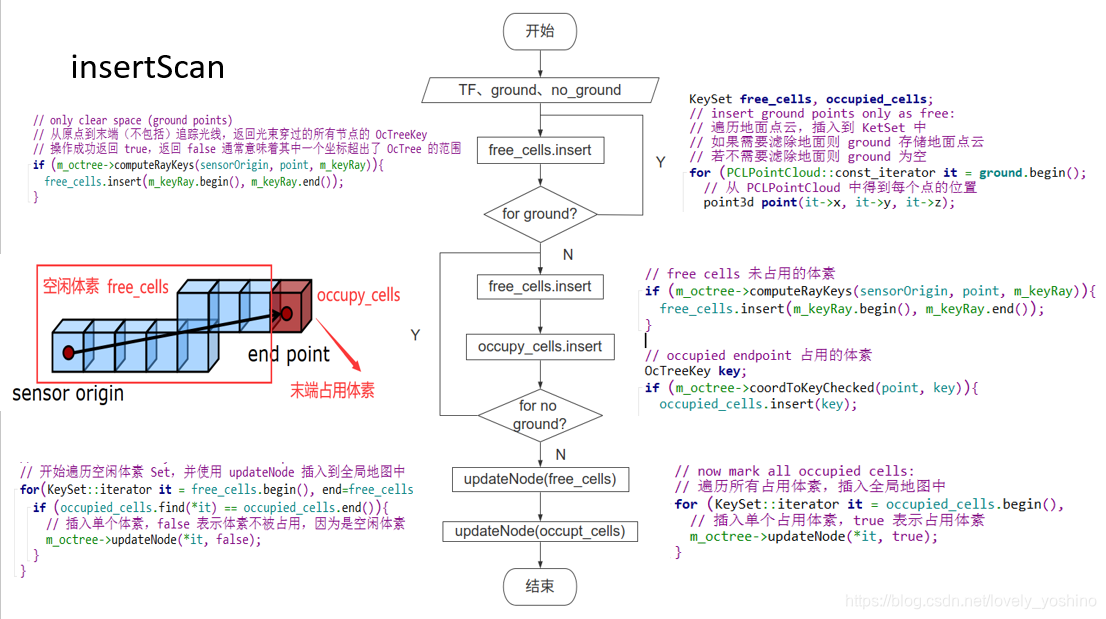
The following is my mapping process launch:
Insert a code chip here <launch> <node pkg="octomap_server" type="octomap_server_node" name="octomap_server"> <!-- resolution in meters per pixel --> <param name = "resolution" value = "0.15" /> <!-- name of the fixed frame, needs to be "/map" for SLAM --> <!-- Static global map frame_id, But when building maps incrementally , You need to provide the... Between the input point cloud frame and the static global frame TF Transformation --> <param name = "frame_id" type = "string" value = "camera_init" /> <!-- set min to speed up! --> <param name = "sensor_model/max_range" value = "15.0" /> <!-- Robot coordinate system base_link, Filtering the ground requires frame --> <!-- <param name = "base_frame_id" type = "string" value = "base_link" /> --> <!-- filter ground plane, distance value should be big! The project does not need to filter the ground --> <!-- <param name = "filter_ground" type = "bool" value = "true" /> --> <!-- <param name = "ground_filter/distance" type = "double" value = "1.0" /> --> <!-- Dividing the ground Z Axis threshold value value --> <!-- <param name = "ground_filter/plane_distance" type = "double" value = "0.3" /> --> <!-- Pass through filtered Z Axis range , Retain [-1.0, 10.0] Points in the range --> <!-- <param name = "pointcloud_max_z" type = "double" value = "100.0" /> --> <!-- <param name = "pointcloud_min_z" type = "double" value = "-1.0" /> --> <!-- <param name = "filter_speckles" type = "bool" value = "true" /> --> <param name = "height_map" value = "false" /> <param name = "colored_map" value = "true" /> <!-- Added radius filter --> <param name = "outrem_radius" type = "double" value = "1.0" /> <param name = "outrem_neighbors" type = "int" value = "10" /> <!-- when building map, set to false to speed up!!! --> <param name = "latch" value = "false" /> <!-- topic from where pointcloud2 messages are subscribed --> <!-- Name of the point cloud topic to subscribe /pointcloud/output --> <!-- This sentence means to change the topic name subscribed by the current node from cloud_in Turn into /pointcloud/output --> <remap from = "/cloud_in" to = "/fusion_cloud" /> </node></launch>6、 ... and 、 Path planning
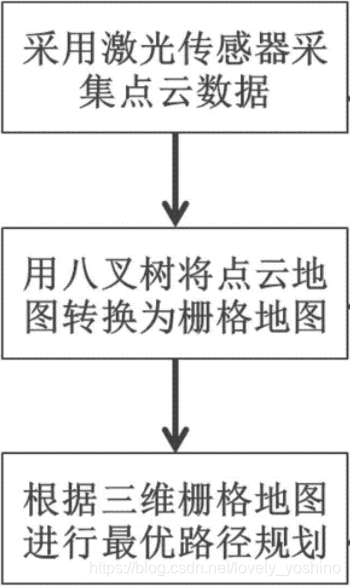
Here's a link :https://github.com/Quitino/IndoorMapping, The author has implemented a system based on ORB-SLAM Generate 3D dense point cloud , And use OctoMap Build indoor navigation map . It also means that we can add trajectory planning algorithm based on OBR-SLAM Indoor planning navigation . The specific code can refer to :https://blog.csdn.net/lovely_yoshino/article/details/105272602 Medium 3D-RRT Path planning method implementation .
7、 ... and : Introduce 3D A* Use in grid map
AngeloG I wrote three-dimensional A Correlation matlab Simulation . For the convenience of ROS Chinese vs A The algorithm is developed , Here is also what I learned before A* Algorithm
#include "Astar_searcher.h"using namespace std;using namespace Eigen;void AstarPathFinder::initGridMap(double _resolution, Vector3d global_xyz_l, Vector3d global_xyz_u, int max_x_id, int max_y_id, int max_z_id){ gl_xl = global_xyz_l(0); gl_yl = global_xyz_l(1); gl_zl = global_xyz_l(2); gl_xu = global_xyz_u(0); gl_yu = global_xyz_u(1); gl_zu = global_xyz_u(2); GLX_SIZE = max_x_id; GLY_SIZE = max_y_id; GLZ_SIZE = max_z_id; GLYZ_SIZE = GLY_SIZE * GLZ_SIZE; GLXYZ_SIZE = GLX_SIZE * GLYZ_SIZE; resolution = _resolution; inv_resolution = 1.0 / _resolution; data = new uint8_t[GLXYZ_SIZE]; memset(data, 0, GLXYZ_SIZE * sizeof(uint8_t)); GridNodeMap = new GridNodePtr **[GLX_SIZE]; for (int i = 0; i < GLX_SIZE; i++) { GridNodeMap[i] = new GridNodePtr *[GLY_SIZE]; for (int j = 0; j < GLY_SIZE; j++) { GridNodeMap[i][j] = new GridNodePtr[GLZ_SIZE]; for (int k = 0; k < GLZ_SIZE; k++) { Vector3i tmpIdx(i, j, k); Vector3d pos = gridIndex2coord(tmpIdx); GridNodeMap[i][j][k] = new GridNode(tmpIdx, pos); } } }}void AstarPathFinder::resetGrid(GridNodePtr ptr){ ptr->id = 0; ptr->cameFrom = NULL; ptr->gScore = inf; ptr->fScore = inf;}void AstarPathFinder::resetUsedGrids(){ for (int i = 0; i < GLX_SIZE; i++) for (int j = 0; j < GLY_SIZE; j++) for (int k = 0; k < GLZ_SIZE; k++) resetGrid(GridNodeMap[i][j][k]);}void AstarPathFinder::setObs(const double coord_x, const double coord_y, const double coord_z){ if (coord_x < gl_xl || coord_y < gl_yl || coord_z < gl_zl || coord_x >= gl_xu || coord_y >= gl_yu || coord_z >= gl_zu) return; int idx_x = static_cast<int>((coord_x - gl_xl) * inv_resolution); int idx_y = static_cast<int>((coord_y - gl_yl) * inv_resolution); int idx_z = static_cast<int>((coord_z - gl_zl) * inv_resolution); data[idx_x * GLYZ_SIZE + idx_y * GLZ_SIZE + idx_z] = 1;}vector<Vector3d> AstarPathFinder::getVisitedNodes(){ vector<Vector3d> visited_nodes; for (int i = 0; i < GLX_SIZE; i++) for (int j = 0; j < GLY_SIZE; j++) for (int k = 0; k < GLZ_SIZE; k++) { // if(GridNodeMap[i][j][k]->id != 0) // visualize all nodes in open and // close list if (GridNodeMap[i][j][k]->id == -1) // visualize nodes in close list only visited_nodes.push_back(GridNodeMap[i][j][k]->coord); } ROS_WARN("visited_nodes size : %d", visited_nodes.size()); return visited_nodes;}Vector3d AstarPathFinder::gridIndex2coord(const Vector3i &index){ Vector3d pt; pt(0) = ((double)index(0) + 0.5) * resolution + gl_xl; pt(1) = ((double)index(1) + 0.5) * resolution + gl_yl; pt(2) = ((double)index(2) + 0.5) * resolution + gl_zl; return pt;}Vector3i AstarPathFinder::coord2gridIndex(const Vector3d &pt){ Vector3i idx; idx << min(max(int((pt(0) - gl_xl) * inv_resolution), 0), GLX_SIZE - 1), min(max(int((pt(1) - gl_yl) * inv_resolution), 0), GLY_SIZE - 1), min(max(int((pt(2) - gl_zl) * inv_resolution), 0), GLZ_SIZE - 1); return idx;}Eigen::Vector3d AstarPathFinder::coordRounding(const Eigen::Vector3d &coord){ return gridIndex2coord(coord2gridIndex(coord));}inline bool AstarPathFinder::isOccupied(const Eigen::Vector3i &index) const{ return isOccupied(index(0), index(1), index(2));}inline bool AstarPathFinder::isFree(const Eigen::Vector3i &index) const{ return isFree(index(0), index(1), index(2));}inline bool AstarPathFinder::isOccupied(const int &idx_x, const int &idx_y, const int &idx_z) const{ return (idx_x >= 0 && idx_x < GLX_SIZE && idx_y >= 0 && idx_y < GLY_SIZE && idx_z >= 0 && idx_z < GLZ_SIZE && (data[idx_x * GLYZ_SIZE + idx_y * GLZ_SIZE + idx_z] == 1));}inline bool AstarPathFinder::isFree(const int &idx_x, const int &idx_y, const int &idx_z) const{ return (idx_x >= 0 && idx_x < GLX_SIZE && idx_y >= 0 && idx_y < GLY_SIZE && idx_z >= 0 && idx_z < GLZ_SIZE && (data[idx_x * GLYZ_SIZE + idx_y * GLZ_SIZE + idx_z] < 1));}inline void AstarPathFinder::AstarGetSucc(GridNodePtr currentPtr, vector<GridNodePtr> &neighborPtrSets, vector<double> &edgeCostSets){ neighborPtrSets.clear(); edgeCostSets.clear(); /* STEP 4: finish AstarPathFinder::AstarGetSucc yourself please write your code below */ // get all neighbours of current node, calculate all the costs, and then save to the point. // should be a 3D search, maxumin 26 nodes, but need to remove the obstacles and boundary Vector3i neighborIdx; for (int dx = -1; dx < 2; dx++) { for (int dy = -1; dy < 2; dy++) { for (int dz = -1; dz < 2; dz++) { if (dx == 0 && dy == 0 && dz == 0) continue; neighborIdx(0) = (currentPtr->index)(0) + dx; neighborIdx(1) = (currentPtr->index)(1) + dy; neighborIdx(2) = (currentPtr->index)(2) + dz; if (neighborIdx(0) < 0 || neighborIdx(0) >= GLX_SIZE || neighborIdx(1) < 0 || neighborIdx(1) >= GLY_SIZE || neighborIdx(2) < 0 || neighborIdx(2) >= GLZ_SIZE) continue; neighborPtrSets.push_back(GridNodeMap[neighborIdx(0)][neighborIdx(1)][neighborIdx(2)]); edgeCostSets.push_back(sqrt(dx * dx + dy * dy + dz * dz)); } } }}double AstarPathFinder::getHeu(GridNodePtr node1, GridNodePtr node2){ /*STEP 1 choose possible heuristic function you want Manhattan, Euclidean, Diagonal, or 0 (Dijkstra) Remember tie_breaker learned in lecture, add it here ? */ // ROS_INFO("[node] calcute Heu"); // return getDiagHeu(node1, node2); double tie_breaker = 1 + 1 / 1000; return tie_breaker * getDiagHeu(node1, node2);}double AstarPathFinder::getEuclHeu(GridNodePtr node1, GridNodePtr node2){ // calculate distance at each dimention double dx = node1->index(0) - node2->index(0); double dy = node1->index(1) - node2->index(1); double dz = node1->index(2) - node2->index(2); double result1 = sqrt(dx * dx + dy * dy + dz * dz); // double result2 = (node2->index - node1->index).norm(); // cout.setf(ios::fixed); // cout << "norm1 = " << setprecision(4) << result1 << endl; // cout << "diff = " << (node2->index - node1->index) << endl; // cout << "norm2 = " << setprecision(4) << result2 << endl; return result1;}double AstarPathFinder::getDiagHeu(GridNodePtr node1, GridNodePtr node2){ double dx = abs(node1->index(0) - node2->index(0)); double dy = abs(node1->index(1) - node2->index(1)); double dz = abs(node1->index(2) - node2->index(2)); double h = 0.0; int diag = min(min(dx, dy), dz); dx -= diag; dy -= diag; dz -= diag; if (dx == 0) h = 1.0 * sqrt(3.0) * diag + sqrt(2.0) * min(dy, dz) + 1.0 * abs(dy - dz); if (dy == 0) h = 1.0 * sqrt(3.0) * diag + sqrt(2.0) * min(dx, dz) + 1.0 * abs(dx - dz); if (dz == 0) h = 1.0 * sqrt(3.0) * diag + sqrt(2.0) * min(dx, dy) + 1.0 * abs(dx - dy); return h;}double AstarPathFinder::getManhHeu(GridNodePtr node1, GridNodePtr node2){ double dx = abs(node1->index(0) - node2->index(0)); double dy = abs(node1->index(1) - node2->index(1)); double dz = abs(node1->index(2) - node2->index(2)); return dx + dy + dz;}void AstarPathFinder::AstarGraphSearch(Vector3d start_pt, Vector3d end_pt){ ros::Time time_1 = ros::Time::now(); // index of start_point and end_point Vector3i start_idx = coord2gridIndex(start_pt); // what is coord2gridIndex mean? Vector3i end_idx = coord2gridIndex(end_pt); goalIdx = end_idx; // position of start_point and end_point start_pt = gridIndex2coord(start_idx); end_pt = gridIndex2coord(end_idx); // Initialize the pointers of struct GridNode which represent start node and // goal node GridNodePtr startPtr = new GridNode(start_idx, start_pt); GridNodePtr endPtr = new GridNode(end_idx, end_pt); // openSet is the open_list implemented through multimap in STL library openSet.clear(); // currentPtr represents the node with lowest f(n) in the open_list GridNodePtr currentPtr = NULL; GridNodePtr neighborPtr = NULL; // put start node in open set startPtr->gScore = 0; startPtr->fScore = getHeu(startPtr, endPtr); // f = h + g = h + 0 startPtr->id = 1; startPtr->coord = start_pt; openSet.insert(make_pair(startPtr->fScore, startPtr)); // startPtr->cameFrom = startPtr; /** STEP 2: some else preparatory works which should be done before while loop please write your code below, neighbour of start point **/ double tentative_gScore; vector<GridNodePtr> neighborPtrSets; vector<double> edgeCostSets; // this is the main loop while (!openSet.empty()) { /* step 3: Remove the node with lowest cost function from open set to closed set, please write your code below IMPORTANT NOTE!!! This part you should use the C++ STL: multimap, more details can be find in Homework description */ // get the min f node from open set to current currentPtr = openSet.begin()->second; // if the current node is the goal if (currentPtr->index == goalIdx) { ros::Time time_2 = ros::Time::now(); terminatePtr = currentPtr; ROS_WARN("[A*]{sucess} Time in A* is %f ms, path cost is %f m", (time_2 - time_1).toSec() * 1000.0, currentPtr->gScore * resolution); // cout << "final point" << endl << terminatePtr->coord << endl; // cout << "came frome" << endl << terminatePtr->cameFrom->coord << endl; return; } // put to close, and erase it openSet.erase(openSet.begin()); currentPtr->id = -1; // STEP 4: finish AstarPathFinder::AstarGetSucc, get the succetion AstarGetSucc(currentPtr, neighborPtrSets, edgeCostSets); /*** STEP 5: For all unexpanded neigbors "m" of node "n", please finish this for loop please write your code below **/ for (int i = 0; i < (int)neighborPtrSets.size(); i++) { /* Judge if the neigbors have been expanded,please write your code below IMPORTANT NOTE!!! neighborPtrSets[i]->id = -1 : in closed set neighborPtrSets[i]->id = 1 : in open set */ neighborPtr = neighborPtrSets[i]; if (isOccupied(neighborPtr->index) || neighborPtr->id == -1) continue; double edge_cost = edgeCostSets[i]; tentative_gScore = currentPtr->gScore + edge_cost; if (neighborPtr->id != 1) { // discover a new node, which is not in the open set /* STEP 6: As for a new node, do what you need do ,and then put neighbor in open set and record it,please write your code below */ // insert to open set openSet.insert(make_pair(startPtr->fScore, neighborPtrSets[i])); neighborPtr->id = 1; neighborPtr->cameFrom = currentPtr; neighborPtr->gScore = tentative_gScore; neighborPtr->fScore = neighborPtr->gScore + getHeu(neighborPtr, endPtr); neighborPtr->nodeMapIt = openSet.insert(make_pair(neighborPtr->fScore, neighborPtr)); // put neighbor in open set and record it. continue; } else if (neighborPtr->gScore >= tentative_gScore) // compare original f and new f from current // this node is in open set and need to judge if it needs to update, // he "0" should be deleted when you are coding { /* STEP 7: As for a node in open set, update it , maintain the openset, and then put neighbor in open set and record it please write your code below */ neighborPtr->cameFrom = currentPtr; neighborPtr->gScore = tentative_gScore; neighborPtr->fScore = tentative_gScore + getHeu(neighborPtr, endPtr); openSet.erase(neighborPtr->nodeMapIt); neighborPtr->nodeMapIt = openSet.insert(make_pair(neighborPtr->fScore, neighborPtr)); // if change its parents, update the expanding direction for (int i = 0; i < 3; i++) { neighborPtr->dir(i) = neighborPtr->index(i) - currentPtr->index(i); if (neighborPtr->dir(i) != 0) neighborPtr->dir(i) /= abs(neighborPtr->dir(i)); } } } } // if search fails ros::Time time_2 = ros::Time::now(); if ((time_2 - time_1).toSec() > 0.1) ROS_WARN("Time consume in Astar path finding is %f", (time_2 - time_1).toSec());}vector<Vector3d> AstarPathFinder::getPath(){ vector<Vector3d> path; vector<GridNodePtr> gridPath; /* STEP 8: trace back from the curretnt nodePtr to get all nodes along the path please write your code below */ gridPath.push_back(terminatePtr); while (terminatePtr->cameFrom != NULL) { terminatePtr = terminatePtr->cameFrom; gridPath.push_back(terminatePtr); } for (auto ptr : gridPath) path.push_back(ptr->coord); reverse(path.begin(), path.end()); return path;}cite: This paper refers to the Denglong Related articles of
边栏推荐
- 数仓:爱奇艺数仓平台建设实践
- 【EXPDP导出数据】expdp导出23行记录,且不包含lob字段的表,居然用时48分钟,请大家帮忙看看
- Tutorial (7.0) 05. Issue forticlient * forticlient EMS * Fortinet network security expert NSE 5 through forticlient EMS
- Is CICC Fortune Securities safe? How long does it take to open an account
- Practical task scheduling platform (scheduled task)
- Creation and traversal of binary tree
- ES6高级-查询商品案例
- If you want to be good at work, you must first use its tools -c language expansion -- embedded C language (11)
- Development and implementation of campus epidemic prevention and control management system based on SSM
- Credit card number recognition (openCV, code analysis)
猜你喜欢

kalibr标定realsenseD435i --多相机标定
OSPF综合实验

Desktop application layout

马斯克被曝绿了谷歌创始人:导致挚友二婚破裂,曾下跪求原谅

HaWe screw cartridge check valve RK4

阿里巴巴一面 :十道经典面试题解析

Parker pump pv140r1k1t1pmmc
We were tossed all night by a Kong performance bug

Strengthen the defense line of ecological security, and carry out emergency drills for environmental emergencies in Guangzhou
Parker solenoid valve d1vw020dnypz5
随机推荐
德国EMG易安基推动器ED301/6 HS
【EXPDP导出数据】expdp导出23行记录,且不包含lob字段的表,居然用时48分钟,请大家帮忙看看
Pytorch installation CUDA corresponding
FTP协议
Tutorial (7.0) 05. Issue forticlient * forticlient EMS * Fortinet network security expert NSE 5 through forticlient EMS
第七章 在 REST 服务中支持 CORS
Paper:《All Models are Wrong, but Many are Useful: 所有模型都是错误的,但许多模型都是有用的:通过同时研究一整类预测模型来了解变量的重要性》翻译与解读
Taishan Office Technology Lecture: the zoom ratio of word is slightly different from the display
2022你的安全感是什么?沃尔沃年中问道
撤回就看不到了?三步让你微信防撤回。
Interview with data center and Bi business (IV) -- look at the essence of ten questions
HaWe screw cartridge check valve RK4
SAP ABAP Netweaver 容器化的一些前沿性研究工作分享
Refuse noise, the entry journey of earphone Xiaobai
We were tossed all night by a Kong performance bug
What is the transport layer protocol tcp/udp???
A coal mine in Yangquan, Shanxi Province, suffered a safety accident that killed one person and was ordered to stop production for rectification
TI C6000 TMS320C6678 DSP+ Zynq-7045的PS + PL异构多核案例开发手册(4)
【DSCTF2022】pwn补题记录
Zynq PS + PL heterogeneous multicore Case Development Manual of Ti C6000 tms320c6678 DSP + zynq-7045 (1)