当前位置:网站首页>The personal test is effective, and the JMeter desktop shortcut is quickly created
The personal test is effective, and the JMeter desktop shortcut is quickly created
2022-07-01 01:36:00 【TEST_ Two black】
JMeter Download and install the tutorial , There's a lot of stuff on the Internet , Let's get straight to the point .
Although many articles are also relatively clear , Teach us how to create desktop shortcuts , But maybe I have a problem understanding , Leading to many detours , So sort out the pits you've stepped on .
The first step of other articles is to make desktop shortcut icons , Or give us the online disk directly , But you need to save it to the network disk and then download it , It's too unfriendly for lazy cancer patients like me .
First step
First find JMeter File installed bin Catalog —>jmeter.bat file , Create a desktop shortcut .

Right click , Click on “ Send to ”----> Desktop shortcuts ”. Then select the desktop shortcut , Right click , Click on “ attribute ”, modify “ attribute ” The path in .
The goal is :D:\tools\apache-jmeter-5.4.1\bin\ApacheJMeter.jar( Completed JMeter Decompression path , Be sure to bring it in the back ApacheJMeter.jar);
The starting position :D:\Test_tool\apache-jmeter-5.1\bin( Fill in your JMeter Decompression path ).

At this time, we have created a desktop shortcut , Right click and double click to open JMeter 了 , But this icon is not very beautiful ?
Second Step
Make JMeter Shortcut icon , Enter into D:\tools\apache-jmeter-5.4.1\docs\images( Actually decompress it by yourself JMeter The path of ) Below file , Choose a picture you like to use as an icon , Change it to ico Format , You can also use your favorite pictures , Look at your personal hobbies .
notes : Change the image format directly , When the icon is changed, it will not take effect , So we can generate icon Icon , Just search on the web .

Then right-click JMeter Desktop shortcuts , Click properties > Change icon > Browse > Find the path of the icon just generated > Click OK to save , That's all right. .

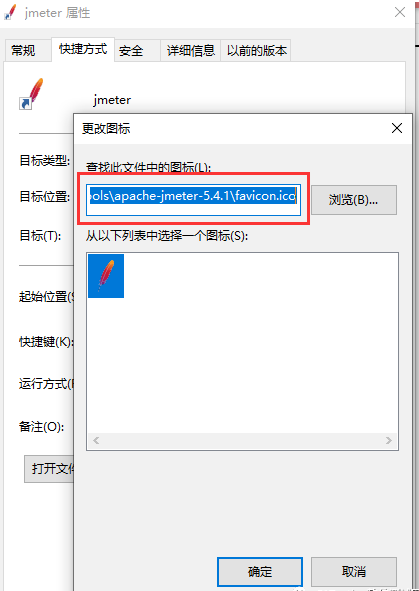
Post a screenshot of my modification :
The pit of tread
1、 I think it's OK to change the image format , But it won't work .
2、 The path must be selected correctly , Don't leave out .
边栏推荐
- Construction and beautification of personal blog
- "Open math input panel" in MathType editing in win11 is gray and cannot be edited
- Visual studio 2019 shortcut notes
- laravel Carbon 时间处理类使用
- [Qt5 tab] tab label and content hierarchical analysis
- Strictmode analysis activity leakage -strictmode principle (3)
- Sun Yuchen told Swiss media Bilan that the bear market will not last long
- Compile and install oh my Zsh
- sort自定义函数
- 【动态规划】路径dp:931. Minimum Falling Path Sum
猜你喜欢
工作八年的程序员,却拿着毕业三年的工资,再不开窍就真晚了...

Unknown database连接数据库错误

微生物健康,食品微生物检测为什么很重要

Opencv basic operation 2 realizes label2rgb and converts gray-scale images into color images

Typora的使用

Note d'étude du DC: zéro dans le chapitre officiel - - Aperçu et introduction du processus de base
亲测有效,快速创建JMeter桌面快捷方式

Institute of Microbiology, commonly used biochemical reactions in microbiological testing

测试必备工具—Postman实战教程

Koa koa combine routes sub route management
随机推荐
微生物安全與健康,什麼是生物處理?
DC学习笔记正式篇之零——综述与基本流程介绍
生意和投资的思考
软件测试的可持续发展,必须要学会敲代码?
Zero of DC learning notes -- overview and basic process introduction
Applet Custom Grid
孙宇晨接受瑞士媒体Bilan采访:熊市不会持续太久
Call the classic architecture and build the model based on the classic
Looksrare team's "cash out" caused disturbance
日志 logrus第三方库的使用
visual studio 2019 快捷键备忘
mysql数据库基础:流程控制
小程序中实现excel数据的批量导入
Neo4j installation, operation, project construction and function realization
1500w播放下还藏着什么热点?B站2个未来趋势你不得错过
Pre training / transfer learning of models
Understanding and application of Qt5 layout in creation
Unknown database connection database error
None of the following candidates is applicable because of a receiver type mismatch
mysql插入\更新前+判断条件