当前位置:网站首页>Fabric. Usage of JS eraser (including recovery function)
Fabric. Usage of JS eraser (including recovery function)
2022-07-02 14:27:00 【Director of Moral Education Department】
Brief introduction
give the thumbs-up + Focus on + Collection = Learned to
<br>
In this paper, Fabric.js Eraser function of .
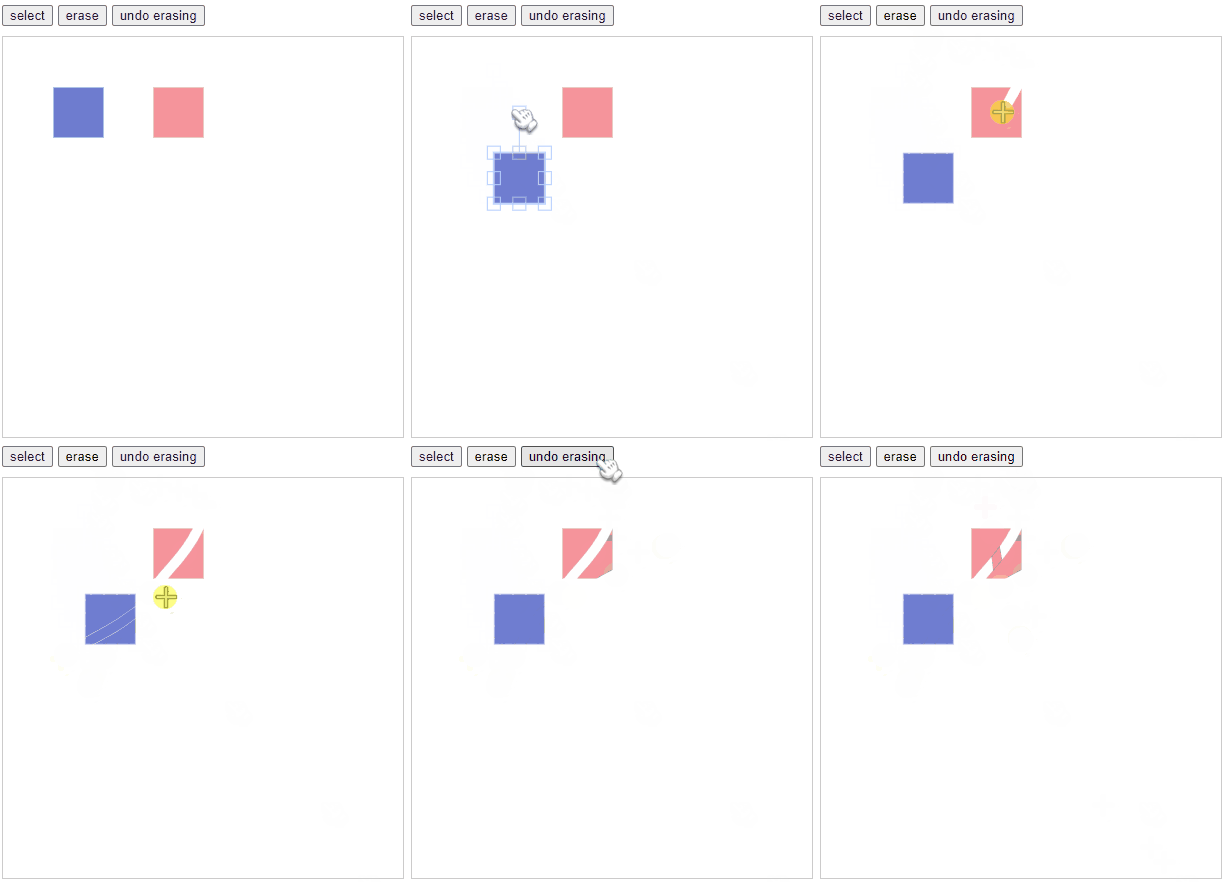
Fabric.js The basic package of does not include the eraser module , If your project needs an eraser , Use the customized version Fabric.js .
<br>
This article needs to have Fabric.js Basic knowledge of .
If you don't know what Fabric.js , I suggest you like it 《Fabric.js From entry to defiance 》.
At the same time, it is best to understand the usage of basic brushes 《Fabric.js Basic brush usage BaseBrush》.
This article USES Fabric 5.2 edition .
<br>
<br>
Knock on the code
This article USES the Original three piece set Development by . There will also be an eraser included npm Download mode .
<br>
customized Fabric.js
Basic version of the Fabric.js Eraser function is not included , If your project needs to use the eraser function , Need to FabricJS builder Customize in .
CDN

Choose Erasing , Then slide to the bottom of the page , Download the development version or compressed version according to your project needs

Above is CDN How to do it , stay <script> In the label , Use src Just quote .
<br>
npm
npm Someone also packed an eraser Fabric.js package .
You can use the command to download to your project
npm i fabric-with-erasing<br>
It should be noted that ,fabric-with-erasing It's in the basic version fabric Eraser function is added in , Use fabric-with-erasing There is no need to download Fabric .
In writing this article ,fabric-with-erasing Used in Fabric The version is 5.2 .
console.log(fabric.version)<br>
code
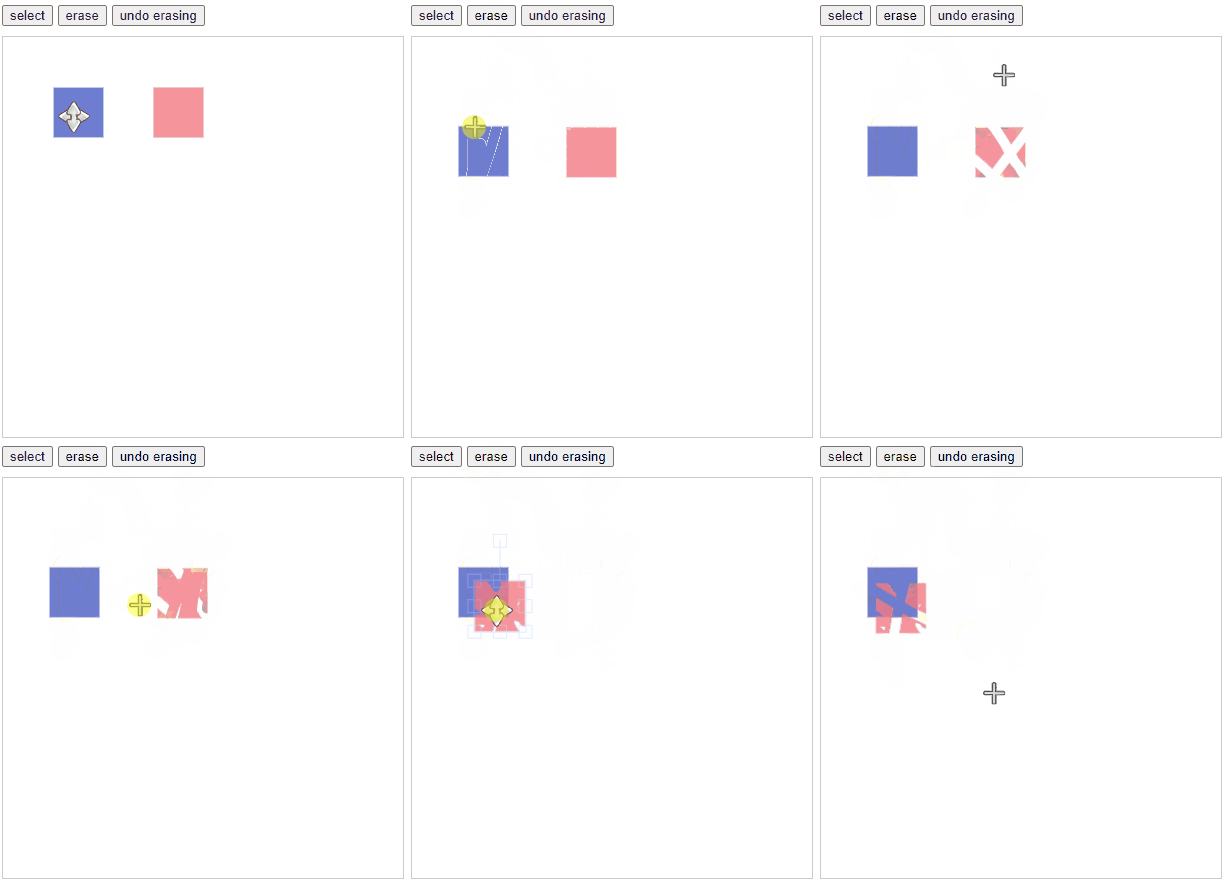
The functions to be realized in this example :
- You can change the canvas mode ( Frame selection 、 Clean )
- The Royal Blue Square cannot be wiped
- The wiped place can be restored
<br>
<!-- Button to modify canvas mode --><div style="margin-bottom: 10px;"> <button id="select" type="button" onclick="changeAction('select')">select</button> <button id="erase" type="button" onclick="changeAction('erase')">erase</button> <button id="erase" type="button" onclick="changeAction('undoErasing')">undo erasing</button></div><!-- canvas --><canvas id="c" width="400" height="400" style="border: 1px solid #ccc;"></canvas><!-- Introduce customized fabric --><script src="./fabric.js"></script><script> // Initialize canvas const canvas = this.__canvas = new fabric.Canvas('c') // Add graphics to the canvas ( This example adds 2 A square ) canvas.add( // The first square ( royal blue ) new fabric.Rect({ top: 50, left: 50, width: 50, height: 50, fill: "#4b5cc4", opacity: 0.8, erasable: false // It is not allowed to wipe }), // The second square ( Pink ) new fabric.Rect({ top: 50, left: 150, width: 50, height: 50, fill: "#f47983", opacity: 0.8 }) ) // Modify the sketchpad behavior mode function changeAction(mode) { switch (mode) { case "select": canvas.isDrawingMode = false // Painting is not allowed ( Return to normal box selection mode ) break case "erase": canvas.isDrawingMode = true // Enter painting mode canvas.freeDrawingBrush = new fabric.EraserBrush(canvas) // Use an eraser brush canvas.freeDrawingBrush.width = 10 // Set the brush thickness to 10 break case 'undoErasing': canvas.isDrawingMode = true canvas.freeDrawingBrush = new fabric.EraserBrush(canvas) canvas.freeDrawingBrush.width = 10 canvas.freeDrawingBrush.inverted = true // Restore the wiped place default: break } }</script><br>
- Use an eraser , First, you need to
isDrawingModeSet totrue. new fabric.EraserBrushYou need to pass in the canvas itself , The object when initializing the canvasconst canvas = this.__canvas = new fabric.Canvas('c').- take
canvas.freeDrawingBrush.invertedSet totrueYou can restore the wiped place .
<br>
<br>
Code warehouse
<br>
<br>
Recommended reading
| article | brief introduction |
|---|---|
| 《Fabric.js Basic brush usage BaseBrush》 | Before reading this article, I strongly recommend that you first understand the usage of basic brushes , Because the eraser is actually a brush |
| 《Fabric.js Draw circles freely 》 | take “ Frame selection ” The action is transformed into a free drawing circle |
| 《Fabric.js 3 individual api Set canvas width and height 》 | Width and height settings are not available only during initialization , In this paper, 3 There are three ways to set the canvas width and height , Make it easier for your canvas to adapt to different usage scenarios |
| 《Fabric.js Change the picture 3 Methods ( Including changing pictures in the Group , And the existence of cache )》 | If your project needs to dynamically change the pictures on the canvas , Then I'll summarize it for you 3 Medium method |
| 《Fabric.js Righting element 4 Methods ( With transition animation )》 | One click to place the elements that have been rotated by you |
| 《Fabric.js Upload local image to canvas background 》 | In addition to setting the canvas background during initialization , I also do the function of uploading background locally , Let the canvas modify the background image at runtime |
| 《 stay Vue3 Use in Fabric.js Achieve gradient (Gradient) effect , Including radial gradient radial》 | The official introductory tutorial also has only linear gradients , So that some articles say Fabric.js Only linear gradients are supported . But in fact Radial Gradient I fully support |
| 《Fabric.js From entry to defiance 》 | Fabric.js Getting started , Can deal with simple business after learning |
| 《Fabric.js Right-click menu 》 | Fabric.js There is no right-click event yet , If you want to realize the function of right-click menu , You can directly copy the code of this article ~ |
give the thumbs-up + Focus on + Collection = Learned to
边栏推荐
- NLA natural language analysis makes data analysis more intelligent
- BeanUtils -- shallow copy -- example / principle
- 自定义事件,全局事件总线,消息订阅与发布,$nextTick
- Methods of software testing
- Fabric.js 自由绘制圆形
- Use of freemaker
- 全屋Wi-Fi:一个谁也解决不好的痛点?
- docker mysql
- Getting started with QT - making a simple calculator
- Pycharm连接远程服务器
猜你喜欢
关于Flink框架窗口(window)函数最全解析
Systemserver process

PHP linked list creation and traversal

途家木鸟美团夏日折扣对垒,门槛低就一定香吗?

The use of TestNG, the testing framework (II): the use of TestNG XML

Certik released the defi security report in 2021, disclosing key data of industry development (PDF download link attached)

Pycharm连接远程服务器
Launcher启动过程
selenium 元素定位方法

Borui data integrated intelligent observable platform was selected into the "Yunyuan production catalogue" of China Academy of communications in 2022
随机推荐
Selenium installing selenium in pycharm
跨服务器数据访问的创建链接服务器方法
Route (II)
How many knowledge points can a callable interface have?
Quick analysis: easy to share the Internet
MySQL45讲——学习极客时间MySQL实战45讲笔记—— 05 | 深入浅出索引(下)
Design and implementation of car query system based on php+mysql
[development environment] StarUML tool (download software | StarUML installation | StarUML creation project)
QT - make a simple calculator - realize four operations
Teamtalk source code analysis win client
博睿数据一体化智能可观测平台入选中国信通院2022年“云原生产品名录”
Start to write a small demo - three piece chess
什么是 eRDMA?丨科普漫画图解
Adhere to the foundation of 20 minutes go every day II
Openharmony notes --------- (4)
go操作redis
What is erdma? Popular science cartoon illustration
Fabric.js 元素被选中时保持原有层级
Fabric.js 上划线、中划线(删除线)、下划线
Borui data integrated intelligent observable platform was selected into the "Yunyuan production catalogue" of China Academy of communications in 2022