当前位置:网站首页>使用verdaccio搭建自己的npm私有库
使用verdaccio搭建自己的npm私有库
2022-07-26 15:15:00 【东扯葫芦西扯瓜】
在没有服务器之前,我们先在本地测试
安装
全局安装
npm i verdaccio -g
安装好后,直接运行命令 verdaccio
这时我们会在控制台看到如下信息:
warn — config file - C:\Users\yanglian\AppData\Roaming\verdaccio\config.yaml
warn — Plugin successfully loaded: verdaccio-htpasswd
warn — Plugin successfully loaded: verdaccio-audit
warn — http address - http://localhost:4873/ - verdaccio/5.7.0
config file - C:\Users\yanglian\AppData\Roaming\verdaccio\config.yaml 信息告诉我们,verdaccio的配置文件存放地址
http address - http://localhost:4873/ - verdaccio/5.7.0 告诉我们 仓库地址
直接将地址 http://localhost:4873/ 粘贴到浏览器,我们看到如下页面
very good!!我们的仓库已经搭建好了!
发布
接下来,该发包了!
我们用vue随便新建一个项目,然后执行发布命令。由于我们发布的是自己的私有库,这里发布时先进行指定仓库,否则发布包会发到当前使用的源地址,而不是我们的私有库地址。
我们打开cmd窗口,执行命令
npm publish --registry http://localhost:4873/
这时候我们可能会看到以下错误:
1.npm ERR! This package has been marked as private
这个包是一个私有包。也就是发到npm库的包不能设为私有包,否则发布不成功。我们需要将package.json里面的private改为false
2.npm ERR! code E401
npm ERR! Unable to authenticate, your authentication token seems to be invalid.
npm ERR! To correct this please trying logging in again with:
npm ERR! npm login
这个就是提示发布没有权限,需要登录,登录是登录到我们的私有仓库,而不是npm官方。同样,这里登录也要指定私有仓库。当然,登录的账户需要我们到npm官方注册。
运行命令
npm login --registry http://localhost:4873/
然后按提示输入Username,Password,Email,如果登录成功,则会显示登录成功信息:Logged in as xxx on http://localhost:4873/.如下图:

注意在输入密码的时候,是没有任何显示的,只要确保输入正确即可。
登录的时候,虽然我们登录的是本地私有仓库,但是由于账户是npm官网注册的,所以仍然会去访问npm官方数据,如果网络环境不好无法访问的,建议使用科学上网。
3.error: one of the uplinks is down, refuse to publish
意思就线路中断,拒绝发布。
这个问题 一般只有在非服务器环境测试才遇到,这是因为verdaccio默认是在服务器运行的,在非服务器环境下,是离线状态,离线状态默认不允许发布包,需要更改配置文件config.yaml。
首先找到config.yaml,文件地址在我们运行 verdaccio命令的时候已经给出了,我这里是: C:\Users\yanglian\AppData\Roaming\verdaccio\config.yaml
我们先解决上面的报错,打开config.yaml文件后,找到 publish 配置,默认是注释的
我们去掉注释,并将allow_offline 改为 true,允许离线发布
然后再尝试一下,成功。

刷新浏览器包地址,此时会看到已经发布的包

这里注意一下,修改yaml文件时,publish前面不能有空格,否则不成功。如果有空格,可能出现的情况就是,修改完后,发布仍然报相同的错误。但是如果重新运行verdaccio命令,会报文件错误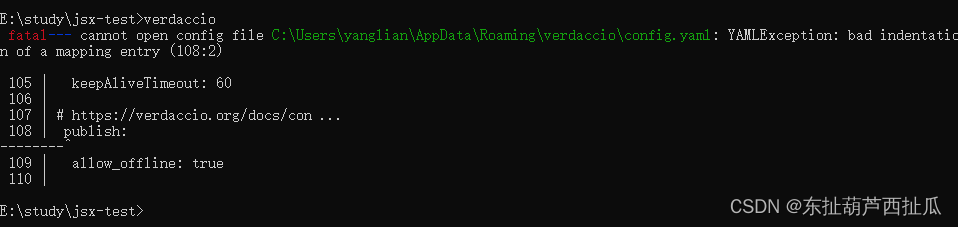
使用仓库
包发布成功后,我们就可以使用仓库安装包了。这里为了方便,推荐使用nrm管理仓库源
npm install nrm -g
nrm ls 查看已经有的包,nrm默认配置有6个源地址
 npm ---------- https://registry.npmjs.org/
  yarn --------- https://registry.yarnpkg.com/
  tencent ------ https://mirrors.cloud.tencent.com/npm/
  cnpm --------- https://r.cnpmjs.org/
  taobao ------- https://registry.npmmirror.com/
  npmMirror ---- https://skimdb.npmjs.com/registry/
现在我们将我们的私有库地址加上
nrm add my-npm http://localhost:4873/
然后切换到我们的私有库地址
nrm use my-npm
通过私有库安装包试试
创建一个项目 my-npm-test 或者随便找个其他项目安装试试
npm i verdaccio --save
安装结果
使用pm2 管理进程。
现在虽然我们可以直接运行verdaccio命令来启动仓库,但是如果我们关闭窗口,服务就死了。正常使用时肯定需要在关闭服务器窗口时仍然能使用,这时候就需要守护进程。
npm install pm2 -g
使用pm2启动verdaccio
pm2 start verdaccio
如果启动出现 erroed,可以用
npm start `which verdaccio`
verdaccio 配置文件 config.yaml
配置文件内容比较多,这里只讲其中几个,其他更详细和高级的配置,见https://verdaccio.org/zh-cn/docs/configuration/
1.storage
# path to a directory with all packages
storage: ./storage
storage就是我们发布的包存放的地方,默认是和config.yaml同级的storage文件夹里面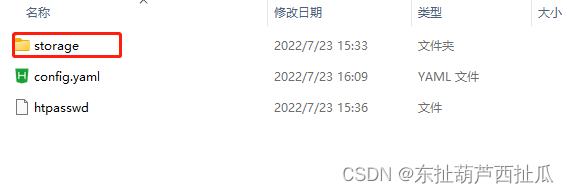

2.web verdaccio ui 界面配置
我们把里面的title 改成 “我的私有库”,保存然后重新运行verdaccio命令,刷新浏览器

3.uplinks 和packages 上游源地址及包配置
我们自己建的私有库,开始时只有我们自己发布的包,但是项目中除了我们自己的以外,肯定有大量的第三方包,如果直接从我们的仓库里面下载,肯定找不到,这时候就需要配置一个上游源地址,当在私有库找不到时,会往上游源寻找。默认配置是npm源,这里我们改成淘宝镜像。这里要和packages配合使用
uplinks 下的名字是taobao,同时package的proxy也是taobao
uplinks:
  taobao:
    url: https://registry.npmmirror.com/

 # Learn how to protect your packages
 # https://verdaccio.org/docs/protect-your-dependencies/
 # https://verdaccio.org/docs/configuration#packages
packages:
  '@*/*':
    # scoped packages
    access: $all
    publish: $authenticated
    unpublish: $authenticated
    proxy: taobao

  '**':
    # allow all users (including non-authenticated users) to read and
    # publish all packages
    #
    # you can specify usernames/groupnames (depending on your auth plugin)
    # and three keywords: "$all", "$anonymous", "$authenticated"
    access: $all

    # allow all known users to publish/publish packages
    # (anyone can register by default, remember?)
    publish: $authenticated
    unpublish: $authenticated

    # if package is not available locally, proxy requests to 'npmjs' registry
    proxy: taobao

- listen 监听配置
默认是localhost:4873,这有这个地址或者http://127.0.0.1:4873/可以访问,比如我们想用Ip,是不行的。
此时我们如果将配置改成 0.0.0.0:4873,就可以用ip访问
在服务器上尝试
按照上面的步骤安装配置操作,唯一不需要改的就是 publish allow_offline 这个地方。
这里测试服务器使用 Oracle VM VirtualBox 安装 ubuntu虚拟机搭建。
使用内网穿透的web界面坑
在搭建公司私有库时,使用的内网ip,但是为了在外面方便访问,运营将内网ip穿透得到一个外网可以访问的ip。但是不能使用内网ip和外网ip同时访问web页面。查看verdaccio的页面请求发现会将当天第一次请求的域名缓存起来。假设当天先访问内网环境域名,则外网环境web页面将无法访问,因为请求被写死成内网地址,如果先访问外网地址,则内网地址跳转到无包页面。
庆幸的是,这并不影响包的安装
边栏推荐
- R语言ggplot2可视化:使用ggplot2可视化散点图、使用ggpubr包的theme_pubclean函数设置可视化图像不包含坐标轴线的主题(theme without axis lines)
- Desktop application layout
- FOC learning notes - coordinate transformation and simulation verification
- About the selection of industrial control gateway IOT serial port to WiFi module and serial port to network port module
- Practical task scheduling platform (scheduled task)
- DICOM learning materials collection
- The R language uses the histogram function in the lattice package to visualize the histogram (histogram plot), the col parameter to customize the fill color, and the type parameter to customize the hi
- 【C】 Flexible array
- How to search literature on nature?
- 采购实用技巧,5个瓶颈物料的采购方法
猜你喜欢

Creation and traversal of binary tree

Strengthen the defense line of ecological security, and carry out emergency drills for environmental emergencies in Guangzhou

Credit card number recognition (openCV, code analysis)

Vs add settings for author information and time information
![[5 minutes paper] Pointer network](/img/9a/66edc27f08f245447cc6b8867d2383.png)
[5 minutes paper] Pointer network

C# 给Word每一页设置不同文字水印

Continuous integration (I) brief introduction to basic concepts

Where is the foreign literature needed to write the graduation thesis?

Glyphs V3 Font Icon query

How to find undergraduate dissertations of domestic universities?
随机推荐
Continuous integration (II) introduction to the basic use of Jenkins
Within a week, I developed my own knowledge sharing platform
使用两个栈实现一个队列
北京的大学排名
FOC电机控制基础
Devsecops, speed and security
Deep packet inspection using cuckoo filter paper summary
Practical task scheduling platform (scheduled task)
R语言ggplot2可视化:使用ggpubr包的ggballoonplot函数可视化气球图(可视化由两个分类变量组成的列联表)、配置guides函数中的size参数指定不显示数据点大小的图例
数仓:数仓建设中的数据建模和日志体系
[static code quality analysis tool] Shanghai daoning brings you sonarource/sonarqube download, trial and tutorial
兆骑科创高端人才项目引进落地,双创大赛承办,线上直播路演
No module named ‘win32gui‘
装备制造业的变革时代,SCM供应链管理系统如何赋能装备制造企业转型升级
Complete MySQL commands
FOC learning notes - coordinate transformation and simulation verification
University rankings in Beijing
pytorch安装 CUDA对应
TI C6000 TMS320C6678 DSP+ Zynq-7045的PS + PL异构多核案例开发手册(2)
超简单!只需简单几步即可为TA定制天气小助理!!