当前位置:网站首页>How to set auto format after saving code in vscade
How to set auto format after saving code in vscade
2022-06-28 13:20:00 【HHppGo】
Method 1 :
1. open vscode, Click on Set up

2. Search box Input format , Check these three options as shown in the figure

Method 2 :
1. Open Settings , Don't type anything into the search box , Click the logo as shown in the figure
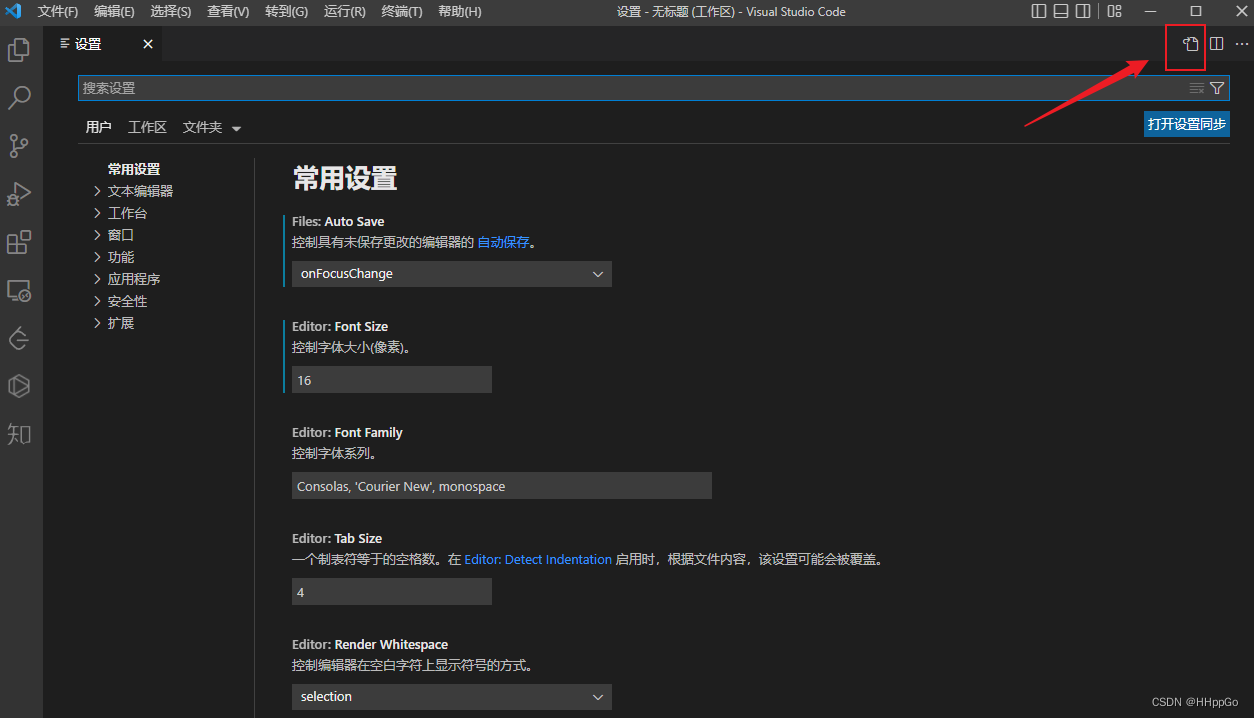
2. After clicking , Will open setting Set up , Enter the following code
    "editor.formatOnType": true,
    "editor.formatOnSave": true,
    "editor.formatOnPaste": true

边栏推荐
- pytorch主要模块
- 2022年中国运维安全产品市场规模及发展趋势预测分析
- plt.savefig()的用法以及保存路径
- Oceanwide micro fh511 single chip microcomputer IC scheme small household appliances LED lighting MCU screen printing fh511
- The counter attack story of Fu Jie, a young secondary school student: I spent 20 years from the second undergraduate to the ICLR outstanding Thesis Award
- 完全背包 初学篇「建议收藏」
- Matlab plotyy coordinate axis setting, [reprint] example of MATLAB plotyy drawing double ordinate graph [easy to understand]
- Complete backpack beginner chapter "suggestions collection"
- 词云的可视化设计教程
- China Database Technology Conference (DTCC) specially invited experts from Kelan sundb database to share
猜你喜欢

Go语学习笔记 - gorm使用 - 数据库配置、表新增 | Web框架Gin(七)

Google Earth engine (GEE) - Global organic soil area of FAO (1992-2018)
移动Web实训DAY-1

The counter attack story of Fu Jie, a young secondary school student: I spent 20 years from the second undergraduate to the ICLR outstanding Thesis Award

4年用户数破亿,孙哥带领波场再创新高

After failing in the college entrance examination, he entered Harbin Institute of technology, but stayed in the university after graduation to be an "Explorer". Ding Xiao: scientific research is accum
1015.摘花生

ShareIt has outstanding strength and landed in the top 7 of the global IAP strength list
![[MySQL from introduction to mastery] [advanced part] (III) creation of MySQL users_ Modification_ Delete and password settings](/img/9c/2a0eb8f5ec03aebbe231dbdb388eca.png)
[MySQL from introduction to mastery] [advanced part] (III) creation of MySQL users_ Modification_ Delete and password settings

flex布局中的align-content属性
随机推荐
Go language learning notes - Gorm usage - database configuration, table addition | web framework gin (VII)
Google Earth engine (GEE) - Global organic soil area of FAO (1992-2018)
Implementation of fruit and vegetable mall management system based on SSM
The counter attack story of Fu Jie, a young secondary school student: I spent 20 years from the second undergraduate to the ICLR outstanding Thesis Award
恒生电子:金融分布式数据库LightDB通过中国信通院多项测评
Oceanwide micro fh511 single chip microcomputer IC scheme small household appliances LED lighting MCU screen printing fh511
895. 最长上升子序列
List set to array
G1垃圾收集器中重要的配置参数及其默认值
PHP gets the number of digits and replaces it with the specified mantissa
##测试bug常用“Redmine”
align-items 与 align-content 的区别
Writing skills of resume
flex布局中的align-content属性
[cloud native] can self-service reports and Bi do so many things?
Flutter series part: detailed explanation of GridView layout commonly used in flutter
Arduino-ESP32闪存文件插件程序搭建和上传
在线JSON转PlainText工具
How does Quanzhi v853 chip switch sensors on Tina v85x platform?
Après avoir échoué à l'examen d'entrée à l'Université de technologie de Harbin, vous devez rester à l'Université en tant que « chercheur » après avoir obtenu votre diplôme.