当前位置:网站首页>【基于ROS的URDF练习实例】四轮机器人与摄像头的使用
【基于ROS的URDF练习实例】四轮机器人与摄像头的使用
2022-07-24 09:00:00 【生如昭诩】
前言
在上一节博客中我们系统的学习了关于URDF的基本使用语法,并从标签、属性、结构关系等多个方面深入体会了URDF文件的框架和理念,本篇文章则主要针对于实际的仿真开发,分别从带有摄像头的长方体和四轮圆柱式机器人进行实例分析,最后给出一些适用的开发工具,帮助理解URDF文件的使用方法.
一、旋转的摄像头
1. 目标机器人模型
需求:底盘为长方体、在前方有一个可以沿Z轴自由旋转的摄像头
URDF文件代码:
<!-- 需求: 底盘为长方体、 在前方有一个可以沿Z轴自由旋转的摄像头 的机器人模型 -->
<robot name="mycar">
    <!-- 底盘 -->
    <link name="base_link">
        <visual>
            <geometry>
                <box size="0.5 0.2 0.1" />
            </geometry>
            <origin xyz="0 0 0" rpy="0 0 0" />
            <material name="blue">
                <color rgba="0 0 1.0 0.5" />
            </material>
        </visual>
    </link>

    <!-- 摄像头 -->
    <link name="camera">
        <visual>
            <geometry>
                <box size="0.02 0.05 0.05" />
            </geometry>
            <origin xyz="0 0 0" rpy="0 0 0" />
            <material name="red">
                <color rgba="1 0 0 0.5" />
            </material>
        </visual>
    </link>

    <!-- 关节 -->
    <joint name="camera2baselink" type="continuous">
        <parent link="base_link"/>
        <child link="camera" />
        <!-- 需要计算两个 link 的物理中心之间的偏移量 -->
        <origin xyz="0.2 0 0.075" rpy="0 0 0" />
        <axis xyz="0 0 1" />
    </joint>

</robot>
2. 启动文件
- 注意项:状态发布节点是必须创建的,其次是关节运动控制节点用于测试关节运动,并生成UI
<launch>

    <param name="robot_description" textfile="$(find urdf_rviz_demo)/urdf/urdf/urdf03_joint.urdf" />
    <node pkg="rviz" type="rviz" name="rviz" args="-d $(find urdf_rviz_demo)/config/helloworld.rviz" />

    <!-- 添加关节状态发布节点 -->
    <node pkg="joint_state_publisher" type="joint_state_publisher" name="joint_state_publisher" />
    <!-- 添加机器人状态发布节点 -->
    <node pkg="robot_state_publisher" type="robot_state_publisher" name="robot_state_publisher" />
    <!-- 可选:用于控制关节运动的节点 -->
    <node pkg="joint_state_publisher_gui" type="joint_state_publisher_gui" name="joint_state_publisher_gui" />

</launch>
3. 问题及优化方法
1)初始模型位置
问题:上述代码产生的机器人模型在初始时会半沉到地下
原因:底盘的重心位于地图原点
解决方法:将初始 link 设置为一个尺寸极小的 link(比如半径为 0.001m 的球体,或边长为 0.001m 的立方体),然后再在初始 link 上添加底盘等刚体
优化代码:
<!-- 使用 base_footprint 优化 -->
<robot name="mycar">
    <!-- 设置一个原点(机器人中心点的投影) -->
    <link name="base_footprint">
        <visual>
            <geometry>
                <sphere radius="0.001" />
            </geometry>
        </visual>
    </link>

    <!-- 添加底盘 -->
    <link name="base_link">
        <visual>
            <geometry>
                <box size="0.5 0.2 0.1" />
            </geometry>
            <origin xyz="0 0 0" rpy="0 0 0" />
            <material name="blue">
                <color rgba="0 0 1.0 0.5" />
            </material>
        </visual>
    </link>

    <!-- 底盘与原点连接的关节 -->
    <joint name="base_link2base_footprint" type="fixed">
        <parent link="base_footprint" />
        <child link="base_link" />
        <origin xyz="0 0 0.05" />
    </joint>

    <!-- 添加摄像头 -->
    <link name="camera">
        <visual>
            <geometry>
                <box size="0.02 0.05 0.05" />
            </geometry>
            <origin xyz="0 0 0" rpy="0 0 0" />
            <material name="red">
                <color rgba="1 0 0 0.5" />
            </material>
        </visual>
    </link>
    <!-- 关节 -->
    <joint name="camera2baselink" type="continuous">
        <parent link="base_link"/>
        <child link="camera" />
        <origin xyz="0.2 0 0.075" rpy="0 0 0" />
        <axis xyz="0 0 1" />
    </joint>

</robot>
2)命令行错误
- 错误提示如下:
UnicodeEncodeError: 'ascii' codec can't encode characters in position 463-464: ordinal not in range(128)
[joint_state_publisher-3] process has died [pid 4443, exit code 1, cmd /opt/ros/melodic/lib/joint_state_publisher/joint_state_publisher __name:=joint_state_publisher __log:=/home/rosmelodic/.ros/log/b38967c0-0acb-11eb-aee3-0800278ee10c/joint_state_publisher-3.log].
log file: /home/rosmelodic/.ros/log/b38967c0-0acb-11eb-aee3-0800278ee10c/joint_state_publisher-3*.log
解决方法:去除中文注释,避免编码问题
- 错误提示如下:
[ERROR] [1584370263.037038]: Could not find the GUI, install the ‘joint_state_publisher_gui’ package解决方法:
sudo apt install ros-noetic-joint-state-publisher-gui
二、四轮圆柱式机器人
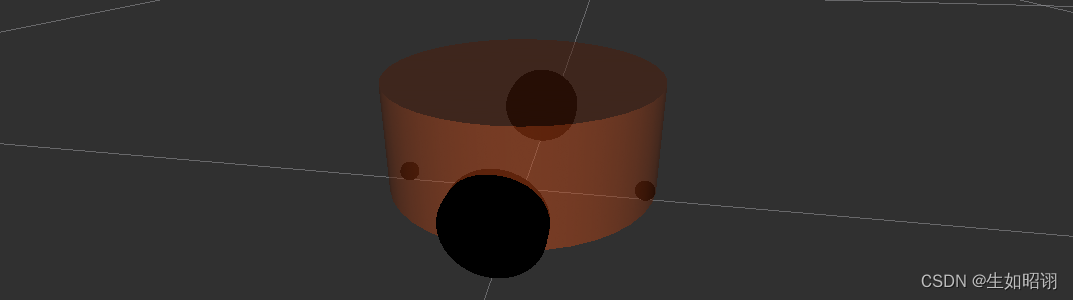
1. 目标机器人模型
- 需求:底盘为圆柱体,四个轮子分别为两个驱动轮,两个支撑轮
- 具体数据及图示:
1.底盘:半径10cm、高8cm,离地间距1.5cm
2.轮子:驱动轮:半径3.25cm、宽1.5cm;支撑轮:球形,半径0.75cm
- URDF文件代码:
<robot name="mycar">
    <!-- 设置 base_footprint -->
	    <link name="base_footprint">
	        <visual>
	            <geometry>
	                <sphere radius="0.001" />
	            </geometry>
	        </visual>
	    </link>

    <!-- 添加底盘 -->
		<!-- 参数 形状:圆柱 半径:10 cm 高度:8 cm 离地:1.5 cm -->
	    <link name="base_link">
	        <visual>
	            <geometry>
	                <cylinder radius="0.1" length="0.08" />
	            </geometry>
	            <origin xyz="0 0 0" rpy="0 0 0" />
	            <material name="yellow">
	                <color rgba="0.8 0.3 0.1 0.5" />
	            </material>
	        </visual>
	    </link>

	    <joint name="base_link2base_footprint" type="fixed">
	        <parent link="base_footprint" />
	        <child link="base_link"/>
	        <origin xyz="0 0 0.055" />
	    </joint>


    <!-- 添加驱动轮 -->
	    <!-- 驱动轮是侧翻的圆柱 参数 半径: 3.25 cm 宽度: 1.5 cm 颜色: 黑色 关节设置: x = 0 y = 底盘的半径 + 轮胎宽度 / 2 z = 离地间距 + 底盘长度 / 2 - 轮胎半径 = 1.5 + 4 - 3.25 = 2.25(cm) axis = 0 1 0 -->
	    <link name="left_wheel">
	        <visual>
	            <geometry>
	                <cylinder radius="0.0325" length="0.015" />
	            </geometry>
	            <origin xyz="0 0 0" rpy="1.5705 0 0" />
	            <material name="black">
	                <color rgba="0.0 0.0 0.0 1.0" />
	            </material>
	        </visual>

	    </link>

	    <joint name="left_wheel2base_link" type="continuous">
	        <parent link="base_link" />
	        <child link="left_wheel" />
	        <origin xyz="0 0.1 -0.0225" />
	        <axis xyz="0 1 0" />
	    </joint>


	    <link name="right_wheel">
	        <visual>
	            <geometry>
	                <cylinder radius="0.0325" length="0.015" />
	            </geometry>
	            <origin xyz="0 0 0" rpy="1.5705 0 0" />
	            <material name="black">
	                <color rgba="0.0 0.0 0.0 1.0" />
	            </material>
	        </visual>

	    </link>

	    <joint name="right_wheel2base_link" type="continuous">
	        <parent link="base_link" />
	        <child link="right_wheel" />
	        <origin xyz="0 -0.1 -0.0225" />
	        <axis xyz="0 1 0" />
	    </joint>


    <!-- 添加万向轮(支撑轮) -->
	    <!-- 参数 形状: 球体 半径: 0.75 cm 颜色: 黑色 关节设置: x = 自定义(底盘半径 - 万向轮半径) = 0.1 - 0.0075 = 0.0925(cm) y = 0 z = 底盘长度 / 2 + 离地间距 / 2 = 0.08 / 2 + 0.015 / 2 = 0.0475 axis= 1 1 1 -->
	    <link name="front_wheel">
	        <visual>
	            <geometry>
	                <sphere radius="0.0075" />
	            </geometry>
	            <origin xyz="0 0 0" rpy="0 0 0" />
	            <material name="black">
	                <color rgba="0.0 0.0 0.0 1.0" />
	            </material>
	        </visual>
	    </link>

	    <joint name="front_wheel2base_link" type="continuous">
	        <parent link="base_link" />
	        <child link="front_wheel" />
	        <origin xyz="0.0925 0 -0.0475" />
	        <axis xyz="1 1 1" />
	    </joint>

	    <link name="back_wheel">
	        <visual>
	            <geometry>
	                <sphere radius="0.0075" />
	            </geometry>
	            <origin xyz="0 0 0" rpy="0 0 0" />
	            <material name="black">
	                <color rgba="0.0 0.0 0.0 1.0" />
	            </material>
	        </visual>
	    </link>

	    <joint name="back_wheel2base_link" type="continuous">
	        <parent link="base_link" />
	        <child link="back_wheel" />
	        <origin xyz="-0.0925 0 -0.0475" />
	        <axis xyz="1 1 1" />
	    </joint>
</robot>
2. 启动文件
- launch文件代码:
<launch>
    <!-- 将 urdf 文件内容设置进参数服务器 -->
    <param name="robot_description" textfile="$(find demo01_urdf_helloworld)/urdf/urdf/test.urdf" />

    <!-- 启动 rivz -->
    <node pkg="rviz" type="rviz" name="rviz_test" args="-d $(find demo01_urdf_helloworld)/config/helloworld.rviz" />

    <!-- 启动机器人状态和关节状态发布节点 -->
    <node pkg="robot_state_publisher" type="robot_state_publisher" name="robot_state_publisher" />
    <node pkg="joint_state_publisher" type="joint_state_publisher" name="joint_state_publisher" />

    <!-- 启动图形化的控制关节运动节点 -->
    <node pkg="joint_state_publisher_gui" type="joint_state_publisher_gui" name="joint_state_publisher_gui" />
</launch>
- 实现流程:此机器人可先新建一个基本的URDF文件,集成启动文件后在逐渐添加底盘及轮子等部件
三、URDF编写工具
1. 语法检查 check_urdf
- 工具安装:
sudo apt install liburdfdom-tools
具体工具:check_urdf,检查复杂的 urdf 文件是否存在语法问题
使用方法:进入对应目录,使用命令
check_urdf 对应urdf文件效果示意:

2. 查看结构 urdf_to_graphiz
工具安装:同上
具体工具:urdf_to_graphiz,查看 urdf 模型结构,显示不同 link 的层级关系
使用方法:进入对应目录,使用命令
urdf_to_graphiz 对应urdf文件,查看当前目录下的PDF文件即可效果示意:

总结
- 声明:本节博客部分参考了CSDN用户赵虚左的ROS教程,本篇博客主要介绍了两个使用URDF进行机器人建模的具体实例,一个是重点在于自由旋转的摄像头,而另一个则是四轮机器人,最后给出了URDF的一些基本ROS工具,包含语法错误检查和link结构展示等,下篇博客将会介绍如何使用Xacro对URDF进行编程优化,敬请期待。

边栏推荐
- 面试官:哥们Go语言的读写锁了解多少?
- 利用opencv 做一个简单的人脸识别
- Attack and defense world ----- confusion1
- Rocky基础-Shell脚本基础知识
- 【一起上水硕系列】June总结+no 焦虑+July计划+如何考试+如何提升
- How to import CAD files into the map new earth and accurately stack them with the image terrain tilt model
- 读写锁、共享锁、独占锁
- TT ecosystem - cross border in-depth selection
- Read write lock, shared lock, exclusive lock
- JUC powerful auxiliary class
猜你喜欢

dp最长公共子序列详细版本(LCS)

Realize page return to parent directory based on cookies
Notify consumers after provider information changes in RPC

【我的创作一周年纪念日】爱情是需要被纪念的,创作也是

On express framework

Office fallback version, from 2021 to 2019
Six pictures show you why TCP shakes three times?
Unity solves the package manager "you see to be offline"

Source code analysis of BlockingQueue (arraybq and linkedbq)

Run little turtle to test whether the ROS environment in the virtual machine is complete
随机推荐
table-rowspan
Developing ebpf program with go language
Tiktok 16 popular categories, tiktok popular products to see which one you are suitable for?
Valentine's Day
What is tiktok creator fund and how to withdraw it?
Tiktok live broadcast with goods marketing play
【一起上水硕系列】Final RAD-new literacies
Tiktok video traffic golden release time
看了纪录片《埃达克岛的海盗宝藏》,想到我国历史上的遗失秘宝
Online lover
Office fallback version, from 2021 to 2019
pip3 带源安装大全
Redis learning - Introduction to redis and NiO principles
PXE principle and configuration
Replace the function of pow with two-dimensional array (solve the time overrun caused by POW)
From single architecture to distributed architecture, there are many pits and bugs!
如何将CAD文件导入图新地球中,与影像地形倾斜模型准确叠加
Houdini 官方HDA SideFX Labs 安装
Read write lock, shared lock, exclusive lock
Assignment operator (geritilent software - Jiuye training)