当前位置:网站首页>Pytorch framework learning record 2 - the use of TensorBoard
Pytorch framework learning record 2 - the use of TensorBoard
2022-07-30 03:57:00 【Yuzu Roo】
Pytorch框架学习记录2——TensorBoard的使用
Tensorboard在训练模型时很有用,可以看训练过程中loss的变化.之前用于Tensorflow框架,自Pytorch1.1之后,Pytorch也加了这个功能.
1. TensorBoard的使用
从torch.utils.tensorboard中导入SummaryWriter类.
1.1 SummaryWriter类使用
SummaryWriter类可以在指定文件夹生成一个事件文件,这个事件文件可以对TensorBoard解析.
首先实例化一个SummaryWriter的类,The parameter represents the name of the saved folder
writer = SummaryWriter("logs") #文件夹名称
1.2 writer.add_scalar()方法:
def add_scalar(
    self,
    tag,
    scalar_value,
    global_step=None,
    walltime=None,
    new_style=False,
    double_precision=False,
):
The above are the officially defined parameters,This method is meant to add a scalar.
tag:drawn icontitle,str类型,注意引号
scalar_value:需要保存的数值,对应y轴的y值
global_step:全局的步数,对应x轴
这里的tagPlay the role of uniquely identifying the image,If you need two pictures,is rewrittentag!!!
1.4 举例
绘制y = x 的图像.
from torch.utils.tensorboard import SummaryWriter


writer = SummaryWriter("logs")

for i in range(100):
    writer.add_scalar("y = x", i, i)

writer.close()
1.5 add_image()方法
def add_image(self, tag, img_tensor, global_step=None, walltime=None, dataformats='CHW'):
''' Args: tag (string): Data identifier img_tensor (torch.Tensor, numpy.array, or string/blobname): Image data global_step (int): Global step value to record walltime (float): Optional override default walltime (time.time()) seconds after epoch of event Shape: img_tensor: Default is :math:`(3, H, W)`. You can use ``torchvision.utils.make_grid()`` to convert a batch of tensor into 3xHxW format or call ``add_images`` and let us do the job. Tensor with :math:`(1, H, W)`, :math:`(H, W)`, :math:`(H, W, 3)` is also suitable as long as corresponding ``dataformats`` argument is passed, e.g. ``CHW``, ``HWC``, ``HW``. '''
其中,img_tensor参数类型要求为:torch.Tensor、numpy.array或者string类型.global_step为步骤,int类型.
img_tensorThe default image size format is (3,H,W),But generally our picture format is (H,W,3),Therefore, the image format needs to be adjusted,调整的方法如下:设置dataformats='HWC'即可!!!
from torch.utils.tensorboard import SummaryWriter
from PIL import Image
import numpy as np

writer = SummaryWriter("logs")

img_path = "C:\\Users\\hp\\PycharmProjects\pythonProject\\Pytorch_Learning\\flower_data\\train\daisy\\5547758_eea9edfd54_n.jpg"
img_PIL = Image.open(img_path)
img_array = np.array(img_PIL)
print(type(img_array))
writer.add_image("test", img_array, 1, dataformats='HWC')

for i in range(100):
    writer.add_scalar("y = x", i, i)

writer.close()

1.6 Event file open method:
在PyCharm中,Find where the project isterminal,
tensorboard --logdir=The name of the folder where the event file is located --port=端口号
Just open it on the URL that pops up.

![[外链图片转存失败,源站可能有防盗链机制,建议将图片保存下来直接上传(img-yfqvOSZM-1658972434470)(C:\Users\hp\AppData\Roaming\Typora\typora-user-images\image-20220728092728557.png)]](/img/b4/b5f851ad538fb869c29b69676de9c7.png)
2. Common error cases
2.1 ImportError: TensorBoard logging requires TensorBoard version 1.15 or above
tensorboard版本过低,Reinstall the latest version after uninstalling.
2.2 AttributeError: module ‘tensorflow._api.v1.io’ has no attribute ‘gfile’
tensorflow 的版本和tensorboard的版本不匹配.升级tensorflow版本为2.0版本即可,Execute the following command to automatically upgradetensorflow版本和tensorboard版本:
pip install tensorflow==2.0
2.3 ModuleNotFoundError: No module named ‘grpc’
重新安装grpcio
pip uninstall grpcio
pip install grpcio
2.4 No dashboards are active for the current data set.
The open file location does not exist,Copy the absolute path to the folder location,然后重新执行terminal语句即可
边栏推荐
- New interface - API interface for "Taote" keyword search
- Wechat second-hand transaction small program graduation design finished product (1) Development overview
- Sentinel 流量防卫兵
- 小程序毕设作品之微信二手交易小程序毕业设计成品(3)后台功能
- 操作配置:如何在一台服务器中以服务方式运行多个EasyCVR程序?
- 小程序毕设作品之微信二手交易小程序毕业设计成品(1)开发概要
- spicy (two) unit hooks
- Taobao/Tmall get Taobao store details API
- 国内首家沉浸式高逼真元宇宙,希元宇宙正式上线
- Microservice CAP Principles
猜你喜欢

Hystrix 服务熔断
After 5 years of Ali internship interview~

OpenFeign realize load balance

小程序毕设作品之微信二手交易小程序毕业设计成品(5)任务书

Small application project works WeChat integral mall small program of graduation design (4) the opening report of finished product

OpenFeign实现降级

一直空、一直爽,继续抄顶告捷!

Nacos namespace
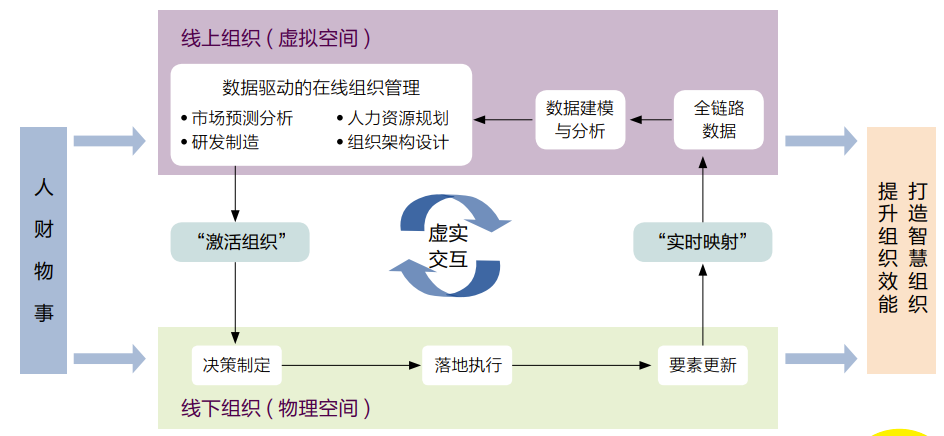
组织在线化:组织数字化变革的新趋势

Mini Program Graduation Works WeChat Second-hand Trading Mini Program Graduation Design Finished Works (4) Opening Report
随机推荐
STM32 SPI+WM8978 voice loopback
Organizations Going Online: A New Trend in Organizational Digital Transformation
Flutter records and learns different animations (1)
Taobao/Tmall get the list of sold product orders API
(六)《数电》——二极管与CMOS门电路(入门)
How to solve the error "no such file or directory" when EasyCVR starts?
Monitor page deployment
Alibaba search new product data API by keyword
Nacos achieves high availability
小程序毕设作品之微信二手交易小程序毕业设计成品(6)开题答辩PPT
小程序毕设作品之微信二手交易小程序毕业设计成品(2)小程序功能
Let's learn the layout components of flutter together
redis分布式锁的原子保证
微服务进阶 Cloud Alibaba
Forum management system
Send it to your friends and let TA treat you to fried chicken!
Nacos installation and deployment
Mini Program Graduation Works WeChat Second-hand Trading Mini Program Graduation Design Finished Works (7) Interim Inspection Report
[Node accesses MongoDB database]
Boutique: Taobao/Tmall Get Order Details API for Purchased Products