当前位置:网站首页>Canoe: the fifth simulation project: simulation + test
Canoe: the fifth simulation project: simulation + test
2022-06-25 22:43:00 【picoasis】
Catalog
1-2 Detect the message length DLC
3-1 Test module entry function MainTest
3-2 CAPL The test case —— Detect message cycle
3-3 CAPL The test case —— Detect the message length DLC
3-4 CAPL The test case —— Detect undefined message undefined msg
3-5 CAPL The test case —— A functional test
5-1 System variable control message sending
5-2 IG Node sends custom message
Engineering background
The main purpose of the project is : Based on the first 3 A simulation project , be familiar with CANoe Message test function of .
Purpose of the project
The project will focus on CAN Messages in the bus , stay Test Module To realize the test function . It mainly includes :
- Detect the period of periodic message
- Check the length of the message
- Check whether there are undefined messages in the network
- Simple function test : By modifying the values of the relevant system variables , Simulate the operation of real test environment , Finally, check the change of signal value on the bus .
- Generate test reports
Message sending
The first 3 The sending and receiving of simulation engineering messages are as follows :
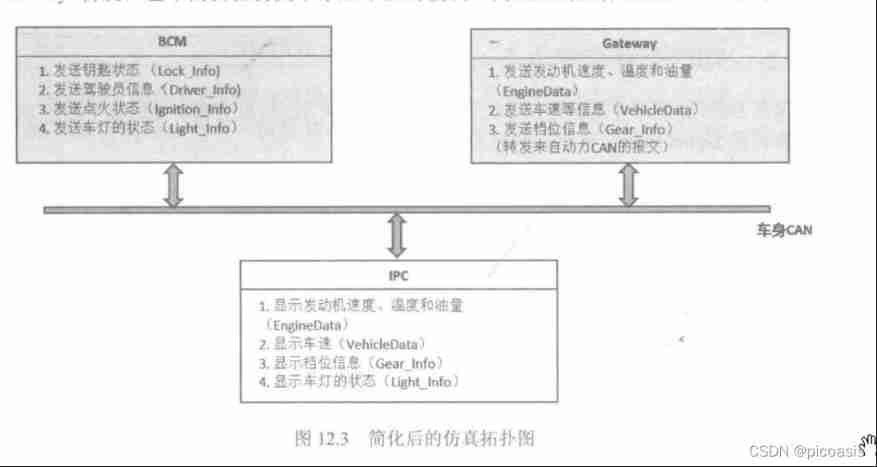
The relevant attributes of the message are summarized in the following table :

The signal attributes in the message are shown in the following table :


Project realization
Overview of Engineering steps
The examples in this chapter are based on 12 Chapter simulation engineering , For the convenience of distinction , You need to copy the folder of the original project and be known as Vehicle_System_Simulation_Test, The project name is also saved as Vehicle_System_CAN_Test.cfg, Create a project folder named Testmodul Folder , Used to store relevant test code .
Next , On this basis, test modules and fault injection panels will be added .
The project includes the following key steps :
- Test method analysis
- add to Test Module,
- CAPL Test case writing ,
- Operation engineering , Run test cases .
- fault injection , Run test cases .
- View test report .
1 Test method analysis
The purpose of this project is to test the sending cycle of different messages 、 packet length DLC; A functional test ( Check whether the signal value is within the expected value range ); Undefined message .
1-1 Detect message cycle
The method of detecting the message cycle is to designate a specific time , Select the first message to be tested in the time period as the start timestamp , Observe the time interval of subsequent repetition of the message to be tested .
TSL function —— Detection function
Detection function 1:
ChkStart_MsgAbsCycleTimeViolation ( Message aObservedMessage,duration aMinCycleTime, duration aMaxCycleTime)
The functionality : Observe the bus periodic message aObservedMessage Every occurrence of , If the interval of the message does not meet the specification requirements , A special event representing the occurrence of an exception will be triggered .
Return value :>0, Return to one IDaCheckedId, That is, observe the event of the message to be tested ;=0 Report errors .
TSL function —— Status report function
Status report function 1:long ChKQuery_NumEvents(dword aCheckId)
The functionality : Query the number of exceptional special events in this time period
Status report function 2:double ChkQuery_StatProbeIntervalAvg(dword aCheckId)
Return to the time period , The average cycle interval of the message
Status report function 3: double ChkQuery_StatProbeIntervalMin(dword aCheckId)
Return to the time period , The minimum cycle interval of the message
Status report function 4: double ChkQuery_StatProbeIntervalMax(dword aCheckId)
Return to the time period , The maximum cycle interval of the message
TSL function —— Detect the control function
Detect the control function 1: long ChkControl_Destroy(Check aCheckId)
Used at the end of the test , Destroy the event object aCheckId, Release resources . return 0 Successful operation ,<0 Report errors .
1-2 Detect the message length DLC
function :
Status report function ChkQuery_NumEvents
Detect the control function ChkControl_Destroy
Detection function :dword ChkStart_InconsistentDLC(Message aMessage,char [] aCallback)
Check whether the length of the specified message sent to the bus is the same as DBC The definitions in the database are consistent
aMessage Message to be tested ;char [] aCallback Callback function name , Optional parameters
Return value :>0: Returns an event object aCheckId;=0 Report errors
1-3 A functional test
Function test used CAPL Program logic to set the value of a signal , And then use ChkStart_MsgSignalValueInvalid Function to detect whether the signal value is within the expected value range .
dword ChkStart_MsgSignalValueInvalid (Signal aObservedSignal,double aMinValue, double aMaxValue, Callback aCallback)
Function parameter : Signal to be tested , Must be set at DBC Signal in , Minimum signal value , Maximum signal value , Callback CAPL Function name , Optional .
Return value : Returns an event object aCheckId, That is, to detect events of undefined messages
1-4 Detect undefined message
Detection function :dword ChkStart_UndefinedMessageReceived (char [] CaplCallback)
effect : Observe whether there are undefined messages on the current bus
Return value :>0: Returns an event object aCheckId, That is, the event of the message to be observed ;=0 Report errors .
Status report function :long ChkQuery_EventMessageId (dword aCheckId)
effect : Returns the message that triggered the event MessageId
Return value :>0 Return the message that triggers this event ID;<0 Report errors .
2 add to Test Module
2-1 Create test environment
Create test environment , Name it NetworkTester.

2-2 Insert CAPL Test Module
Insert CAPL Test Module, And configure this module Configuration Dialog box

To configure Module Of Name by :Network Tester, stay TestModule Create under folder CAPL file NetworkTester.can

3 CAPL Write test cases

Choose TestModule, Right click to select Edit, Can edit NetworkTester.can .
3-1 Test module entry function MainTest
CAPL In the test module can Documentation requirements :- Must contain MainTest function , All test cases enter from this interface
- add to TestModule describe :Title,DisCription.
- Simulation project initialization , Ensure the normal sending of messages ; In this project, the door is unlocked , Set up CarDriver, And the key position is set to 2.
- Group test cases testGroupBegin, Test case function name calls ,testGroupEnd.
void MainTest()
{
  testModuleTitle("NetworkTester");
  testModuleDescription("Message Specification Test and Function Test Demo.");
  testGroupBegin("Check msg cycle time","Check the differ mesage cycle time");
    Init_Test_Condition();
    CheckMsgEngineData();
    CheckMsgVehicleData();
    CheckMsgGear_Info();
    CheckMsgIgnition_Info();
    CheckMsgLight_Info();
    testGroupEnd();

  testGroupBegin("Check msg DLC","Check DLC of a message");
  CheckDLCLock_Info();
  testGroupEnd();

  testGroupBegin("Check undefined msg","Check the undefined message");
  CheckUndefinedMessage();
  testGroupEnd();

  testGroupBegin("Fucntion Test","Check the engine speed after setup");
  CheckEngine_Speed();
  testGroupEnd();

}

// Initialize simulation engineering status , Ensure that each module is in Online
Init_Test_Condition()
{
  @Vehicle_Key::Unlock_Car = 1;
  @Vehicle_Key::Car_Driver = 0;
  @Vehicle_Key::Key_State = 2;
  testWaitForTimeout(500);
}
3-2 CAPL The test case —— Detect message cycle
The test respectively EngineData(50),VehicleData(50),Gear_Info(50),Ignition_Info(50) ,Light_Info(500) Message cycle .
With EngineData For example ,CAPL The program logic is as follows :
- First declare the detection event gCycCheckId
- Define constants :
- Maximum and minimum range value of the cycle :[lCycMinCycleTime,lCycMaxCycleTime] by [40,60]
- Light_Info Period range of :[Light_MIN_CYCLE_TIME,Light_MAX_CYCLE_TIME] by [490,510].
- Write test cases :
- Define test report prompt information : use testCaseTitle Define test report prompt information , With EngineData For example testCaseTitle("TC-1","TC-1:Check cycle time of msg EngineData");
- Observe the message to be measured , Whether the cycle is within the scope requirements : Use ChkStart_MsgAbsCycleTimeViolation Observe whether the message to be tested is within the set interval . Normal return message detection event ID——aCheckedId . If aCheckedId Greater than 0 It means that the test runs normally , If =0 It means there is an error in the measurement process .
- Test case results , After outputting the test report , Destroy the test event
- Set the time for use case testing KTIMEOUT, Observe the period of the message to be measured in this observation period .
- Run the test case to the result aCheckedId As test Conditions ——testAddCondition, This means that the test case run results will be presented in the report
- Wait for the test time to end ,
- After the observation , Count the period average value of the message in the test case 、 Maximum 、 minimum value .
- Run the result according to the use case aCheckedId Print report , If aCheckedId Is greater than 0, That is, detect that the message cycle is not within the range , Then use snprintf+TestStepFail Describe the test steps that caused the error , The decision of the test case is automatically set to fail here . Otherwise, use snprintf+TestStepPass Describe the test results , The report will show the test steps performed as expected , pass with flying colors .
- Finally, destroy the detection event gCycCheckId.
Other messages only need to be sent in 3 Test case part , Change to the corresponding message name .1 Declare detection events ,4 Use case test results ,5 Destruction detection events are common functions .
The specific code example is as follows :
variables
{
  //TC1
  dword gCycCheckId;// Declare the... Of the detection event ID
  int gUndefinedMsgCheckResult;// Declare the detection result of undefined message
  const long kMIN_CYCLE_TIME = 40;// General minimum cycle time constant
  const long kMAX_CYCLE_TIME = 60;// General maximum cycle time constant
  const long Light_MIN_CYCLE_TIME = 490;// Define message Light_Info Minimum cycle time constant
  const long Light_MAX_CYCLE_TIME = 510;// Define message Light_Info Maximum cycle time constant
  const long kTIMEOUT = 4000;// Define the test wait time constant

  // Custom message —— Use IG modular

}

// Cycle time detection result function
CheckMsgCyc(float aCycMinCycleTime, float aCycMaxCycleTime)
{
  long lQueryResultProbeAvg;// Average declaration time
  long lQueryResultProbeMin;// Declare the minimum measurement time
  long lQueryResultProbeMax;// Declare the maximum measurement time
  char lbuffer[100];

  testAddCondition(gCycCheckId);// Add an event to this function
  testWaitForTimeout(kTIMEOUT);// Wait for the test time to end
  // Statistical average time
  lQueryResultProbeAvg = ChkQuery_StatProbeIntervalAvg(gCycCheckId);
  // Statistics min Time
  lQueryResultProbeMin = ChkQuery_StatProbeIntervalMin(gCycCheckId);
  // Statistics max Time
  lQueryResultProbeMax = ChkQuery_StatProbeIntervalMax(gCycCheckId);

  if(ChkQuery_NumEvents(gCycCheckId)>0)
  {
    // Count the number of exceptions // Print report
    snprintf(lbuffer,elCount(lbuffer),"Valid values %.0fms - %.0fms",aCycMinCycleTime,aCycMaxCycleTime);
    testStepFail("",lbuffer);
    snprintf(lbuffer,elCount(lbuffer),"Average cycle time: %dms",lQueryResultProbeAvg);
    testStepFail("",lbuffer);
    snprintf(lbuffer,elCount(lbuffer),"Min cycle time: %dms",lQueryResultProbeMin);
    testStepFail("",lbuffer);
    snprintf(lbuffer,elCount(lbuffer),"Average cycle time: %dms",lQueryResultProbeMax);
    testStepFail("",lbuffer);
  }
  else
  {
    snprintf(lbuffer,elCount(lbuffer),"Valid values %.0fms - %.0fms",aCycMinCycleTime,aCycMaxCycleTime);
    testStepPass("",lbuffer);
    snprintf(lbuffer,elCount(lbuffer),"Average cycle time: %dms",lQueryResultProbeAvg);
    testStepPass("",lbuffer);
    snprintf(lbuffer,elCount(lbuffer),"Min cycle time: %dms",lQueryResultProbeMin);
    testStepPass("",lbuffer);
    snprintf(lbuffer,elCount(lbuffer),"Average cycle time: %dms",lQueryResultProbeMax);
    testStepPass("",lbuffer);
  }
  ChkControl_Destroy(gCycCheckId);// Destruction event

}

//TC1:Check Cycle time of msg EngineData
testcase CheckMsgEngineData()
{
  float lCycMinCycleTime;// Declare the minimum cycle time
  float lCycMaxCycleTime;// Declare the maximum cycle time
  lCycMinCycleTime = kMIN_CYCLE_TIME;// assignment
  lCycMaxCycleTime = kMAX_CYCLE_TIME;
  // Test report prompt information
  testCaseTitle("TC-1","TC-1:Check cycle time of msg EngineData");
  // Start to observe the message to be tested
  gCycCheckId = ChkStart_MsgAbsCycleTimeViolation(EngineData,lCycMinCycleTime,lCycMaxCycleTime);
  CheckMsgCyc(lCycMinCycleTime,lCycMaxCycleTime);// Cycle time detection result function
  testRemoveCondition(gCycCheckId);// Remove test conditions
}
//TC-2:Check Cycle time of msg VehicleData
testcase CheckMsgVehicleData()
{
  float lCycMinCycleTime;
  float lCycMaxCycleTime;
  lCycMinCycleTime = kMIN_CYCLE_TIME;
  lCycMaxCycleTime = kMAX_CYCLE_TIME;


  testCaseTitle("TC-2","TC-2:Check cycle time of msg VehicleData");
  gCycCheckId = ChkStart_MsgAbsCycleTimeViolation(VehicleData,lCycMinCycleTime,lCycMaxCycleTime);
  CheckMsgCyc(lCycMinCycleTime,lCycMaxCycleTime);
  testRemoveCondition(gCycCheckId);
}
//TC-3:Check Cycle time of msg  Gear_Info
testcase CheckMsgGear_Info()
{
  float lCycMinCycleTime;
  float lCycMaxCycleTime;
  lCycMinCycleTime = kMIN_CYCLE_TIME;
  lCycMaxCycleTime = kMAX_CYCLE_TIME;


  testCaseTitle("TC-3","TC-3:Check cycle time of msg Gear_Info");
  gCycCheckId = ChkStart_MsgAbsCycleTimeViolation(Gear_Info,lCycMinCycleTime,lCycMaxCycleTime);
  CheckMsgCyc(lCycMinCycleTime,lCycMaxCycleTime);
  testRemoveCondition(gCycCheckId);
}
//TC-4:Check Cycle time of msg  Ignition_Info
testcase CheckMsgIgnition_Info()
{
  float lCycMinCycleTime;
  float lCycMaxCycleTime;
  lCycMinCycleTime = kMIN_CYCLE_TIME;
  lCycMaxCycleTime = kMAX_CYCLE_TIME;

  testCaseTitle("TC-4","TC-4:Check cycle time of msg Ignition_Info");
  gCycCheckId = ChkStart_MsgAbsCycleTimeViolation(Ignition_Info,lCycMinCycleTime,lCycMaxCycleTime);
  CheckMsgCyc(lCycMinCycleTime,lCycMaxCycleTime);
  testRemoveCondition(gCycCheckId);
}
//TC-5:Check Cycle time of msg  Light_Inf
testcase CheckMsgLight_Info()
{
  float lCycMinCycleTime;
  float lCycMaxCycleTime;
  lCycMinCycleTime = kMIN_CYCLE_TIME;
  lCycMaxCycleTime = kMAX_CYCLE_TIME;

  testCaseTitle("TC-5","TC-5:Check cycle time of msg Light_Info");
  gCycCheckId = ChkStart_MsgAbsCycleTimeViolation(Light_Info,lCycMinCycleTime,lCycMaxCycleTime);
  CheckMsgCyc(lCycMinCycleTime,lCycMaxCycleTime);
  testRemoveCondition(gCycCheckId);
}
3-3 CAPL The test case —— Detect the message length DLC
//TC6:DLC  Message length test
testcase CheckDLCLock_Info()
{
  dword checkId;
  // Test report prompt information
  testCaseTitle("TC-6","TC-6:Check msg DLC of Lock_Info");
 // Steward observation message Lock_Info Of DLC
  checkId = ChkStart_InconsistentDlc(Lock_Info);
  testAddCondition(checkId);
  // Wait for the test time to end
  testWaitForTimeout(kTIMEOUT);
  testRemoveCondition(checkId);
}
3-4 CAPL The test case —— Detect undefined message undefined msg
//TC-7: Detect undefined signals
testcase CheckUndefinedMessage()
{
  long lEventUndefineMessageId;// Declare undefined message Id
  char lbuffer[100];

  gUndefinedMsgCheckResult = 0;//? The number of initialization undefined messages is 0
  testCaseTitle("TC-7","TC-7:Check CAN channel for undefined message");
  // Start observing the current bus
  gCycCheckId = ChkStart_UndefinedMessageReceived("UndefinedMsgCallback");
  // Time delay , That is, measure the time period
  testWaitForTimeout(kTIMEOUT);

  switch(gUndefinedMsgCheckResult)
  {
    case 1:
      write("undefined message detected!");
      // Get undefined message ID
      lEventUndefineMessageId = ChkQuery_EventMessageId(gCycCheckId);
      snprintf(lbuffer,elCount(lbuffer),"Undefined message detected: Id 0x%x",lEventUndefineMessageId);
      testStepFail("",lbuffer);
      break;
    default:
      write("Iamdefault");
      testStepPass("","No undefined message detected!");
      break;
  }
  ChkControl_Destroy(gCycCheckId);// Destruction event
}

UndefinedMsgCallback(dword aCheckId)
{
  // Callback function , Call when an undefined message is detected
  write("Test: undefined message finded");
  ChkQuery_EventStatusToWrite(aCheckId);
  gUndefinedMsgCheckResult=1;// Set the number of undefined messages to 1
}
3-5 CAPL The test case —— A functional test
testcase CheckEngine_Speed()
{
  dword checkId;
  testCaseTitle("TC-8","TC-8:Check Engine Speed Value");
  @Vehicle_Key::Unlock_Car = 1;
  @Vehicle_Key::Car_Driver = 0;
  @Vehicle_Key::Key_State = 2;
  @Vehicle_Control::Eng_Speed = 2000;

  // Start observing , Whether the signal value is within the range
  checkId = ChkStart_MsgSignalValueInvalid(EngineData::EngSpeed,1900,2100);
  testWaitForTimeout(kTIMEOUT);
  if(ChkQuery_EventSignalValue(checkId))
  {
    testStepPass("","Correct Engine Speed Value");
  }
  else
  {
    testStepFail("","Incorrect Engine Speed Value");
  }
}
4 Project operation test
After running the project , Run the test .

The test case running results are shown in the figure ,Light_Info Message cycle detection error of .
—— see CANdb, Only messages are found Light_Info The message cycle of is 500, The detection range used in the code is 40-60, Change the cycle range to Light_MIN_CYCLE_TIME and Light_MAX_CYCLE_TIME, The following example :
//TC-5:Check Cycle time of msg  Light_Info
testcase CheckMsgLight_Info()
{
  float lCycMinCycleTime;
  float lCycMaxCycleTime;
  //lCycMinCycleTime = kMIN_CYCLE_TIME;//kMIN_CYCLE_TIME=40==>Light_MIN_CYCLE_TIME=490
  //lCycMaxCycleTime = kMAX_CYCLE_TIME;//kMAX_CYCLE_TIME=60==>Light_MAX_CYCLE_TIME=510
  lCycMinCycleTime = Light_MIN_CYCLE_TIME;
  lCycMaxCycleTime = Light_MAX_CYCLE_TIME;

  testCaseTitle("TC-5","TC-5:Check cycle time of msg Light_Info");
  gCycCheckId = ChkStart_MsgAbsCycleTimeViolation(Light_Info,lCycMinCycleTime,lCycMaxCycleTime);
  CheckMsgCyc(lCycMinCycleTime,lCycMaxCycleTime);
  testRemoveCondition(gCycCheckId);
}
Run the test case again , All pass .
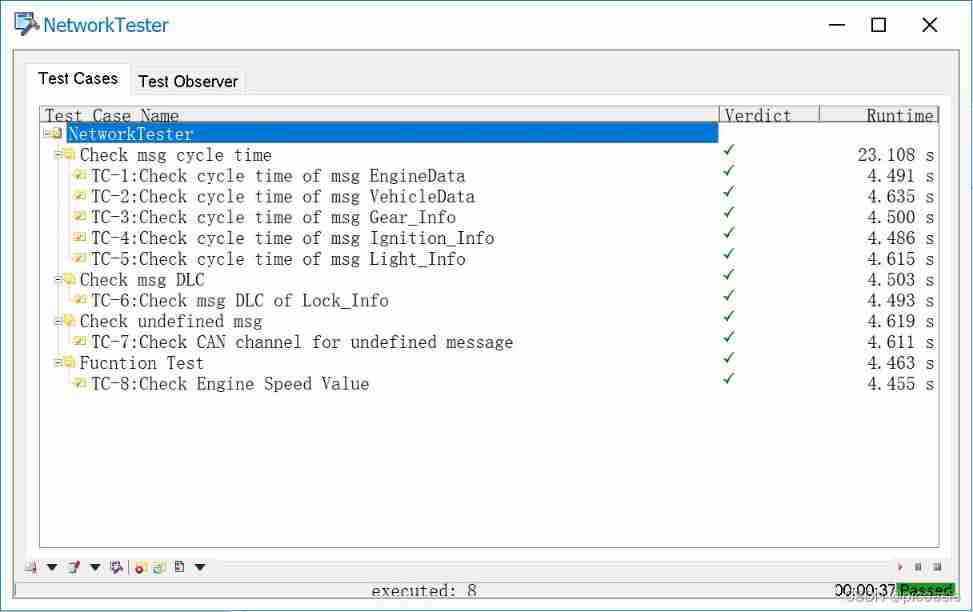
5 fault injection
To verify the correctness of the test case , A variety of fault injection methods can be used to achieve fault injection , Common are : Use the fault injection function , Use network nodes CAPL Programming , And the use of IG node .
A panel is made in the book : Msg_Switch and Custom_Msg, Control the sending and closing of messages respectively , And sending customized messages .
I try to use Panel The module implements this panel : Create system variables , Associate the panel check box with the system variable , And then CAPL Read system variables in programming , Control the corresponding message function according to the variable value .
But in the end , Use Panel only Msg_Switch part .Custom_Msg No corresponding undefined message creation method is found , You are welcome to share with us . Finally using IG The node implements the sending of undefined messages .
5-1 System variable control message sending
Create system variables , Associate the panel check box with the system variable , And then CAPL Read system variables in programming , Control the corresponding message function according to the variable value .
The test case involves 7 A message , So create 7 The system variables are created as follows :

With Gateway_EngineData_off For example , The process of creating system variables is as follows .
Create a Value Table The common use . because 7 System variables have the same numerical interpretation : Check as 1 Stop message sending , If not, it means 0 It means that the message is sent normally . Use the same ValueTable It can be managed in a unified way .

Panel The creation process is as follows :
First add a Panel panel , Name it NetworkTest.

Add a check box component , Change the name and , Associate the corresponding system variable , The example below is EngineData, Other message control can be matched one by one according to the name .
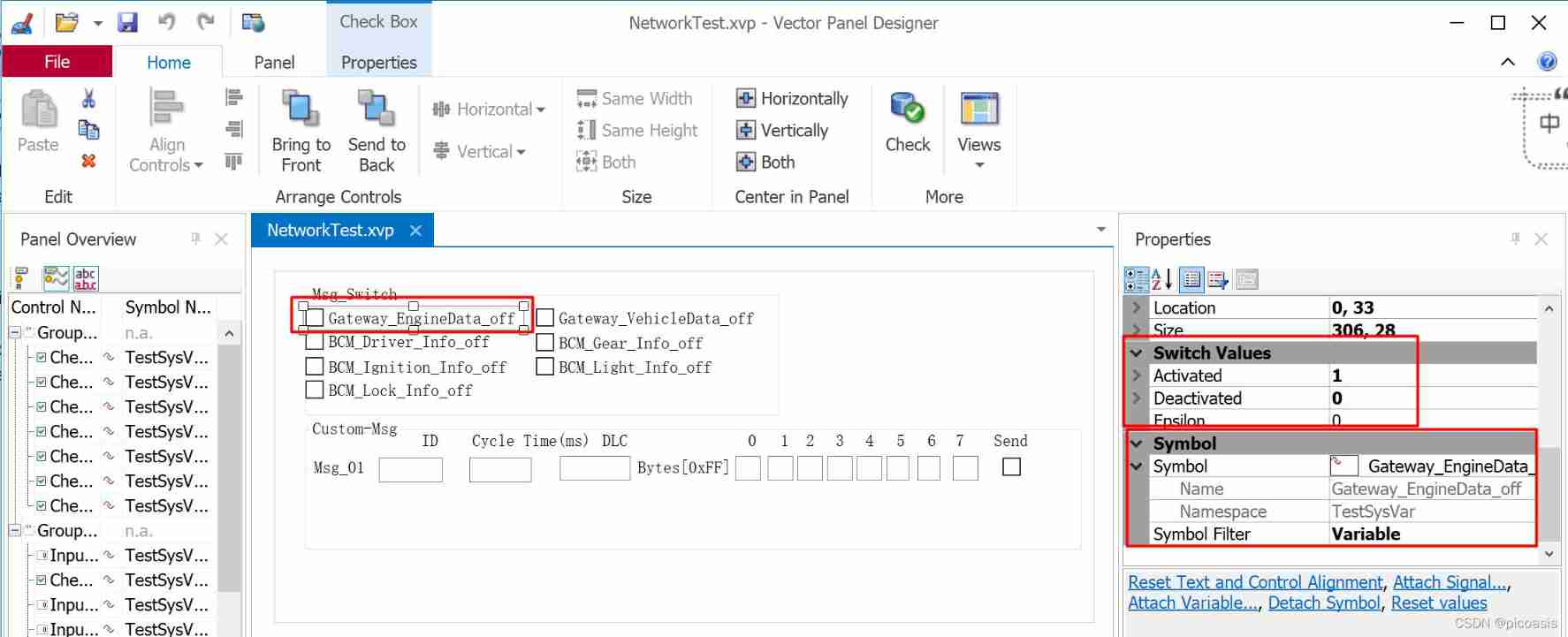
Panel After creation , stay NetworkTest.can Add variables to listen for events , Control corresponding message sending .
With EngineData For example ,CAPL The programming is as follows :
on sysvar_update TestSysVar::Gateway_EngineData_off
{
  if (@this==1)
  {
    testDisableMsg(EngineData);
    write("Test: disable EngineData");
    //testDisableMsg(Cluster_Info);
   // ILDisableMsg("Cluster_Info");
  }
  else{
    testEnableMsg(EngineData);
    write("Test: enable EngineData");
  }
}
There are more than functions that control the sending and termination of messages testDisableMsg and testEnableMsg, For other functions, please refer to this article ( Put the link after improvement ).
5-2 IG Node sends custom message
IG Nodes can be divided into CAN IG and IG, The difference is that CANIG Only support CAN message , and IG Can support CAN、LIN、MOST And other messages . Besides, there are IG and PDU IG The difference between ,PDU IG It can support any network protocol , Include CAN as well as Ethernet 、FlexRay.

5-2-1 establish IG node
stay Simulation Setup Create... On the bus CAN IG modular ,CAN IG The module allows users to send customized CAN message .

5-2-2 Add custom message , And configuration

Add... As shown in the figure above 3 Custom message Msg_01,Msg_02,Msg_03, And define relevant attributes according to the following figure

5-2-3 function
After the save , Start the project , Start the test case , Send custom message .
Test results show that undefined message is detected .

6 Test report
The test report has 2 format :①CANoe TestReport Viewer( recommend )②XML/HTML Format ( Former )
As shown in the figure below , Modify it to the format you want :

The opening position of the test report is as follows

①CANoe TestReport Viewer( recommend )

②XML/HTML Format ( Former )


END
边栏推荐
- Youku IPv6 evolution and Practice Guide
- 【WPF】CAD工程图纸转WPF可直接使用的xaml代码技巧
- 2022-2028 global transmission type photoelectric circuit breaker industry research and trend analysis report
- Huasheng lithium battery IPO meeting: 9-month revenue of 690million; shenjinliang's family relationship is complex
- In depth analysis of Flink fine-grained resource management
- Interview shock 23: talk about thread life cycle and transformation process?
- 圖解棧幀運行過程
- leetcode: 49. Grouping of alphabetic words
- Fujilai pharmaceutical has passed the registration: the annual revenue is nearly 500million yuan. Xiangyun once illegally traded foreign exchange
- 数据治理,说起来容易,做起来难
猜你喜欢
What are the debugging methods for nodejs

NRM source switching tool

Obsidian basic tutorial

2022-2028 global transmission type photoelectric circuit breaker industry research and trend analysis report
This 110 year old "longevity" enterprise has been planning for the next century
![[HNU summer semester] preparation stage of database system design](/img/cf/5ff390e2662a8942fa22e2c41e0fb5.png)
[HNU summer semester] preparation stage of database system design
2022-2028 global proton exchange membrane hydrogen electrolyzer industry survey and trend analysis report

Illustration de l'exécution du cadre de pile

再突破!阿里云进入Gartner云AI开发者服务挑战者象限
2022-2028 global carbon fiber unidirectional tape industry research and trend analysis report


随机推荐
Research Report on China's new energy technology and equipment market competition analysis and marketing strategy suggestions 2022-2028
Nacos 源码分析01 代码结构
面对AI人才培养的“产学研”鸿沟,昇腾AI如何做厚产业人才黑土地?
Diagram of stack frame running process
【WPF】CAD工程图纸转WPF可直接使用的xaml代码技巧
图解栈帧运行过程
Online crudhasone Association query reports an error unabletouseinternalvariable:list
China soft magnetic material market demand status and prospect scale forecast report 2022-2028
The difference between synchronize and volatile
[WPF] XAML code skills that can be directly used for converting CAD engineering drawings to WPF
Application runtime layotto enters CNCF cloud native panorama
用idea建立第一個網站
Beyond natural motion: exploring the discontinuity of video interpolation
聊聊Adapter模式
Talk about adapter mode
Progress of the 137th MPEG Conference
[HNU summer semester] preparation stage of database system design
Hello, teacher, is it really safe to open an account in Alipay fund?
2022-2028 global cloud based remote browser isolation industry research and trend analysis report
Introduction to HNU database system ODBC