当前位置:网站首页>i. MX - rt1052 sdcard operation (SDIO interface)
i. MX - rt1052 sdcard operation (SDIO interface)
2022-06-21 12:13:00 【Summer foam and light rain】
Write it at the front :
The purpose of this article is to summarize backup 、 For future reference , Because it's a personal summary , If there is any wrong , Welcome to correct ; in addition , Most of the content comes from the Internet 、 Books 、 And all kinds of manuals , In case of infringement, please inform , Immediately delete the post and apologize .
Catalog
Hardware interface and circuit
MIMXRT1050 EVKB There is a on the evaluation board SD Card slot (J20).J20 Is used for USDHC1 Interface Micro SD slot .
SD Cards generally support SDIO and SPI These two interfaces ,Micro SD The card interface mode pins are defined as follows :

Micro SD Card and SD Card compared to ,Micro SD The card is just 8 This pin is because it is smaller than SD One card is missing Vss, The difference is as follows :

On the evaluation board , Is the use of the SDIO Interface to operate Micro SD Card ,( The following is unified with SD Card title ), The hardware circuit is as follows :

Peripheral signal pin
stay RT1052 On , Provides uSDHC This peripheral function , Its signal pins are defined as follows :


The general summary is as follows :

among ,CD,WP,LCTL,RST and VSELECT It is optional for system implementation . If uSDHC Need to support 4 Bit data transfer , be DAT7〜DAT4 It can also be optional and bound to high level ; If uSDHC I won't support it HS400 Pattern , be STROBE It can also be optional and bound to low level .
Clock control circuit

It can be seen from the figure above ,uSDHC The root clock has 2 Optional input sources ( With uSDHC1 For example , The red line and the blue line ):
- PLL2 PFD0
- PLL2 PFD2
The last configured clock is generally 198 MHz, This is also the maximum clock frequency . In the official routine , The clock line used is the blue line above .
Peripheral block diagram architecture

Data buffering and DMA technology
It can be seen from the figure above ,RT1052 Of uSDHC Peripheral support DMA Of transmission technology .
Direct memory access (Direct Memory Access,DMA) Is a memory access technology in computer science . It allows hardware devices of different speeds to communicate , It doesn't have to depend on CPU Large amount of interrupt load ; otherwise ,CPU You need to copy every piece of data from the source to the register , Then write them back to the new place ; In this time ,CPU Can't be used for other jobs .
stay uSDHC A configurable data buffer is used in the system bus in an optimized way (IP Bus or AHB Bus ) and SD Transfer data between cards , This maximizes the two clock domains (IP Peripheral clock and master clock ) Throughput between .
This buffer is used as temporary storage for transferring data between the host system and the card . Support the configuration of read / write watermark values (1~128 A word ) And configure the read / write burst length (1~31 A word ).
Write operation sequence :
When the user transfers data to the card , There are two ways to write data to a buffer :
- The processor core passes the... In the interrupt status register BWR Bit to poll ( Interrupt or poll )
- Internal direct memory access ( utilize DMA technology )
Read operation sequence :
When the user transfers data to the card , There are two ways to read data from a buffer :
- The processor core passes the... In the interrupt status register BRR Bit to poll ( Interrupt or poll )
- Internal direct memory access ( utilize DMA technology )
Drive migration
In the official project , There are already included migrations SDMMC This kind of driver file , So we just need to add the corresponding files to our own project files , Here's the picture :
next , You also need a configuration file to drive the upper layer (sdmmc_config.c), This document is officially SDK Bag …\boards\evkbimxrt1050\sdmmc_examples\sdcard_polling Found under path , Here's the picture :
Then extract all the above information into your project folder , Put it in the path folder in the following figure ; among port What is stored in the folder is the one above sdmmc_config Two documents :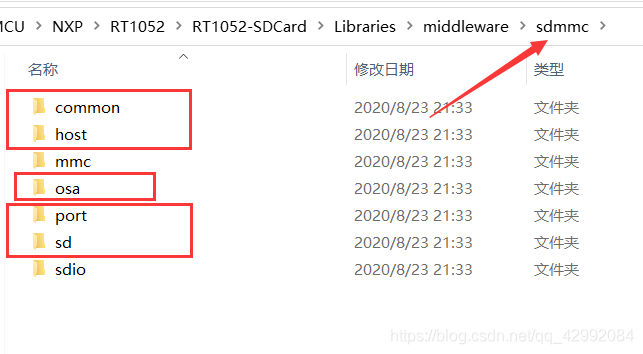
about SDCard The required files are selected from the above boxes , among osa Folders are worth noting , This folder actually contains a reference OS The superior who handled it API file , This is because in the official SDCard Driving medium , Need a similar to OS Handling of operations ; meanwhile , It is also necessary to fsl_os_abstraction_bm.c file ( route :…\components\osa) Add to project , This file is the one above osa The simulation that the folder depends on OS Processing documents , And you can get at the beginning of this file /* This is the source file for the OS Abstraction layer for MQXLite. */ This information , If you use FreeRTOS, You need to select another file ; in addition , Suffix with “ _bm ” Of , Actually, I don't take it out OS Supporting documents ; The project architecture added to is shown in the following figure :
Last , On the original preprocessing macro , You also need to add the following macros to enable the corresponding code :
FSL_SDK_ENABLE_DRIVER_CACHE_CONTROL=1, SD_ENABLED
Code routines
The underlying driver has , that , We also need a routine to verify , Add the following code :
sd_card.c Source file
#include "sd_card.h"
#include "sdmmc_config.h"
#include "pin_mux.h"
#include "board.h"

#include "fsl_debug_console.h"


/* SD Card Hardware detection enable  */
#define SD_DETECT_ENABLE 1

#define BOARD_USDHC1_CLK_FREQ (CLOCK_GetSysPfdFreq(kCLOCK_Pfd2) / (CLOCK_GetDiv(kCLOCK_Usdhc1Div) + 1U))
#define BOARD_SD_HOST_CLK_FREQ BOARD_USDHC1_CLK_FREQ

/*! @brief Data block count accessed in card */
#define DATA_BLOCK_COUNT (5U)
/*! @brief Start data block number accessed in card */
#define DATA_BLOCK_START (2U)

/*! @brief Data buffer size. */
#define DATA_BUFFER_SIZE (FSL_SDMMC_DEFAULT_BLOCK_SIZE * DATA_BLOCK_COUNT)

/*! @brief Card descriptor. */
sd_card_t g_sd;

/*! @brief sdmmc dma buffer */
AT_NONCACHEABLE_SECTION_ALIGN(static uint32_t s_sdmmcHostDmaBuffer[BOARD_SDMMC_HOST_DMA_DESCRIPTOR_BUFFER_SIZE],
                              SDMMCHOST_DMA_DESCRIPTOR_BUFFER_ALIGN_SIZE);

/*! @brief Data written to the card */
SDK_ALIGN(uint8_t g_dataWrite[DATA_BUFFER_SIZE], BOARD_SDMMC_DATA_BUFFER_ALIGN_SIZE);
/*! @brief Data read from the card */
SDK_ALIGN(uint8_t g_dataRead[DATA_BUFFER_SIZE], BOARD_SDMMC_DATA_BUFFER_ALIGN_SIZE);

#if (0 == SD_DETECT_ENABLE)
static sd_detect_card_t s_cd;
static sdmmchost_t s_host;
OSA_EVENT_HANDLE_DEFINE(host_event);

#endif /* SD_DETECT_ENABLE */

static bool s_isReadOnly;

static void SDCard_ClockConfig(void);
static status_t AccessCard(sd_card_t *card, bool isReadOnly);
static void CardInformationLog(sd_card_t *card);

/************************************************  The name of the function  : SDCard_Test  work   can  : SD Card test   ginseng   Count  :  nothing   return   return   value  : -1 / 0 *************************************************/
int SDCard_Test(void)
{

    sd_card_t *card = &g_sd;
    char ch = '0';

    while (ch != 'q') {

        PRINTF("\r\nRead/Write/Erase the card continuously until encounter error......\r\n");

        for (;;) {

            if (kStatus_Success != AccessCard(card, s_isReadOnly)) {

                /* access card fail, due to card remove. */
                if (SD_IsCardPresent(card) == false) {

                    SD_HostDoReset(card);
                    PRINTF("\r\nCard removed\r\n");
                    PRINTF(
                        "\r\nInput 'q' to quit read/write/erase process.\ \r\nInput other char to wait card re-insert.\r\n");

                    ch = GETCHAR();
                    PUTCHAR(ch);
                }
                /* access card fail, due to transfer error */
                else {

                    ch = 'q';
                }

                break;
            }
            else {

                PRINTF("\r\nInput 'q' to quit read/write/erase process.\ \r\nInput other char to read/write/erase data blocks again.\r\n");

                ch = GETCHAR();
                PUTCHAR(ch);
                if (ch == 'q') {

                    break;
                }
            }
        }
    }

    PRINTF("\r\nThe example will not read/write data blocks again.\r\n");
    SD_Deinit(card);

    return 0;
}

/************************************************  The name of the function  : SDCard_Init  work   can  : SD Card User initialization   ginseng   Count  :  nothing   return   return   value  :  nothing  *************************************************/
void SDCard_Init(void)
{

    sd_card_t *card = &g_sd;

#if SD_DETECT_ENABLE
    BOARD_SD_Config(card, NULL, BOARD_SDMMC_SD_HOST_IRQ_PRIORITY, NULL);

#else
    SDCard_ClockConfig();

    card->host                                = &s_host;
    card->host->dmaDesBuffer                  = s_sdmmcHostDmaBuffer;			// dma buffer
    card->host->dmaDesBufferWordsNum          = BOARD_SDMMC_HOST_DMA_DESCRIPTOR_BUFFER_SIZE;// dma Buffer size
    card->host->hostController.base           = BOARD_SDMMC_SD_HOST_BASEADDR;	//  Host peripheral address
    card->host->hostController.sourceClock_Hz = BOARD_SD_HOST_CLK_FREQ;			//  clock frequency
    card->host->hostEvent					  = &host_event;					//  Event handler pointer
    card->usrParam.cd						  = &s_cd;	//  Card detection callback function pointer ( Here we mainly remove assertion warnings )

    NVIC_SetPriority(BOARD_SDMMC_SD_HOST_IRQ, BOARD_SDMMC_SD_HOST_IRQ_PRIORITY);

#endif /* SD_DETECT_ENABLE */

    /* SD host init function */
    if (SD_HostInit(card) != kStatus_Success)
    {

        PRINTF("\r\nSD host init fail\r\n");
    }

    PRINTF("\r\nPlease insert a card into board.\r\n");

#if SD_DETECT_ENABLE
    /* power off card */
    SD_SetCardPower(card, false);
    /* wait card insert */
    SD_PollingCardInsert(card, kSD_Inserted);
    /* power on the card */
    SD_SetCardPower(card, true);

    PRINTF("\r\nCard inserted.\r\n");

#else
	PRINTF("\r\nWait Card initialization......\r\n");
    /* power on the card */
    SD_SetCardPower(card, true);

#endif /* SD_DETECT_ENABLE */

    /* Init card. */
    if (SD_CardInit(card)){

        PRINTF("\r\nSD card init failed.\r\n");
    }
	else{

		PRINTF("\r\nSD card init succeed.\r\n");
	}
    /* card information log */
    CardInformationLog(card);

    /* Check if card is readonly. */
    s_isReadOnly = SD_CheckReadOnly(card);
}

/************************************************  The name of the function  : SDCard_ClockConfig  work   can  : SD Card Clock configuration   ginseng   Count  :  nothing   return   return   value  :  nothing  *************************************************/
static void SDCard_ClockConfig(void)
{

    /*  Check if macros are predefined  SKIP_SYSCLK_INIT,  It is generally defined by default , If defined ,  So in  clock_config.c in  sys pll It's to stop   Close the configuration and leave it to the user to configure and select . */
    CLOCK_InitSysPll(&sysPllConfig_BOARD_BootClockRUN);
    /*configure system pll PFD2 fractional divider to 24, output clock is 528MHZ * 18 / 24 = 396 MHZ*/
    CLOCK_InitSysPfd(kCLOCK_Pfd2, 24U);
    /* Configure USDHC clock source and divider */
    CLOCK_SetDiv(kCLOCK_Usdhc1Div, 1U); /* USDHC clock root frequency maximum: 198MHZ */
    CLOCK_SetMux(kCLOCK_Usdhc1Mux, 0U);
}

/************************************************  The name of the function  : AccessCard  work   can  :  Access card data   ginseng   Count  : card ---- sd Card structure pointer  isReadOnly ----  read-only operation   return   return   value  : status_t ----  state  *************************************************/
static status_t AccessCard(sd_card_t *card, bool isReadOnly)
{

    if (isReadOnly) {

        PRINTF("\r\nRead one data block......\r\n");
        if (kStatus_Success != SD_ReadBlocks(card, g_dataRead, DATA_BLOCK_START, 1U)) {

            PRINTF("Read one data block failed.\r\n");
            return kStatus_Fail;
        }

        PRINTF("Read multiple data blocks......\r\n");
        if (kStatus_Success != SD_ReadBlocks(card, g_dataRead, DATA_BLOCK_START, DATA_BLOCK_COUNT)) {

            PRINTF("Read multiple data blocks failed.\r\n");
            return kStatus_Fail;
        }
    }
    else {

        memset(g_dataWrite, 0x67U, sizeof(g_dataWrite));

        PRINTF("\r\nWrite/read one data block......\r\n");
        if (kStatus_Success != SD_WriteBlocks(card, g_dataWrite, DATA_BLOCK_START, 1U)) {

            PRINTF("Write one data block failed.\r\n");
            return kStatus_Fail;
        }

        memset(g_dataRead, 0U, sizeof(g_dataRead));
        if (kStatus_Success != SD_ReadBlocks(card, g_dataRead, DATA_BLOCK_START, 1U)) {

            PRINTF("Read one data block failed.\r\n");
            return kStatus_Fail;
        }

        PRINTF("Compare the read/write content......\r\n");
        if (memcmp(g_dataRead, g_dataWrite, FSL_SDMMC_DEFAULT_BLOCK_SIZE)) {

            PRINTF("The read/write content isn't consistent.\r\n");
            return kStatus_Fail;
        }
        PRINTF("The read/write content is consistent.\r\n");

        PRINTF("Write/read multiple data blocks......\r\n");
        if (kStatus_Success != SD_WriteBlocks(card, g_dataWrite, DATA_BLOCK_START, DATA_BLOCK_COUNT)) {

            PRINTF("Write multiple data blocks failed.\r\n");
            return kStatus_Fail;
        }

        memset(g_dataRead, 0U, sizeof(g_dataRead));

        if (kStatus_Success != SD_ReadBlocks(card, g_dataRead, DATA_BLOCK_START, DATA_BLOCK_COUNT)) {

            PRINTF("Read multiple data blocks failed.\r\n");
            return kStatus_Fail;
        }

        PRINTF("Compare the read/write content......\r\n");
        if (memcmp(g_dataRead, g_dataWrite, FSL_SDMMC_DEFAULT_BLOCK_SIZE)) {

            PRINTF("The read/write content isn't consistent.\r\n");
            return kStatus_Fail;
        }
        PRINTF("The read/write content is consistent.\r\n");

        PRINTF("Erase multiple data blocks......\r\n");
        if (kStatus_Success != SD_EraseBlocks(card, DATA_BLOCK_START, DATA_BLOCK_COUNT)) {

            PRINTF("Erase multiple data blocks failed.\r\n");
            return kStatus_Fail;
        }
    }

    return kStatus_Success;
}

/************************************************  The name of the function  : CardInformationLog  work   can  :  Card information printing   ginseng   Count  : card ---- sd Card structure pointer   return   return   value  :  nothing  *************************************************/
static void CardInformationLog(sd_card_t *card)
{

    assert(card);

    PRINTF("\r\nCard size %d * %d bytes\r\n", card->blockCount, card->blockSize);	// sd card Memory size
    PRINTF("\r\nWorking condition:\r\n");
    /*  Working voltage  */
    if (card->operationVoltage == kSDMMC_OperationVoltage330V) {

        PRINTF("\r\n Voltage : 3.3V\r\n");					// 3.3V
    }
    else if (card->operationVoltage == kSDMMC_OperationVoltage180V) {

        PRINTF("\r\n Voltage : 1.8V\r\n");					// 1.8V
    }

    /*  Timing patterns  */
    if (card->currentTiming == kSD_TimingSDR12DefaultMode) {

        if (card->operationVoltage == kSDMMC_OperationVoltage330V) {

            PRINTF("\r\n Timing mode: Default mode\r\n");	//  Normal mode
        }
        else if (card->operationVoltage == kSDMMC_OperationVoltage180V) {

            PRINTF("\r\n Timing mode: SDR12 mode\r\n");	// SDR12  Pattern
        }
    }
    else if (card->currentTiming == kSD_TimingSDR25HighSpeedMode) {

        if (card->operationVoltage == kSDMMC_OperationVoltage180V) {

            PRINTF("\r\n Timing mode: SDR25\r\n");			// SDR25  Pattern
        }
        else {

            PRINTF("\r\n Timing mode: High Speed\r\n");	//  High speed mode
        }
    }
    else if (card->currentTiming == kSD_TimingSDR50Mode) {

        PRINTF("\r\n Timing mode: SDR50\r\n");				// SDR50  Pattern
    }
    else if (card->currentTiming == kSD_TimingSDR104Mode) {

        PRINTF("\r\n Timing mode: SDR104\r\n");			// SDR104  Pattern
    }
    else if (card->currentTiming == kSD_TimingDDR50Mode) {

        PRINTF("\r\n Timing mode: DDR50\r\n");				// DDR50  Pattern
    }

    PRINTF("\r\n Freq : %d HZ\r\n", card->busClock_Hz);	//  frequency
}


/*---------------------------- END ----------------------------*/
sd_card.h The header file
#ifndef __SD_CARD_H
#define __SD_CARD_H


#include "MIMXRT1052.h"
#include "fsl_usdhc.h"


int SDCard_Test(void);
void SDCard_Init(void);


#endif /* __SD_CARD_H */


/*---------------------------- END ----------------------------*/
From the pin description above ,CD,WP,LCTL,RST and VSELECT The pins are optional .
So sometimes because of the cost or the compactness of the pins , Hardware detection is often not used , So here you can use macros like the code above SD_DETECT_ENABLE To determine whether hardware detection is enabled , But once the detection function is cancelled , Then plug it in before the equipment is powered on for operation SDCard, Otherwise, the computer will crash and get stuck .
among ,BOARD_SD_Config(); The function is mainly used to configure the processing function of the hardware detection function pin ; in addition , It is worth noting that ,BOARD_SD_Config(); The clock configuration in the function uses sys pll pfd0 Source clock of , When the hardware detection function is cancelled , You can see the execution SDCard_ClockConfig(); Function is to use sys pll pfd2 Source clock of .
Last
sd_card.c Head note :
/* * ReadMe: *  The following routine is just a demonstration  SD Card Demonstration of operation ; *  The pin is configured in  sdmmc_config.h Change in ; * SD Card Insertion detection uses blocking rotation , Non disruptive processing ; *  For interrupt handling, please refer to the official website  SDK The following project paths in the package : * ...\boards\evkbimxrt1050\sdmmc_examples\sdcard_interrupt * *  Be careful : If you will  DATA3 Used for card detection  PIN, *  Please make sure  DATA3 Be pulled down , Whether it's inside or outside , *  Also make sure that the card can be pulled  DATA3, Then the host can pass  DATA3 Test card . *  and  SDHC The host is not supported to pass  CD Test card , Can pass  DATA3 or  GPIO Test card . *  Whether through the host or gpio Test card , Make sure  pinmux The configuration is correct . *  The following macros need to be added : * (FSL_SDK_ENABLE_DRIVER_CACHE_CONTROL=1, SD_ENABLED) * *  When  SD Card When hardware detection is enabled , The clock uses  sys pll pfd0, *  When not in use , The clock uses  sys pll pfd2. */

/*  Print examples : [2020-08-17 17:13:52.118]# RECV ASCII> Please insert a card into board. [2020-08-17 17:13:58.809]# RECV ASCII> Card inserted. [2020-08-17 17:13:59.076]# RECV ASCII> Card size 247808 * 512 bytes Working condition: Voltage : 3.3V Timing mode: High Speed Freq : 49500000 HZ [2020-08-17 17:14:10.909]# RECV ASCII> Read/Write/Erase the card continuously until encounter error...... Write/read one data block...... Compare the read/write content...... The read/write content is consistent. Write/read multiple data blocks...... Compare the read/write content...... The read/write content is consistent. Erase multiple data blocks...... Input 'q' to quit read/write/erase process. Input other char to read/write/erase data blocks again. [2020-08-17 17:14:20.992]# SEND ASCII> q [2020-08-17 17:14:21.041]# RECV ASCII> q The example will not read/write data blocks again. */
边栏推荐
- 记一次Vmware虚拟机升级GLIBC导致系统瘫痪的恢复解决方法
- Knowledge points: several special wiring methods for PCB
- Rename all files in the folder with one click
- 【深度学习】利用深度学习监控女朋友的微信聊天?
- Brief discussion on four full bonding processes of oca\uv-oca loca\sloca
- tensorflow中使用的一些函数
- Guangdong issues product testing coupons, and consumers also share
- Jenkins 通过Build periodically配置定时任务
- 异质化社群量化研究4丨RATE OF CHANGE WITH BANDS
- TypeScript 变量声明 —— 类型断言(Type Assertion)
猜你喜欢
Golang implements redis (9): use geohash to search people nearby

Typera free version, without cracking, can be installed and used directly
External attention tensorflow (under update)

Apache shardingsphere 5.1.2 release | new driving API + cloud native deployment to create a high-performance data gateway

使用Huggingface在矩池云快速加载预训练模型和数据集

STM32开发之 VS Code + gcc环境编译
Use huggingface to quickly load pre training models and datasets in the moment pool cloud
![[yolov5s target detection] opencv loads onnx model for reasoning on GPU](/img/87/49a54dfaf325fe104287235fe533c5.png)
[yolov5s target detection] opencv loads onnx model for reasoning on GPU

Snow Ice City (blackened)

自动弹出 微信授权登录窗口
随机推荐
Vs code + GCC environment compilation for STM32 development
Harmonyos training I
Is the Huatai Securities account given by qiniu school true? Is it safe to open an account
CPU、MPU、MCU、SoC、MCM介绍
Illustrated with pictures and texts -- wechat applet to obtain the user's geographic location information and call Tencent map API to obtain the user's specific location
How does Huawei build a project centered project management system from 0 to 1?
These three young men are more ruthless than Ma Huateng and Zhang Yiming
Clear the switch configuration, configure the image port and Wireshark packet capturing (take Huawei s5720 as an example)
[comprehensive pen test] sword finger offer II 114 Alien dictionary
Chapter VIII web project testing
Summary of UART problems in stm32cubemx
Embedded struct and embedded interface
harmonyos培训一
Brief discussion on four full bonding processes of oca\uv-oca loca\sloca
MySQL-DQL
Formation harmonyos I
SSD的anchor_box计算
The final battle of the giant: instant retailing
Simulated 100 questions of 2022 safety officer-a certificate examination and online simulated examination
MySQL 5.6.49 enterprise version setting password complexity policy