当前位置:网站首页>Koa_ mySQL_ Integration of TS
Koa_ mySQL_ Integration of TS
2022-06-26 08:31:00 【BloggerM】
Koa_mySQL_Ts Integration of
Desktop new folder
ts_mysql_koaInitialize project :
npm init -y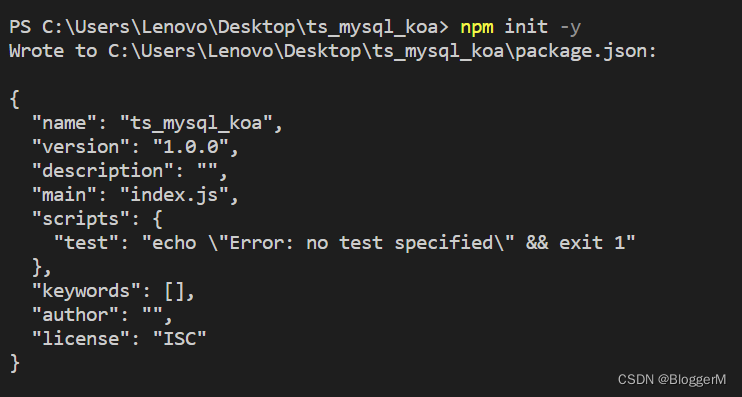
Install some required third-party modules :
npm i koa koa-router koa-bodyparser typescript mysql2
stay
package.jsonConfiguration script{ "name": "ts_mysql_koa", "version": "1.0.0", "description": "", "main": "index.js", "scripts": { "start": "ts-node-dev ./src/app.ts" }, "keywords": [], "author": "", "license": "ISC", "dependencies": { "koa": "^2.13.4", "koa-bodyparser": "^4.3.0", "koa-router": "^10.1.1", "mysql2": "^2.3.3", "ts-node-dev": "^2.0.0", "typescript": "^4.7.4" } }Create a new folder in the root directory
src, In the foldersrcNext, create a new folderapp.tsAs an entry file .Build the directory structure of the project

Start by opening
Navicat PremiumDatabase development tools , New databasemalluse mall; CREATE TABLE `user` ( id INT PRIMARY KEY AUTO_INCREMENT, username VARCHAR(20), `password` VARCHAR(20), nickName VARCHAR(20), age INT, birthday TIMESTAMP DEFAULT CURRENT_TIMESTAMP ) INSERT INTO `user` SET username = 'admin',password = '123456',nickname = ' Zhang San ',age = 18; INSERT INTO `user` SET username = 'lisi',password = '123456',nickname = ' Li Si ',age = 18; INSERT INTO `user` SET username = 'wangwu',password = '123456',nickname = ' Wang Wu ',age = 18; INSERT INTO `user` SET username = 'zhaoliu',password = '123456',nickname = ' Zhao Liu ',age = 18; SELECT * FROM `user`;stay
configNew under folderdb.tsFolderexport default { host:'localhost', port:3306, user:'root', password:'123456', database:'mall' }stay
utilCreate a new file under the folderindex.ts( Encapsulate database operation statements )import { createConnection} from "mysql2"; import config from '../config/db' // Get database connection const connection = createConnection(config) export default class DBUtil { // Encapsulate common database operation statements static query(sql:string,params?:any|any[]|{ [param:string]:any}):Promise<any>{ // adopt Promise Returns the result of the database operation return new Promise<unknown>((resolve,reject)=>{ // Execute via database connection sql sentence connection.query(sql,params,(err,result,fields)=>{ // Judge sql Is there any error in execution if(err){ // Failure reject(err) }else { // success resolve(result ) } }) }) } }stay
routerNew under the folderuser.tsimport * as Router from 'koa-router' import UserService from '../service/user' const userRouter = new Router({ prefix:'/user'}) const { queryAll,count,queryOne,del,save,edit} = new UserService() /** * Query all */ userRouter.get('/',queryAll) /** * Query quantity */ userRouter.get('/count',count) /** * according to id Inquire about */ userRouter.get('/:id',queryOne) /** * according to id Delete */ userRouter.delete('/:id',del) /** * add to */ userRouter.post('/',save) /** * modify */ userRouter.patch('/:id',edit) export default userRouterstay
serviceNew under the folderuser.tsimport UserController from '../controller/user' const { queryAll,getCount,queryOne,del,save,edit} = new UserController() export default class UserService{ /** * Query all * @param ctx */ async queryAll(ctx):Promise<void>{ const { page}=ctx.query let currentPage = 1 if(page && page !='undefined') { currentPage = (page - 1) * 10 } const res = await queryAll([currentPage,10]) ctx.body = res } /** * Number * @param ctx */ async count(ctx):Promise<void>{ const [count] = await getCount() ctx.body = count } /** * according to id Inquire about * @param ctx */ async queryOne(ctx):Promise<void>{ const { id} = ctx.params const [res] = await queryOne(id) ctx.body = res } /** * according to id Delete * @param ctx */ async del(ctx):Promise<void>{ const { id} = ctx.params const { affectedRows} = await del([id]) ctx.body = affectedRows?' Delete successful ':' Delete failed ' } /** * add to * @param ctx */ async save(ctx):Promise<void>{ const body = ctx.request.body const { insertId} = await save(body) ctx.body = insertId?' Add success ':' Add failure ' } /** * modify * @param ctx */ async edit(ctx):Promise<void>{ const body = ctx.request.body const { id} = ctx.params const { affectedRows} = await edit([body,id]) ctx.body = affectedRows?' Modification successful ':' Modification failed ' } }stay
controllerNew under the folderuser.tsimport DBUtil from '../util' export default class UserController { /** * Query all * @param params */ queryAll(params:any){ return DBUtil.query('select * from user limit ?,?',params) } getCount(){ return DBUtil.query('select count(*) as count from user') } /** * according to id Inquire about * @param params */ queryOne(params:any){ return DBUtil.query('select * from user where id=?',params) } /** * according to id Delete * @param params */ del(params:any){ return DBUtil.query('delete from user where id=?',params) } /** * add to * @param params */ save(params:any){ return DBUtil.query('insert into user set ?',params) } /** * modify * @param params */ edit(params:any){ return DBUtil.query('update user set ? where id=?',params) } }According to the
PostmanInterface test tools test one by one , Unmistakable
边栏推荐
- Win10 mysql-8.0.23-winx64 solution for forgetting MySQL password (detailed steps)
- Getting started with idea
- HEVC学习之码流分析
- Fabrication of modulation and demodulation circuit
- Discrete device ~ diode triode
- Design of reverse five times voltage amplifier circuit
- Example of offset voltage of operational amplifier
- Idea uses regular expressions for global substitution
- OpenCV Learning notes iii
- Compiling owncloud client on win10
猜你喜欢

73b2d wireless charging and receiving chip scheme

Apple motherboard decoding chip, lightning Apple motherboard decoding I.C

【Unity Mirror】NetworkTeam的使用

The solution of installing opencv with setting in pycharm

Method of measuring ripple of switching power supply

Cause analysis of serial communication overshoot and method of termination

FFmpeg音视频播放器实现
Design based on STM32 works: multi-functional atmosphere lamp, wireless control ws2812 of mobile app, MCU wireless upgrade program

鲸会务为活动现场提供数字化升级方案

Learning signal integrity from scratch (SIPI) -- 3 challenges faced by Si and Si based design methods
随机推荐
Parameter understanding of quad dataloader in yolov5
批量执行SQL文件
Detailed explanation of SOC multi-core startup process
How to Use Instruments in Xcode
Time functions supported in optee
MySQL practice: 1 Common database commands
VS2005 compiles libcurl to normaliz Solution of Lib missing
Using transformers of hugging face to realize named entity recognition
When loading view, everything behind is shielded
opencv学习笔记三
Delete dictionary from list
(3) Dynamic digital tube
Analysis of Yolo series principle
The solution of installing opencv with setting in pycharm
Torch model to tensorflow
KNN resolution
Batch modify file name
Example of offset voltage of operational amplifier
h5 localStorage
Swift code implements method calls