Introduce
In the last article , I gave a brief introduction to Web Key technical points related to keyboard and input method application . Starting with this article, we delve into various topics , See what is worth noting in the development . Here, start with the input related events supported by the browser ( Key 、 Input, etc ) Start .
keydown/keyup/keypress event
keydown[1] and keyup Events usually occur in pairs ( There are exceptions. ), they
Basically
The user is pressing ( Release ) When a key , The first event triggered by the browser . There are two more points to note here :
Whether the user is using the input method or not ,keydown Events always trigger , Even if there are no characters in the input control . For example, I am spelling with input method , And it hasn't been submitted yet .
On some special platforms or browsers ( such as Android Chrome perhaps Mac Firefox wait ),keydown The event is not always triggered first , Some input method related events ( Such as compostionstart) It will trigger earlier . This has an impact on some business logic that depends on the sequence of events , And because the platform is related , Related to it bug Not easy to find .
keypress event [7] Has been abandoned by standards , It is not recommended to continue to use . It represents the key event that actually generates the character value , such as ALT、CTRL Such function keys will not trigger this event . But even if it produces character output , This event does not necessarily trigger , This is related to the implementation of the browser , The key logic suggests not relying on this event .
keyCode attribute
In a key event ,key、code and keyCode These three attributes can be used to identify which key was pressed .key and code The property is a string , and keyCode It's an integer . In some older applications , We'll see keyCode Widely used . such as keyCode=65 For letters a Pressed ,keyCode=18 yes Alt key , and keyCode=32 It means space bar . But official documents [2] This attribute is deprecated , Because it has been Web The standard is gradually abandoned , Various browser manufacturers will gradually no longer support .keyCode Values vary by platform and browser , Pay special attention to , For specific values, please refer to MDN Official documents of .
about keyCode There are also some special cases , For example, when using input method , Pressing a key corresponds to a character that is not on the keyboard ( For example, Korean ), In fact, this button also has keyCode, Its value is usually large ( For example, Korean characters are basically 4000 above , Exactly
keypress
The event keyCode), This information can be used as a reference for judging the current input language . It's different for Chinese and Japanese , When spelling Chinese characters , Each time you press a key, it will return to a
229
Of keyCode value , With this value, you can filter out the keydown event .
in general , Use keyCode Always think about browsers 、 Language and platform compatibility , also keyCode The value of is hard to remember , Bring difficulty to development and debugging , Therefore, it is not recommended to use... For new applications . So how to get the exact key value ? The answer is
Use key and code attribute
.
key attribute
Simply speaking ,key attribute [3] Tell you what happens to your keys
value
, This property name is slightly confusing ( It's called “ key ”, the truth is that “ value ”). For example, on an English keyboard , You press “A” key , That corresponds to key event in key The value of the property is “a”.
It should be noted that key The value of is
The final
Output value , That is, it also considers SHIFT And other function keys 、 Systematic locale And the keyboard layout Etc . such as , If you press yes
SHIFT+A
Combine , that key The attribute value of is uppercase “
A
"; In Korean input method , Press the button on the right CTRL key , It is actually Korean input Hanja key( Used to input Chinese characters ), Corresponding key The property value of is “
HanjaMode
”( instead of CTRL In itself ); In Japanese 106/109 On the keyboard , Press special Kana/ Roman conversion key , Will produce “
KanaMode
” Of key Property value .
Be careful , The resulting key If the value is a printable character ( Such as the letter 、 Numbers 、 Symbols etc. ), Then we will go further
input
Other events , Enter characters into a text control . If it's just a function key ( such as Hanja Key) There won't be
input
The event occurred . therefore , Sometimes when we intercept user input
input
Events do not necessarily come in time , Not every keystroke produces actual input .
In some input method scenarios , Helpful key Attributes may appear in
keypress
Incident . For example, when using Chinese input method to input some full angle characters ( Chinese
¥
,
【
,
》
wait ), stay keydown and keyup Incident ,key Attributes may just be “
Process
”, Indicates that this key has been processed by the input method , And in the keypress In the event key Attribute can get accurate Chinese full angle characters . In this case , Developers should also pay attention to the differences of platforms , According to my experience , stay
Ubuntu Of Firefox
Browser ,keypress Events cannot occur , It can be thought of as a bug. But in the appeal scenario , Usually there is
input
The event occurred , Processing that can be used for input , But not necessarily a good time .
If the platform and browser do not recognize the keys of a keyboard , Then the key press event will still occur , It's just key The value of the property is “
Unidentified
”. There are three factors to keep in mind when handling key press events :
Keyboard layout 、 Operating system and browser
. There's a special kind of key be called Dead Key[5], In some European languages accent Character time , You need to press the accent symbol once first
`
, Press the letter key again ( For example, in French
à=`+a
), The accent symbols here will produce “
Dead
” Of key value , and a Keyed key Attribute is the final character
à
.
code attribute
occasionally , We may not care what the output of a key is , It just cares about which key on the current keyboard is pressed , This is actually like getting a key
Scan Code
.Scan Code There are different representations on different platforms , It is also related to the external keyboard ( For example, English 101 keyboard , Japanese 106 keyboard , Korean 103 Keyboard and so on. ). Corresponds to the browser platform , did not scan code The concept of , But through code attribute [4] Express similar functions .
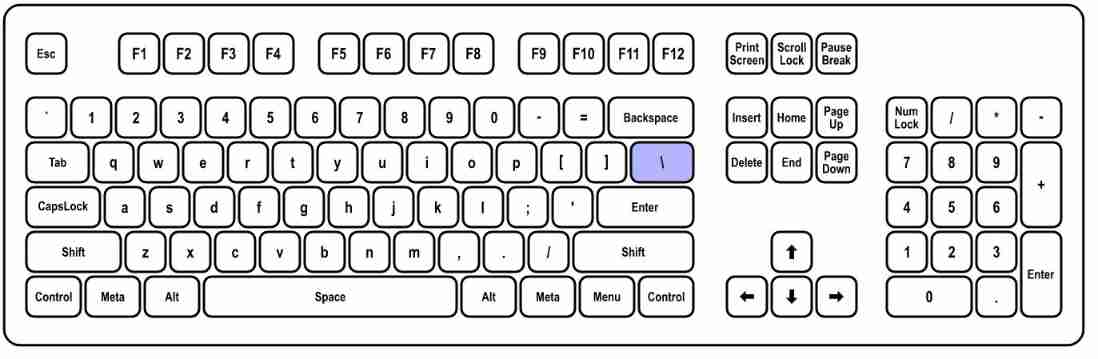
according to W3C The standards of the organization [6] Definition ,code The attribute contains the user's
Physical bond
Information about . Since it's a physical bond , It depends on the type of keyboard , For example, the following figure is a typical English 101- Keyboard layout .
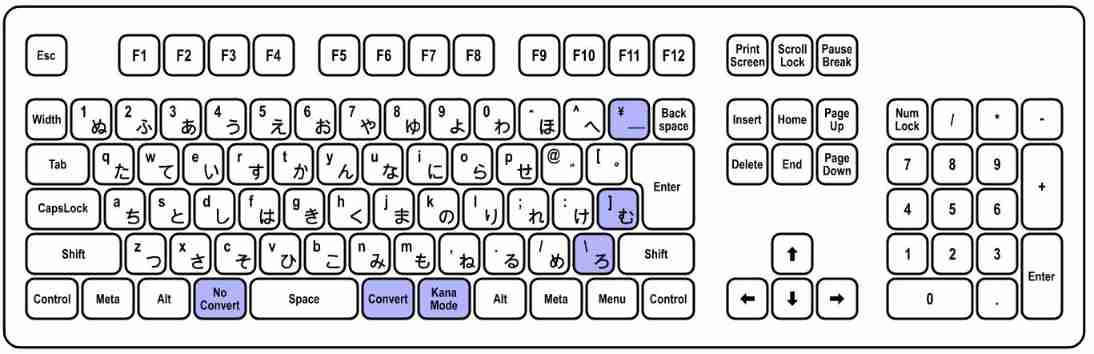
There is also a typical Japanese 106 Keyboard layout , You can see that there are more function keys related to Japanese input .
Whatever the keyboard layout , The types of the above keys can always be divided into several categories . In alphanumeric form (Alphanumeric) Area as an example , Common alphanumeric keys can be called
The writing system (Writing System) key
, And like ALT、SHIFT and KanaMode This is
function (Functional) key
. But whatever type of key , Have a unique name or ID, This is code The value of the property . Like in the picture below
“KeyA” It's letters A Key generated by the key code Property value
, No matter what keyboard layout you use , This code Value doesn't change , Because it represents the position of the key , Instead of producing any output .
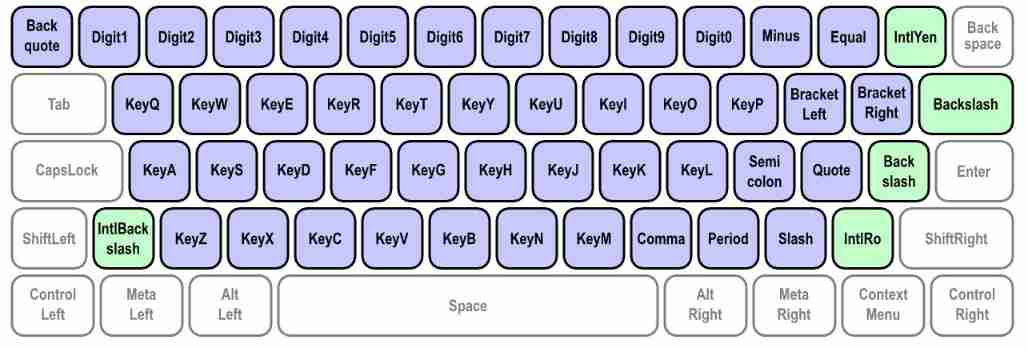
Another thing to note , The purple key in the figure is
whatever
Keyboard layout has keys , The green key is only
given
The layout of the keyboard . Like the enter button
On the left
Of “BackSlash” key , It doesn't exist on the English keyboard . Through this code attribute , We can not only know which key is pressed , You can also learn some
The current keyboard layout of the client
Information about . For example, you receive a value of “KanaMode” Of code attribute , The keyboard layout must be Japanese , Because it is impossible for other types of keyboards to generate this property value .
Other attributes
There are also some commonly used properties in key events , For example, related to key combinations
altKey
、
ctrlKey
and
shiftKey
, They indicate when a key is pressed , Whether a function key is pressed and held at the same time . This is useful when dealing with some shortcut related logic . For example, dealing with ALT+F The combination of , Can monitor keydown event , If it is
F
The key is pressed , Also check its altKey attribute , If
true
, The key combination will take effect .
location Property indicates the area where the key is located , For example, for ALT Key to say , If it's on the left ALT, The value is
1
; If it's on the right , Then for
2
. If the key in the keypad area is involved , The value is
3
May also be . This attribute is also useful in some cases , such as Windows Korean input method , Dexter CTRL Key is as
HanjaMode
key The use of , In addition to code Attribute differentiation ,location It's fine too . In some European language keyboard layouts , Dexter ALT The key is
AltGraph
key , In judging keyCode At the same time , adopt location It can also be compared with the one on the left ALT Distinguish .
repeat Indicates whether a key has been pressed all the time , Triggered when a key is pressed and held . Long press according to how long , Each system platform may differ , Only the platform thinks that long press triggers , This attribute is
true
.
summary
This article introduces the knowledge and precautions for keyboard events in the browser , The specific performance of each event and attribute depends on the specific development practice , If the standard is written, it does not mean that every platform and browser has been correctly implemented , Check documents frequently during development , But we should not be superstitious about standards . Start with the next article , Let's look at the events related to the input method .
Reference reading
原网站版权声明
本文为[InfoQ]所创,转载请带上原文链接,感谢
https://yzsam.com/2022/03/202203011539323298.html