当前位置:网站首页>Use of Azkaban in task scheduler
Use of Azkaban in task scheduler
2022-06-29 10:15:00 【Jack_ Chen】
Task scheduler Azkaban Use
Azkaban summary
Azkaban By Linkedin Open source batch workflow task scheduler . Used to run a set of work and processes in a specific sequence within a workflow .
Azkaban It defines one KV file (properties) Format to establish dependencies between tasks , And provide an easy to use web User interface to maintain and track your workflow .
Official website : https://azkaban.github.io/
install Azkaban
download
wget https://github.com/azkaban/azkaban/archive/refs/tags/3.73.0.tar.gz

tar -zxvf 3.73.0.tar.gz

mv azkaban-3.73.0  azkaban-src
install Git
yum ‐y install git
yum ‐y install gcc‐c++

[[email protected] program]# git version
git version 1.8.3.1
modify azkaban-src In the catalog build.gradle file , modify allprojects Node configuration , Specify the warehouse address as Alibaba cloud warehouse
allprojects {

    apply plugin: 'jacoco'
    repositories {

       maven {

    	  	url 'https://maven.aliyun.com/repository/public/'
   	 }
    mavenLocal()
    mavenCentral()
    }
}
Start compilation 、 Install and skip the test phase
 cd azkaban/

./gradlew  build installDist -x test
Finally, the compilation is successful
BUILD SUCCESSFUL in 4m 52s
82 actionable tasks: 76 executed, 6 from cache
The following files are obtained after compilation
# azkaban-web-server Page display service
[[email protected] azkaban-src]# ls azkaban-web-server/build/distributions/
azkaban-web-server-0.1.0-SNAPSHOT.tar.gz  azkaban-web-server-0.1.0-SNAPSHOT.zip

# azkaban-solo-server
[[email protected] azkaban-src]# ls azkaban-solo-server/build/distributions/
azkaban-solo-server-0.1.0-SNAPSHOT.tar.gz  azkaban-solo-server-0.1.0-SNAPSHOT.zip

# azkaban-exec-server Mission execution services
[[email protected] azkaban-src]# ls azkaban-exec-server/build/distributions/
azkaban-exec-server-0.1.0-SNAPSHOT.tar.gz  azkaban-exec-server-0.1.0-SNAPSHOT.zip

# two server Patterns need C Program
[[email protected] azkaban-src]# ls az-exec-util/src/main/c
execute-as-user.c

#  Database script
[[email protected] azkaban-src]# ll azkaban-db/build/install/azkaban-db/
 Total usage  112
-rw-r--r-- 1 root root 12022 3 month   12 13:33 create-all-sql-0.1.0-SNAPSHOT.sql
Single service mode
Azkaban The single service mode of uses a single node mode to start the service , Just start the installation package , All data is saved in H2 In the memory .
Get ready
azkaban-solo-server-0.1.0-SNAPSHOT.tar.gz
decompression
decompression azkaban-solo-server-0.1.0-SNAPSHOT.tar.gz
tar -zxvf  azkaban-solo-server/build/distributions/azkaban-solo-server-0.1.0-SNAPSHOT.tar.gz -C ../azkaban

[[email protected] azkaban]# ls
azkaban-solo-server-0.1.0-SNAPSHOT
install
modify vim azkaban-solo-server-0.1.0-SNAPSHOT/conf/azkaban.properties file , Guarantee and Linxu The server time zone is consistent
#default.timezone.id=America/Los_Angeles

default.timezone.id=Asia/Shanghai
modify vim azkaban-solo-server-0.1.0-SNAPSHOT/plugins/jobtypes/commonprivate.properties file
# set execute-as-user
execute.as.user=false

# Azkaban High memory requirements , Turn off memory checking
memCheck.enabled=false
start-up solo-server
 cd azkaban-solo-server-0.1.0-SNAPSHOT/

 bin/start-solo.sh

[[email protected] azkaban-solo-server-0.1.0-SNAPSHOT]# jps
22563 AzkabanSingleServer
visit Web
Browser access :IP:8081
land , User name and password :azkaban
Use
establish Job Description file vim test.job
type=command
command=echo "hello world"
Create a project 
take test.jobjob Resource files are packaged into test.zipzip file , And upload 
Start execution job


Two server modes
Get ready
azkaban-web-server-0.1.0-SNAPSHOT.tar.gz

azkaban-exec-server-0.1.0-SNAPSHOT.tar.gz

create-all-sql-0.1.0-SNAPSHOT.sql

execute-as-user.c
Initialize database
CREATE DATABASE azkaban;


CREATE USER 'azkaban'@'%' IDENTIFIED BY 'azkaban';

GRANT all privileges ON azkaban.* to 'azkaban'@'%' identified by 'azkaban' WITH GRANT OPTION;

flush privileges;

use azkaban;

source /usr/local/program/azkaban-src/azkaban-db/build/install/azkaban-db/create-all-sql-0.1.0-SNAPSHOT.sql
decompression
tar -zxvf  azkaban-web-server/build/distributions/azkaban-web-server-0.1.0-SNAPSHOT.tar.gz   -C ../azkaban


tar -zxvf  azkaban-exec-server/build/distributions/azkaban-exec-server-0.1.0-SNAPSHOT.tar.gz  -C ../azkaban

[[email protected] azkaban]# ls
azkaban-exec-server-0.1.0-SNAPSHOT  azkaban-solo-server-0.1.0-SNAPSHOT  azkaban-web-server-0.1.0-SNAPSHOT
install SSL Safety certification
install SSL Safety certification , Allow to use https Mode of access azkaban Of web service
[[email protected] azkaban]# keytool -keystore keystore -alias keyalias -genkey -keyalg RSA
 Enter the keystore password :
 Enter the new password again :
 What is your first and last name ?
  [Unknown]:
 What is the name of your organizational unit ?
  [Unknown]:
 What is the name of your organization ?
  [Unknown]:
 What is the name of your city or area ?
  [Unknown]:
 Your province / City / What is the name of the Autonomous Region ?
  [Unknown]:
 The unit's two letter country / What is the area code ?
  [Unknown]:
CN=Unknown, OU=Unknown, O=Unknown, L=Unknown, ST=Unknown, C=Unknown Whether it is right ?
  [ no ]:  y

 Input  <keyalias>  Key password for
        ( If it's the same password as the keystore ,  Press enter ):

Warning:
JKS  The keystore uses a private format . It is recommended to use  "keytool -importkeystore -srckeystore keystore -destkeystore keystore -deststoretype pkcs12"  Migrate to industry standard format  PKCS12.
[[email protected] azkaban]# ls
azkaban-exec-server-0.1.0-SNAPSHOT  azkaban-solo-server-0.1.0-SNAPSHOT  azkaban-web-server-0.1.0-SNAPSHOT  keystore
install Azkaban Web Server
install azkaban web server, Get into cd azkaban-web-server-0.1.0-SNAPSHOT/conf edit vim azkaban.properties
#default.timezone.id=America/Los_Angeles
default.timezone.id=Asia/Shanghai

#jetty.use.ssl=false
jetty.use.ssl=true

# ssl To configure
jetty.ssl.port=8443
jetty.keystore=/usr/local/program/azkaban/keystore
jetty.password=azkaban
jetty.keypassword=azkaban
jetty.truststore=/usr/local/program/azkaban/keystore
jetty.trustpassword=azkaban

# Azkaban mysql settings by default. Users should configure their own username and password.
database.type=mysql
mysql.port=3306
mysql.host=localhost
mysql.database=azkaban
mysql.user=azkaban
mysql.password=azkaban
mysql.numconnections=100

azkaban.executorselector.filters=StaticRemainingFlowSize,MinimumFreeMemory,CpuStatus
#azkaban.executorselector.filters=StaticRemainingFlowSize,MinimumFreeMemory,CpuStatus

azkaban.activeexecutor.refresh.milisecinterval=10000
azkaban.queueprocessing.enabled=true
azkaban.activeexecutor.refresh.flowinterval=10
azkaban.executorinfo.refresh.maxThreads=10
install Azkaban Executor Server
install azkaban executor server, Get into cd azkaban-exec-server-0.1.0-SNAPSHOT/conf edit vim azkaban.properties
#default.timezone.id=America/Los_Angeles
default.timezone.id=Asia/Shanghai

#jetty.use.ssl=false
jetty.use.ssl=true

# ssl To configure
jetty.ssl.port=8443
jetty.keystore=/usr/local/program/azkaban/keystore
jetty.password=azkaban
jetty.keypassword=azkaban
jetty.truststore=/usr/local/program/azkaban/keystore
jetty.trustpassword=azkaban

# Where the Azkaban web server is located
#azkaban.webserver.url=http://localhost:8081
azkaban.webserver.url=http://localhost:8443

# Azkaban mysql settings by default. Users should configure their own username and password.
database.type=mysql
mysql.port=3306
mysql.host=localhost
mysql.database=azkaban
mysql.user=azkaban
mysql.password=azkaban
mysql.numconnections=100
Add the plug-in
Will be compiled C file execute-as-user.c copy to azkaban-exec-server-0.1.0-SNAPSHOT/plugins/jobtypes Catalog
cp az-exec-util/src/main/c/execute-as-user.c /usr/local/program/azkaban/azkaban-exec-server-0.1.0-SNAPSHOT/plugins/jobtypes
Generate execute-as-user
cd azkaban-exec-server-0.1.0-SNAPSHOT/plugins/jobtypes

[[email protected] jobtypes]# yum -y install gcc-c++

[[email protected] jobtypes]# gcc execute-as-user.c -o execute-as-user
[[email protected] jobtypes]# ls
commonprivate.properties  execute-as-user  execute-as-user.c

[[email protected] jobtypes]# chown root execute‐as‐user

[[email protected] jobtypes]# chmod 6050 execute-as-user

[[email protected] jobtypes]# ll
 Total usage  24
-rw-rw-r-- 1 root root    44 5 month   31 2019 commonprivate.properties
---Sr-s--- 1 root root 13536 3 month   12 15:33 execute-as-user
-rw-r--r-- 1 root root  3976 3 month   12 15:30 execute-as-user.c
Modify the configuration file
vim commonprivate.properties

# set execute-as-user
execute.as.user=false
#  Memory detection is off
memCheck.enabled=false
#  Specify the plug-in storage directory
azkaban.native.lib=/usr/local/program/azkaban/azkaban-exec-server-0.1.0-SNAPSHOT/plugins/jobtypes
Start the service
start-up azkaban exec server
cd azkaban-exec-server-0.1.0-SNAPSHOT

bin/start-exec.sh


[[email protected] azkaban-src]# jps
24655 AzkabanExecutorServer


#  When azkaban-exec-server-0.1.0-SNAPSHOT Appear under directory executor.port file , Indicating successful startup
[[email protected] azkaban-exec-server-0.1.0-SNAPSHOT]# ls
bin  conf  currentpid  executions  executor.port  executorServerLog__2022-03-12+15:57:50.out  lib  logs  plugins  projects  temp
Activate exec-server
[[email protected] azkaban-exec-server-0.1.0-SNAPSHOT]# curl -G "node01:$(<./executor.port)/executor?action=activate" && echo
{
    "status":"success"}
start-up azkaban-web-server
cd azkaban-web-server-0.1.0-SNAPSHOT/

bin/start-web.sh

[[email protected] azkaban-src]# jps
11146 AzkabanWebServer
visit Web
Browser access IP:8443
Be careful : Release port or Turn off firewall
systemctl stop firewalld.service
Use tests
take Single service mode Job Upload resources for testing 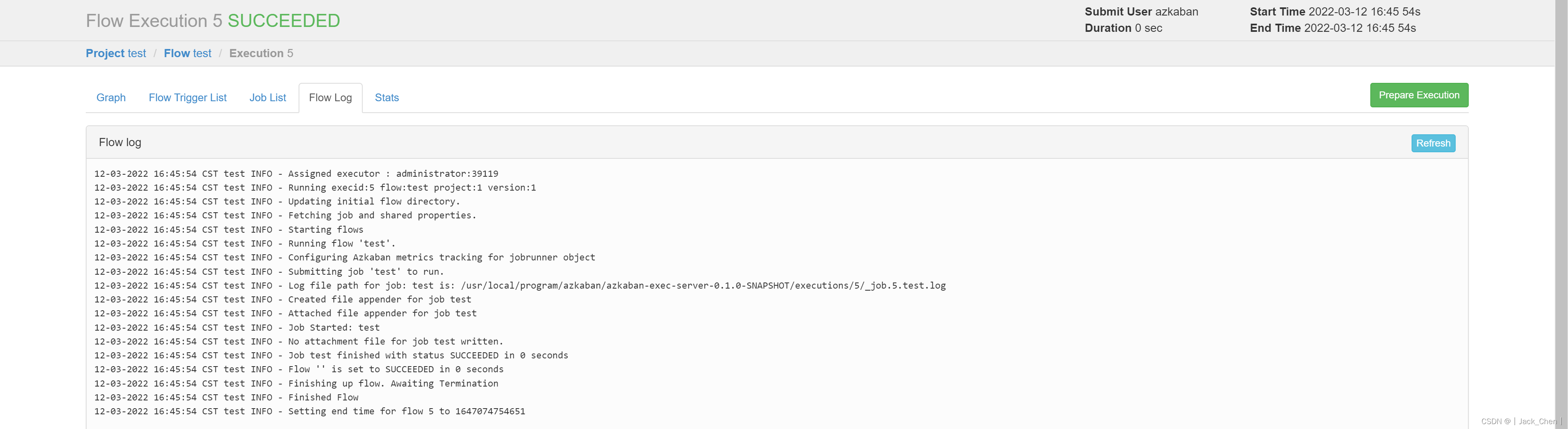
Task submission and execution
Command type
1. A single Job Use
1. establish  Job  Description file

2. take job Resource files are packaged into zip file

3. Create project and upload zip Compressed package

4. Start workflow flow, perform job
establish Job Description file vim test.job
type=command
command=echo "hello world"
2. many Job Use
1. Create multiple dependencies job describe

2. Will all job Type a resource file to zip In bag

3. Create project and upload zip Compressed package

4. Start workflow flow, perform job
establish Job Description file vim test1.job
type=command
command=echo "test1 hello world"
establish Job Description file vim test2.job
type=command
command=echo "test2 hello world"
dependencies=test1
After uploading, the dependency is displayed during execution 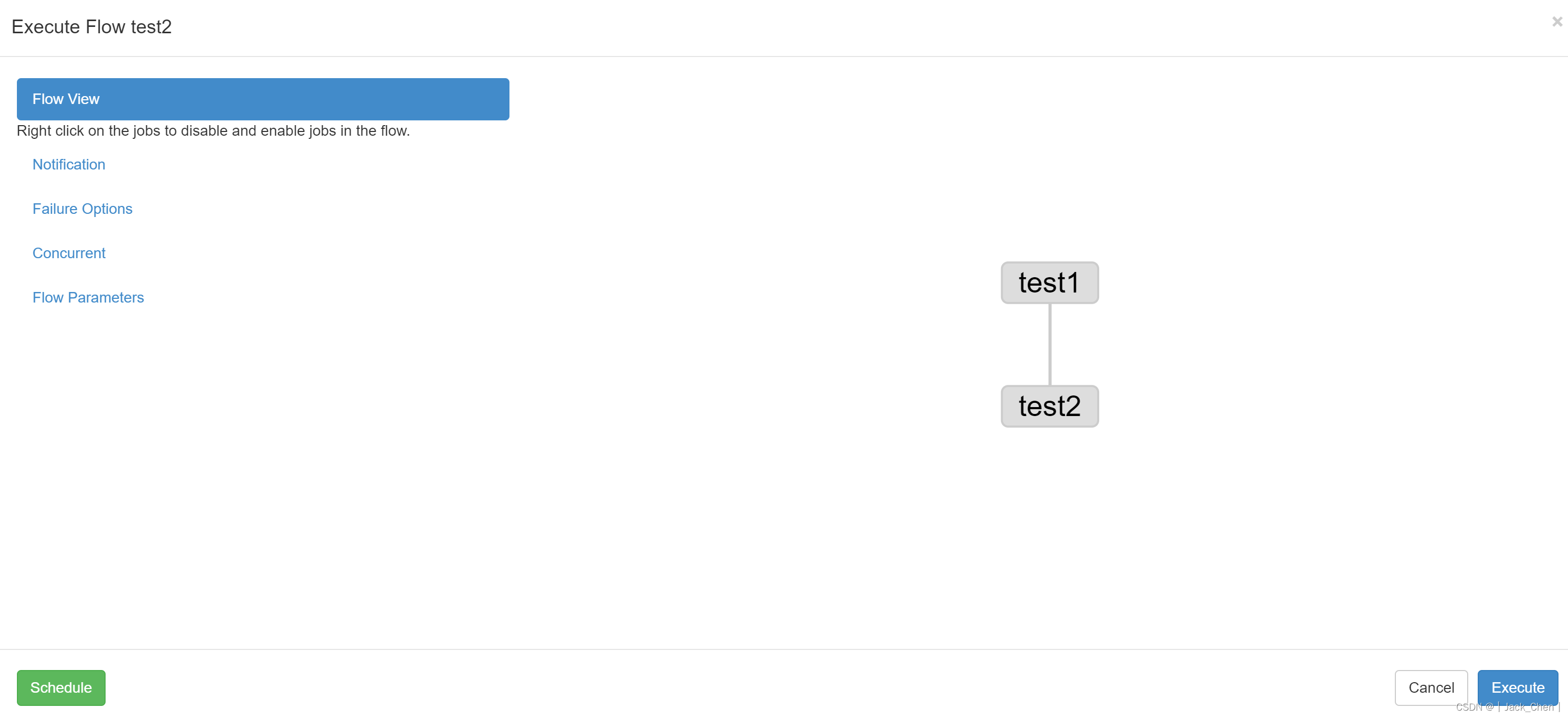
Execution process and results 
Timing task
Azkaban Of scheduler This function can realize the regular scheduling of job tasks

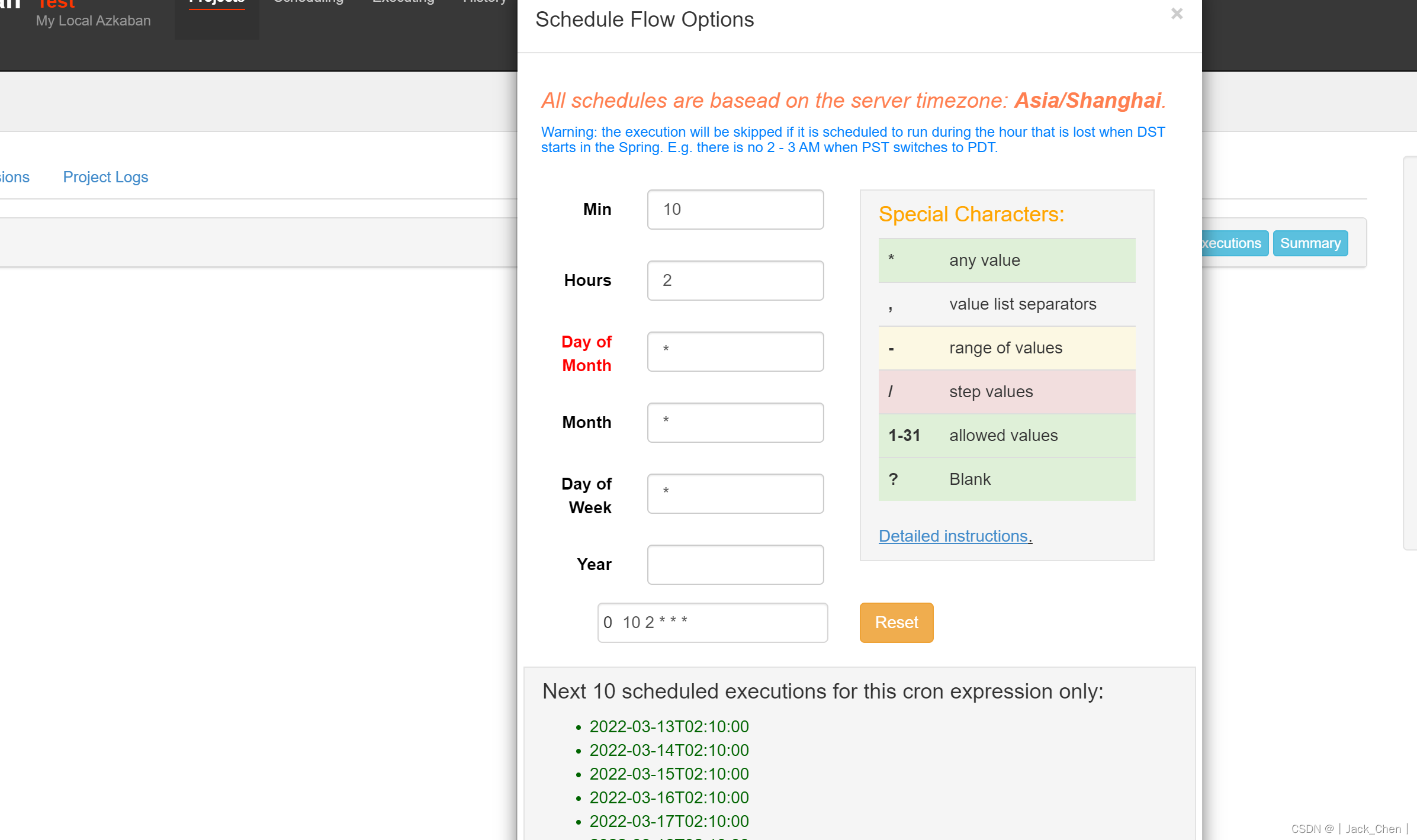
HDFS Operational tasks
1. establish job Description file

2. take job Resource files are packaged into zip file

3. establish project And upload job Compressed package

4. Start execution of the job
vim hdfs.job
type=command
command=/usr/local/program/hadoop/bin/hdfs dfs -mkdir /azkaban

View after execution HDFS
[[email protected] hadoop]# hdfs dfs -ls /
Found 6 items
drwxr-xr-x   - root supergroup          0 2022-03-12 18:37 /azkaban
MapReduce Mission
1. download /usr/local/program/hadoop/share/hadoop/mapreduce/hadoop-mapreduce-examples-3.3.2.jar file
2. establish job Description file vim mr.job
type=command
command=/usr/local/program/hadoop/bin/hadoop jar hadoop-mapreduce-examples-3.3.2.jar pi 3 5
3. Will all job Resource file ( vim mr.job、hadoop-mapreduce-examples-3.3.2.jar) Call one zip In the compressed package
4. Create project and upload zip package , start-up job
Hive Script task
1. Get ready Hive Script : hive.sql
create database if not exists dbazkaban;
use dbazkaban;
create table if not exists tbazkaban(id string,name string) row format
delimited fields terminated by '\t';
2. establish job Description file hive.job
type=command
command=/usr/local/program/hive/bin/hive -f 'hive.sql'
3. Will all job Type a resource file to zip In bag
4. Create project and upload zip package , start-up job
边栏推荐
猜你喜欢
Binding mechanism of JVM methods

使用Rancher搭建Kubernetes集群

弧形 View 和弧形 ViewPager

qgis制图

Constructing SQL statements by sprintf() function in C language

Alibaba cloud firewall configuration, multiple settings (iptables and firewall)

RecyclerView 粘性(悬浮)头部

SeaweedFS安全配置(Security Configuration)

JVM之TLAB

JVM之方法返回地址
随机推荐
Caused by: org. apache. xerces. impl. io. MalformedByteSequenceException: Invalid byte 3 of 3-byte UTF-8
Wandering --- 最后的编程挑战
同花顺炒股软件可靠吗,安全吗?
1146 Topological Order (25 分)
Dsolve function of sympy
FreeRTOS (IX) - queue
Signal works: time varying and time invariant
PHP内存马技术研究与查杀方法总结
Related problems of pointer array, array pointer and parameter passing
Pointer functions and function pointers
逆向思维-小故事
Serpentine filling number
EDA and VHDL question bank
JNI. H description
JVM之 MinorGC、 MajorGC、 FullGC、
L2-031 深入虎穴 (25 分)
To 3 --- 最后的编程挑战
两个栈的模拟题
GCC and makefile
Wandering -- the last programming challenge