当前位置:网站首页>Unity Shader学习(一)认识unity shader基本结构
Unity Shader学习(一)认识unity shader基本结构
2022-06-27 11:03:00 【ToDoNothing】
最近打算认真学一下Unity的Shader,以后的项目中还是会用到,虽然说用别人的shader很舒服,但是再好用也是别人的,自己也理解不了,所以还是要自己懂才行。今天稍微来认识一下shader的结构,以及我对unity shader的渲染简单理解。
1.简单了解计算机渲染流程
首先要学习shader,对计算机的渲染流程肯定要了解,这里推荐大家自己百度一下,以下参考:
Unity技术美术
计算机渲染流程
简单了解计算机渲染流程
在概念上我们一般把计算机的渲染流程分为几个阶段:
1.应用阶段:主要是由CPU处理光照、模型等数据,形成点线面的图元数据。
2.几何阶段:处理点线面信息。
3.光栅化阶段:添加纹理、颜色等。
(注意:上述阶段是简化流程,真实操作更加复杂)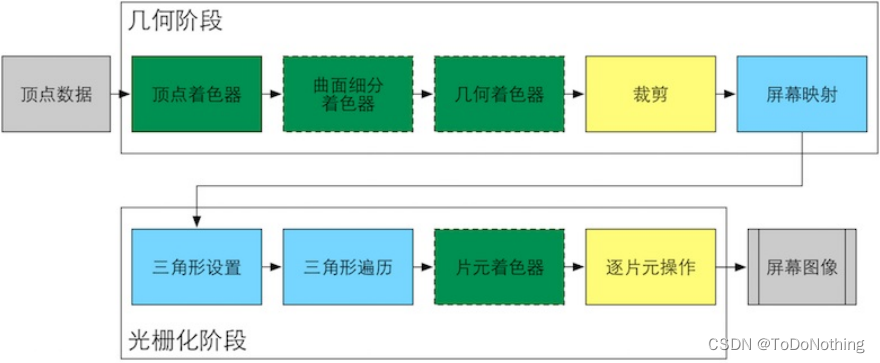
2.认识Unity Shader的结构
打开Unity,创建一个材质球,可以看到默认的材质球使用的是标准的pbr shader渲染方式
我们再创建一个shader,通过右键鼠标》Shader》随便选择一个,这里我们选择无光照的Unlit Shader,创建好了如下所示:
双击打开shader,这里我使用的是VScode编写Shader,Unity的Shader使用的是shaderlab语言,封装好了底层的接口,直接调用即可,兼容所有的平台。
Shader "Unlit/shader1"
{

    Properties
    {

        _MainTex ("Texture", 2D) = "white" {
    }
    }
    SubShader
    {

        Tags {
     "RenderType"="Opaque" }
        LOD 100

        Pass
        {

            CGPROGRAM
            #pragma vertex vert
            #pragma fragment frag
            // make fog work
            #pragma multi_compile_fog

            #include "UnityCG.cginc"

            struct appdata
            {

                float4 vertex : POSITION;
                float2 uv : TEXCOORD0;
            };

            struct v2f
            {

                float2 uv : TEXCOORD0;
                UNITY_FOG_COORDS(1)
                float4 vertex : SV_POSITION;
            };

            sampler2D _MainTex;
            float4 _MainTex_ST;

            v2f vert (appdata v)
            {

                v2f o;
                o.vertex = UnityObjectToClipPos(v.vertex);
                o.uv = TRANSFORM_TEX(v.uv, _MainTex);
                UNITY_TRANSFER_FOG(o,o.vertex);
                return o;
            }

            fixed4 frag (v2f i) : SV_Target
            {

                // sample the texture
                fixed4 col = tex2D(_MainTex, i.uv);
                // apply fog
                UNITY_APPLY_FOG(i.fogCoord, col);
                return col;
            }
            ENDCG
        }
    }
}
最上面的这个是Shader的命名操作,不需要管
Shader "Unlit/shader1"
然后是Properties块,这里是预先定义的参数变量,可以通过Unity的面板调节
  Properties
    {

        _MainTex ("Texture", 2D) = "white" {
    }
    }
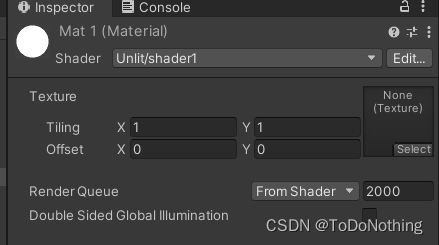
定义的形式主要为
_Name (“Display Name”,Type) = Default Value
Type类型又包括:
Color颜色
Int整数
Float浮点数
Vector四维数
2D纹理
3D纹理
Cube立方体纹理
SubShader类似渲染的列表,可以为渲染提供多种画质选择
Tags:设置特殊的渲染方式,如对透明物体、半透明物体的渲染
LOD:设置渲染的细节控制,处理是针对设备性能进行处理,可以先不管
  SubShader
    {

        Tags {
     "RenderType"="Opaque" }
        LOD 100
Pass块,所有的渲染都在这里进行,从CGPROGRAM开始,ENDCG结束
一般来说,可以有多个Pass
      Pass
        {

        CGPROGRAM
        ENDCG

		}
#pragma vertex/fragment name 分别是对顶点着色器和片元着色器的命名
定义好了顶点着色器和片元着色器,就需要对而这进行处理,
具体细节看代码中的注释
     CGPROGRAM
            #pragma vertex vert
            #pragma fragment frag
            //引入UnityCG
            #include "UnityCG.cginc"

            struct appdata
            {

                float4 vertex : POSITION;
                float2 uv : TEXCOORD0;
            };

            struct v2f
            {

                float2 uv : TEXCOORD0;
                UNITY_FOG_COORDS(1)
                float4 vertex : SV_POSITION;
            };

            sampler2D _MainTex;
            float4 _MainTex_ST;
			//几何阶段的顶点着色器处理,需要输入一个应用阶段的数据appdata,即点线面等信息
			//输入之后处理,返回一个片元着色器要是用到的数据v2f
            v2f vert (appdata v)
            {

                v2f o;
                o.vertex = UnityObjectToClipPos(v.vertex);
                o.uv = TRANSFORM_TEX(v.uv, _MainTex);
                UNITY_TRANSFER_FOG(o,o.vertex);
                return o;
            }
			//光栅化阶段,输入一个需要光栅化处理的结构体v2f,返回颜色信息
            fixed4 frag (v2f i) : SV_Target
            {

                // sample the texture
                fixed4 col = tex2D(_MainTex, i.uv);
                // apply fog
                UNITY_APPLY_FOG(i.fogCoord, col);
                return col;
            }
            ENDCG
上面的阶段,总结起来就是:
vert处理了点的信息
frag把点的信息进行处理输出颜色
里面具体的细节先不去了解,下一节我们来编写自己的代码
边栏推荐
- Prevent being rectified after 00? I. The company's recruitment requires that employees cannot sue the company
- 机器学习系统在生产中的挑战
- Co jump
- [tcapulusdb knowledge base] Introduction to tcapulusdb data structure
- Leetcode 729. 我的日程安排表 I(提供一种思路)
- [methodot topic] what kind of low code platform is more suitable for developers?
- 从零开始搭建物联网系统
- [tcapulusdb knowledge base] tcapulusdb system user group introduction
- Future & CompletionService
- C语言0长度数组的妙用
猜你喜欢
![[tcapulusdb knowledge base] Introduction to tcapulusdb general documents](/img/04/b1194ca3340b23a4fb2091d1b2a44d.png)
[tcapulusdb knowledge base] Introduction to tcapulusdb general documents
![Leetcode 522 longest special sequence ii[enumeration double pointer] leetcode path of heroding](/img/b1/80a51b403dfb0611b87ef9aa3215af.png)
Leetcode 522 longest special sequence ii[enumeration double pointer] leetcode path of heroding

记一次 .NET 某物管后台服务 卡死分析

一篇抄十篇,CVPR Oral被指大量抄袭
![[tcapulusdb knowledge base] Introduction to tmonitor stand-alone installation guidelines (II)](/img/6d/8b1ac734cd95fb29e576aa3eee1b33.png)
[tcapulusdb knowledge base] Introduction to tmonitor stand-alone installation guidelines (II)

【TcaplusDB知识库】TcaplusDB单据受理-创建游戏区介绍

Code for structural design of proe/creo household appliances - electric frying pan

15+ urban road element segmentation application, this segmentation model is enough!
![Jerry's DAC output mode setting [chapter]](/img/2e/62bc74e216ed941bd2a0a191db63f0.png)
Jerry's DAC output mode setting [chapter]

Summary of qstype class usage (III)
随机推荐
Eureka core source code analysis
杰理之增加一个输入捕捉通道【篇】
深入理解 happens-before 原则
[tcapulusdb knowledge base] Introduction to tcapulusdb analytical text export
【TcaplusDB知识库】TcaplusDB单据受理-建表审批介绍
【值得收藏】Centos7 安装mysql完整操作命令
What is the experience of telecommuting in a foreign company| Community essay solicitation
The wonderful use of 0 length array in C language
21: Chapter 3: develop pass service: 4: further improve [send SMS, interface]; (in [send SMS, interface], call Alibaba cloud SMS service and redis service; a design idea: basecontroller;)
Eureka核心源码解析
【TcaplusDB知识库】TcaplusDB运维单据介绍
istio相关资料
One copy ten, CVPR oral is accused of plagiarizing a lot
[methodot topic] what kind of low code platform is more suitable for developers?
Jerry added an input capture channel [chapter]
After Jerry's sleep, the regular wake-up system continues to run without resetting [chapter]
Codeforces Round #786 (Div. 3) ABCDE
【TcaplusDB知识库】TcaplusDB单据受理-事务执行介绍
Imeta: a collection of imagegp+ video tutorials of high-value drawing websites, which has been cited 360 times (220625 updates)
[tcapulusdb knowledge base] Introduction to tcapulusdb data structure